Mephistopheles
Members
-
Joined
-
Last visited
-
Ok.. äh.. und für Doofe: Wie macht man das? :D
-
Mhm. Nö, musste ich da nicht zuweisen. Gibt's da auch gar nicht. 🤔 Der ganze Rest sind VPN-Konfigurationen, die ich nicht brauche.
-
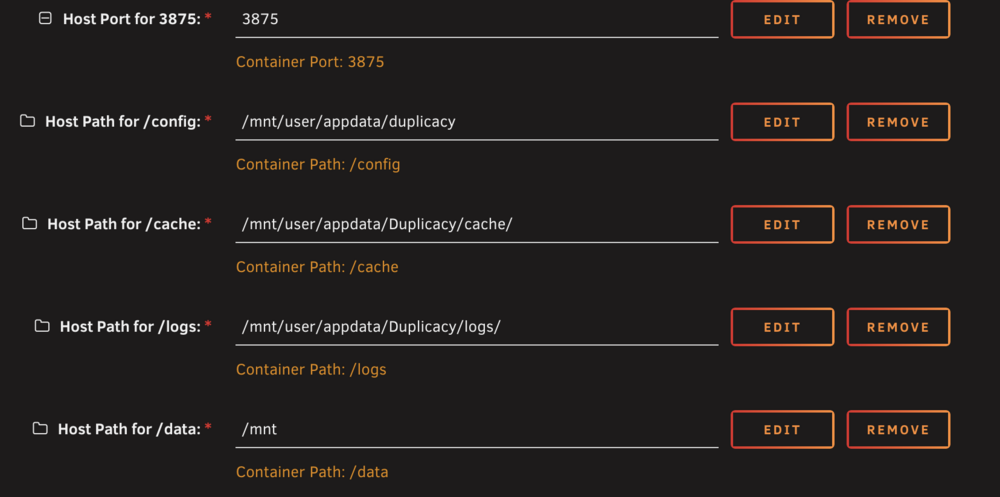
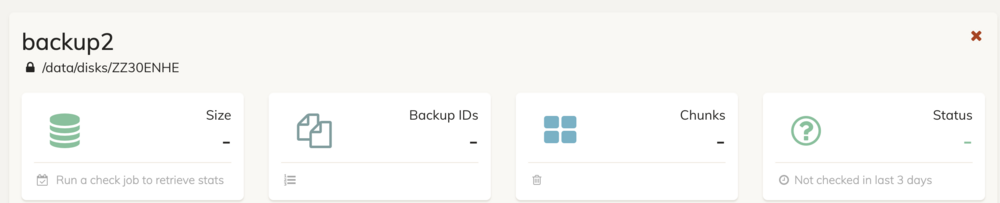
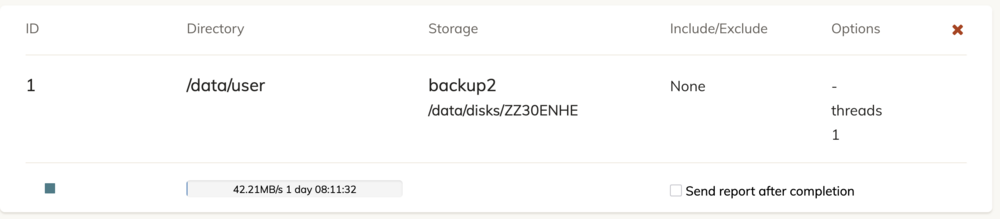
Ich glaube, der gute Hinweis war tatsächlich "war die Platte vor dem Start des Dockers gemounted". Ganz ehrlich: Das war mir gar nicht klar, dass es da eine Reihenfolge gibt... vielen Dank für den Hinweis. Mir sind dabei allerdings Fragezeichen aufgekommen. Vielleicht hast du dazu auch eine Idee: Ich hatte mir gedacht, es würde reichen, den Container einfach neuzustarten. Das hat nicht geklappt. Dann bin ich also hergegangen und habe die Platte unmounted und von USB abgezogen und den Container gestoppt. Dann wieder angesteckt, gemounted, den Container gestartet. Die nächste Meldung war dann "Storage not initialized". Kannst du mir erklären warum? Lösung war jetzt, dass ich das Storage einfach noch mal hinzugefügt habe - genau so, wie's vorher auch schon hinzugefügt war - und jetzt schreibt er das Backup. Ich würde aber gern verhindert, dass es beim nächsten Mal wieder fehlschlägt und wieder sagt, dass es "not initialized" wäre. Also - ich will nicht bei jedem Unmount und Stopp des Containers (oder bei einem Neustart von Unraid wegen Update) die Backup-Konfiguration verlieren... UAD sieht so aus: Einstellungen in Duplicacy sehen so aus: Wie genau zeige ich dir den Docker-Mount? 🤔

-
Moin zusammen, seit dem Update auf Unraid 7.3 funktioniert mein Backup offenbar nicht mehr. Ich hatte mir eine neue gekauft, weil die alte voll war, obwohl ich das mittlerweile auch anzweifle. Vor dem Update auf 7.3 hatte ich die Platte formatiert, hinzugefügt und in Duplicacy als Backup-Ziel eingerichtet. Das hat soweit gut funktioniert und er hat 4 TB auf die insgesamt 12 TB große Platte geschrieben. Heute sollte das nächste Regel-Backup stattfinden und es brach schlicht ab. Angeblich ist die Platte voll und er kann nicht darauf schreiben. Ich habe aber keine Idee, warum nicht. Geschweige denn wüsste ich jetzt ad hoc wo ich denn die Schreibrechte für das Laufwerk prüfen sollte. Musste ich vorher ja auch nicht, da hat er ja völlig problemlos das Backup gemacht. Die Platte ist auch nicht "read only" gemounted und ich kann aus der Unraid-UI auch Dateien darauf schreiben. Hat einer von euch eine Idee, was hier kaputt gegangen ist? Ohne Backup fühlt sich das alles ein wenig... unsicher... an. 😏 Die Fehlermeldung sieht so aus: "no space left on device" ist definitiv falsch. Die Platte ist komplett leer - das ist haufenweise space left. Und ich weiß nicht, warum er mir das jetzt so plöztlich ausgibt.
-
Ich hab's geschafft. Es lag an einem falschen "/" in der Pfadanangabe des Druckers. 😐
-
Moin zusammen, ich habe nun endlich Paperless ngx halbwegs gut konfiguriert und würde ja gern in den consume-Ordner direkt rein scannen... ich weiß, dass scan to folder schon mal funktioniert hat (ich habe auf einem Share noch alte Dateien, die direkt vom Scanner stammen gefunden). Wenn ich das jetzt versuche, bekomme ich nur eine ganze Reihe dieser Meldungen im Log: Mar 4 09:02:54 AngryNerds smbd[1127271]: [2026/03/04 09:02:54.961909, 0] ../../source3/smbd/msdfs.c:120(parse_dfs_path_strict) Mar 4 09:02:54 AngryNerds smbd[1127271]: parse_dfs_path_strict: Hostname WORKGROUP is not ours. Nur... warum? Kennt das Problem jemand von euch?
-
Ich hab’s ehrlicherweise einfach aufgegeben und wieder eine kleine, externe SSD angeschlossen. Geht schneller und ist zuverlässiger. 🤷♂️
-
Ha! I did it! (So als Linux-Noob ist das für mich schon mal so ein kleiner Feier-Moment!). Ich hab' die Datein in einen temporären Ordner geschoben und da klein geschrieben, dann wieder zurück geschoben - und nach einem Neustart waren alle Shares wieder da. Puh... Das war jetzt kurz mal ein Abenteuer. Aber gut. Dann lass ich mal die letzten Kamera-Backups durchlaufen.
-
Ah! Ich habe den Fehler gefunden! Die cfg-Datei ist Groß geschrieben, der Share hat aber einen kleingeschriebenen Namen. Also der Share heißt /music, aber die Config heißt Music.cfg. Wenn ich aber versuche, die Datei umzubenennen, kommt: mv: 'Music.cfg' and 'music.cfg' are the same file Mhm. Was mach ich da? Ich meine: Ja klar ist das die gleiche Datei. Die soll ja auch nur einen anderen Namen bekommen. 🧐
-
Gut möglich. Geht aber ja auch ohne 😅
-
Nö. Ich weiß nicht, warum es keine 1, gibt, aber die gab's tatsächlich noch nie:


-
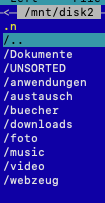
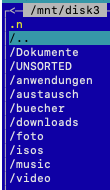
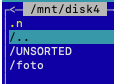
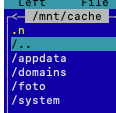
Das waren die Dinger, die alo haben wollte. Ich weiß ehrlich gesagt nicht, was genau du meinst. Die einzelnen Disks sehen so aus:
-
Also das hier ist /users0: total 0 drwxrwxrwx 1 nobody users 17354 Dec 15 03:00 Dokumente/ drwxrwxrwx 1 nobody users 1826 Dec 13 03:00 UNSORTED/ drwxrwxrwx 1 nobody users 642 Jan 7 2024 anwendungen/ drwxrwxrwx 1 nobody users 48 Mar 8 2023 austausch/ drwxrwxrwx 1 nobody users 11596 Dec 14 03:00 buecher/ drwxrwxrwx 1 nobody users 6036 Nov 1 2022 downloads/ drwxrwxrwx 1 nobody users 0 Jun 9 2024 foto/ drwxrwxrwx 1 nobody users 126 Jan 21 2024 isos/ drwxrwxrwx 1 nobody users 12278 Dec 24 2021 music/ drwxrwxrwx 1 nobody users 958 Dec 14 03:00 video/ drwxrwxrwx 1 nobody users 1452 Dec 4 2020 webzeug/ Und das hier ist /cache: drwxrwxrwx 1 nobody users 764 Nov 13 07:40 appdata/ drwxrwxrwx 1 nobody users 10 Jun 2 2024 domains/ drwxrwxrwx 1 nobody users 60 Jun 9 2024 foto/ drwxrwxrwx 1 nobody users 26 Nov 28 2020 system/ Und das hier wäre /user root@AngryNerds:/mnt/user# ls -l total 0 drwxrwxrwx 1 nobody users 17354 Dec 15 03:00 Dokumente/ drwxrwxrwx 1 nobody users 1826 Dec 13 03:00 UNSORTED/ drwxrwxrwx 1 nobody users 642 Jan 7 2024 anwendungen/ drwxrwxrwx 1 nobody users 764 Nov 13 07:40 appdata/ drwxrwxrwx 1 nobody users 48 Mar 8 2023 austausch/ drwxrwxrwx 1 nobody users 11596 Dec 14 03:00 buecher/ drwxrwxrwx 1 nobody users 10 Jun 2 2024 domains/ drwxrwxrwx 1 nobody users 6036 Nov 1 2022 downloads/ drwxrwxrwx 1 nobody users 60 Jun 9 2024 foto/ drwxrwxrwx 1 nobody users 126 Jan 21 2024 isos/ drwxrwxrwx 1 nobody users 12278 Dec 24 2021 music/ drwxrwxrwx 1 nobody users 26 Nov 28 2020 system/ drwxrwxrwx 1 nobody users 958 Dec 14 03:00 video/ drwxrwxrwx 1 nobody users 1452 Dec 4 2020 webzeug/ Die Config für /foto sieht so aus: GNU nano 8.6 /boot/config/shares/foto.cfg # Generated settings: shareComment="Foto" shareInclude="" shareExclude="" shareUseCache="yes" shareCachePool="cache" shareCachePool2="" shareCOW="auto" shareAllocator="highwater" shareSplitLevel="" shareFloor="97676156" shareExport="e" shareCaseSensitive="auto" shareSecurity="public" shareReadList="" shareWriteList="" shareVolsizelimit="" shareExportNFS="e" shareExportNFSFsid="100" shareSecurityNFS="public" Und die Config für /music so: GNU nano 8.6 /boot/config/shares/music.cfg # Generated settings: shareComment="Musik Files" shareInclude="" shareExclude="" shareUseCache="no" shareCachePool="cache" shareCachePool2="" shareCOW="auto" shareAllocator="highwater" shareSplitLevel="" shareFloor="0" shareExport="e" shareCaseSensitive="auto" shareSecurity="public" shareReadList="" shareWriteList="" shareVolsizelimit="" shareExportNFS="e" shareExportNFSFsid="108" shareSecurityNFS="public" shareHostListNFS=""
-
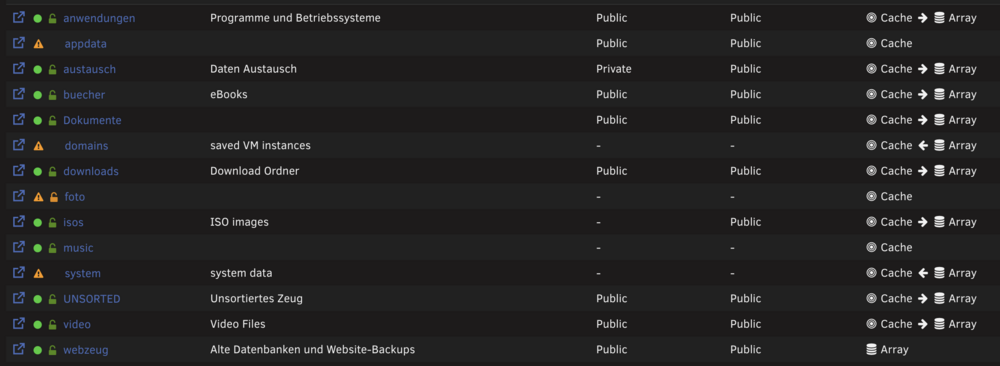
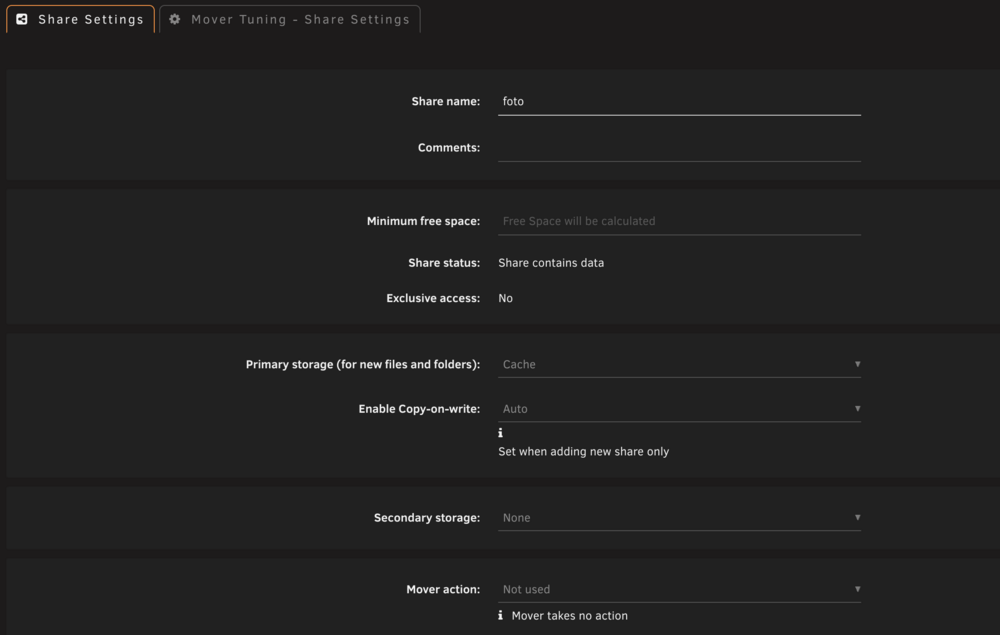
foto und music sollten eigentlich gar nicht auf dem Cache liegen, sondern tatsächlich, wie die anderen auch Cache => Array sein. Aber da kann ich nichts einstellen. Ich benutze kein Windows - aber heißt das, dass in dem Share /foto eine Datei namens "foto.jpg" sein könnte und er deshalb glaubt, dass der Share doppelt ist? 😳 Ich muss später mal genau gucken, was die Konfigurationen da ausspucken. Das ist so ein Tauchgang ins Dateisystem, den ich immer vermeiden wollte. 🙈 Aber ich gucke da nachher mal rein.
-
Ok... das beweist meine völlige Ahnungslosigkeit vom Unraid-Dateisystem. Das sind die Shares. Da ist keiner doppelt oder anders benannt. "foto" und "music" warenauch mal "Public" und ich konnte darauf zugreifen. Das ist jetzt #ausGründen nicht mehr so. Und ich habe auch keine Möglichkeit, das da einzustellen, denn die Reiter-Navigation dafür ist gar nicht (mehr) da: Und die Behauptung, dass da was doppelt wäre, kommt von Unraid: