





beanmeister
Members
-
Joined
Everything posted by beanmeister
-
Hmm.. According to the Unifi GPT, the Unifi Console has a SSL certificate import in Settings->System. My current running version doesn't have this option. Can anyone running a recent version check if the option to import the SSL certificate is available in the Settings->System section of the console?
-
Again, thank you @bmartino1 for all the links. I do believe from all your links, I will figure out the commands to get the Unifi controller to use my own certificates. I think the trick is to run those commands within the docker container since the Unifi controller is running inside the docker container. I can attest that the configuration backup file does not contain certificates information. I will definitely have to set up the Unifi reborn controller docker container with my certificates again. Kind of like moving the controller from one server machine to another. If I can't get it to work, then I will just fallback to importing the default certificate that comes with the Unifi controller like @PeteAsking suggested.
-
Yes I did know you can import a certificate to a client browser. What I did not realize was that the Unifi controller, by default, comes with a certificate to allow you to just import and trust it. At least that is my understanding from your response. I just remember when the Unifi controller stopped supporting regular http, there were instructions for using LetsEncrypt which was more hassle then just issuing my own using pfSense. So I got the impression that I needed to configure the controller with a certificate to access the new https admin page. Anyway, I will give your import suggestion a try when I install the reborn docker, after migrating all my drives off reiserfs (yes, another long over due task that I have procrastinated from doing).
-
Thanks @bmartino1. Yes, I am trying to use my self authorized certificate for the Unifi controller. However, if I recall correctly, I just need the commands to run within the Unifi Controller docker instance to register/import my certificate files so that the Unifi controller uses my self authorized certificate for https connection within my internal network. I just can't seem to find the instructions for importing in self authorized certificates for now. I even tried to use a copy of my current unifi appdata for the reborn docker (thereby reusing the keystore file, but that did not work.). Somehow, I need to import my self signed certificates files into the reborn unifi controller keystore file.
-
May be I used the wrong terminology. I issue and manage my own certificates via pfsense for internal https usage like Unifi, pfsense, and unRAID admin web pages (servers that have no reason to be on the public Internet). With Unifi, I somehow got the linuxserver docker to use my private certificate so that it does not pester me with the security warning when I access the Unifi web interface via https. I just cant recall how I did it, but eventually will have to accept the fact that once I move to the reborn docker, I will have to redo configuring the docker to use my self authorized certificate. I just hope I can import my current configuration file once I can track down the instructions for configuring the Unifi docker to use my self authorized certificates. Hopefully that is a little bit clear. I apologize for any wrong usage of terminologies, but my end goal is to avoid being pester with the security warning every time I access the Unifi admin web page using https.
-
Can you elaborate what this actually means? I hope it doesn't mean I can't import my configuration from the linuxserver.io image running 7.5.187. Main reason I haven't upgraded is because I never saw an upgrade path that would preserve my private SSL keys so that I would not have to redo it (I am still trying to recall how I got it to work).
-
That makes sense where I rather lose parity drives than data drives in a HBA, backplane, or disk failure. Since I can't predict which hardware will fail, the best I can do when deciding how to populate my server so as to not create a bottleneck during disk operations. So in a two parity drive configuration, every time I write to a data drive, I am actually writing to 3 disks at the same time. So from a performance perspective, is it better to have those 3 disks on the same PCIe lane/HBA and backplane or put each disk on a different PCIe lane, HBA and backplane?
-
How does the Supermicro X13SEI-TF with Xeon 4510T sound for my next unRAID server for the next 15 years? I like the board for the 2 M.2 slots and several independent PCIe lanes. There doesn't seem too much CPU choices for this board that is under $800.
-
I thought about the 9400-16i, but I was thinking of spreading my drives across as many "data lanes/pathways" to maximize throughput. For example instead of 16 drives on one PCIe x8 lane, I would use 3 9400-8i cards and have 8 drives on each PCIe x8 slots. So on the Norco 4224, I would have two backplanes on each PCIe x8. Given that each PCIe x8 slot has its own pathway to the CPU in the block diagram. If I am writing to a drive with two parity drives, would it be better if those 3 drives are on the same backplane and hence same 9400-8i controller or spread across different backplanes connected to different 9400-8i controllers? BTW, the X13SEI-TF looks interesting with two M.2 connections. The X11SPL-F looks good too.
-
Looking to update my Supermicro X7SBE that has been running unRAID since 2010. This means I have not kept up with Supermicro products for the last 14 years. Looking for something to last another 15 years. It will replace my current X7SBE in the Norco 4224 case. I will probably get 3 LSI 9400-8i and so would like a board with at least three x8 PCIe slots. I would like to use M.2 SSDs drives for things like cache. Is X14SBI-TF a good board? What's a good Xeon 6700 CPU in terms of performance and power consumption? What's this 6 PCIe 5.0 x8 via MCIO connectors and how would I put it to use? If the Supermicro X14 is not recommended (I only chose it since it seems to be the most current listed on Supermicro's website), which other ones like the X13, X12...? I tried looking at the X11 but the Supermicro website says there were discontinued. Edit: Didn't realized the X14 boards are too new and the CPUs are expensive. Now I would have to work my way backward to the X13 and X12 to see which are more mainstream.
-
So does this mean if I use SAS controllers with straight through SAS cables, I can still use SATA drives? If yes, can I mix SATA and SAS drives?
-
My Norco 4224 server of 14 years is currently loaded with SATA 2TB drives using onboard and SuperMicro AOC-SAT2-MV8 controller SATA ports (via reverse breakout cables). The specs says the Norco 4224 accommodates SATA/SAS drives. Does this mean I can just load a SAS drive into one of the drive tray and it will plug into the HBA like the SATA drives? Do I need to replace the onboard SATA port connections and SuperMicro AOC-SAT2-MV8 controller with something with SAS connection? Does anyone knows what SAS version and bandwidth is the HBA that came with the Norco 4224? Just planning my options to upgrading my drives and seeing what of the current server I can reuse.
-
Successfully upgraded from 6.12.8. Now will be waiting for the spin down fix. unRAID 7.0.0 seems to be running smoothly on my really old hardware that I will may not have to upgrade the hardware after all. Just need to look into migrating from resierfs to xfs.
-
Would there be an issue if I rename the container name? I believe I will need it to match my current SSL certificate.
-
Any thoughts on making a copy of the current linuxserver.io unifi appdata and then configuring the reborn container to the location of the appdata copy? Will the reborn unifi be able to use the copy of the linuxserver.io appdata so that no restore is required and hopefully I retain my SSL self signed certificate (I don't recall how I got it to work, but I am hoping to avoid having to do it again).
-
Is there a recommended version of the controller that I would need to be at before switching from the linuxserver.io container to the reborn container? I am currently on 7.2.95.
-
My current Unifi Controller (linuxserver.io) is running on Network Type: Custom: BR0.30 (VLAN 30). Will this pose a problem when I switch to the reborn container? Also, will the restore also restore the SSL certificate (self signed) that I had configured so my browser doesn't complain about the HTTPS?
-
Still on 7.2.95 but just checking in after a little over year to see what's up. On first read here's is my two cents opinion: 1. One container solution is simpler and less moving parts to break. The unknown is an unestablished container developer? 2. Two containers solution sounds like it would be a nightmare for casual users (like me) to keep updated since there are now twice or more moving parts to worry about. However, the containers are maintained by established developers. Operating under the KISS mantra, I would prefer a one container solution. Let's put it this way, if I was brand new to Unifi and looking for a way to run it on unRAID as a docker container, I would most likely opt for the one container vs the two containers solution.
-
Upgraded from 6.11.5 to 6.12.6 with no issues other than losing my 355 plus days of uptime.
-
OK then. Look like there's some hope. Will have to do some more experimenting.
-
@JorgeB What X7 motherboard are you using? My X7SBE has an add-on daughter card (AOC-SIM1U+) to provide IPMI functionality. I have a feeling the IPMI firmware (V1.64) is just too old to work with IPMIView. I also have a Supermicro A1SRi-2758F with built-in IMPMI functionality on the motherboard and IPMIView works fine. So I may be SOL with my unRAID server.
-
Next time I have to reboot, I will see if I can enter the BIOS during boot before unRAID even loads. If my keyboard responds and I can navigate the BIOS, then at least I can eliminate IPMIView as the culprit.
-
IPMIView 2.17 and 2.20. I will try to downgrade to IPMIView 2.14 (don't have 2.15) to see if that solves my issue. Edit: Nope, my keyboard input is not responding even with version 2.14. Could it be some configuration with the IPMIView software? I think it used to work until I upgraded unRAID and lost the local console screen, but never looked into it until now since I never had a need to access the local console for a long time.
-
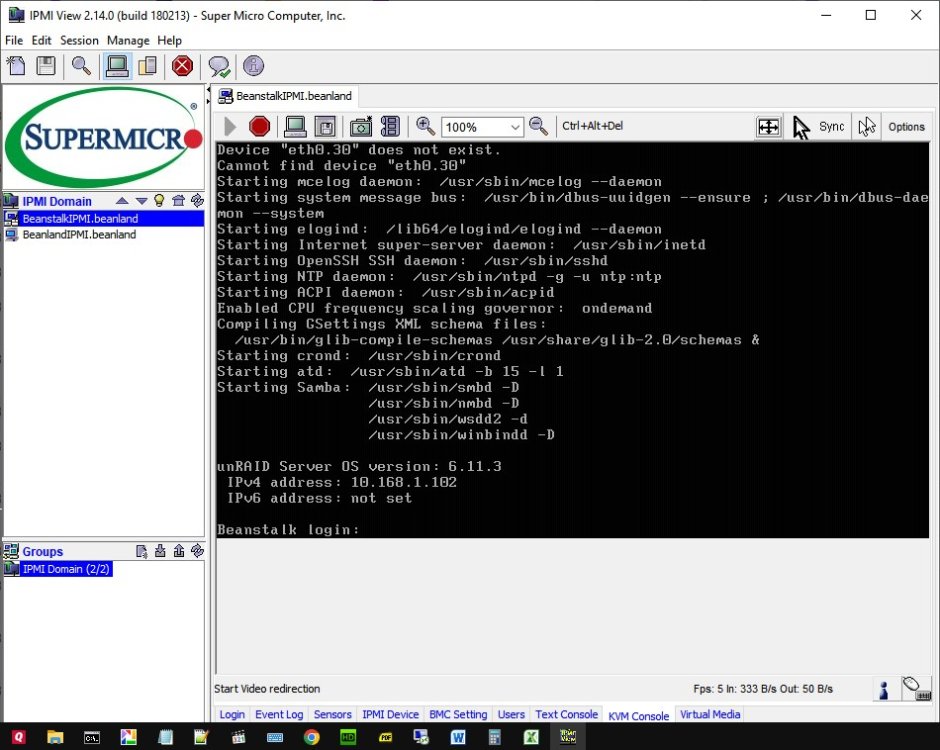
I get the login prompt, but I am unable to interact with the KVM console. No response from my keyboard. Don't know it this is related to unRAID or the IPMIView software.
-
Thank you! That got me the local console login prompt via IPMI back. Not quite sure why I need to blacklist something that I do not have installed.


