




-
Thanks Mason, this apps works well and is a good addition to sonarr / radarr
-
Hi, i posted a solution for that on the linuxserver.io - Jackett thread I think it should solve your issue
-
It's available on dockerhub through Apps tab
-
not yet (still considered as a beta). The developer speaks also about integrating it in Jackett in the future but for now, it worls on standalone
-
Actually when i look at the github, mine is the last stable version
-
Mine is v0.17.64; it should explain your issue
-
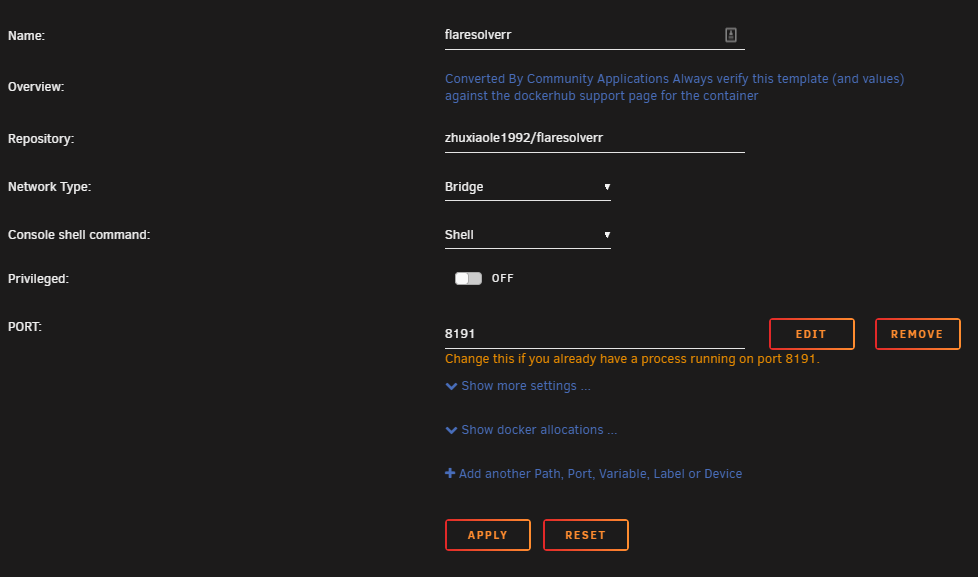
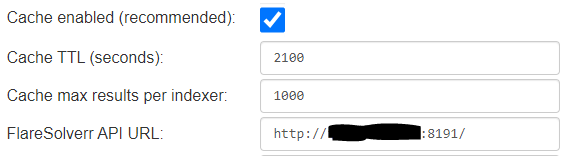
Hi Guys, You probably noticed that a lot of trackers activated cloudflare. As a consequence, they didn't work anymore with Jackett. Fortunately, the developer of Jackett developped an app called FlareSolverr that fix this issue perfectly. To implement it, it's quite easy: Go to apps, look for FlareSolverr on Github I setup it like that: and then in jacket just add it like this: It works fine for me and should work with other jackett containers.

View in the app
A better way to browse. Learn more.

