





RedSpider
Members
-
Joined
-
Last visited
-
Got home today and NAS was hung again despite the C-states change. syslog was mirrored to usb drive. Logs attached syslog-previous.txt
-
i already have that enabled but it never seems to capture anything. Logs attached in first post
-
Thank you. I have altered the c-states bios option and will see how this runs! 🙏
-
Hello, I am hoping someone can help because i've been struggling with this issue for the last 3 years. Without any warning and completely at random Unraid will completely hang, no display output, no keyboard input, nothing. Even holding the power button does not turn the machine off. The only solution is to literally turn off power at the socket. This happens at complete random. It may happen twice in one month or once in 8 months. I have been unable to track down any root cause. syslog is useless as nothing is written to the log at the time of the crash (even when sent to an external syslog server). I have replaced CPU, RAM, GPU, NVME drive, multiple HDDs as well as trying various config changes and BIOS updates - all to no avail. Because this happens so randomly, it is hard to reproduce or test potential fixes as i do not know when this might happen next. When checking syslog-previous, the last few lines are always related to "spinning down": Apr 23 11:40:14 Unraid emhttpd: spinning down /dev/sdf Apr 23 11:40:20 Unraid emhttpd: spinning down /dev/sdi Apr 23 11:40:46 Unraid emhttpd: spinning down /dev/sdh Apr 23 11:40:48 Unraid emhttpd: spinning down /dev/sdg Apr 23 11:48:41 Unraid emhttpd: spinning down /dev/sdk Apr 23 12:02:55 Unraid emhttpd: read SMART /dev/sdk Apr 23 12:47:56 Unraid emhttpd: spinning down /dev/sdk Apr 23 13:15:56 Unraid emhttpd: spinning down /dev/sdj Specs: ASUSTeK COMPUTER INC. TUF B450M-PLUS GAMING AMD Ryzen 5 5600X 6-Core @ 3700 MHz 64 GiB DDR4 LSI 6Gbps SAS HBA LSI 9200-8i Really hoping someone can help me get to the bottom of this because its driving me insane. I run some game servers on my unraid box and having random outages is really problematic. Thanks in advance! unraid-diagnostics-20260423-1535.zip
-
Managed to resolve this myself by nuking my docker.img, switching to directory storage and setting up my containers again. Thanks!
-
I managed to resolve my issue by competely deting the docker and config and recreating it
-
Having an issue where my unraid box is becoming completely unresponse almost straight after boot. I was able to hit the web ui once and login but then it hung before before the dashboard loaded. Plugged a monitor in and i can see that the system throws an error about 20-30s after it shows the login prompt on terminal. Was able to grab the following from the syslog: Jul 30 14:26:02 TOWER kernel: BTRFS info (device loop2): using crc32c (crc32c-intel) checksum algorithm Jul 30 14:26:02 TOWER kernel: BTRFS info (device loop2): using free space tree Jul 30 14:26:03 TOWER kernel: BTRFS info (device loop2): enabling ssd optimizations Jul 30 14:26:03 TOWER root: Resize device id 1 (/dev/loop2) from 50.00GiB to max Jul 30 14:26:03 TOWER emhttpd: shcmd (95): /etc/rc.d/rc.docker start Jul 30 14:26:03 TOWER root: starting dockerd ... Jul 30 14:26:03 TOWER avahi-daemon[6849]: Server startup complete. Host name is TOWER.local. Local service cookie is 2554105344. Jul 30 14:26:04 TOWER avahi-daemon[6849]: Service "TOWER" (/services/ssh.service) successfully established. Jul 30 14:26:04 TOWER avahi-daemon[6849]: Service "TOWER" (/services/smb.service) successfully established. Jul 30 14:26:04 TOWER avahi-daemon[6849]: Service "TOWER" (/services/sftp-ssh.service) successfully established. Jul 30 14:26:05 TOWER kernel: BTRFS error (device loop2): invalid free space control: bg start=7815036928 len=268435456 total_bitmaps=3 unit=4096 max_bitmaps=2 bytes_per_bg=134217728 Jul 30 14:26:05 TOWER kernel: BTRFS error (device loop2): invalid free space control: bg start=7815036928 len=268435456 total_bitmaps=4 unit=4096 max_bitmaps=2 bytes_per_bg=134217728 Jul 30 14:26:05 TOWER kernel: BUG: kernel NULL pointer dereference, address: 0000000000000008 Jul 30 14:26:05 TOWER kernel: #PF: supervisor read access in kernel mode Jul 30 14:26:05 TOWER kernel: #PF: error_code(0x0000) - not-present page Jul 30 14:26:05 TOWER kernel: PGD 140ee1067 P4D 140ee1067 PUD 140ee8067 PMD 0 Jul 30 14:26:05 TOWER kernel: Oops: 0000 [#1] PREEMPT SMP NOPTI Jul 30 14:26:05 TOWER kernel: CPU: 2 PID: 1018 Comm: kworker/u64:9 Tainted: P O 6.1.38-Unraid #2 Jul 30 14:26:05 TOWER kernel: Hardware name: System manufacturer System Product Name/TUF B450M-PLUS GAMING, BIOS 3802 04/28/2022 Jul 30 14:26:05 TOWER kernel: Workqueue: btrfs-cache btrfs_work_helper Jul 30 14:26:05 TOWER kernel: RIP: 0010:_compound_head+0x0/0x36 Jul 30 14:26:05 TOWER kernel: Code: 75 1d 48 8b 07 0f ba e0 10 73 14 48 8b 47 48 48 89 c2 83 e2 01 74 08 48 ff c8 48 39 c7 75 03 8b 57 5c 48 89 d0 e9 56 1d 8b 00 <48> 8b 57 08 48 89 f8 f6 c2 01 75 21 66 90 e9 43 1d 8b 00 f7 c7 ff Jul 30 14:26:05 TOWER kernel: RSP: 0018:ffffc900008e7c70 EFLAGS: 00010212 Jul 30 14:26:05 TOWER kernel: RAX: 0000000000000004 RBX: 0000000000000000 RCX: 0000000000001000 Jul 30 14:26:05 TOWER kernel: RDX: 000000000000e040 RSI: 0000000000000000 RDI: 0000000000000000 Jul 30 14:26:05 TOWER kernel: RBP: 0000000000000000 R08: 0000000000001000 R09: 00000000000016a1 Jul 30 14:26:05 TOWER kernel: R10: ffff888000000000 R11: 0000000000000002 R12: 000000000000e040 Jul 30 14:26:05 TOWER kernel: R13: ffff888148d53000 R14: 00000001df500000 R15: ffff88815de23780 Jul 30 14:26:05 TOWER kernel: FS: 0000000000000000(0000) GS:ffff88880e880000(0000) knlGS:0000000000000000 Jul 30 14:26:05 TOWER kernel: CS: 0010 DS: 0000 ES: 0000 CR0: 0000000080050033 Jul 30 14:26:05 TOWER kernel: CR2: 0000000000000008 CR3: 000000018993c000 CR4: 00000000003506e0 Jul 30 14:26:05 TOWER kernel: Call Trace: Jul 30 14:26:05 TOWER kernel: <TASK> Jul 30 14:26:05 TOWER kernel: ? __die_body+0x1a/0x5c Jul 30 14:26:05 TOWER kernel: ? page_fault_oops+0x329/0x376 Jul 30 14:26:05 TOWER kernel: ? do_user_addr_fault+0x12e/0x48d Jul 30 14:26:05 TOWER kernel: ? exc_page_fault+0xfb/0x11d Jul 30 14:26:05 TOWER kernel: ? asm_exc_page_fault+0x22/0x30 Jul 30 14:26:05 TOWER kernel: ? compound_nr+0x42/0x42 Jul 30 14:26:05 TOWER kernel: PageUptodate+0x5/0x18 Jul 30 14:26:05 TOWER kernel: assert_eb_page_uptodate+0x59/0x7b Jul 30 14:26:05 TOWER kernel: extent_buffer_test_bit+0x3c/0x74 Jul 30 14:26:05 TOWER kernel: free_space_test_bit+0x75/0xa3 Jul 30 14:26:05 TOWER kernel: load_free_space_tree+0x133/0x2d0 Jul 30 14:26:05 TOWER kernel: caching_thread+0xea/0x3f7 Jul 30 14:26:05 TOWER kernel: btrfs_work_helper+0x114/0x2a5 Jul 30 14:26:05 TOWER kernel: process_one_work+0x1ab/0x295 Jul 30 14:26:05 TOWER kernel: worker_thread+0x18b/0x244 Jul 30 14:26:05 TOWER kernel: ? rescuer_thread+0x281/0x281 Jul 30 14:26:05 TOWER kernel: kthread+0xe7/0xef Jul 30 14:26:05 TOWER kernel: ? kthread_complete_and_exit+0x1b/0x1b Jul 30 14:26:05 TOWER kernel: ret_from_fork+0x22/0x30 Jul 30 14:26:05 TOWER kernel: </TASK> Jul 30 14:26:05 TOWER kernel: Modules linked in: nvidia_uvm(PO) xfs md_mod zfs(PO) zunicode(PO) zzstd(O) zlua(O) zavl(PO) icp(PO) zcommon(PO) znvpair(PO) spl(O) tcp_diag inet_diag ip6table_filter ip6_tables iptable_filter ip_tables x_tables efivarfs 8021q garp mrp bridge stp llc igb i2c_algo_bit r8169 realtek nvidia_drm(PO) nvidia_modeset(PO) edac_mce_amd edac_core intel_rapl_msr intel_rapl_common iosf_mbi kvm_amd nvidia(PO) kvm video crct10dif_pclmul crc32_pclmul crc32c_intel ghash_clmulni_intel sha512_ssse3 drm_kms_helper aesni_intel crypto_simd wmi_bmof drm mpt3sas cryptd nvme backlight i2c_piix4 input_leds syscopyarea raid_class ahci sysfillrect k10temp sysimgblt ccp led_class nvme_core joydev rapl i2c_core fb_sys_fops scsi_transport_sas libahci wmi tpm_crb tpm_tis tpm_tis_core tpm button acpi_cpufreq unix [last unloaded: i2c_algo_bit] Jul 30 14:26:05 TOWER kernel: CR2: 0000000000000008 Jul 30 14:26:05 TOWER kernel: ---[ end trace 0000000000000000 ]--- Jul 30 14:26:05 TOWER kernel: RIP: 0010:_compound_head+0x0/0x36 Jul 30 14:26:05 TOWER kernel: Code: 75 1d 48 8b 07 0f ba e0 10 73 14 48 8b 47 48 48 89 c2 83 e2 01 74 08 48 ff c8 48 39 c7 75 03 8b 57 5c 48 89 d0 e9 56 1d 8b 00 <48> 8b 57 08 48 89 f8 f6 c2 01 75 21 66 90 e9 43 1d 8b 00 f7 c7 ff Jul 30 14:26:05 TOWER kernel: RSP: 0018:ffffc900008e7c70 EFLAGS: 00010212 Jul 30 14:26:05 TOWER kernel: RAX: 0000000000000004 RBX: 0000000000000000 RCX: 0000000000001000 Jul 30 14:26:05 TOWER kernel: RDX: 000000000000e040 RSI: 0000000000000000 RDI: 0000000000000000 Jul 30 14:26:05 TOWER kernel: RBP: 0000000000000000 R08: 0000000000001000 R09: 00000000000016a1 Jul 30 14:26:05 TOWER kernel: R10: ffff888000000000 R11: 0000000000000002 R12: 000000000000e040 Jul 30 14:26:05 TOWER kernel: R13: ffff888148d53000 R14: 00000001df500000 R15: ffff88815de23780 Jul 30 14:26:05 TOWER kernel: FS: 0000000000000000(0000) GS:ffff88880e880000(0000) knlGS:0000000000000000 Jul 30 14:26:05 TOWER kernel: CS: 0010 DS: 0000 ES: 0000 CR0: 0000000080050033 Jul 30 14:26:05 TOWER kernel: CR2: 0000000000000008 CR3: 000000018993c000 CR4: 00000000003506e0 Jul 30 14:26:05 TOWER kernel: note: kworker/u64:9[1018] exited with irqs disabled Any help would be appreciated as my system is unsuable at the moment EDIT: Disabling docker allows the system to stay up
-
Having the same issue here
-
Yes, Sorry i thought I was in the Privoxy specific thread - my bad! I'll give that a go
-
Did something change on this container. I'm getting proxy connections refused in web browser and also in other containers like Sonarr, Radarr etc.
-
Hello. I'm looking at implementing OAuth2 Proxy but currently run my stuff behind HAProxy as part of pfSense. Is it possible to run OA2P behind HAprox and if so does anybody have a guide? I only see NGINX? Thanks!
-
Looks like I managed to resolve the issue by swapping to a new NIC with I225-V chipset
-
Replaced the NIC today, exact same issue. Nobody any ideas?
-
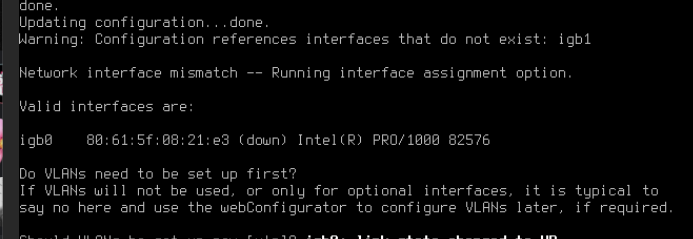
I am trying to set up pfSense in a VM for testing. Is fine on intial setup/installation but when i reboot the VM one of my interfaces (igb1 - LAN) completely disappears and can no longer be seen by pfSense. I have a physical PCIe NIC (Dual Port Intel 82576) in my unraid box that i want to use for this VM and In my VM settings i have both ports selected. So far the only fix seems to be I have to restart the entire unraid box. Any ideas/suggestions would be apprecaited and it's driving me mad trying to figure it out Thanks! Edit: Noticed this in the terminal when a freshly installed VM rebooted igb1: <Intel(R) PRO/1000 82576> port 0xa000-0xa01f mem 0xc8c00000-0xc8c1ffff,0xc8800000-0xc8bfffff,0xc8c20000-0xc8c23fff irq 22 at device 0.0 on pci1 igb1: Setup of Shared code failed, error -2 igb1: IFDI_ATTACH_PRE failed 6 device_attach: igb1 attach returned 6 Edit 2: Same thing happens with OPNSense avalon-diagnostics-20230220-1916.zip

-
hello, user-scripts noob here. having some issues getting this to work right, i am trying to get it to run steam-lancache-prefill on a schedule, but it doesn't seem to be passing the `prefill` arg. Am i doing something wrong? #!/bin/bash #arrayStarted=true #argumentDescription=SteamPrefill command #argumentDefault=prefill cd "/mnt/lancache/steam-prefill" ./SteamPrefill it just outputs the same as if i ran `./SteamPrefill` via terminal.
