





deltaexray
Members
-
Joined
-
Last visited
-
That actually makes a lot more sense, Thank you for clearing this up the right way! Also, I think I should setup Nut to have better monitoring and control over the UPS?
-
Hello I do know that, that’s not even a bad thing. I just say this notification for the first time that said “System Crash“ directly
-
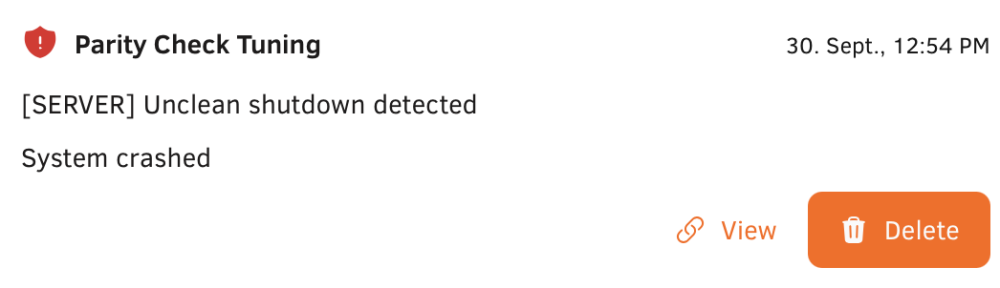
Hello, Thanks for your input, I just wanna say: I'm a bit under the weather and quite sick for a few days now, It might be the reason I haven't thought of any these tips beforehand - My Apologies. Anyway, back to what you've said. Yeah I noticed that too, which led me to kind of a wild goose chase to be honest since after checking the IPMI, btw thank you for that tip!, I was as clueless as before since it wasn't showing any signs of answers to figure out what has happened to it. But after some time I figured out what must have happened to it: Yesterday and the days before that, it ran the Loudness Data Analysis from Plex which it does from time - So nothing knew there. Well the fans picked up quite the RPM after some time, given I had 27° in the room it wasn't something to be concerned about but it kept running like that beyond 12PM, the Schedule for these Plex Operations is 11AM to 11PM, so it should've been off by that time but it wasn't. I can only imagine that it kept running like I had described before well beyond 3AM and after that, It crashed for some reason - The exact reason? I have no idea. Temperature? Wattage? Power? Idk. 1. Syslog Server has now been turned on, after Parity Check finishes I'll reboot and figure out why it's not giving me the option to select the folder to store these logs. 2. Already answered this kind of, the IPMI is not showing anything useful, just the Turn On time that was around 3AM ish. 3. Today it has been completely rebooted and when navigating to the IP to login into the GUI, I was presented with the Main Screen to select which drives go where - So basically the screen where you input the encryption phase / file. The Drives are always in the right spot, that has never changed but it tells me the system has crashed since there is nothing which would explain that behavior. 4. Server is on a UPS which is sufficient to let it power off gently and without any unclean shutdowns. 5. Couple Years ago, like in the 6.X era these things almost never happened, I'd go as far as to say these only started to happen in the 7.2/3 era. But like this? It's the first time. Like the system got stuck a couple of times over the years and needed a full hard reboot but that was mostly because I was dumb. A complete system crash, like this, never happened. Why do I know this? Because this message: Has never appeared before. This is the first time. Before you ask: Parity Check Tuning is installed but it hasn't been turned on nor is it running scheduled Checks. So yeah that's all. I'll add new information when I have 'em. Cheers and Thank you in advance! Alex
-
Thank you! I have followed the instructions and set it up, after the Parity Check is done I’ll reboot the system and check if the log server works. Thank you :)
-
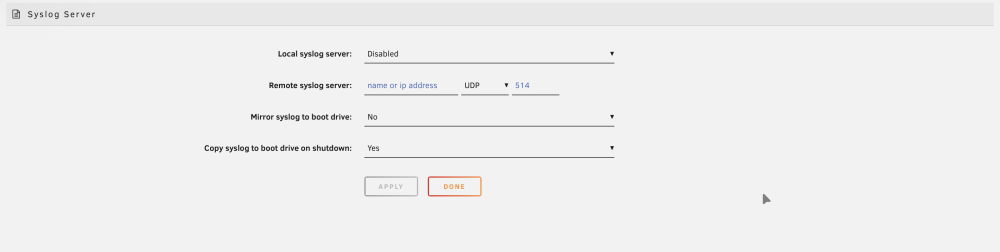
Thank you for pointing that out, In fact the server wasn’t running at all: Screenshot is attached, If you could provide me with the settings that works best It would be greatly appreciated!
-
Hello everyone, For quite some time I have encountered random shutdowns, unclean Shutdowns and crashes. Although I never put 1 and 1 together, in the early hours this morning it happened again and I do not have a solution to it or a cause for why it is happening. Attached is the text I was posting in a different thread but after feedback a new thread seemed to be the way to go. Diagnostics are attached. This morning I was wondering why my Server wasn’t showing up within my finder on mac, since is happens from time to time that finder throws it out, I wasn’t really concerned with it - After 3 Failed reconnects I was and If it wasn’t for them, after Plex hasn‘t shown any Libraries after starting it - I was. Quick trip to the GUI and I knew what happened: System Crashed, out of the Blue at roughly 12pm last night, right around midnight. I don’t know what happened or why it happened in the first place. I’ve attached the diagnostics but I’d really appreciate any tips or solutions to or for fixing it. Sick of these unclean Shutdowns for months now Cheers and Thanks in Advance Alex server-diagnostics-20260930-1345.zip
-
Okay, will do. And I think the yslog server is already running I might have to check
-
So is this thing still on? This morning I was wondering why my Server wasn’t showing up within my finder on mac, since is happens from time to time that finder throws it out, I wasn’t really concerned with it - After 3 Failed reconnects I was and If it wasn’t for them, after Plex hasn‘t shown any Libraries after starting it - I was. Quick trip to the GUI and I knew what happened: System Crashed, out of the Blue at roughly 12pm last night, right around midnight. I don’t know what happened or why it happened in the first place. I’ve attached the diagnostics but I’d really appreciate any tips or solutions to or for fixing it. Sick of these unclean Shutdowns for months now Cheers and Thanks in Advance Alex EDIT: Took the liberty to @ @JorgeB and @silentsnow31802 server-diagnostics-20260930-1345.zip
-
Just to show u something fun:
-
DAWG is quite fitting, kinda saved myself a lot of research for this. Thanks man
-
Just a quick feedback: Whenever a Job crashes or fails because of file or size issue, directly restarting it seems to „fix“ it in a way that it works the next time? Idk whats weirder when it comes to that but I‘m currently seeing that behaviour again while backing up 1,5TB worth of Backups. Weird
-
I did not but I‘ll check it out tomorrow, this may work EDIT: Of course I know Kopia, I even have it pinned on the UnRaid App Tabs. I‘m tired. I‘ll check it out, so far it looks promising
-
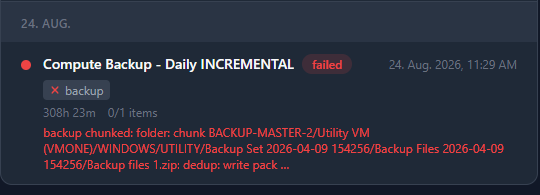
Hello All and @PanicMechanic007 It‘s me again with another update or feedback, however u wanna call it :D I ran my 500Gb ish music Library Backup again and it, again, failed - So far so good, nothing to worry about. I‘ve attached the logs and a screenshot, just for the sake of it. What kinda wonders me is that after that failed, a couple other jobs failed to and after checking, the storage location, a Hetzner Storage Box with SFTP Connection display a red „breaker is on“ button. I wonder what that is, cause all these Jobs displayed a „Connection lost“ issue before I manually reset the breaker and sort of restored the connection back. Dedup is working fine, tho I‘m not sure if it only merges the duplicated files or also deletes files that are no longer needed, i.e from jobs that are no longer on the list ? Besides everything works as intended, only larger backups do create issues and fail almost completely while also, sort of, causing issues for the rest of the plugin and jobs. Anyway, these are my two cents. Again: Thank you for your work, we do love you and the Plugin :) Cheers‘ Alex vault-diagnostics-2026-08-21.zip vault-diagnostics-2026-08-08.zip vault-diagnostics-2026-08-20.zip

-
Hi @PanicMechanic007 Quick Feedback/Observation: When I run a Incremental Backup without any Compression on it, the Status bar on the running Job stays a 0% all the time, even til the end. Could it be the case that the Widget, sort of, only jumps to 1% or more when the operation is finished i.e the Whole Backup Job is finished? If that's not the case it may just takes a lot of time, I just simply noticed that Cheers´ Alex
-
You‘re absolutely welcome my friend, my pleasure posting my experience with the plugin and my setup. Yeah I already thought that this is obviously a passion project but then again: The Scope is already quite large & up to a certain standard that rivals other programs and software alike. So no pressure in that regard, I guess no one has that amount of „test-data“ on hand when u just do something for fun and personally need. But, since this is open source, someone someday will most certainly to something about it. That would be great, both for usage and long term control. Resiliency is always a very well welcomed addition. I myself mostly use brave on windows and safari, well, on Apple devices so usually I find myself just using my Mac to do it. It just accrued to me that clearing website data also helps when the unraid webui itself freezes. Sometimes you‘re simply not seeing the solution in front of you Again, You are the one we have to thank you, specially since this plugin is just the simple solution most of us want. Connect a FTP site, run the jobs and you‘re good to go. Even if this would be a paid option, I‘d gladly pay the price. Just because it‘s everything I want and need. That said: Thank you for yours time, work and patience, specially when someone throws a wall of text at you ;) Cheers, Alex



