




.jpg.cd0ee2faf0b1ddf75893cc24e561601d.jpg)
ZappyZap
Members
-
Joined
Everything posted by ZappyZap
-
I am not using this feature, but i will try to set it up and get back to you
-
Updated Thanks
-
thanks for the head up i will ad it to the template
-
Sorry , i did not try rclone with this yet
-
Where ? you just update the bind mout ....
-
Due the the fact this container run in host mode if you change the value here you must change it in the field WEBUI as well this is in the description of the WebUI variable. you must change the http://[IP]:[PORT:8000]. to http://[IP]:[PORT:<your_new_port>]
-
Waiting on the dev to release the new version
-
I feel you , i am still on 01.06.01.xx but after all this time , realise i really do not use handy app at all so i think i will update and switch to lan mode + dev permanetly For your request , you should add a feature request on the github
-
Your issue is because you already run something on port 8000 INFO: Application startup complete. ERROR: [Errno 98] error while attempting to bind on address ('0.0.0.0', 8000): [errno 98] address already in use INFO: Waiting for application shutdown. I have also update the template to fix an issue with the UI port The reason the container is set to host is not the template but the app itself seems recommend it. https://wiki.bambuddy.cool/getting-started/docker/?h=host#network-mode-host Thanks
-
let me know INFO: Application startup complete. INFO: Uvicorn running on http://0.0.0.0:8001 (Press CTRL+C to quit)
-
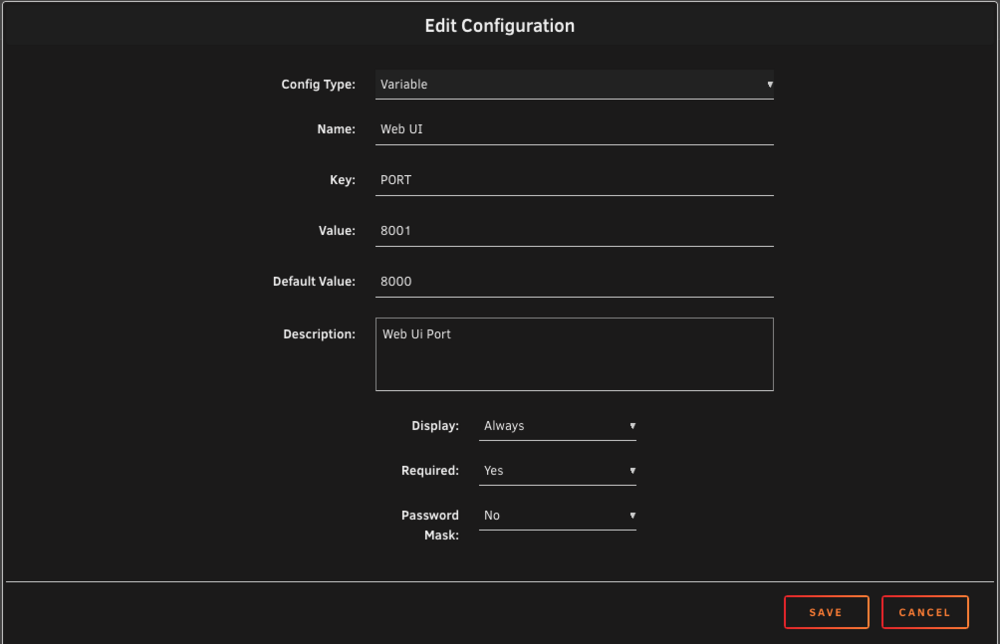
i have made a change to the template and push it to git.... change the port in unraid as follow and it should be all good :
-
Let me check that , and get back to you
-
reserved
-
Overview: Support for Docker image Nambuddy Application Name: Bambuddyy Application: https://bambuddy.cool/index.html Documentation: https://github.com/maziggy/bambuddy Overview : A powerful, self-hosted print archive and management system for Bambu Lab 3D printers. No cloud dependency, complete privacy, full control. ## Why Bambuddy? - Own your data — All print history stored locally, no cloud dependency - Works offline — Uses Developer Mode for direct printer control via local network - Full automation — Schedule prints, auto power-off, get notified when done - Multi-printer support — Manage your entire print farm from one interface Make sure to look at the complete documentation Please post any questions/issues relating to this docker template you have in this thread.
-
i will investigate
-
i am almost positive the rate limit is with pihole
-
Really interesting , if you can point me to some app, i think i will learn something and yes i will let everybody know.... i am still gathering data on this testing , i want to make sure it is smooth, we do have some time. Thanks
-
Pretty good question, i dont use cert with this app , but directly iwth SSH the best would be to ask on the github : https://github.com/LukeGus/Termix let me know
-
Good stuff thanks for the feedback Please post as feature request i am pretty sure he will look at thie notification Yeah , i am working with the dev to try get that sort out
-
reserved
-
Overview: Support for Docker image Databasement Application Name: Databasement Application: https://david-crty.github.io/databasement/ reporsitory : https://github.com/David-Crty/databasement Summary :Databasement is a web application for managing database server backups. It allows you to register database servers (MySQL, PostgreSQL, MariaDB), test connections, schedule automated backups, and restore snapshots to any registered server.
-
@frank_sp61 which template are you using ? they should have a support thread
-
Hey @frank_sp61 this template has been deprecated a while back. please use the speedtest-tracker template from LSIO Thanks
-
Hi @chickenmilk-icebright thanks for the update , i will look at it and update . EDIT: Updated ...
-
i make some research and found : https://github.com/NLnetLabs/unbound/issues/308
.thumb.jpg.bec61e4e919a9235cc4475f8cb53d5e3.jpg)

