




.jpg.cd0ee2faf0b1ddf75893cc24e561601d.jpg)
ZappyZap
Members
-
Joined
Everything posted by ZappyZap
-
I am travelling so will be when I get back, I will avoid upgrading unraid while I am away please open an issue on the container github
-
Totally my fault I am so sorry, I disable the automation for some heavy lifting and forgot to re-enable it..... Hope you will forgive me .... update has been push 11.11.2025 14:48:26 cloudflared version 2025.11.1 (built 2025-11-07-16:59 UTC) installed for x86_64 11.11.2025 14:48:27 Stubby 0.4.3 installed for x86_64 11.11.2025 14:48:28 Unbound Version 1.24.1 installed for x86_64 11.11.2025 14:48:29 Core version is v6.2.2 (Latest: v6.2.2) installed 11.11.2025 14:48:29 Web version is v6.3 (Latest: v6.3) installed 11.11.2025 14:48:29 FTL version is v6.3.3 (Latest: v6.3.3) installed 11.11.2025 14:48:29 Built from pihole/pihole with tag latest
-
Possible, and to be clear, not my container, it is my template but not container. I will update my unraid and get back to you.
-
Hmmmm interesting.... which version or the unraid kernel ?
-
that's lokk good `ls -alh /mnt/user/appdata/pbs/etc` Thanks if you do not have anything backed up yet i would say , delete all dir and start from scratch .... because i cant reproduce this issue
-
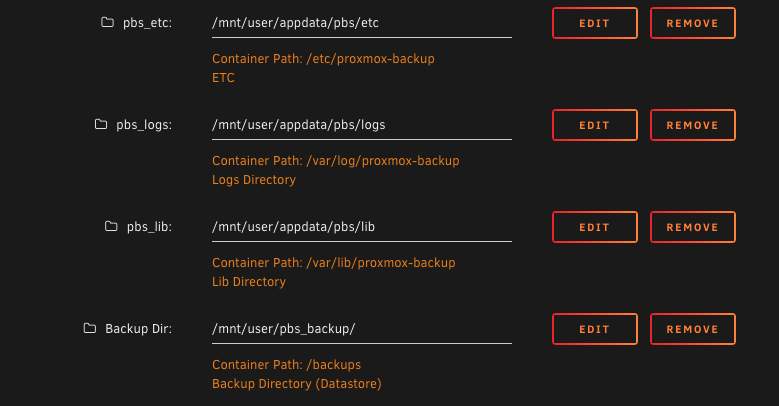
on you ss , of /mnt/user/pbs_backup , i see you have etc, logs and lib directory they should be in /mnt/user/appdata/pbs unless i am mistaken can you please share : ls -alh /mnt/user/appdata/pbs/ Thanks
-
here are the default for this template : and your SS match it but your FS seems to say otherwise
-
can you put the perm of. /mnt/user/appdata/pbs Seem like your directory are not correctly set for /etc/proxmox-backup. you have set /mnt/user/appdata/pbs/etc but the etc. directory seems to be in /mnt/user/pbs_backup
-
Well i cannot reproduce this
-
please post the permission
-
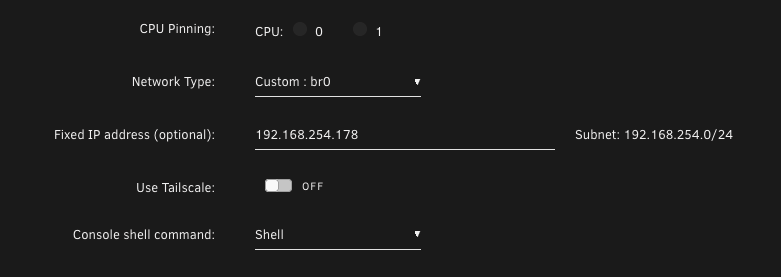
check the permission of your mount point in the Host.
-
always happy when it help somebody thanks
-
I will need to try to reproduce ... .as i am using a RP
-
reserved
-
Overview: Support for Docker image Pulse Application Name: Pulse Application: https://github.com/rcourtman/Pulse Demo: https://demo.pulserelay.pro/ Summary : Real-time monitoring for Proxmox VE, Proxmox Mail Gateway, PBS, and Docker infrastructure with alerts and webhooks. Monitor your hybrid Proxmox and Docker estate from a single dashboard. Get instant alerts when nodes go down, containers misbehave, backups fail, or storage fills up. Supports email, Discord, Slack, Telegram, and more. Make sure to look at the complete documentation Please post any questions/issues relating to this docker template you have in this thread.
-
excellent
-
make sure the perm are correct on /mnt/user/appdata/dumbpad
-
What do you have in you Data: Field ?
-
DumbTerm added!
-
Hi @Wozzagonebush thanks for the report i will have fix asap
-
no worries, i really enjoy this app.
-
Hello, Thanks for the compliments, but it is not my app.... but i am totally agree it is a great app :) your question is a excellent candidate to ask in their github : https://github.com/tphakala/birdnet-go you will have more expert answer. Thanks
-
thanks @u03mdr but i doubt (even if it is fairly possible) they will install a usb microphone on the unraid server..... but that's a great reminder. i will add it in the readme
-
post your question in the Blocky git hub, as this is not issue with template let me know if you need further help
-
Overview: Support for Docker image BirdNET-Go Application Name: BirdNET-Go Application URL: https://github.com/tphakala/birdnet-go Documentation: https://github.com/tphakala/birdnet-go/wiki Make sure to look at the complete documentation Please post any questions/issues relating to this docker template you have in this thread. Note: this is not a support thread for BirdNET-Go
.thumb.jpg.bec61e4e919a9235cc4475f8cb53d5e3.jpg)
