





paululibro
Members
-
Joined
Everything posted by paululibro
-
I'm trying to generate new UUID but I'm getting timeout error in syslog: Nov 30 22:24:29 Orion2 unassigned.devices: Error: shell_exec(/usr/sbin/xfs_admin -U generate '/dev/sdg1') took longer than 20s! Nov 30 22:24:29 Orion2 unassigned.devices: Changed partition UUID on '/dev/sdg1' with result: command timed out After clicking "Change UUID" again I'm getting this: Nov 30 22:24:47 Orion2 unassigned.devices: Changed partition UUID on '/dev/sdg1' with result: ERROR: cannot find log head/tail, run xfs_repair So I run xfs_repair with required -L flag and try to generate again but it's back to timeout error and head/tail error. I'm doing it in the maintenance mode. orion2-diagnostics-20211130-2231.zip
-
Yes So, you're option right now is to fix the errors on the old disk 3 and then copy back into the array. I ran xfs_repair: But the original drive still shows up empty: Also when old disk is mounted, new disk is unmountable: And now, there is also a "Format" button next to the old drive. If it's the one we talked about earlier then I'm 100% sure I didn't format: Started array in the maintenance mode and checked both drives: Original drive: New drive: So what do I do now? orion2-diagnostics-20211130-1115.zip



-
So how do I proceed? Currently new Disk 3 is mounted and empty and original Disk 3 is unassigned and mounted to /dev/sdg. Checking file system gives the same logs as posted before. I just use xfs_repair but point it to /dev/sdg1?
-
I’m not 100% sure but I don’t think so. I connected new disk, assigned it to the Disk 3 and started array. I got a message that replacement disk was found, disk 3 is not ready and that Parity-Sync/Data-Rebuild is in progress.
-
I read multiple posts related to "Unmountable: not mounted" error and I can’t find anything similar to my issue. Like: - what happened to the data on the original Disk 3? Is it still there but can’t be accessed due to fs errors? - and why content of original Disk 3 wasn’t rebuilt to new Disk 3 even if parity was valid and finished with 0 errors?
-
Also when I click on "File System Check" next to unassigned old Disk 3: I'm getting these logs:
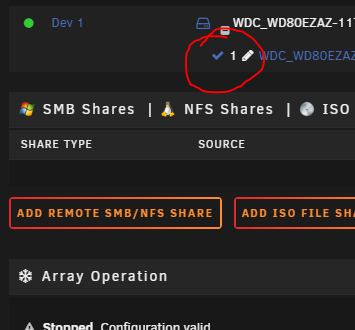
-
It was a brand new empty disk. When you said it was not possible to rebuild data lost with xfs_repair I was at least hoping it would have the rest of data from old Disk 3. Here are diagnostics with old Disk 3 (the one that should have data but shows empty) plugged in but unassigned and new Disk 3 not connected at all. orion2-diagnostics-20211129-1104.zip
-
Here is what happened: 1. My Disk 3 was showing up as "Unmountable: not mounted" 2. I ran xfs_repair on it and it was mounted again but was missing over 600GB of data 3. I unplugged it and replaced it with brand new disk 4. After boot, rebuilding from parity started automatically 5. After it finished, new Disk 3 is mounted but with zero data on it Now: - I plugged old Disk 3, with new Disk 3 still connected and mounted old Disk 3 with "Unassigned Devices" plugin - When old Disk 3 is mounted it shows that it has zero data on it BUT when old Disk 3 is mounted, new Disk 3 shows up "Unmountable: not mounted". When I unplugged old Disk 3 and rebooted, new Disk 3 is mounted again but with zero data I'm confused, beacuse old Disk 3 should still have remaining data. Should I start array with old or new Disk 3 unassigned?
-
So should I try to rebuild from parity? Is it even possible?
-
Attachments orion2-diagnostics-20211128-1028.zip
-
So one of my drives was unmounted and was showing "Unmountable: not mounted". I followed this guide and was able to mount the drive. But now some of its data is missing and my server shows more free space than before (~600GB). Is it possible to rebuild that data from parity or was it overwritten with xfs_repair?
-
I just created new container using "binhex-radarr" template from CA. The only settings I have changed are: - Mapped /mnt/user/appdata/binhex-radarr to /data - Mapped /mnt/user/Downloads/automated/radarr/ to /media Container starts, loggs the following: Created by... ___. .__ .__ \_ |__ |__| ____ | |__ ____ ___ ___ | __ \| |/ \| | \_/ __ \\ \/ / | \_\ \ | | \ Y \ ___/ > < |___ /__|___| /___| /\___ >__/\_ \ \/ \/ \/ \/ \/ https://hub.docker.com/u/binhex/ 2021-10-28 14:51:48.914640 [info] Host is running unRAID 2021-10-28 14:51:48.940434 [info] System information Linux eae9730505bc 5.10.28-Unraid #1 SMP Wed Apr 7 08:23:18 PDT 2021 x86_64 GNU/Linux 2021-10-28 14:51:48.969988 [info] OS_ARCH defined as 'x86-64' 2021-10-28 14:51:49.001003 [info] PUID defined as '99' 2021-10-28 14:51:49.033743 [info] PGID defined as '100' 2021-10-28 14:51:49.077781 [info] UMASK defined as '000' 2021-10-28 14:51:49.113501 [info] Permissions already set for volume mappings 2021-10-28 14:51:49.145356 [info] Deleting files in /tmp (non recursive)... 2021-10-28 14:51:49.178443 [info] Starting Supervisor... and then exits with 135 exit code. What am I doing wrong?
-
Thanks. I had to run it with additional -L flag so it was xfs_repair -v -L /dev/md3. Disk is back on and it also created new share with some files without extensions. I already identified two of them but can't figure one what the third one is.
-
Hi. I just noticed that my array is missing about 8TB of space so I checked it and one of the drives shows "Unmountable: not mounted" message. It was fine a few hours ago, I didn't change anything on the server, no reboots, no power outage etc. I restarted the array but it didn't change anything. I restarted the server, but it didn't help either. So I followed this guide: Check Disk Filesystems up to the "Running the test" section. I started array in the Maintenance mode, checked fs of my drive (xfs) and ran the test with -nv flags. Test results: What should I do next?
-
Not at the moment. Are they exported from somewhere or have unified structure? No, and it’s not planned to add this feature.
-
Support thread for code snippets manager: Snippet Box Links: Github Project Page Docker Hub Setup parameters: - Application Data: path to appdata directory where SQLite file will be stored - Application Port: port for WebUI access
-
Hi. You can try one of these three solutions : Corrupted Database File. I think you will have to open db file with sqlite browser and drop additional tables.
-
Not at this moment but some kind of authentication system is in the works. Check #33 and #45 on GitHub.
-
Right now, only addresses like “www.domain.com/path” or “192.168.0.128” are supported. Using “http[s]://“ is messing with how React Router works. In the future I might add some kind of parser which would allow to use wider range.
-
Can you tell me the whole address you typed while creating new app/bookmark?
-
Support thread for Flame startpage. Links: Github Docker Hub Setup should be very simple. The only two things that need to be specified are port for web ui and volume for sqlite file.


