





RazorX
Members
-
Joined
-
Last visited
-
ok will do, i didn't know i needed to add it on this as it wasn't part of the default config, i believe it was on crafty4, i will give that a try thanks.
-
the amp page itself works as intended.
-
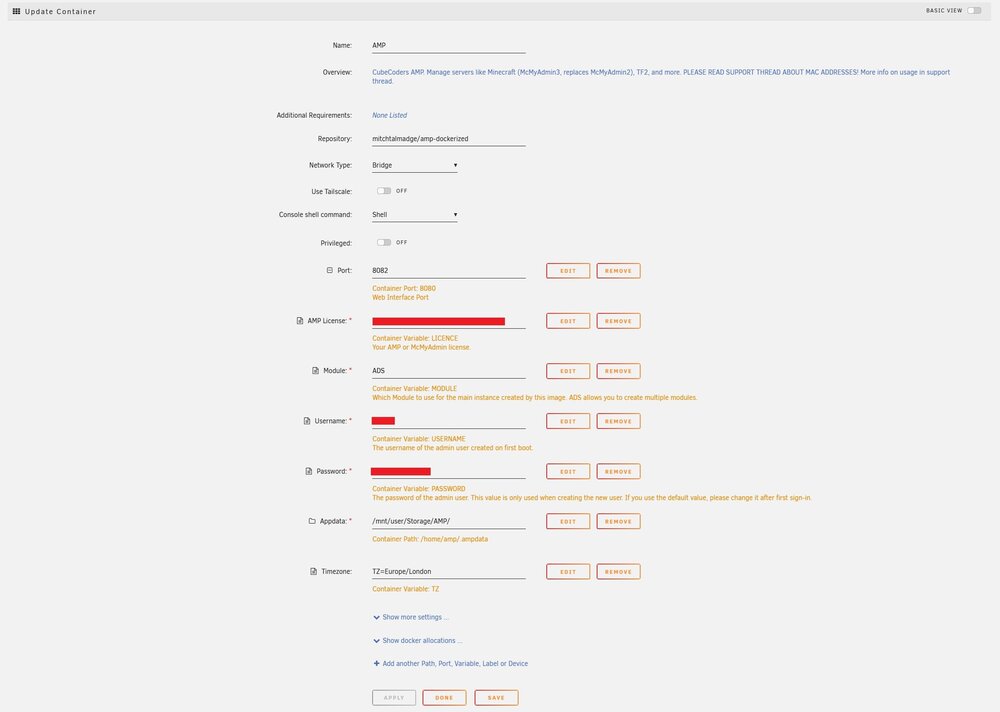
thank you for helping me, i have no idea why it's acting up, i have it fully port forwarded and working online with crafty4 and with crafty4 stopped and this started i just cannot get minecraft to see my server at all, whether that's using my dns address or local port. also i did have it set to 8080 and just incase that was the issue i changed it to 8082 but that changed nothing.
-
i can't get this to work at all, i create a minecraft java server and it says it's up and running but when i try to connect to the server on minecraft it says can't find server yet if i setup the same thing on crafty, it just works and that's free, what's going on?
-
anyone having issues setting up a space engineers server? i have followed the guide and in the logs it says everything is running correctly but when i load up the game i just can't connect to it via direct connection or find it in any list. log: text error warn system array login ls: cannot access '/appdata/space-engineers/plugins/*.dll': No such file or directory Setting breakpad minidump AppID = 244850 2025-02-25 22:24:20.413: Public IP: XX.XXX.XX.XXX 2025-02-25 22:24:20.413: User ID: [009...656] 2025-02-25 22:24:20.413: Server connected to Steam 2025-02-25 22:24:22.431: Server Name: RazorX-Gaming 2025-02-25 22:24:22.431: World Name: razorx-gaming 2025-02-25 22:24:22.532: Auto Restart Enabled 2025-02-25 22:24:22.553: Remote Server Listener started. Listening on XX.XXX.XX.XXX:8080 2025-02-25 22:24:26.415: Loading Sandbox world configuration file Z:\appdata\space-engineers\instances\razorx-gaming\Saves\razorx-gaming\Sandbox_config.sbc 2025-02-25 22:24:26.429: Sandbox world configuration file found, overriding checkpoint settings. 2025-02-25 22:24:26.433: Server PolicyResponse (1) 2025-02-25 22:24:26.436: Downloading world mods - START 2025-02-25 22:24:26.436: Downloading world mods - END 2025-02-25 22:24:26.456: Loading session: Z:\appdata\space-engineers\instances\razorx-gaming\Saves\razorx-gaming 2025-02-25 22:24:26.544: Experimental mode: Yes 2025-02-25 22:24:26.544: Experimental mode reason: InsufficientHardware 2025-02-25 22:24:26.544: Console compatibility: No 2025-02-25 22:25:23.904: Analytics session started: UserID = (4389758671567789417) SessionID = (a63be873-4c3c-415d-b2e1-328844579d68) 2025-02-25 22:25:23.958: Session loaded 2025-02-25 22:25:27.263: Game ready... 2025-02-25 22:34:10.248: Autosave 2025-02-25 22:34:25.019: Saving Sandbox world configuration file Z:\appdata\space-engineers\instances\razorx-gaming\Saves\razorx-gaming\.new\Sandbox_config.sbc 2025-02-25 22:40:02.803: Server disconnected (NoConnection) 2025-02-25 22:40:17.336: Server connected to Steam 2025-02-25 22:40:17.569: Server PolicyResponse (1) -------------------------------INSTALL & UPDATE------------------------------ WARNING: setlocale('en_US.UTF-8') failed, using locale: 'C'. International characters may not work. Redirecting stderr to '/root/.local/share/Steam/logs/stderr.txt' Logging directory: '/root/.local/share/Steam/logs' [ 0%] Checking for available updates... [----] Verifying installation... UpdateUI: skip show logoSteam Console Client (c) Valve Corporation - version 1738027521 -- type 'quit' to exit -- Loading Steam API...OK Connecting anonymously to Steam Public...OK Waiting for client config...OK Waiting for user info...OK "@sSteamCmdForcePlatformType" = "windows" Success! App '298740' already up to date. ---------------------------------UPDATE CONFIG------------------------------- ---------------------------------UPDATE PLUGINS------------------------------ Found 0 plugins in /appdata/space-engineers/plugins -----------------------------CURRENT CONFIGURATION--------------------------- GAME_DIR=/appdata/space-engineers/SpaceEngineersDedicated CONFIG_PATH=/appdata/space-engineers/instances/razorx-gaming/SpaceEngineers-Dedicated.cfg INSTANCE_IP=172.17.0.5 CURRENT_IP= CURRENT_WORLDNAME=razorx-gaming SAVE_PATH=Z:\\appdata\\space-engineers\\instances\\razorx-gaming\\Saves\\razorx-gaming wine-9.0 ----------------------------------START GAME--------------------------------- 2025-02-25 22:44:13.523: App Version: 01_205_026 2025-02-25 22:44:13.546: Is official: True [NO][NIS][NAMP] 2025-02-25 22:44:13.549: Client Build Number: 3 2025-02-25 22:44:13.549: Server Build Number: 2 2025-02-25 22:44:13.549: Environment.ProcessorCount: 24 2025-02-25 22:44:13.551: Environment.OSVersion: Microsoft Windows 7 Professional (Microsoft Windows NT 6.1.7601 Service Pack 1) 2025-02-25 22:44:13.551: Environment.CommandLine: "Z:\appdata\space-engineers\SpaceEngineersDedicated\DedicatedServer64\SpaceEngineersDedicated.exe" -noconsole -ignorelastsession -path Z:\appdata\space-engineers\instances\razorx-gaming 2025-02-25 22:44:13.552: Environment.Is64BitProcess: True 2025-02-25 22:44:13.552: Environment.Is64BitOperatingSystem: True 2025-02-25 22:44:13.552: Environment.Version: .NET Framework 4.8.3761.0 2025-02-25 22:44:13.552: Environment.CurrentDirectory: Z:\appdata\space-engineers\SpaceEngineersDedicated\DedicatedServer64 2025-02-25 22:44:13.552: CPU Info: Intel(R) Xeon(R) CPU X5675 @ 3.07GHz Computer does not meet minimum requirements, forcing Experimental mode 2025-02-25 22:44:17.220: Bind IP : 0.0.0.0:27016 2025-02-25 22:44:24.700: Networking service: Steam 2025-02-25 22:44:24.700: Server successfully started 2025-02-25 22:44:24.700: Product name: Space Engineers 2025-02-25 22:44:24.700: Desc: Space Engineers 2025-02-25 22:44:24.700: Public IP: XX.XXX.XX.XXX 2025-02-25 22:44:24.701: User ID: [009...184] 2025-02-25 22:44:24.706: Server connected to Steam 2025-02-25 22:44:27.004: Server Name: RazorX-Gaming 2025-02-25 22:44:27.004: World Name: razorx-gaming 2025-02-25 22:44:27.123: Auto Restart Enabled 2025-02-25 22:44:27.144: Remote Server Listener started. Listening on XX.XXX.XX.XXX:8080 2025-02-25 22:44:32.999: Loading Sandbox world configuration file Z:\appdata\space-engineers\instances\razorx-gaming\Saves\razorx-gaming\Sandbox_config.sbc 2025-02-25 22:44:33.015: Sandbox world configuration file found, overriding checkpoint settings. 2025-02-25 22:44:33.020: Server PolicyResponse (1) 2025-02-25 22:44:33.023: Downloading world mods - START 2025-02-25 22:44:33.023: Downloading world mods - END 2025-02-25 22:44:33.041: Loading session: Z:\appdata\space-engineers\instances\razorx-gaming\Saves\razorx-gaming 2025-02-25 22:44:33.131: Experimental mode: Yes 2025-02-25 22:44:33.132: Experimental mode reason: InsufficientHardware 2025-02-25 22:44:33.132: Console compatibility: No 2025-02-25 22:45:23.060: Analytics session started: UserID = (4389758671567789417) SessionID = (d852dadc-e409-47d3-8fd0-b9739aea18bb) 2025-02-25 22:45:23.150: Session loaded 2025-02-25 22:45:25.202: Game ready... i'm uk, do i need to adjust it for that in anyway?
-
right, with the network connection set to no now, i don't have to worry about that
-
no, should i?
-
ok so i think i've actually solved it, i did the following: Motherboard and Model: Dell Enable Network Connection(s): No Enable Virtual Machine Override: Dell Motherboard Model: Any then in Fan Control i set it to Yes, then under fan settings i had to enable Advanced View and set the temperature sensor and fan speeds there and it seems to have worked.
-
for the IPMI support plugin, when i type in the ip address of the idrac or type in local host i get connection failed
-
i can't get ipmitool working on unraid 7.0.0
-
i added the scripts and i just get: /tmp/user.scripts/tmpScripts/Temp Pull/script: line 17: ipmitool: command not found edit: if i install the abandoned nerdtools in order to install ipmitool i then get this error: ipmitool: error while loading shared libraries: libcrypto.so.1.1: cannot open shared object file: No such file or directory
-
does anyone know how to get this working for a dell poweredge r710 or dell poweredge r730xd? i just bought an r730xd and the fans are running at 14280 RPM atm so if anyone can help me i'd really appreciate it thanks. i had a script on unraid that worked for my r710 but since updating to 7.0.0 it no longer works due to ipmitools.
-
ok will try that
-
just tried that, the seed still wasn't the same
-
i wonder if anyone can help me, i've just setup a Valheim server on unraid for my friends but i don't own the game, i've tried looking for where this docker saves the world/map etc so i can create an adminlist and stuff like that but i can't find it. i looked in /mnt/disk1/appdata/valheim and the server files are there but not the world or anything like that, can anyone help me thanks. i also can't seem to figure out how to use a specific world seed, i tried adding worldseed to the game param followed by a space then the seed but not sure it worked.


