





Belgian Genius
Members
-
Joined
-
Last visited
Everything posted by Belgian Genius
-
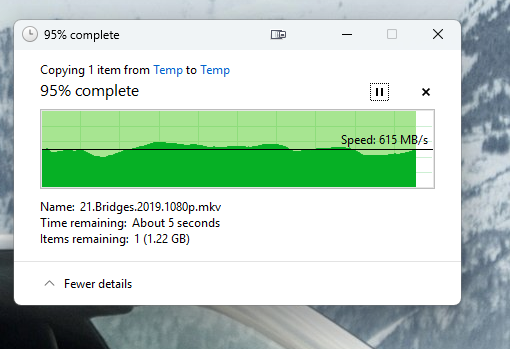
Here's a graph of transferring a 25GB file. It bounces all over the place from a low of 500MB/s to a high of about 800MB/s. By comparison, transfers to my Windows server on the same network are a straight line around 980MB/s.
-
Agreed, but my Windows server which sits next to it on the same network writes 980MB/s. I'll try the disk share. UPDATE: I made my cache an exclusive share. Unfortunately, no difference.
-
Ok., I replaced my cache drive with something new - a 1TB Crucial P3 Plus drive. iPerf shows ethernet performance as ~ 950 MB/s. Diskspeed now shows SSD write performance at 2.5 GB/s, so SSD bottleneck has been eliminated. BUT, when I transfer a file to the unRAID over the network, I'm still getting 700MB/s max. WHAT * THE * HELL? What am I missing here?
-
No, this is the only SSD on the server. It's plugged directly into an NVME slot on the MB, so I have no doubt that it's unRAID that is somehow hobbling its performance to 650MB/S Write, but I can't figure out what is causing it. The SSD is easily capable of 4X that performance.
-
I tried that - no difference.
-
Hi, I have an unraid setup with 10GbE and a 970 Evo cache drive. Writes to this machine max out around 650MB/s. iPerf shows 950MB/s over the network. But, diskspeed shows average writes to the NVME 970 Evo at 650MB/s, which is my limiting factor. Why is this drive performing so slowly? In a windows machine, it can write at 2.5 GB/s. Are there settings I should change?
-
Tried blkdiscard /dev/nvme0n1 -f Still do dice. Same unmountable drive. What gives??
-
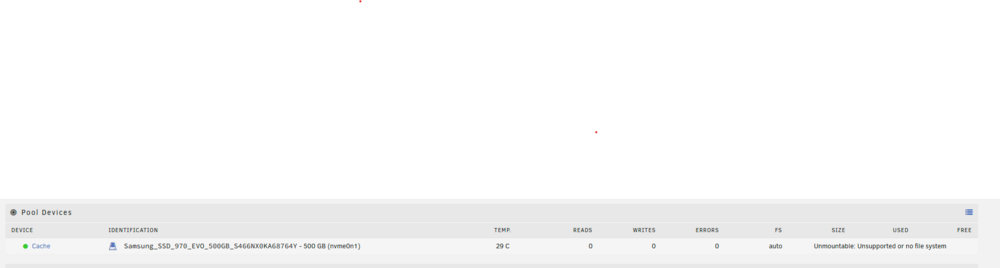
I have a 500GB NVME SSD that became available, so I installed it in my unRAID machine with the existing NTFS partition expecting unRAID would let me wipe it and reformat it and add it as a cache drive. I pulled out an old SATA SSD when I did this (yes, I invoked mover first and then properly shut down unRAID). I've tried adding the new drive to the pool, removing it from the pool, deleting the pool and creating a new one, erasing the drive, changing the file system, and mounting/unmounting each time. Nothing gives. This is all I get: Is it not possible to format a drive with unRAID?
-
Thanks.
-
Nope.
-
Thanks. What a nightmare. If only I had known that UnRaid was storing stuff on USB flash, I would have kept backups! Assuming I can get it booting with a new Flash USB, how do I set up my disk array? 5 Data disks (3x12GB, 2X10GB for 44GB usable space) One of the 12GB disks is parity and I can likely guess which it is, but I won't be certain. There is also a 256GB SSD cache disk.
-
No, I just reflashed it with a clean image. The data is all saved on my hard drives, right? I realized after I screwed myself by wiping the flash drive, but I never realized UnRaid saved anything to the flash drive. First things first - why would is suddenly stop booting and why would the computer end up at the bios screen after the flash drives flashes for two minutes?
-
I was running the latest version of 6.9.2. I logged into unraid today and got a message that the USB drive had "dropped off" and could be corrupt. Rebooted and no dice. Reformatted the drive on my windows PC and reinstalled UNRAID. USB key seems perfectly fine with no errors on format. But, when I put it into my NAS computer, the computer seems to recognize it and try to boot off of it (key is flashing like normal), but the screen is blank the whole time and nothing happens. Sometimes the computer just jumps into the bios after a few minutes. Any idea what the heck is going on here?
