Bowling666
Members
-
Joined
-
Last visited
-
Vielen Dank für die schnellen Reaktionen! Falls doch noch etwas schief läuft melde ich mich unter dem Thread.
-
Sorry habe vergessen zu erwähnen, dass ich vorher keine Parity hatte, deswegen auch der Wechsel auf das MB mit mehr als 2 SATA Ports. Huch und stimmt da hab ich mich verlesen. Kann ich diese Warnung also ignorieren?
-
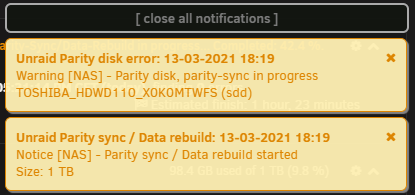
Hab das ganze jetzt mal gemacht und er macht jetzt einen parity-sync aber es kam oben rechts eine notification mit "Warning". Ist da trotzdem alles in Ordnung? 😬 EDIT: Er erkennt auch die Toshiba HDD als SSD? Kann ich das beeinflussen? Ich danke dir schon einmal für deine Hilfe!
-
Hallo, ich möchte mein Unraid auf ein neues System übertragen. Es sollen wenn möglich die VMs und Dateien erhalten bleiben. Reicht es wenn ich einfach die alten "Komponenten" anstecke und dann boote vom neuen System oder muss ich da noch was beachten? Vielen Dank für alle Antworten!
-
Thank you very much! The system is running again.
-
after my file backup is finished i try it
-
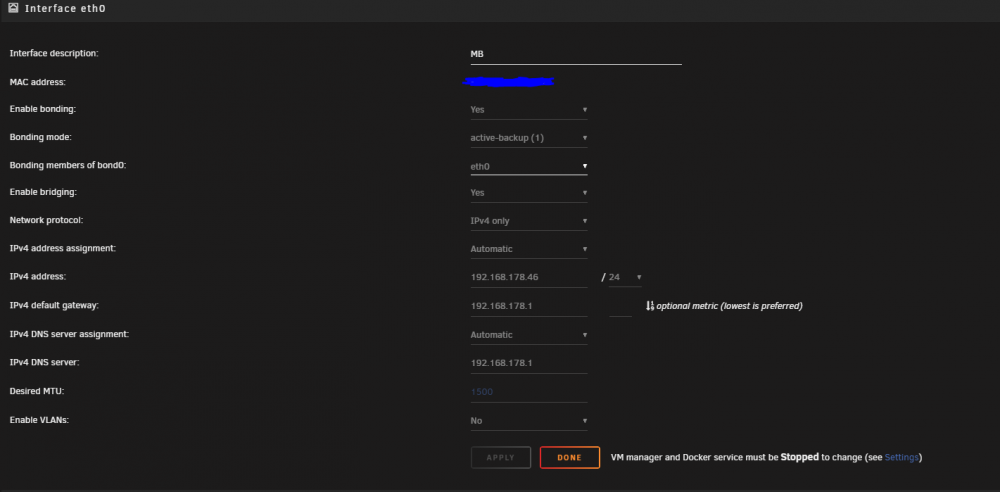
My network settings:
-
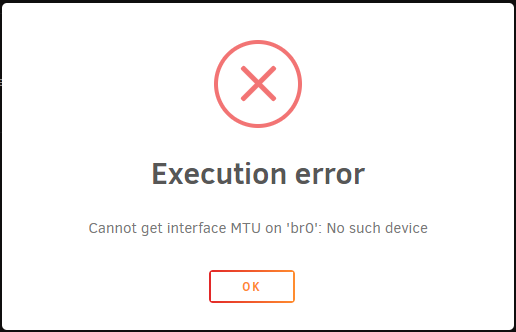
I also dont know why "br0" is not there anymore. Hmmm and when i try to add it manually it does not work sadly.
-
Hello i have the same problem with my vms. Sadly a reboot does not fix the problem. Also by running the command "virsh net-start default" came an error. i hope someone can help me. Thank you!