Hoddl
Members
-
Joined
-
Last visited
Everything posted by Hoddl
-
ich bekomme beim installieren folgende fehler meldung: root@localhost:# /usr/local/emhttp/plugins/dynamix.docker.manager/scripts/docker run -d --name='deconz' --net='host' -e TZ="Europe/Berlin" -e HOST_OS="Unraid" --device=/dev/ttyACMO 'marthoc/deconz' af8998861ab0e70326dcc53e8c17c569141f87a7d63a9d4ecdb769128bca0c4a docker: Error response from daemon: error gathering device information while adding custom device "/dev/ttyACMO": no such file or directory. Der Befehl ist fehlgeschlagen. ist das ACMO(O als buchstabe) oder ACM0 (null)
-
na dann muss ich es noch mal komplett bauen 🙂 hab bei den ports ports benutzt 🙂 ich werde es morgen noch mal machen... vielen Dank schon mal für deine hilfe
-
du hast über all als Beschreibung "Variable" stehen - sind das wiklich alles Variablen?
-
eine config.ini datei hab ich nicht.
-
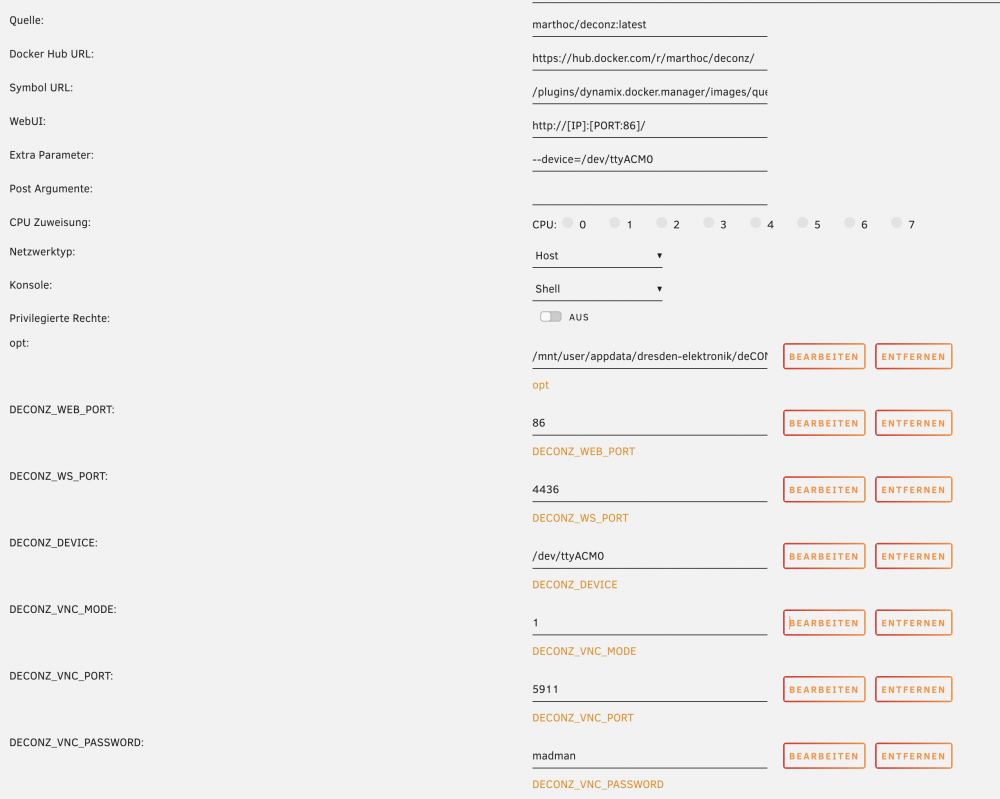
kann man den stick iregndwie reseten bez. auf werkseinstellung bringen? Der VNC mode ist auf 1 drinnen.
-
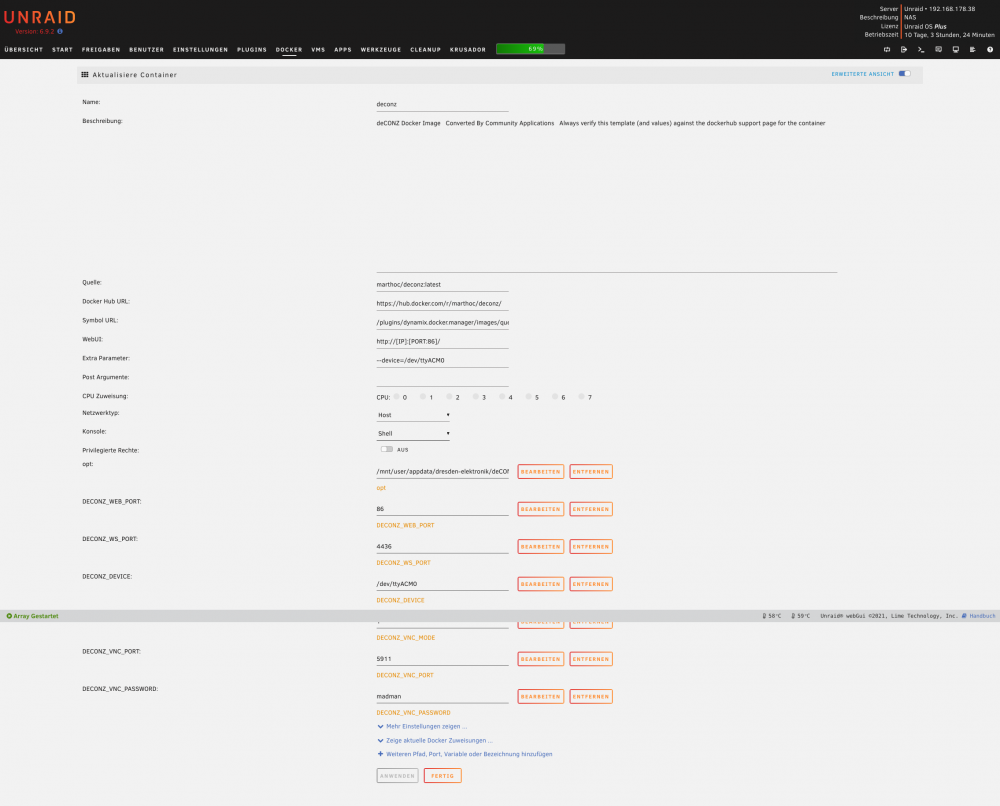
hier das docker:
-
ich komm nicht auf die WebUI seite nicht gefunden. Im Protokoll sind auch fehler: FehlerWarnungSystemArrayAnmelden [marthoc/deconz] Starting deCONZ... [marthoc/deconz] Current deCONZ version: 2.12.00 [marthoc/deconz] Web UI port: 80 [marthoc/deconz] Websockets port: 443 [marthoc/deconz] VNC Disabled QStandardPaths: XDG_RUNTIME_DIR not set, defaulting to '/tmp/runtime-root' libpng warning: iCCP: known incorrect sRGB profile This plugin does not support propagateSizeHints() This plugin does not support propagateSizeHints() 20:28:20:432 HTTP Server listen on address 0.0.0.0, port: 8080, root: /usr/share/deCONZ/webapp/ 20:28:20:504 ZCLDB init file /root/.local/share/dresden-elektronik/deCONZ/zcldb.txt 20:28:20:658 parent process /bin/sh 20:28:20:658 gw run mode: docker 20:28:20:658 GW sd-card image version file does not exist: /root/.local/share/dresden-elektronik/deCONZ/gw-version 20:28:20:659 DB sqlite version 3.27.2 20:28:20:659 DB PRAGMA page_count: 0 20:28:20:659 DB PRAGMA page_size: 4096 20:28:20:659 DB PRAGMA freelist_count: 0 20:28:20:659 DB file size 0 bytes, free pages 0 20:28:20:659 DB PRAGMA user_version: 0 20:28:20:659 DB upgrade to user_version 1 20:28:20:925 DB write sqlite user_version 1 20:28:20:937 DB PRAGMA user_version: 1 20:28:20:937 DB upgrade to user_version 2 20:28:20:961 DB write sqlite user_version 2 20:28:20:973 DB PRAGMA user_version: 2 20:28:20:973 DB upgrade to user_version 6 20:28:21:011 DB write sqlite user_version 6 20:28:21:022 DB PRAGMA user_version: 6 20:28:21:023 DB upgrade to user_version 7 20:28:21:045 DB write sqlite user_version 7 20:28:21:057 DB PRAGMA user_version: 7 20:28:21:057 DB cleanup 20:28:21:057 DB create temporary views 20:28:21:059 started websocket server at port 443 20:28:21:060 create default username and password 20:28:21:061 [INFO] - Found file containing button maps. Parsing data... 20:28:21:067 [INFO] - Button maps loaded. 20:28:21:068 dlg action: Read binding table 20:28:21:068 found node plugin: libde_rest_plugin.so - REST API Plugin 20:28:21:070 found node plugin: libde_signal_plugin.so - Signal Monitor Plugin 20:28:21:087 found node plugin: libstd_otau_plugin.so - STD OTAU Plugin This plugin does not support propagateSizeHints() 20:28:24:163 Device firmware version 0x26660700 ConBee II 20:28:24:176 unlocked max nodes: 200 20:28:24:289 Device protocol version: 0x010C 20:28:24:431 Device protocol version: 0x010C 20:28:25:838 GW update firmware found: /usr/share/deCONZ/firmware/deCONZ_ConBeeII_0x26660700.bin.GCF 20:28:25:838 GW firmware version: 0x26660700 20:28:25:838 GW firmware version is up to date: 0x26660700 20:28:26:283 Announced to internet https://phoscon.de/discover 20:28:30:583 invalid current channel 0 (TODO) 20:28:40:583 invalid current channel 0 (TODO) 20:28:41:084 Set bridgeid to 00212EFFFF07216A 20:28:50:583 invalid current channel 0 (TODO) 20:29:00:583 invalid current channel 0 (TODO) 20:29:10:583 invalid current channel 0 (TODO) 20:29:20:609 invalid current channel 0 (TODO) 20:29:30:583 invalid current channel 0 (TODO) 20:29:40:583 invalid current channel 0 (TODO) 20:29:50:583 invalid current channel 0 (TODO) 20:30:00:583 invalid current channel 0 (TODO) 20:30:10:583 invalid current channel 0 (TODO) 20:30:20:583 invalid current channel 0 (TODO) 20:30:30:583 invalid current channel 0 (TODO) 20:30:40:583 invalid current channel 0 (TODO) 20:30:50:583 invalid current channel 0 (TODO) 20:31:00:583 invalid current channel 0 (TODO) 20:31:10:583 invalid current channel 0 (TODO) 20:31:20:583 invalid current channel 0 (TODO) 20:31:30:583 invalid current channel 0 (TODO) 20:31:40:583 invalid current channel 0 (TODO) 20:31:50:583 invalid current channel 0 (TODO) 20:32:00:583 invalid current channel 0 (TODO) 20:32:10:583 invalid current channel 0 (TODO) 20:32:20:583 invalid current channel 0 (TODO) 20:32:25:583 GW firmware version: 0x26660700 20:32:25:583 GW firmware version is up to date: 0x26660700 20:32:30:583 invalid current channel 0 (TODO) 20:32:40:583 invalid current channel 0 (TODO) 20:32:50:583 invalid current channel 0 (TODO) 20:33:00:583 invalid current channel 0 (TODO) 20:33:10:583 invalid current channel 0 (TODO) 20:33:20:584 invalid current channel 0 (TODO) 20:33:30:583 invalid current channel 0 (TODO) 20:33:40:583 invalid current channel 0 (TODO) 20:33:50:583 invalid current channel 0 (TODO) 20:34:00:583 invalid current channel 0 (TODO) 20:34:10:584 invalid current channel 0 (TODO) 20:34:20:583 invalid current channel 0 (TODO) 20:34:30:583 invalid current channel 0 (TODO) 20:34:40:583 invalid current channel 0 (TODO) 20:34:50:583 invalid current channel 0 (TODO) 20:35:00:583 invalid current channel 0 (TODO) 20:35:10:583 invalid current channel 0 (TODO) 20:35:20:583 invalid current channel 0 (TODO) 20:35:29:411 device state timeout ignored in state 3 20:35:29:571 device state timeout ignored in state 3 20:35:29:731 device state timeout ignored in state 3 20:35:29:891 device state timeout ignored in state 3 20:35:30:052 device state timeout ignored in state 3 20:35:30:211 device state timeout ignored in state 3 20:35:30:371 device state timeout ignored in state 3 20:35:30:532 device state timeout ignored in state 3 20:35:30:583 invalid current channel 0 (TODO) 20:35:30:691 device state timeout ignored in state 3 20:35:30:852 device state timeout ignored in state 3 20:35:31:011 device state timeout ignored in state 3 This plugin does not support propagateSizeHints() 20:35:31:171 device state timeout (handled) 20:35:31:177 device disconnected reason: 1, index: 0 20:35:31:251 void zmMaster::handleStateIdle(zmMaster::MasterEvent) not connected goto OFF state 20:35:31:251 device state timeout ignored in state 1 20:35:32:083 start reconnect to network 20:35:32:083 wait reconnect 15 seconds 20:35:33:083 wait reconnect 14 seconds 20:35:34:084 wait reconnect 13 seconds 20:35:35:083 wait reconnect 12 seconds 20:35:36:083 wait reconnect 11 seconds 20:35:37:083 wait reconnect 10 seconds 20:35:37:333 failed to reconnect to network try=1 20:35:38:083 wait reconnect 9 seconds 20:35:39:084 wait reconnect 8 seconds 20:35:40:083 wait reconnect 7 seconds 20:35:41:084 wait reconnect 6 seconds 20:35:42:084 wait reconnect 5 seconds 20:35:42:583 failed to reconnect to network try=2 20:35:43:084 wait reconnect 4 seconds 20:35:44:083 wait reconnect 3 seconds 20:35:45:083 wait reconnect 2 seconds This plugin does not support propagateSizeHints() 20:35:46:084 wait reconnect 1 seconds 20:35:46:165 Device firmware version 0x26660700 ConBee II 20:35:46:171 unlocked max nodes: 200 20:35:46:284 Device protocol version: 0x010C 20:35:46:294 new node - ext: 0x00212effff07216a, nwk: 0x0000 20:35:46:363 Current channel 15 20:35:46:381 CTRL got nwk update id 2 20:35:46:388 CTRL ANT_CTRL 0x03 20:35:46:432 Device protocol version: 0x010C 20:35:46:533 CTRL ANT_CTRL 0x03 20:35:46:577 Device protocol version: 0x010C 20:35:46:680 CTRL ANT_CTRL 0x03 20:35:47:583 reconnect network done 20:35:56:585 saved node state in 0 ms 20:35:56:585 sync() in 0 ms 20:36:20:619 Device TTL 3553 s flags: 0x7 20:36:25:584 GW firmware version: 0x26660700 20:36:25:584 GW firmware version is up to date: 0x26660700 20:37:20:631 Device TTL 3493 s flags: 0x7 20:38:20:620 Device TTL 3433 s flags: 0x7 20:39:20:621 Device TTL 3373 s flags: 0x7 20:40:20:621 Device TTL 3313 s flags: 0x7 20:40:25:583 GW firmware version: 0x26660700 20:40:25:583 GW firmware version is up to date: 0x26660700 20:40:25:583 GW firmware version: 0x26660700 20:40:25:583 GW firmware version is up to date: 0x26660700
-
was muss den bei WebUI rein???
-
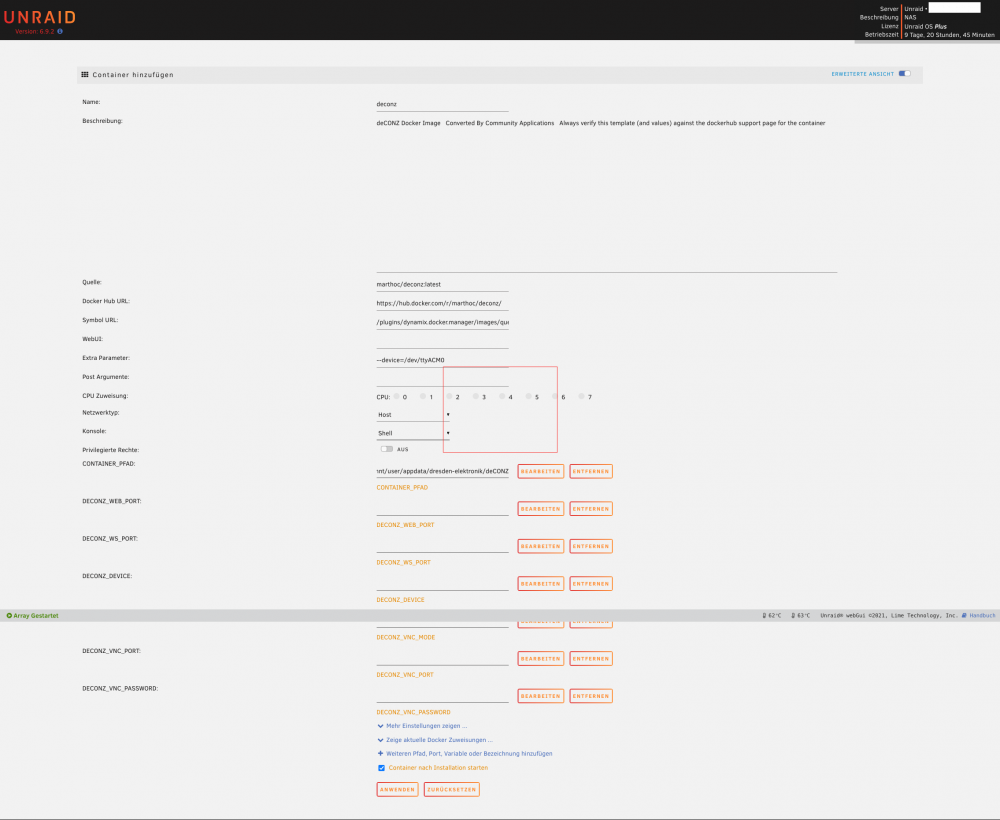
@vakilando so hier mein Docker... passt das so?
-
die waren einfach da... ohne das ich was gemacht hab... ok lösche ich raus und fange dann noch mal an.
-
der hat bei mir 3 ips gehabt... ich fang noch mal mit marthoc an... hab alles noch mal gelöscht und alles bereinigt so das ich komplett sauber starten kann. Soll ich den marthoc über die apps nehmen und dann die variablen einfügen oder soll och einen komplett leeren docker nehmen?
-
dann hab ich wohl was bei der docker erstellung falsch gemacht denn ich komme nicht auf die webUI von deCONZ drauf 😞 dabei ist es egal welche der ips ich versuche... Ich bau den Docker noch mal neu mit der vorlage von SpaceInvaderOne's.
-
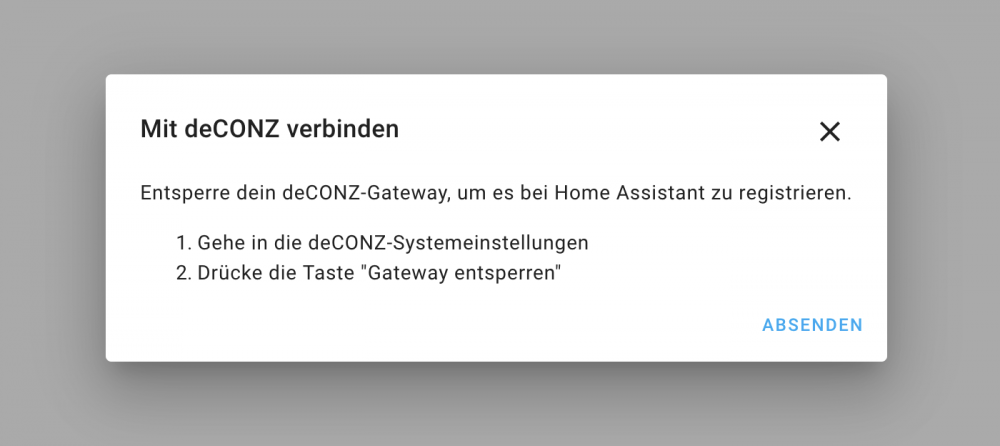
@vakilando ok er ist da doch was muss ich jetzt noch machen?
-
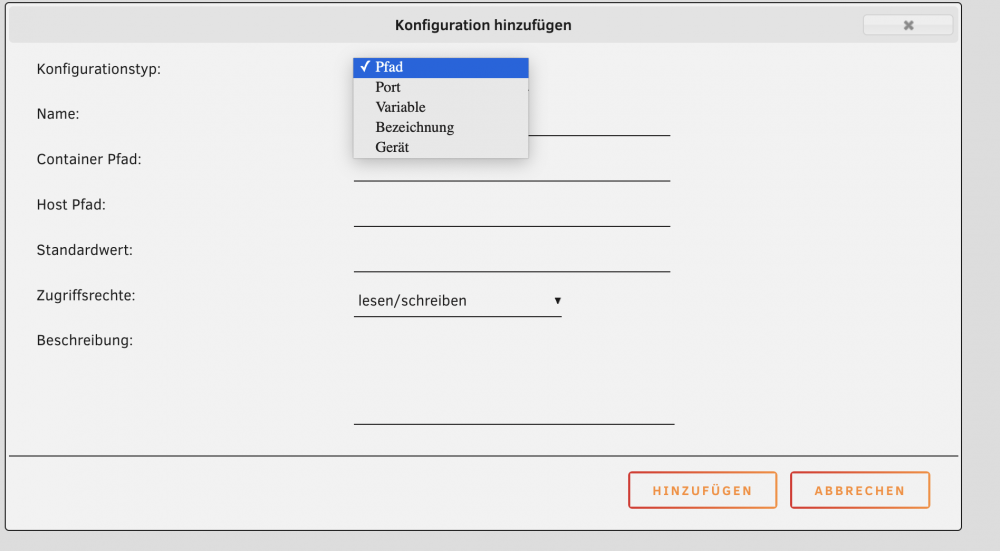
und was nehme ich da genau?
-
was nehme ich denn für den VNC-Mode für eine einstellung? und für das Passwort? bei device und Port ist es klar da ich dies ja auswählen kann den rest was ich am anfang geschrieben habe weis ich leider nicht was ich da nehmen muss 😞
-
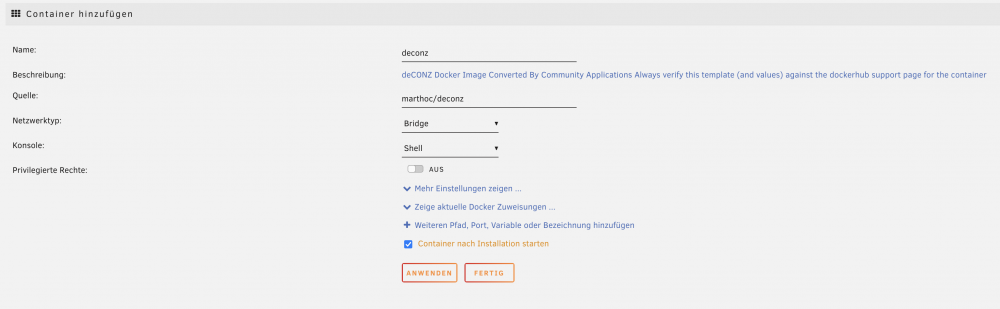
warum sieht es bei mir so aus? Das docker ist von dockerhub
-
👍 vielen dank ich werde mich mal an die arbeit machen...
-
@vakilando wie hast du denn den Docker marthoc/deconz installiert?
-
ok danke... dann werd ich mich später mal dran machen...
-
Hallo, wer weis wie ich den ConBee II in HA bekomme? Ich weis leider nicht den pfad zum USB Port nicht... wird dieser überhhaupt automatich zu HA (Docker) durchgereicht? Oder muss ich die USB Schnittstelle mit dem Docker für HA bekannt machen?
-
ich würde gerne das system DEVONthink oder vergleichbares auf dem Unraid haben
-
DEVONthink hab ich ha am mac laufen da brauch ich glaube ich nicht noch einen am Server laufen zu haben.. ja schade... doch ich werde die suche nicht aufgeben 🙂 Danke
-
Confluence hab ich mal kurz installiert und gleich wieder gelöscht ist was ganz anderes
-
Confluence teste ich mal... danke für den tip ich habe devonthink ja hier am mac am laufen... ich habe mir halt gedacht wenn die datenbanken schon auf dem unraid sind warum nicht gleich alles damit machen... devonthink vergisst immer mal wieder wo die datenbanken sind das nervt halt schon arg...
-
ja gibt es noch... doch nicht für unraid - oder???