SubbyDew
Members
-
Joined
-
Last visited
Everything posted by SubbyDew
-
I've already reinstalled the plugin once and I don't believe I've ever used any of the override options. For now, I've just changed my appdata and system shares to cache:yes so that mover will ignore them. Thanks for the help @Masterwishx. I'll also keep an eye on the github issue #41 that seems to be the same thing.
-
Yes, only my data share moves from primary (cache) to secondary (array). All other shares are keep on primary. Yes, the shares filling up the .list files are cache:prefer. See appdata section of log below. Same is for system share as well. 20:28:56.643 Primary storage: cache - size: 932GiB - used: 16 % (141GiB) 20:28:56.644 Secondary storage: user0 20:28:56.651 Share Information: Name: appdata - Path: /mnt/*/appdata 20:28:56.656 Moving threshold: % (0B) ; Filling up threshold: 70% (653GiB) 20:28:56.657 Mover action: user0->cache (cache:prefer). Pool is below priming threshold percentage: 16% < 70%. 20:28:56.658 => Will smart move newest files from user0 to cache until threshold. 20:31:02.177 Updated Filtered filelist: /tmp/ca.mover.tuning/Filtered_files_2025-03-29T202856.list for appdata ------------ 20:31:03.388 Deciding the action (move/sync/keep) for each file. There are 465466 files, it can take a while... 20:40:39.006 No new files will be moved/synced from primary to secondary 20:40:39.007 No new files will be moved/synced from secondary to primary 20:40:39.011 Cleaning lock and stop files
-
I've had a look into the files and they seem to have every single file from my shares that use the cache (both yes or prefer) listed in them, primarily being from the 'system' and 'appdata' shares. There is just over 490,000 files listed in those .list files, with the majority being Plex metadata files (very large media collection). 00:56:02.986 Deciding the action (move/sync/keep) for each file. There are 490165 files, it can take a while... 01:06:00.142 No new files will be moved/synced from primary to secondary 01:06:00.143 No new files will be moved/synced from secondary to primary 01:06:00.146 Cleaning lock and stop files Is this the expected behavior where it will list all the files from shares that have move rules setup, even if those files are already on the correct drive? I'm just curious as it only seems to be a very recent issue for me, even though I've had a large Plex collection for some time.
-
Apologies if I didn't fully understand the previous posts. I see you mentioned the above. I'm a little confused as I've never had this issue before, is this a bug or did something change with how the plugin functions?
-
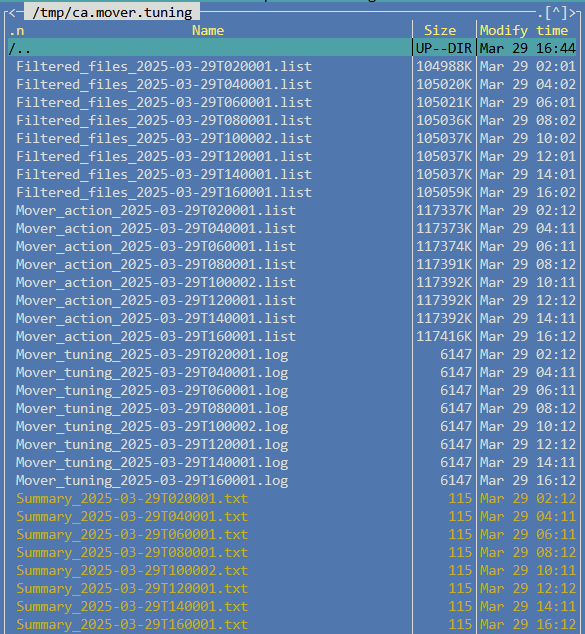
Hey Everyone, I'm hoping you can help me out. My RAM keeps filling up and I've identified that it's the mover log and run files causing the issue. They are not being cleaned up or removed and therefore keep filling up the RAM, particularly the .list files. I've tried rebooting and reinstalling the plugin, but no luck. I've manually deleted older files to stop the RAM completely filling up and crashing the system, which has happened once already. For additional context if it helps, I recently had some corruption issues on my cache pool due to one of the two ssd drives failing. I've removed the failing drive from the pool and left it as a single drive for the time being. I don't think this would have anything to do with this issue but wanted to mention it. I have also recently upgraded to v7 and 7.0.1. vault-diagnostics-20250329-1636.zip
-
I am also having the plugin issue, if this won't have a solution soon, how do I roll back to a specific release?
-
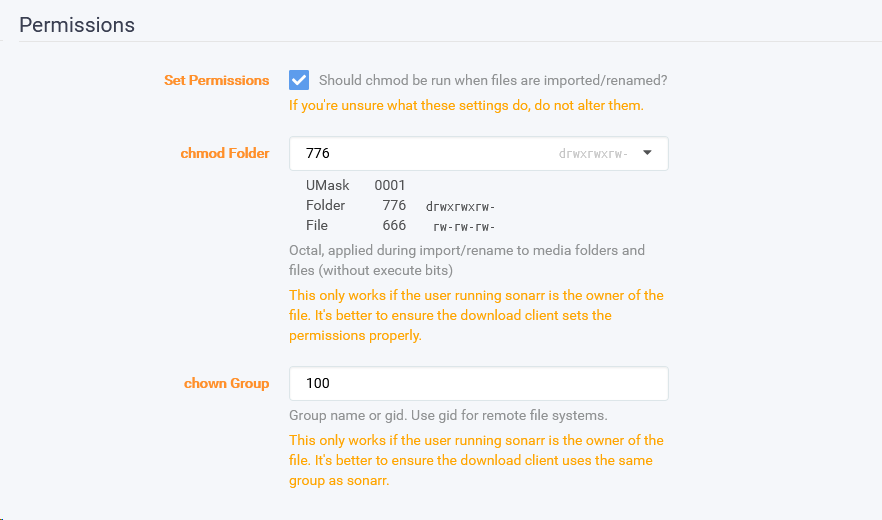
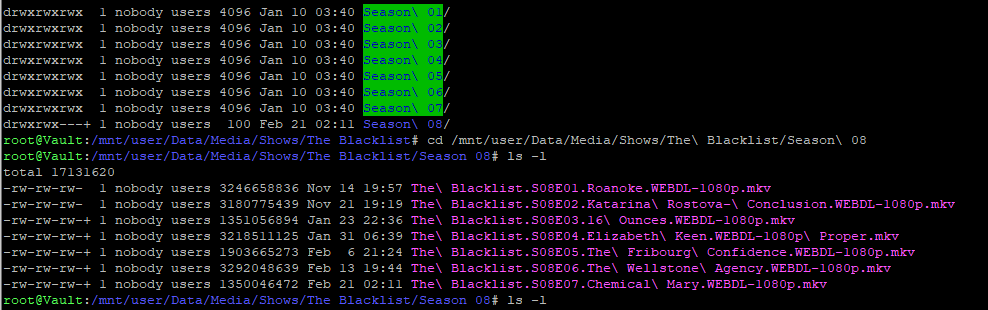
Hey peeps, I am having some issues with permissions in sonarr, I have been having general issues with SMB and not giving me access even when I have windows credentials set as a user defined in unraid. My quick fix was to set sonarr to change the file/folder permissions to 776 so that even a public user should be able to access the files. My issue is that it sets the file permissions correctly when importing but the folder does not get set correctly, it carries over the folder permissions that I guess deluge had set which is drwxrwx--- but it also then sets each higher level folder to the same, ie. the show folder as well as the root TV Shows folder which then gives me the "You do not have permission to access....." error due to the SMB issue when trying to get into my top level TV Shows folder. Also, yes I am using Sonarr V3. Does anyone know of a reason why Sonarr is not setting the folder permission correctly? I would appreciate any help with this.