





limital
Members
-
Joined
-
Last visited
Everything posted by limital
-
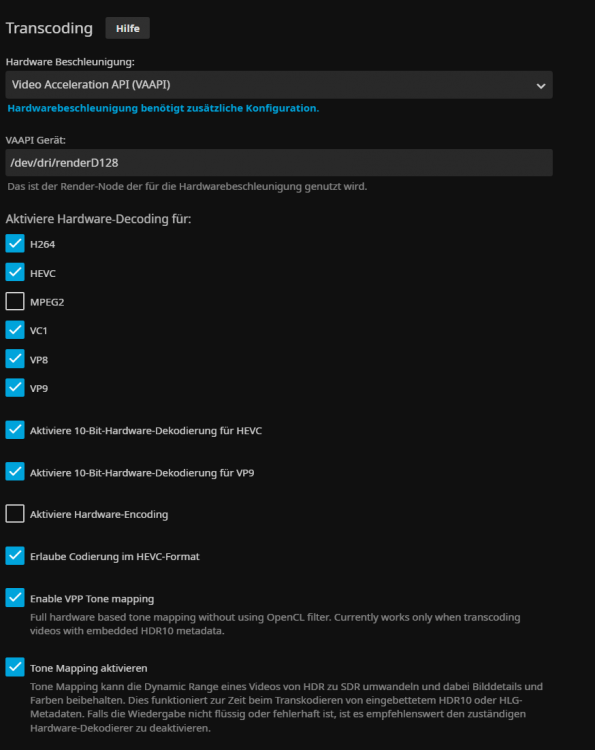
i have a strange problem with jellyfin. Im using an amd ryzen 4650g and configured the hardware acceleration but i'm getting strange colorful flickering on all my media. i found out that the flickering disappears when i disable hardware encoding in settings. Any idea why that happens?
-
Did you get some game to run on your VM? Can you please tell how you got it to work? Headless would be fine for me
-
i hope you get it to work on unraid win10 vm... i was really looking forward to using the igpu within my vm :(
-
well, i kinda gave up on getting it running in my VM. All the things i tried ended up in failure so i will just wait until someone who has more knowledge about it gets it done.
-
No i don't get any output only when connecting via teamviewer. The Error code i get is Error 43...
-
Hi! As i have the same problem as you guys with Win 10 VM and 4650G igpu passthrough i thought i'll share my results with the provided vbios. I am able to get my vm to run and i can also install the amd radeon drivers for it but it does not matter if i attach the vbios or not. When i check in device manager the gpu is listed but says that it encountered errors and is not running. I don't know how to resolve that error Mainboard: Asrock x570m Pro4
-
Thank you! With the backup it works flawlessly
-
Hello! The valheim server was running fine yesterday and today the docker was updated. Now the server isn't shown in the server browser anymore and i can't connect via ip-adress and port. Restarting didn't help either. Did something change with the docker update?

