





folic86
Members
-
Joined
-
Last visited
-
I would say that the emulation is better so what would be my next step?
-
the drive sadly still shows as emulated?
-
I was, yes. It moved some files to lost+found. I then rechecked and got no fix option wopr-diagnostics-20261007-1657.zip
-
it had corruption so I ran a fix on the XFS drive now says Phase 1 - find and verify superblock... Phase 2 - using internal log - zero log... - scan filesystem freespace and inode maps... - found root inode chunk Phase 3 - for each AG... - scan (but don't clear) agi unlinked lists... - process known inodes and perform inode discovery... - agno = 0 - agno = 1 - agno = 2 - agno = 3 - agno = 4 - agno = 5 - agno = 6 - agno = 7 - agno = 8 - agno = 9 - agno = 10 - agno = 11 - agno = 12 - agno = 13 - agno = 14 - agno = 15 - agno = 16 - process newly discovered inodes... Phase 4 - check for duplicate blocks... - setting up duplicate extent list... - check for inodes claiming duplicate blocks... - agno = 0 - agno = 2 - agno = 7 - agno = 11 - agno = 6 - agno = 3 - agno = 1 - agno = 8 - agno = 9 - agno = 10 - agno = 4 - agno = 5 - agno = 12 - agno = 13 - agno = 14 - agno = 15 - agno = 16 No modify flag set, skipping phase 5 Phase 6 - check inode connectivity... - traversing filesystem ... - traversal finished ... - moving disconnected inodes to lost+found ... Phase 7 - verify link counts... No modify flag set, skipping filesystem flush and exiting.
-
I did but I can try again?
-
wopr-diagnostics-20260830-2240.zipUpdated diags after a reboot.
-
The rebuild completed before I got to it to shutdown. Can you advise? Still shutdown and check connections?wopr-diagnostics-20260830-2127.zip
-
currently at 96.8% but disk 11 is showing over 1,000,000 errors and has unmounted! wopr-diagnostics-20260830-1633.zip
-
Thanks for the suggestion, I'm rebuilding the unattached drive and then will proceed if advised that is the right way
-
I have now resolved the disk connection issues but still have a failed parity drive - any suggestions? Can't believe how expensive hdds are right now! wopr-diagnostics-20260828-2022.zip
-
OK so this worked but it has now got a failed parity drive and is wopr-diagnostics-20260603-1709.zipocking up/becoming unreachable from the network..... how screwed am I?
-
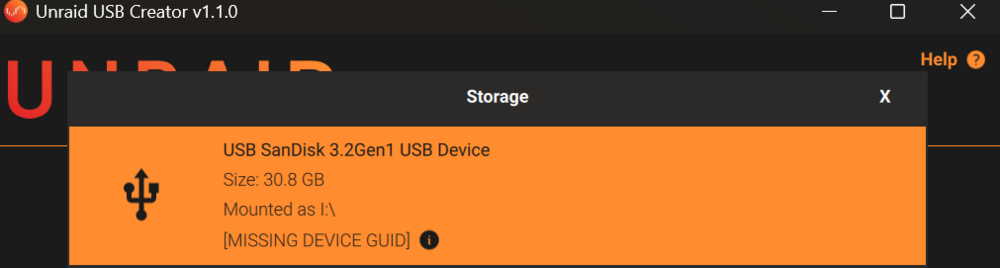
Does it matter which version I create? I'm not 100% sure which I was running but I know that it was not the latest..... Also this is the usb I was using - it appears to no longer have a GUID?
-
Hi, after a lock up and a forced reeboot I have encountered REBOOT AND SELECT PROPER BOOT DEVICE. I have checked the BIOS priorities and I am not able to get it to boot even when the USB is the primary option. Please advise. I am running 6.9 I think
-
That is what I thought as well because it occurred quite a while ago after swapping out a different failed drive, I just hadn't got to it yet.
-
It was, yes, but I was sure it showed the device ID?
