





yourguybob
Members
-
Joined
-
Last visited
-
As stated in the title, I cannot bring up the main unraid login screen. I've tried to directly connect using the server IP address, then I force restarted the server about an hour ago and still can't see it on my network and normal docker services are also unreachable. Where should I start? Pings return with "Destination host is unreachable." I also cannot seem to connect using SSH. 🤷
-
@coppatop, did this work for you or did you resolve this in another way? I'm also running into this! Thanks!
-
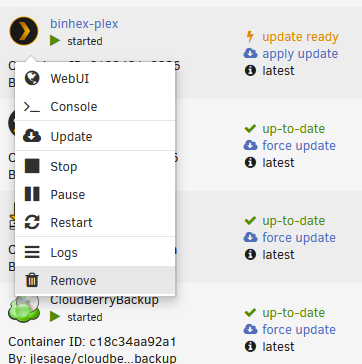
Hi - I have two issues and am unsure if they are related. (I'm a moderate newbie). First, earlier this week I noticed that two docker containers had updates ready (in my case Jackett and binhex-Plex). Usually, they update themselves, but I'm noticing that this didn't occur after a few days. So, I clicked on "apply update," and I got this error: Configuration not found. Was this container created using this plugin? Second, Apologies, usually, I try not to commingle issues, but I have a second issue that may be related (?). I cannot access any container settings or configurations by clicking on the container icon (see screenshot). I simply don't have the option anymore. I've used 3 browsers and 3 devices to access the interface just in case and I'm just totally stumped! Could these two issues be linked in some way? Thank you for your assistance .
-
Thanks again for the help and for anyone who stumbles across this: I believe I had an issue that left my Sonarr image open to the internet and the sonarr forums say they have seen a lot of bad actors wiping things of late. I backup offsite for work-related and personal files, but not video (usually). Are there any file recovery routes I can take? I'm really looking for a small handful of the removed directories (I can download everything else)?
-
So odd. When I go into Sonarr, it looks like an empty library, not sure what is going on there. Radarr looks normal and I don't (think) there are any directories missing that are managed by that. The system is behind a firewall at the docker level (I have each routed through VPN).
-
Sorry for the delay (got covid just as I posted this!). So, what I can see in MC mirrors what I can see when browing my shares over the network. Again, it looks like each share is there, some are totally empty, but some have, say 5 directories instead of the expected 150+. Looking at my main screen, it appears that 10TB of a ballpark of about 38 used TB before are missing (i don't have the exact size before. I'm kind of worried.
-
Hello - I noticed that huge swathes of my media library were not accessible/did not exist and were also not showing up in Plex (of course). It does appear that all of my shares are present, but many are empty or have a handful of directories (versus hundreds which should be there). Based on what is showing, I am pretty sure that some disks are fine and others are not. I don't have any warnings (that I can see). Based on some googling I am thinking it may be a filesystem corruption? I actually don't mind that much, because what I am really worried about are all of the working files I need for my business (a ton). My tech prowess is about 6/10, so I am a bit at a loss as to how to proceed and diagnose. Suggestions? (Logs attached) hafer-diagnostics-20220803-1301.zip
