





Original_Vecna
Members
-
Joined
-
Last visited
Everything posted by Original_Vecna
-
Server is an intel dell R710, the only thing that has changed recently was an upgrade to a single port Realtek 8215 from the on board 4 port 1G nic. One of those crashes could have certainly been due to the card, but I've since found the Realtek 8215 drivers on the community app store ( didn't know I needed to install drivers specifically in unraid and rebooted ). Thank You @itimpi for the tip. So...these settings can often times get confusing. I don't have a remote server, and I don't want it written to the flash drive. I've created a share on the cache drive that I want the logs written to. Common sense says selecting that share in the "Local Syslog Folder" would mean your syslog is now being written to that share. Is it possible to have it behave this way?
-
These are my current setting for the syslog server: Doesn't appear to do anything. Syslog itself appears to be working fine, I can logger <MSG> and it displays in syslog. Apr 12 17:24:32 Unraid Server root: Test message for syslog But it's not writing to the directory on the cache drive I specified.
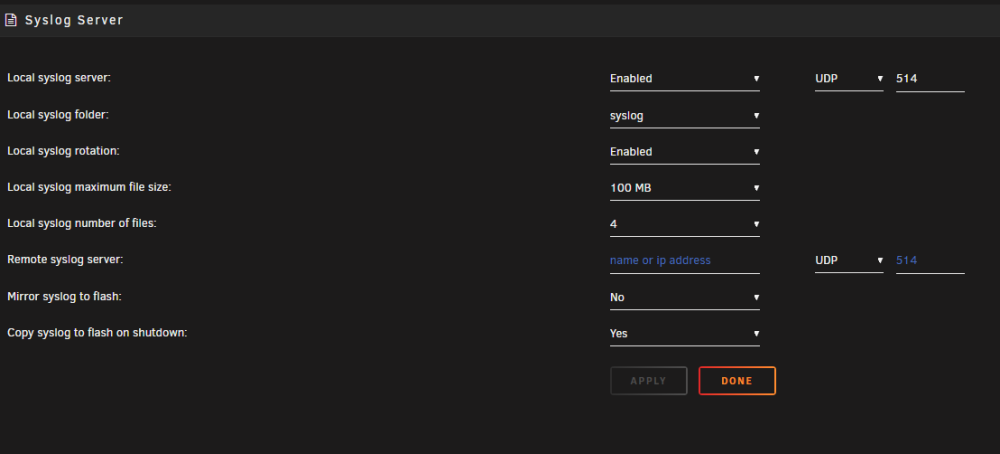
-
Hey @JorgeB, thanks for replying! So I do have syslog server enabled, and it was pointed to my media share. I checked that directory, and there isn't anything in the syslog there. I've since created a share on the cache drive called syslog, and attached the syslog server to it. In the off chance this doesn't fix this issue, is there anything I can do to test the functionality of the syslog server? Cause it doesn't appear to be doing anything.
-
R710. Been running for years with no issues. Recently installed duplicacy and am working to configure backups to a separate Unraid connected via tailscale with an NFS share. I was able to get a couple backups completed, but my main Unraid server keeps going off the network, when I plug in an external monitor to the server, I get no video. The only way to get it back up and running, is cold booting the server, which as you can imagine is unacceptable. Can anyone tell me how I can figure out what is going on here? Today when it locked up, no backups were running, I was remoted into the server trying to get the NFS share to mount again, an poof, offline and crashed. Need to get this sorted ASAP. Unraid Pro running 6.12.6
-
Yes. Which is again, why I'm here posting. I believe I already said I checked online and couldn't find anything of use. That little blerb did nothing to help, the "procedure" on that page does not work.
-
I'm trying to configure two unraid servers to connect remotely for duplicity backups from my main server, to the client server. I'd like use the built in VPN manager, but try as I might, am unable to get them to connect to one another. Is there a guide to getting this connection working? I've searched online, and tried everything.
-
-
From everything I can find online, Firmware on 82599 network controller is ROM based and generally speaking not upgradable.
-
So...? Is there any more information I can provide to get this fixed?
-
I've found this, but these are drivers: https://www.intel.com/content/www/us/en/download/14302/intel-network-adapter-driver-for-pcie-intel-10-gigabit-ethernet-network-connections-under-linux.html There is nothing Unraid specific, and I can't compile my own drivers on Unraid using the ixgbe-5.19.6.tar.gz package.
-
There is none that I can find. This is a common card folks are using with Unraid, given the number of posts here. Is there truly no solution to this issue? If there is a firmware update, there should be documentation on where to find it, and how to apply it, no?
-
The following is spamming and filling my Unraid logs: ixgbe 0000:04:00.0: Warning firmware error detected FWSM: 0x00000000 I'm using the card, but I think this error is contributing to random network issues. I've seen people ask for support on this in here, but no one ever answers how to fix it, or if Unraid is going to fix their support for it. Can anyone help? Running 6.12.6. Here is the result of ethtool -i eth0: driver: bnx2 version: 6.1.64-Unraid firmware-version: 5.0.12 bc 5.0.11 NCSI 2.0.5 expansion-rom-version: bus-info: 0000:01:00.0 supports-statistics: yes supports-test: yes supports-eeprom-access: yes supports-register-dump: yes supports-priv-flags: no
-
We're you ever able to figure this out? Having the same issue.
-
My major issues are detection, not being accurate (not triggering). I literally have to be standing in front of the camera, and at night, the recording (detection) drops to near zero. Is this more an issue with poor cameras, or are my posted settings just plum wrong?
-
Got my system dialed in pretty well now using the coral TPU, and I must admit, this thing is amazing. Fantastic Job. I have one issue however, and that is frigate isn't recording events reliably. I suspect it's ENTIRELY my settings that I'm currently using. On one camera, I lowered the person threshold to 0.7 from 0.8, and it started working better, but that kind of defeats the purpose of reducing false positives. My question is, all my substreams are 640x480, and I've read that is well enough for detection, but is that in fact true? Or should I be detecting at the native 1080p or 4k of the camera? This is what I have for code, which is the same for every camera. cameras: Driveway: ffmpeg: inputs: ### 1080P Mainstream ### - path: rtsp://path roles: - record ### 640x480 Substream ### - path: rtsp://path roles: - detect - rtmp detect: width: 640 height: 480 fps: 29.970030 objects: track: - person - car - dog filters: person: threshold: 0.8 min_area: 2500 max_area: 100000 snapshots: enabled: True record: enabled: True retain: days: 7 mode: motion events: retain: default: 30 mode: active_objects objects: dog: 2 rtmp: enabled: False motion: mask: - 128,79,142,82,159,72,179,63,200,51,217,45,235,36,250,30,271,27,297,29,349,28,388,21,413,25,436,29,462,32,508,44,540,56,570,70,599,83,640,105,640,0,0,0,0,138 - 640,43,640,0,428,0,429,42
-
I brought the array off line. I was getting an alert email every second. Removed both parity drives, brought the array back online, then shut down the server. Pulled the bad drive, replaced the good 16TB into the parity drive bay and restarted. Shut the array down, added the "good" 16TB drive as my primary parity drive and restarted the array. It's rebuilding now. This is my first time buying refurb exos drives, everyone says it's the best way to get large capacity drives for your server, but this has me incredibly worried. The last 16TB drive had no errors during preclear, went the entire way of becoming a full parity drive, ran for 48 hrs, then when I added another parity drive, 5 hrs in decides to shit itself? That's incredibly worrying. There were no red flags in the SMART data of the drive either...just unlucky?
-
Purchased two 16TB exos factory refurbs to replace my 14TB parity drive so I could add more space to my array. Pre-cleared the disk, no issues. Added as my parity 1 drive, no issues. Added the second 16TB drive after a pre-clear as my second parity drive, and I woke up to this this morning. Dec 15 07:01:30 kernel: critical medium error, dev sdd, sector 10484684520 op 0x0:(READ) flags 0x0 phys_seg 16 prio class 0 Dec 15 07:01:40 kernel: sd 1:0:2:0: [sdd] tag#1068 UNKNOWN(0x2003) Result: hostbyte=0x00 driverbyte=DRIVER_OK cmd_age=18s Dec 15 07:01:40 kernel: sd 1:0:2:0: [sdd] tag#1068 Sense Key : 0x3 [current] [descriptor] Dec 15 07:01:40 kernel: sd 1:0:2:0: [sdd] tag#1068 ASC=0x11 ASCQ=0x0 Dec 15 07:01:40 kernel: sd 1:0:2:0: [sdd] tag#1068 CDB: opcode=0x88 88 00 00 00 00 02 70 ef a5 e0 00 00 01 20 00 00 Dec 15 07:01:40 kernel: critical medium error, dev sdd, sector 10484688432 op 0x0:(READ) flags 0x0 phys_seg 26 prio class 0 Dec 15 07:01:50 kernel: sd 1:0:2:0: [sdd] tag#1077 UNKNOWN(0x2003) Result: hostbyte=0x00 driverbyte=DRIVER_OK cmd_age=9s Dec 15 07:01:50 kernel: sd 1:0:2:0: [sdd] tag#1077 Sense Key : 0x3 [current] [descriptor] Dec 15 07:01:50 kernel: sd 1:0:2:0: [sdd] tag#1077 ASC=0x11 ASCQ=0x0 Dec 15 07:01:50 kernel: sd 1:0:2:0: [sdd] tag#1077 CDB: opcode=0x88 88 00 00 00 00 02 70 ef d2 08 00 00 00 d0 00 00 Dec 15 07:01:50 kernel: critical medium error, dev sdd, sector 10484699736 op 0x0:(READ) flags 0x0 phys_seg 16 prio class 0 Dec 15 07:02:00 kernel: sd 1:0:2:0: [sdd] tag#1047 UNKNOWN(0x2003) Result: hostbyte=0x00 driverbyte=DRIVER_OK cmd_age=13s Dec 15 07:02:00 kernel: sd 1:0:2:0: [sdd] tag#1047 Sense Key : 0x3 [current] [descriptor] Dec 15 07:02:00 kernel: sd 1:0:2:0: [sdd] tag#1047 ASC=0x11 ASCQ=0x0 Dec 15 07:02:00 kernel: sd 1:0:2:0: [sdd] tag#1047 CDB: opcode=0x88 88 00 00 00 00 02 70 ef e1 90 00 00 02 08 00 00 Dec 15 07:02:00 kernel: critical medium error, dev sdd, sector 10484703840 op 0x0:(READ) flags 0x0 phys_seg 39 prio class 0 Dec 15 07:02:09 kernel: sd 1:0:2:0: [sdd] tag#1033 UNKNOWN(0x2003) Result: hostbyte=0x00 driverbyte=DRIVER_OK cmd_age=23s Dec 15 07:02:09 kernel: sd 1:0:2:0: [sdd] tag#1033 Sense Key : 0x3 [current] [descriptor] Dec 15 07:02:09 kernel: sd 1:0:2:0: [sdd] tag#1033 ASC=0x11 ASCQ=0x0 Dec 15 07:02:09 kernel: sd 1:0:2:0: [sdd] tag#1033 CDB: opcode=0x88 88 00 00 00 00 02 70 ef e0 40 00 00 01 50 00 00 Dec 15 07:02:09 kernel: critical medium error, dev sdd, sector 10484703584 op 0x0:(READ) flags 0x0 phys_seg 6 prio class 0 Dec 15 07:02:24 kernel: sd 1:0:2:0: [sdd] tag#1047 UNKNOWN(0x2003) Result: hostbyte=0x00 driverbyte=DRIVER_OK cmd_age=9s Dec 15 07:02:24 kernel: sd 1:0:2:0: [sdd] tag#1047 Sense Key : 0x3 [current] [descriptor] Dec 15 07:02:24 kernel: sd 1:0:2:0: [sdd] tag#1047 ASC=0x11 ASCQ=0x0 Dec 15 07:02:24 kernel: sd 1:0:2:0: [sdd] tag#1047 CDB: opcode=0x88 88 00 00 00 00 02 70 f0 3a a0 00 00 01 00 00 00 Dec 15 07:02:24 kernel: critical medium error, dev sdd, sector 10484726472 op 0x0:(READ) flags 0x0 phys_seg 27 prio class 0 Dec 15 07:02:41 kernel: sd 1:0:2:0: [sdd] tag#1076 UNKNOWN(0x2003) Result: hostbyte=0x00 driverbyte=DRIVER_OK cmd_age=9s Dec 15 07:02:41 kernel: sd 1:0:2:0: [sdd] tag#1076 Sense Key : 0x3 [current] [descriptor] Dec 15 07:02:41 kernel: sd 1:0:2:0: [sdd] tag#1076 ASC=0x11 ASCQ=0x0 Dec 15 07:02:41 kernel: sd 1:0:2:0: [sdd] tag#1076 CDB: opcode=0x88 88 00 00 00 00 02 70 f0 9f 40 00 00 04 00 00 00 Dec 15 07:02:41 kernel: critical medium error, dev sdd, sector 10484752576 op 0x0:(READ) flags 0x0 phys_seg 80 prio class 0 Dec 15 07:02:51 kernel: sd 1:0:2:0: [sdd] tag#1034 UNKNOWN(0x2003) Result: hostbyte=0x00 driverbyte=DRIVER_OK cmd_age=9s Dec 15 07:02:51 kernel: sd 1:0:2:0: [sdd] tag#1034 Sense Key : 0x3 [current] [descriptor] Dec 15 07:02:51 kernel: sd 1:0:2:0: [sdd] tag#1034 ASC=0x11 ASCQ=0x0 Dec 15 07:02:51 kernel: sd 1:0:2:0: [sdd] tag#1034 CDB: opcode=0x88 88 00 00 00 00 02 70 f0 cd 38 00 00 01 30 00 00 Dec 15 07:02:51 kernel: critical medium error, dev sdd, sector 10484764112 op 0x0:(READ) flags 0x0 phys_seg 19 prio class 0 Dec 15 07:03:00 kernel: sd 1:0:2:0: [sdd] tag#1057 UNKNOWN(0x2003) Result: hostbyte=0x00 driverbyte=DRIVER_OK cmd_age=17s Dec 15 07:03:00 kernel: sd 1:0:2:0: [sdd] tag#1057 Sense Key : 0x3 [current] [descriptor] Dec 15 07:03:00 kernel: sd 1:0:2:0: [sdd] tag#1057 ASC=0x11 ASCQ=0x0 Dec 15 07:03:00 kernel: sd 1:0:2:0: [sdd] tag#1057 CDB: opcode=0x88 88 00 00 00 00 02 70 f0 d9 c8 00 00 03 18 00 00 Dec 15 07:03:00 kernel: critical medium error, dev sdd, sector 10484767728 op 0x0:(READ) flags 0x0 phys_seg 30 prio class 0 It goes on for hours. On the main screen that drive now has over 30,000 errors. Now, I know this drive is crap. But I'm in the process of building parity on the second 16TB drive I've added. My question is, it's going at a snails pace, and says it'll take 200 days to complete, and is only running at 200k/sec. I've reached out to the sellers of the drives for a replacement, but what should be my course of remediation at this point? Should I stop the array and yank the drive, and start the parity rebuild on the other drive?
-
Though I did take your advice, and try installing the frigate unraid docker. It worked, and the coral TPU is working. So...screw it! Unraid it is! LOL
-
Running frigate in unraid isn't the recommended configuration.
-
Quick Question. So I went ahead and installed HA with Mosquito, and got Frigate running on latest version of Ubuntu minimal desktop. Frigate installed, connected to HA no problems, even managed to sort out the cameras. System looks great. My only issue is with installing pycoral library. It repeatedly fails saying my version of python is too high etc. How do you get around this?
-
Right, I don't use HA. So the end of it all is simply, Frigate requires HA. Which is fine, I'll stick with Shinobi. No worries. Thanks for clarifying.
-
I included everything the documentation indicated to start out with the yaml file in my OP. So clearly the installation needs something more than just a YAML config file to access the GUI, or something in the docker image is borked.
-
Everyone's would be different, but if you need it to even get into the GUI, kinda important to have that for a functioning product no?
-
I've just installed this, and going to the GUI of frigate yields page cannot be found. Reading through here, the only bit of info is that I needed to create a default config.yml file in the /mnt/user/appdata/frigate directory with the following code: mqtt: host: cameras: back: ffmpeg: inputs: - path: rtsp://admin:[email protected]:554/cam/realmonitor?channel=1&subtype=0&authbasic=64 roles: - detect - rtmp detect: width: 1280 height: 720 I don't have Home Assistant installed, so I've left the mqtt host blank. I suppose I've got a couple questions. One, why isn't a config.yml included in the install to get the docker up and running after install, where you edit your preferences like ZM or Shinobi? And two, is Frigate not a all in one NVR like ZM and Shinobi? Does it require HA to work and HA is the front end?
-
Scrapped Zoneminder and switched to Shinobi. No problems. Issue was with software.
