





Hiccup
Moderators
-
Joined
-
Last visited
-
网络这边是如何设置的呢?
-
插件里面安装一下。Unraid Connect 然后登录后应该会有
-
It doesn't affect usage at the moment, but it makes me a bit uncomfortable. The current delay is around 700ms to 1 second.
-
No problem: Motherboard:[ ASUS b85 tuf ] CPU: [ E3-1231 V3 ] GUI Slow: Motherboard:[ Gigabyte MZ32-AR0 ] The BIOS has been updated to the latest version. CPU:[ EYPC-7D12 ] I plan to check the BIOS C-States settings. I've disabled Global C-state in BIOS, but the WebUI is still lagging
-
To isolate the issue, I created a brand-new system USB flash drive. This clean installation works flawlessly on different hardware. However, when using this same clean drive on my production hardware, the WebUI lag persists. This confirms the issue is not related to my previous configuration or plugins, but rather a compatibility conflict between the new OS environment and my specific hardware components. tower-diagnostics-20260209-1752.zip
-
I’m also experiencing this GUI lag. I’ve performed extensive testing and downgrades, and the issue consistently appears in versions 7.20 through 7.23. Performance ComparisonVersion Range Response Time (Browser Network Tab) User Experience v7.20 - v7.23 1s - 2s Noticeably sluggish v7.14 (and below) ~200ms (mostly under 500ms) Extremely fast/Snappy Troubleshooting Performed:Clean Slate: Restored plugin settings and kept only pool configurations — No effect. Plugin Removal: Deleted all plugins entirely — No effect. Minimal Load: Even with the array stopped and no Docker/VMs running, the lag persists. Interesting Note: A friend of mine is running v7.23 with perfectly normal response times.
-
如果是6.10之后。可以在设置-docker设置。把macvlan改为ipvlan即可。(更改为ipvlan的影响是,docker的mac会和宿主机一样。路由上有些依赖mac的功能可能会失效) 如果是6.10之前的版本。就只能是按照你的设置。取消桥接。用eth1。
-
如果下载盘只在ssd的话。可以尝试下在映射的时候使用 /mnt/disk5
-
试试无痕模式。 如果无痕模式可以访问,那就清楚cookie和缓存之后。强制刷新
-
尝试在设置--docker--Docker custom network type 从macvlan改为ipvlan(该选项仅从6.10.x之后支持)
-
额外参数添加 --memory=1G 即可。
-
location / { set $upstream http://你的内网ip+端口 proxy_set_header Upgrade $http_upgrade; proxy_set_header Connection "upgrade"; proxy_set_header Host $http_host; proxy_set_header X-Real-IP $remote_addr; proxy_set_header X-Forwarded-For $proxy_add_x_forwarded_for; proxy_set_header X-Forwarded-Proto http; proxy_set_header X-Nginx-Proxy true; proxy_redirect http:// https://; proxy_buffering off; proxy_pass $upstream; # Force SSL include conf.d/include/force-ssl.conf; } 直接修改npm 对应unraid的反向代理配置文件。 https://note.youdao.com/web/#/file/recent/note/WEB75816a310cd68929b7fab6ef3c48e9bd/ 该链接还有针对filebrowser右下角红字弹窗。 如果有br0与host、bridge网络模式无法互相访问的问题。可以在设置--docker--(打开右上角高级视图)--主机访问自定义网络(启用)。
-
应该还是新主板的bios设置问题。 建议您可以试试看。 或者也可以制作一个全新的系统u盘,放到新平台上测试。能否正常启动。
-
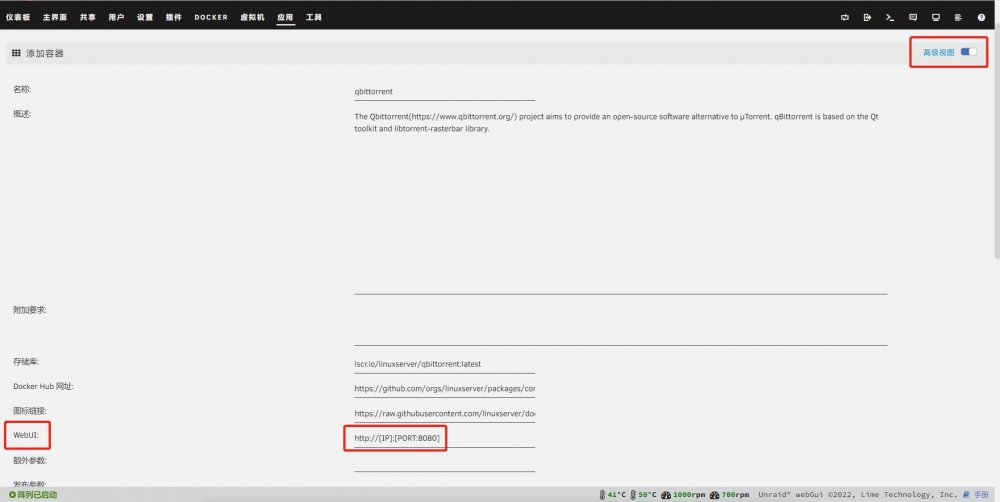
因为模板默认端口了。 所以只要如图更改即可。
-
仪表盘显示的是默认频率。 您可以从控制台输入 watch grep \"cpu MHz\" /proc/cpuinfo 来查看实时频率。 如果你还想对 CPU频率进行更多的操作,可以安装@lyqalex推荐的插件,即可。


