




Skip to content
View in the app

A better way to browse. Learn more.

Unraid

A full-screen app on your home screen with push notifications, badges and more.

To install this app on iOS and iPadOS
  1. Tap the Share icon in Safari
  2. Scroll the menu and tap Add to Home Screen.
  3. Tap Add in the top-right corner.
To install this app on Android
  1. Tap the 3-dot menu (⋮) in the top-right corner of the browser.
  2. Tap Add to Home screen or Install app.
  3. Confirm by tapping Install.

JMCee

Members
  • Joined

  • Last visited

Everything posted by JMCee

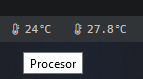
  1. Hey. Not sure if it's been brought up here or if it's just an issue on my end, but the sensor display for the Dynamix System Temperature plugin has a misspelling of the word 'Processor'. It's currently spelt 'Procesor'.
  2. @Doublemyst Thank you so much dude. Your instructions really helped. I had this working previously by following spaceinvader's video but I had to recreate my docker.img as it got corrupted. I set up my containers using the templates from the previous installs but I couldn't get access to the Sonarr, Radarr or Jackett web UI's when they were routed through DeluveVPN. I followed your instructions and everything is working again now so thank you again.
Account

Navigation

Search

Search

Configure browser push notifications

Chrome (Android)
  1. Tap the lock icon next to the address bar.
  2. Tap Permissions → Notifications.
  3. Adjust your preference.
Chrome (Desktop)
  1. Click the padlock icon in the address bar.
  2. Select Site settings.
  3. Find Notifications and adjust your preference.