





dius
Members
-
Joined
-
Last visited
Everything posted by dius
-
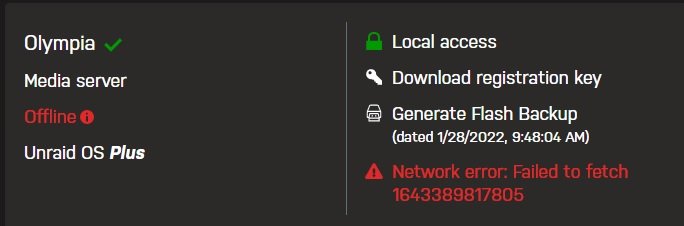
I recently upgraded my unraid license from Basic to Plus. I now am seeing a situation where I am no longer able to stay logged in to Unraid.net. When I click on the Sign In button in the upper right hand corner, it brings up the login page. I enter my credentials, and click submit. I'm then successfully logged in and the page closes. Then a few seconds later, I am signed out (I didn't sign out) and have to sign in again. I notice also that in the My Servers page I am offline. The log file doesn't show any issues. Any pointers to how to troubleshoot would be appreciated. Thanks.

-
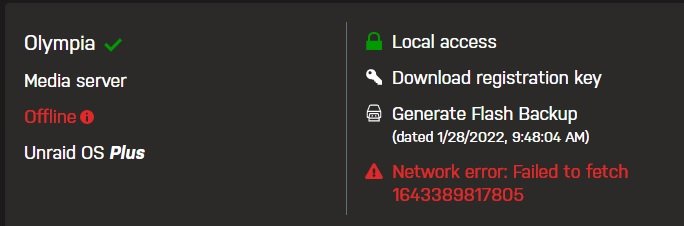
Yesterday I upgraded my license from Basic to Plus. I now am seeing a situation where I am no longer able to stay logged in to Unraid.net. When I click on the Sign In button in the upper right hand corner, it brings up the login page. I enter my credentials, and click submit. I'm then successfully logged in and the page closes. Then a few seconds later, I am signed out (I didn't sign out) and have to sign in again. I notice also that in the My Servers page I am offline. The log file doesn't show any issues. Any pointers to how to troubleshoot would be appreciated. Thanks.

-
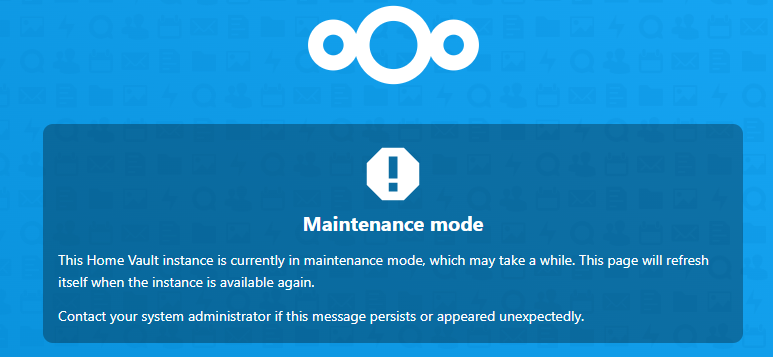
I'm getting a message telling me that my NextCloud is in Maintenance mode. Just a few minutes earlier it was working fine. I checked for any updates, and found two. I applied them then when I refreshed the page, I got the message below. I've restarted the docker image and the log shows no errors. How do I clear this so I can use the service again? Update: I did a google search and was able to fix the issue with the following: cd /config/www/nextcloud sudo -u abc ./occ maintenance:mode --off This worked.
-
Thank you so much! You're absolutely correct. I had a small usb drive plugged in for a while and never got around to removing it. I don't use it as part of my array so it never occurred to me that it could be the cause of my problem. Now that I know better, it won't happen again. My server is up and doing a parity check now. I love unraid! When I don't mess things up, it just works. I'm very impressed!
-
Our power went out in the house today for a couple of minutes. After power was restored, I checked my unraid server, and it was offline. I rebooted it expecting it to come back online. Unfortunately, it remained offline. I could login to the console, and from other computers on my network I could ping it. I could see clearly that it was connected to my router. When I checked on the Mothership (forums.unraid.net - My Servers) it showed my server as being available. However when I attempted to connect to it, I get connection refused. I checked to see if my Plex server was at least running, and nothing. My Nextcloud server is also unreachable. I restored my flash drive from the backup I did yesterday, and booted from that with no luck. I'm running unraid 6.9.2. When I boot unraid in safe mode I am able to login. I tried running the command unraid-api restart and I get the message output shown below: root@Olympia:~# unraid-api restart Sending process 2522 SIGTERM. Starting unraid-api in "production" mode. Value "invalid" is not no/yes. This is where it stops and never completes. I ran diagnostics and uploaded the log file. Thanks for any suggestions - they would be greatly welcomed. olympia-diagnostics-20210417-2014.zip
-
So I restored my flash drive from this mornings backup, rebooted, and I'm now able to reach my server. Thank goodness for backups!
-
I rebooted into the local GUI, but when it comes up, I get the error from Firefox that says it can't reach the server using localhost. I'll try the safe mode next...
-
I upgraded and rebooted and now my server is unreachable. I was running on 6.9.1. I Had My Server installed and running. I can't reach my server either locally or remotely. I do have a monitor and keyboard attached and can confirm the system is running. It responds to ping as well. I can login locally, but I don't know where to go from here. Any suggestions would be appreciated.
-
Thanks for this info. As I was setting it up, I couldn't get the remote access to work without it. I'm sure I just didn't have the port forwarding setup quite right. I turned off the UPnP in unRaid and tested the remote access and it seems to be working still, so something I had done earlier fixed the remote access issue but it wasn't the UPnP setting. Thanks for your help.
-
I have an Orbi (Netgear) router with 2 satellites. In order to get the remote access to work, along with adding the port forwarding, I had to enable "Use UPnP" setting on the Management Settings page. Is there a better way to do this, or is this in any way compromising my system's security?
-
I'm seeing that my server is not accessible when viewing from the unraid.net page, but the dropdown for MyServer (upper right corner) on my unraid server says everything is ok. Is that what others are seeing too? Everything was fine this morning.
