





WirralTom
Members
-
Joined
-
Last visited
Everything posted by WirralTom
-
Bit of background, so energy prices in the UK are frankly ridiculous at the moment, so I've decided to start shutting the server down overnight when no ones watching Plex to see if it makes a significant difference to my bills. I'm currently using the Dynamix Sleep plugin to shut the server down between midnight - 10am Sunday - Thursday. There's a script that runs about 5 minutes before this that pauses all my docker containers, then the plug in shuts my server down. Then at 10am my bios has a 'power on by RTC' selected for 10am, and another script runs 10 minute after that to check the Docker containers started/are unpaused. My board is an Asus Z-590-E Gaming with an i5-10400. I've gone through my bios and ensured that the likes of Fast Boot/MRC Fast Boot are disabled, however the server still occassionally doesn't start up properly on a restart. It won't respond to a ping, returning a "destination Host Unreachable" and the GUI will not load, meaning I have to short press the power button on the front and reboot it again. I normally do this with a keyboard and monitor plugged in and it will POST and then start Unraid without issue. Tuesday and yesterday it worked fine without any intervention from myself, however today it hasn't come up properly. Is there anything in particular I should be looking at that could stop this happening? It seems, through internet searches, that I have most of the correct options selected in bios settings, but is there anything I can check in Unraid or look for in the logs?
-
Brilliant, thank you. I'll mark this as solved then and let it rebuild
-
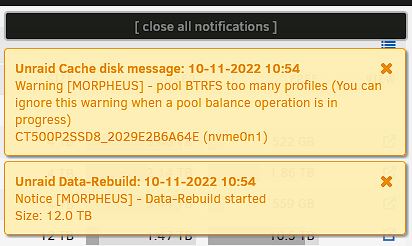
Thank you for this Jorge, I really appreciate it! So I stopped the array and re-added the two missing devices (the cache drive and Disk 4). Array has restarted fine and has started a Data Rebuild, however it's thrown up an interesting cache disk warning. Is it anything to worry about?
-
OK, steps followed. When I ran the command it's returned "8 bytes wer erased at offset 0x00010040 (btrfs): 5f 42 48 52 66 53 5f 4d" Rest of the steps followed and new diagnostics attached Tom morpheus-diagnostics-20221110-1750.zip
-
Ok, rebooted, took disk 4 out of the array. Array has now restarted without issue, and is no longer asking for a format of disk 4 and the array. New diagnostics attached morpheus-diagnostics-20221110-1452.zip
-
Diagnostics attached. I've just upgraded to 6.11.3, system is showing parity as valid but still showing the Disk 4 and cache disks as requiring formatting. The diagnostics seem to reflect this. morpheus-diagnostics-20221110-1327.zip
-
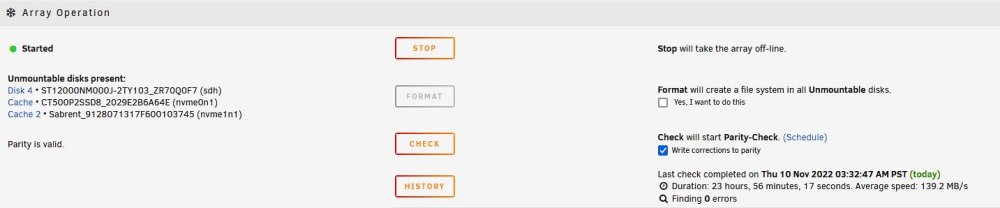
Hi all, I'll keep things brief. I had a 12Tb drive that was reporting errors. I've RMA'd it and had a replacement shipped. I've popped the replacement in and the system has completed a parity rebuild taking 20-odd hours. I've just restarted the array and it's now showing that Disk 4 (the replacement disk) needs formatting as expected, however it is also showing my cache pool as requiring formatting, somerthing I obviously don't want to do. It's showing Disk 4 as "Unmountable - unsupported partition layout" but the cache drives as "Unmountable - "No file system" Does anyone have any idea what's gone wrong and what I need to do to fix it? Thanks, Tom
-
Your containers for Sonarr, Radarr & sabnzbd are showing as stopped? Are they failing to start?
-
Sometimes it really does just take another pair of eyes. At some point during swapping the cables back and forth trying to test them I'd left them swapped so eth1 was connected to my backup server which is off, and eth2 was connected to my windows box but I was putting the IP in of eth1 for the connection. Swapped them back and it's all appeared so thank you so much! Quick follow up question, can I give both the 10Gb links the same IP address on Unraid? So can I give them both a 10.0.0.1 address or do I need to name them separately - as for example 10.0.0.1 and 10.0.0.2?
-
Sorted, thanks.
-
Hi all - really hope someone can help me with this as I'm at my wits end. I've got an Unraid box with a 1Gb connection at 192.168.30.214, which has a network share mapped to my Windows PC at 192.168.30.156. This maps perfectly fine through the usual 'Map a Network Drive'. Also on my Unraid box is a Mellanox ConnectX-3 CX312A (a 2 port 10Gb card) which is connected via a DAC cable to a Mellanox ConnectX-3 MCX311A (single port card) on the Windows PC. Both of these are mapped to 10.0.0.1 and 10.0.0.3 respectively, and the Unraid share has been mapped as a 10Gb share on the Windows PC This setup has worked perfectly fine for ages, except now its not. The 10.0.0.1 can be pinged from Command Line and receives a response, however when I try to map it as a network drive it now says its unreachable because "The device or resource (10.0.0.1) is not set up to accept connections on port "The File and printer sharing (SMB)". This is bizarre because its accepting SMB connections perfectly fine through the 192.168.30.214 connection. I've been through half a dozen different threads but a lot of them are to do with ensuring SMB in some variation is on in Unraid, which it clearly is in this case. I've tried swapping ports and different DAC cables and no joy, I've tried to Iperf3 between the connections and nothing works there either. I'm at a complete loose end with it so if anyone has any ideas I'm all ears!!! I've attached the diagnostics. Syslog seems to say at the end that SMB on the 10Gb connection is running but if anyone needs any other information please let me know. Thanks Tom morpheus-diagnostics-20210921-2029.zip
