





Kardiogramm
Members
-
Joined
-
Last visited
-
"I really can't imagine that the quality is better since Intel's HW transcoder is praised for it's quality on many forums (but I don't want to argue with anyone about that)" Oh by noise I meant from the server fans. Image quality is the same but I think the performance from the GPU was better, especially when multitasking. I added the path for the iGPU /dev/dri and now both of them pop up as an option in the Plex app transocde settings. Am I going insane? I didn't see: DEVICE /dev/dri in the Plex instructions on the first page. I will given them both a try and see which one is better Thank you for your time and your help, much appreciated
-
Sorry about that, I was wondering why it did that. I just find there is less noise with the GPU and I get fewer transcode popup warnings too along with snappier performance. I don't mind energy consumption when it's working on something, but it's not great when idle. My previous CPU struggled with scanning media for intro/credits, so this one is much better. Nativley as in I download something and it just works and recognises the hardware without having to configure it outside the docker app. kardiogramm-diagnostics-20240529-2144.zip
-
Ok I turned the server off, unplugged it from the old router again, walked away for a few hours and came back and turned it back on again and it worked. Thank you for your help.
-
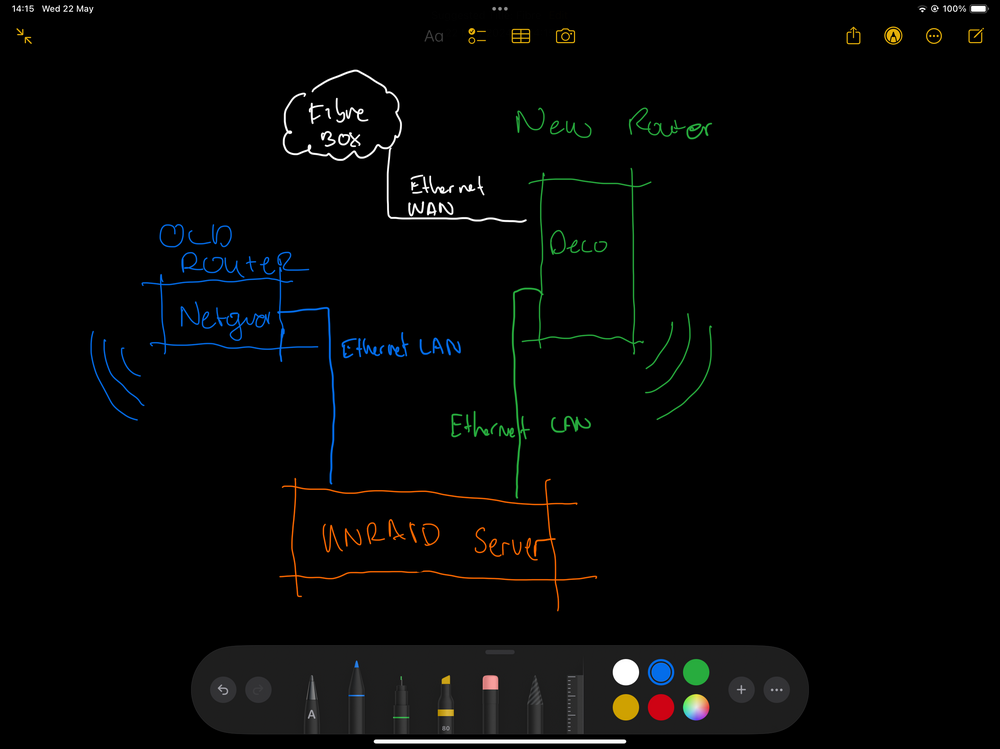
I'm only on the old one because the server doesn't pop up when I connect it to the new one and I needed to access it to get diagnostics. Excuse my crappy sketch
-
The link to the previous similar issue in my post about this: is it a case of changing the servers ip address to start with 255 in the network config file? If so which one is it? GATEWAY[0]= or DNS_SERVER1=
-
The server is connected directly to the new router via a new cat 8 ethernet cable (I have switched cables to see if its the cable) and the router itself is connected to a fibre box for internet, there's nothing complicated, no switch attached. At the same time it's temporarily connected to the old router so I can still access unraid through there so I can follow any instructions. https://www.tp-link.com/uk/home-networking/deco/deco-be85/
-
Ok I deleted the config file, it's on a new IP address, it's still connected to the old router (how I managed to find the address and log in) and it's connected (physically but not recognised by it) to the new one too. kardiogramm-diagnostics-20240522-1309.zip
-
Here you go kardiogramm-diagnostics-20240522-1049.zip
-
Hello, I have upgraded from a Netgear router to a TP Link Wifi 7 Deco router and for some reason the server doesn't come up when I connect via ethernet (it worked fine on the Netgear). I have tried different ethernet cables and I know my lighting hub at least connects as the Deco app has that showing. I had a look at the thread below, but I think I'm going to need some hand holding and spoon feeding as I'm terrible at networking and I do not know what to change to what.

