





Kam
Members
-
Joined
-
Last visited
-
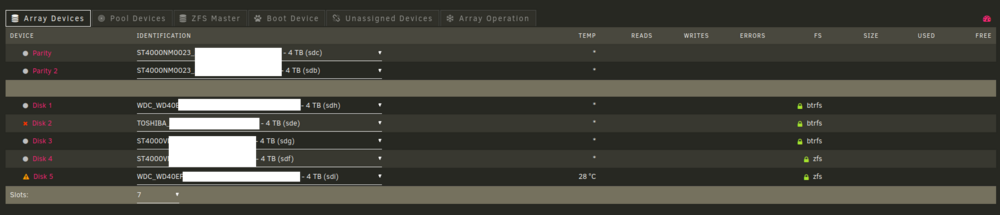
Thanks for your response. A reddit user suggested the problem was from RAM errors. I ran 10 tests of memtest82, but all were fine (10 pass / 0 errors) ! Maybe the ram needed some holidays ^_^ I really don't know what caused the problem, but after shutting it down for a few days, the 2 parity disks were good, so I swapped the Disk 2 and Disk 5 with 2 spares I had... The parity rebuild went fine (took 8 hours). So far so good. Here's the screenshot you asked, even though it doesn't seem relevant anymore. I checked the 2 "faulty" disks on my laptop using an USB dock, and there doesn't seem to be any issues with the disk. All the data is still there and SMART values are good too (even when marked as "failed"). Thanks again :-)
-
Thanks, I'll try to restart and take a screenshot again
-
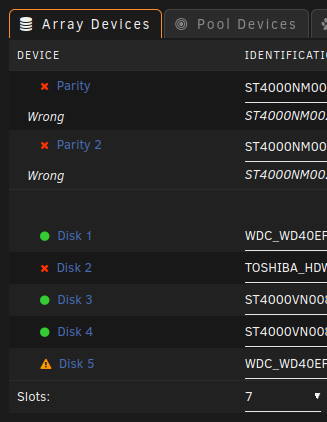
Hi everyone, I wasn't able to take care of this issue before, but it makes three weeks already 😫 It started with an issue Disk5 and I'm pretty sure this a cable/controller issue, but then I messed up. I replaced the failed drive with a spare one, but during the rebuild, I tested the drive and cable. It froze the server and I had to reboot (after waiting a while) As a result, the 2 parity drives AND another disk failed !!! Can anyone confirm the disks are okay ? there is no SMART error, I'm quite certain the data is still there (most important data is backed up). My plan is to test every disk individually, every sata cables with and without the SAS expander. Should I try resetting the config ? I can't rebuild the array as there are more than 2 "failed disk"... In the mean time, I'd like to "export" some of my docker container to a VPS (eg. Vaultwarden, immich, radicale...). I have a backup of my appdata share and some container specific shares (immich) but I don't really know how should I proceed. Anyone could tell me the main steps ? Thank you so much for you help ! kus-diagnostics-20260121-1814.zip
-
Sorry, I didn't have the time to come back and reply. Sadly, I think there must be a problem with the hardware compatibility with custom kernels, maybe the ram... I can boot ubuntu, debian and slackware fine. But, I'm stuck with either unraid or proxmox. With proxmox, it got stuck at "creating ramdisk", and thus my doubt about the ram. I'll try it later, but for now I've just put back the old motherboard. At least I can enjoy my unraid server again Thanks everybody for your replies PS: Sorry, I misread your previous post. The UEFI booting is ON, and CSM disabled already.
-
Thank you @pantheis CSM is disabled, so is XMP. So maybe it's the lack of discrete GPU... I'll check further during the weekend. Thanks again
-
The 3 flash drives boot on my laptop. I'll try to get back the ASRock-D1541D4U-2T8R to try this weekend. The asus motherboard is compatible with ubuntu, but I'll try also with slackware to see if it has something to do with it. I tell you guys as soon as I've got anything new. Thanks
-
Yes I am. I was booting from the front USB2 ports, but then I thought I might be luckier with the mb's USB2 port.
-
Sorry for spamming my thread... 😅 Just to mention that after Loading /bzimage... ok Loading /bzroot...ok It just becomes unresponsive. I can't reboot with the keyboard and need to manually shut down the computer
-
I've just read about the boot sequence at https://docs.unraid.net/unraid-os/troubleshooting/boot-issues/ It seems to me that it's failing to mount the USB drive, but there is no error message. What's more, the doc says it should prompt for login, but there is just nothing. What do you think I could try ?
-
Hi and thank you for your advice. Sorry, I've just found the time to try it. Unfortunately, it is still stuck at the same point. So far, I've tried with 3 different usb drives (all different models of SanDisk) and 3 different version (2 stable and 1 beta). So I assume the drive nor the kernel are faullty... And as I could boot from other OSes, I assume the mobo/cpu/ram are fine too. Do you think I could have wrongly configure something in the BIOS ? Here's a link to the motherboard I installed: https://www.asus.com/fr/motherboards-components/motherboards/tuf-gaming/tuf-gaming-z590-plus-wifi/
-
Hi @JorgeB, thanks for your answer. It was a stock install of UNRAID 7.0.1 Actually, I struggled a bit to make it bootable (I should report it to the correct thread). Just in case it could be related: I had to make a bootable linux (xubuntu or proxmox) keep the boot files only and copy/paste the content of the UNRAID 7.0.1 archive. Then it booted but got stuck at the same point "bzroot... ok" Do you know what is the next step that should be loaded ? Maybe I can check how it's related to my motherboard? cpu? something else? And also, do you know if it's possible to log the boot sequence and how to check it ?
-
Hello everyone, I'm a bit lost and don't know what to do anymore. I've changed the mobo/cpu of my unraid server from an ASRock-D1541D4U-2T8R (with xeon-d integrated) to an Asus Z590 PLUS WIFI and i5-11600. I added a LSI 9207-8i which I firmware upgraded (I thought that could be the issue). But I can't start the UNRAID system anymore. It boots but get stuck after "/bzroot... ok". It is still 6.9.2 (yeah I know...) but I got the same result with a new usb drive and 7.0.1 I unplugged the HBA and all the drives but still the same... To blow my mind a bit more, I can boot it on my laptop (Tuxedo with AMD cpu) !! I also tried to boot a xubuntu live on the z590... and it works ! As I said before, I don't know what to do next ? So please, if anyone has any idea, that would be much appreciated Thanks
-
Hi, I'm quite a new user to UNRAID (1 year), but I think array disk can only be HDDs as SSD's sectors cannot be accessed directly. In my understanding you should use 2 HDDs (1 parity and 1 data) at least to build your array. What I do is I have nextcloud docker running on the SSD cache (2x480GB mirrored with btrfs) and backups going to the array (12TB array + 4TB parity). I would say you should buy HDDs to build your array. That would be much cheaper than using such big SSDs and more effective. Good luck with your set up Kam
-
So, as expected it was a problem from their servers. It is now backing up. I've started with only a few shares (not the biggest one like series and movies), and it tells me it's going to take 5 days for +- 250GB o_O and I didn't set any maximum rate... I hope restoring a backup would be faster than the backup upload. I'm wondering if I should keep going on with crashplan (I'm still in the trial free month). It doesn't sound very reliable. Are you guys happy with it ? Does it worth the monthly $10 ?
-
Ok probably something wrong with my account ... It is still stuck at the same stage after 8 hours. I just selected 1 folder with 1 text file, which makes a total of 156B (yes < 1KB) !! o_O So I created a ticket to crashplan. So far, nothing bad with the container Thanks anyway ! PS: I'll put the answer here when it's resolved, in case someone has the same problem as me some day

