





TheBurgundyBear
Members
-
Joined
-
Last visited
-
@arbyyyyh did you figure out what the problem was?
-
I wasn't able to successfuly get the "Or Provide a PPD File" option to work. Has anyone uploaded their own PPD file? If so, how did you get it work?
-
The latest Minecraft release is 1.19.4, but my server is running paper-1.19.3.jar. How do I go about updating my server to 1.19.4?
-
@rutherford, that worked! Thank you. Any clue why changing server.properties didn't force these changes?
-
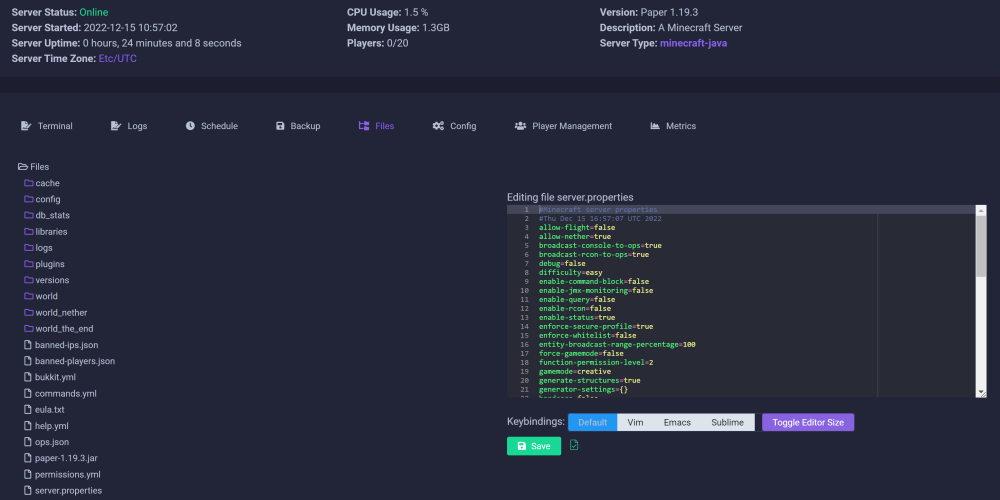
@rutherford, I'm actually trying to do it right in the UI of Crafty:
-
@rutherford, I tried that, but it didn't seem to do anything. I changed gamemode to creative, restarted, but no flight enabled.
-
Hi all! Completely new to this! When I edit server.properties, I don't see the changes take effect. What could I be doing wrong?
-
Hi all! Completely new to this! When I edit server.properties, I don't see the changes take effect. What could I be doing wrong?
-
How do you configure this thing to make it work? Default settings don't seem to be enough to connect over LAN.
-
Has anyone tried to have Tailscale route it's traffic through a VPN container (e.g. --net=container:passthroughvpn)? You could then use Tailscale on unraid as an exit node. That way, all devices connected on Tailscale and using unraid as the exit node would be using a commercial VPN to connect to WAN. I have a current solution for this, but what I'm proposing here would be more elegant.
-
Thank you, @Kulisch! Your instructions are very thorough and clear. I think I have this pretty much working now. I don't know if you know much about Nginx Proxy Manager (I used to use Swag). But when you create the letsencrypt keys, you need to specify a port. Do you happen to know which port that would be since a mail server uses several ports?
-
Thank you for this, @Kulisch! The one part that I'm having difficulty with is the SSL type and SSL mount path. I use Nginx Proxy Manager on UNRAID. Would the SSL path be to a letsencrypt folder in the Nginx Proxy Manager appdata?
-
@JorgeB, what would be a reason as to why the disk "could be reading slow?" The current parity disk is fairly new.
-
@JorgeB, thanks for looking again. At this point, I may well let it finish. I have Home Assistant running in a docker container. I'll let you know if I survive 10 days without my smart home
-
@JorgeB, please see the attached! enterprise-diagnostics-20220405-0915.zip
