





TheBurgundyBear
Members
-
Joined
-
Last visited
Everything posted by TheBurgundyBear
-
@arbyyyyh did you figure out what the problem was?
-
I wasn't able to successfuly get the "Or Provide a PPD File" option to work. Has anyone uploaded their own PPD file? If so, how did you get it work?
-
The latest Minecraft release is 1.19.4, but my server is running paper-1.19.3.jar. How do I go about updating my server to 1.19.4?
-
@rutherford, that worked! Thank you. Any clue why changing server.properties didn't force these changes?
-
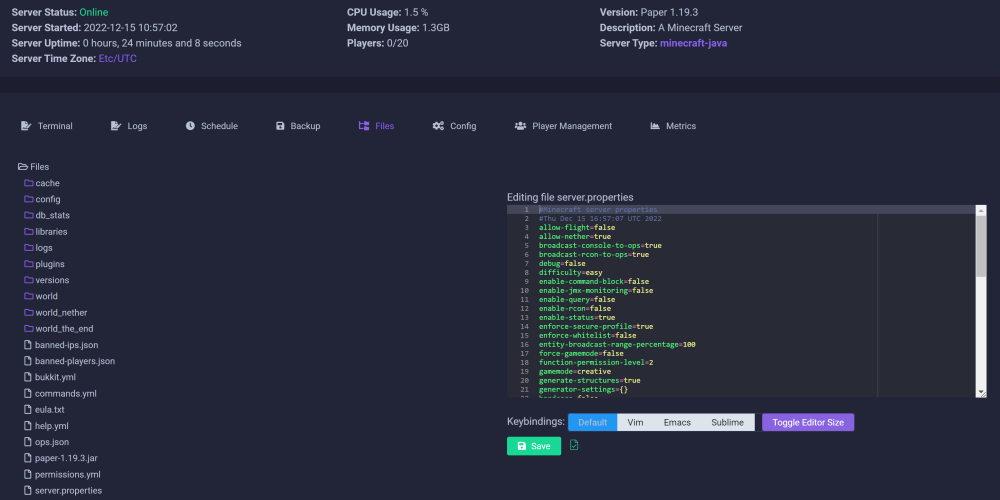
@rutherford, I'm actually trying to do it right in the UI of Crafty:
-
@rutherford, I tried that, but it didn't seem to do anything. I changed gamemode to creative, restarted, but no flight enabled.
-
Hi all! Completely new to this! When I edit server.properties, I don't see the changes take effect. What could I be doing wrong?
-
Hi all! Completely new to this! When I edit server.properties, I don't see the changes take effect. What could I be doing wrong?
-
How do you configure this thing to make it work? Default settings don't seem to be enough to connect over LAN.
-
Has anyone tried to have Tailscale route it's traffic through a VPN container (e.g. --net=container:passthroughvpn)? You could then use Tailscale on unraid as an exit node. That way, all devices connected on Tailscale and using unraid as the exit node would be using a commercial VPN to connect to WAN. I have a current solution for this, but what I'm proposing here would be more elegant.
-
Thank you, @Kulisch! Your instructions are very thorough and clear. I think I have this pretty much working now. I don't know if you know much about Nginx Proxy Manager (I used to use Swag). But when you create the letsencrypt keys, you need to specify a port. Do you happen to know which port that would be since a mail server uses several ports?
-
Thank you for this, @Kulisch! The one part that I'm having difficulty with is the SSL type and SSL mount path. I use Nginx Proxy Manager on UNRAID. Would the SSL path be to a letsencrypt folder in the Nginx Proxy Manager appdata?
-
@JorgeB, what would be a reason as to why the disk "could be reading slow?" The current parity disk is fairly new.
-
@JorgeB, thanks for looking again. At this point, I may well let it finish. I have Home Assistant running in a docker container. I'll let you know if I survive 10 days without my smart home
-
@JorgeB, please see the attached! enterprise-diagnostics-20220405-0915.zip
-
@JorgeB, thank you for taking a look. I decided to disconnect that USB device last night, just in case. Didn't seem to make a difference though--up to 14% now. During the parity swap procedure, does the array start and stop? In the picture above, the grey triangle is "STOPPED" but at the bottom, it says "Array Started."
-
Hi folks! Based on what I've been reading, to only be 10% complete 24h in doesn't seem right. Any indication as to what might be awry based on the attached diagnostics? Also, is it normal for the copying process to be stopped? I think it's going back and forth from being stopped to copying because the percentage is still progressing, albeit slowly. enterprise-diagnostics-20220404-2011.zip

-
@BKS, what exactly do you mean by this? If you're interacting with protonmail-bridge using the command line, aren't you using the cli? The reason I ask is because when I type in "protonmail-bridge --cli" nothing happens. I then type "login" and keep getting a "login incorrect" error.
-
Has anyone come across a tutorial on how to set up the Home-Assistant-Core docker container properly? I've seen the VM tutorials, but that's not helping right now. I've used Spaceinvader One's nextcloud tutorial to get pretty far. I'm able to connect remotely using swag, but I've lost the ability to connect locally, so I know I'm missing something.
-
I have the opposite problem! Now I can only access HA remotely. I've lost local access!
-
This was necessary to get things working in my set up, however, I can't access HA locally now!
-
Hi folks. Is it possible to use a different gateway with WireGuard? I don't see a place to configure it. I have a server running a VPN that I'd like to route WireGuard traffic through once it enters my LAN. Would I have to change the gateway for my UNRAID server for this to work?
-
Looks like it was as easy as opening a console in the container and typing "TZ=America/Chicago"
-
For the life of me, I can't figure out how to get the timezone to be correct in Node-RED! Server time is correct. Has anyone run into this issue and resolved it?
-
That worked! Thank you!


