monghuz
Members
-
Joined
-
Last visited
Everything posted by monghuz
-
Hi @alturismo, Thanks for your quick reply. I was not aware of that. Thanks a lot for explaining, I learnt something new today As a side note it would be more straight forward to disable the concerned port field if a non bridge mode is used. Although I appreciate that it would be a feature request and it's not related to a single container. Regards, Tamas
-
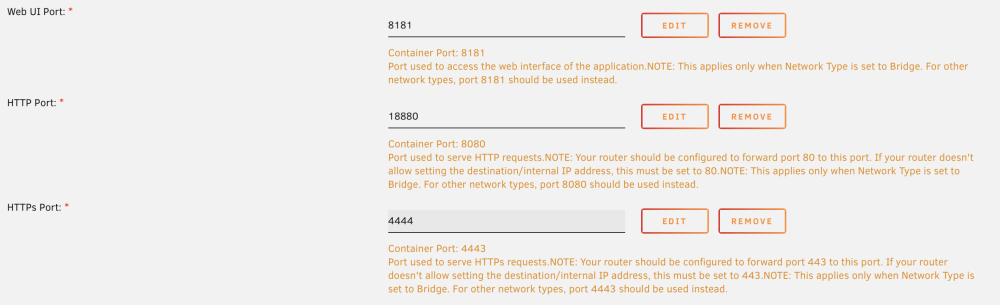
Hi Folks, Seems I found a bug with the template. I configured a custom port for the docker container, although it seems regardless what I configure the base 4443 and 8080 ports are used. To repro: Install NginxProxyManager Change container ports from 8080 and 4443 to something else Once applied, check the port mapping on the docker page It's a bit confusing for me why both sides of the port mapping has the container's IP, but my understanding is that the left port is the one that I use to access to the container while the right one is used inside the container. Anyhow regardless what I configured in the template alway the default ports were in use and not the ones I configured. I'm not familiar how templates are made / maintained, but I hope my explanation was good enough regards, @monghuz

-
Hi JorgeB, Thanks for your reply. Considering that 6.10 is in rc2 I rather changed all my dockers back to br0. I will upgrade and test with dedicated IP addresses once the prod release will be available. I'm at 9 days uptime, however the longest was 18 days since I have this issue so I keep monitor this. As I side note it's not too promising that this issue reported for a while and it's not yet fixed. Actually on the second link you attached I saw that even on 6.10 the same happens.
-
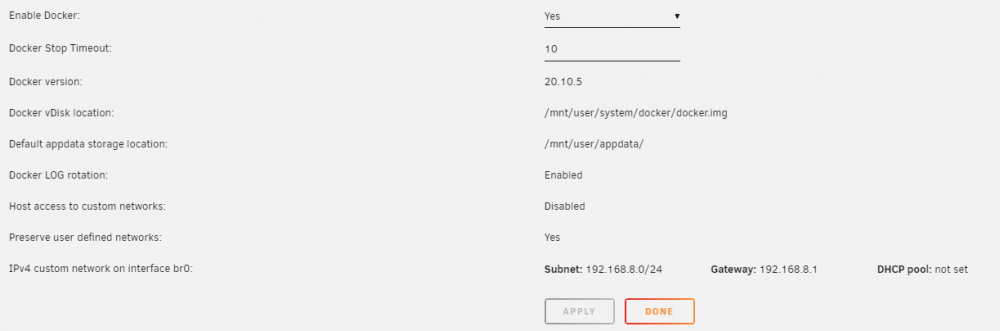
Hi All, It's been a while I'm experiencing os crashes with unraid. The most Common one is the "Kernel Panic - not syncing: Fatal exception in interrupt". This is tricky since even I have syslog enabled (to remote host + copy to flash) I was not able to see any real logs that would reveal the smoking gun. Like this below... after a successful backup the next message is after I did a hard reset on my machine. syslog-127.0.0.1-kernelpanic.zip Dec 6 05:03:07 Pandora-NAS CA Backup/Restore: Backup Complete Dec 6 05:03:07 Pandora-NAS CA Backup/Restore: Verifying backup Dec 6 05:03:07 Pandora-NAS CA Backup/Restore: Using command: cd '/mnt/user/appdata/' && /usr/bin/tar --diff -C '/mnt/user/appdata/' -af '/mnt/user/backups/appdata-monthly/[email protected]/CA_backup.tar' > /var/lib/docker/unraid/ca.backup2.datastore/appdata_backup.log & echo $! > /tmp/ca.backup2/tempFiles/verifyInProgress Dec 6 13:28:25 Pandora-NAS root: Delaying execution of fix common problems scan for 10 minutes The diagnostics package pandora-nas-diagnostics-20211206-1331.zip that created post this recent crash is attached as well. I believe that the issue started after I added a quad NIC into my system. Although I was running with it for few months without any issues. Till once the OS crashed. Since then it had countless crashes with a various duration of 1-14 days. My docker settings: I have many docker container although the 3 that runs most of the time with br0 are : qbitorrent, plex, tautulli. The rest are either in bridge mode or not running. I read many articles and I saw that it could be something with VLANs although I'm not sure how to adjust my settings.... also it seems that others experiencing the same even on 6.10.0-rc2. Although the remote symptoms (Web UI, shares, ssh are all unavailable) are the same, I had 2 cases when the console didn't showed the kernel panic message, but the command prompt was "working". I got invalid password although I provided the correct one hence the authentication engine should failed. I was managed to login, ip settings were good and I was able to ping my gateway although the OS was not accessible. diagnostics was failed, but the syslog syslog-127.0.0.1-notaccesible-20nov.zipshowed some kernel info ~ midnight, then the next log is indicating the time I did a hard reset. Nov 20 00:12:17 Pandora-NAS kernel: igb 0000:04:00.1 eth1: Reset adapter Nov 20 00:12:17 Pandora-NAS kernel: bond0: (slave eth0): link status definitely down, disabling slave Nov 20 00:12:17 Pandora-NAS kernel: device eth0 left promiscuous mode Nov 20 00:12:17 Pandora-NAS kernel: bond0: now running without any active interface! Nov 20 00:12:17 Pandora-NAS kernel: br0: port 1(bond0) entered disabled state Nov 20 00:12:17 Pandora-NAS kernel: igb 0000:04:00.0 eth0: Reset adapter Nov 20 09:54:32 Pandora-NAS root: Delaying execution of fix common problems scan for 10 minutes Any help would be much appreciated since I hit my array with parity checks (7+ hours) each time I have a crash, and I had many... Regards monghuz pandora-nas-diagnostics-20211206-1331.zip syslog-127.0.0.1-kernelpanic.zip syslog-127.0.0.1-notaccesible-20nov.zip