





gandalf15
Members
-
Joined
-
Last visited
Everything posted by gandalf15
-
Thank you very much. I actually found help on Reddit. What I did was update, stopped all dockers and shut down docker service. I started then the docker safe new perms plugin. After 20 hours I canceld it and excluded 1 share (beside appdata), since it took too long and the docker had to get back online (glad it works). After that I run "sudo chown -Rc nobody:users /mnt/user/appdata" When this was finished, I added to all docker the value PUID 99 and PGID 100 (some had it already). Then my rclone mount made problems, since it was mounted as root:root. I then added PUID 99, PGID 100 AND UNMASK 000 to my mount script as an argument. In the end it seems like all is working again. To be honest, I have no idea if this was secure or/and right. But it works again, this is what counts (now) for me.
-
@tawehruhle Do you have some news? I simply dont have the capacity yet for a backup
-
Thank you very much for your testing. That is the problem I see and why I dont think its the solution: Dockers still dont work after doing that fix. I have some dockers running that I cant lose (Storj for an example, the node is 24 months old...)
-
how long did it take for you to complete and how much space? I have 10 TB (a lot of tiny files) and I am scared if that could take days to complete? Edit: Also I read that you should not run it on appsdata folder, did you include everything?
-
Is there a solution that works now or do I really have to make a clean install of everything?
-
Thanks I read those threads already. Sadly they dont help. I am a bit disapointed, that an update causes that much of problems and there is no official FAQ how to solve that problem. There are a lot of posts with the same problem. I hope there will be a official solution - without becoming a linux pro. If I was looking for a pro solution, I could go with a baremetal linux distro. I got unraid since it was user friendly. I hope it will move back into that direction. Except my storj docker - every docker stopped working after the update.
-
I downgraded back to 6.9.2 and all works again. I dont know but something is brocken with permissions on later releases.
-
Hello everyone I run Unraid now for something like 2 years and all worked perfectly. I hardly do updates and I saw that I am "2 versions" behind and updated from 6.9 to 6.11.5. Now my dockers have problems: Syncthing cant sync anymore - when it tries to download files it gets permission denied. I searched the web and it said "use chmod 777 yourfolder/" I did that for the folders where syncthing downloads its files. Now Radarr, Sonarr, Lydarr all cant import the files - also permission denied. It looks like people have those problems since 6.10. Someone can guide me how to fix that problem for all my dockers and folders? I read something about the "New Permissions" under Tools, which I run currently on all disks and all User Shares. Is this the way to go? Thank you for your help!
-
There are all my mounts - and one named "media.cfg". So it seems right there. I dont know though why your mover plugin thinks its "Media"?
-
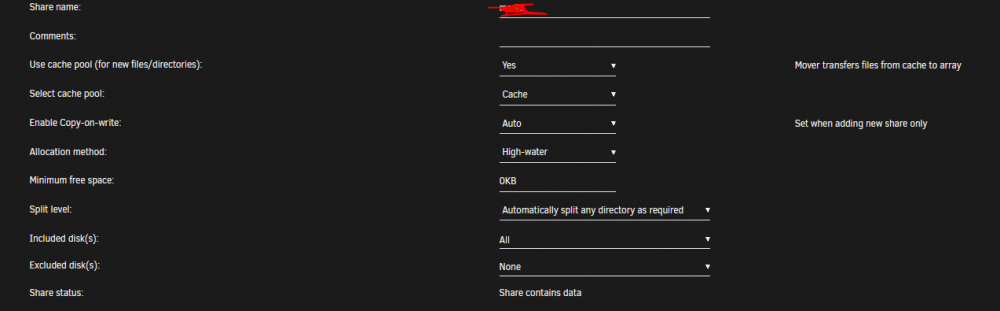
I still have the problem actually. I enabled logging and saw that it tries to move "Media" - but my share is named "media". I have no Idea why it thinks its with capital. Everywhere i used "media" and not "Media". All works except the mover? Is it save to just rename "media" share to "Media" without breaking everything?
-
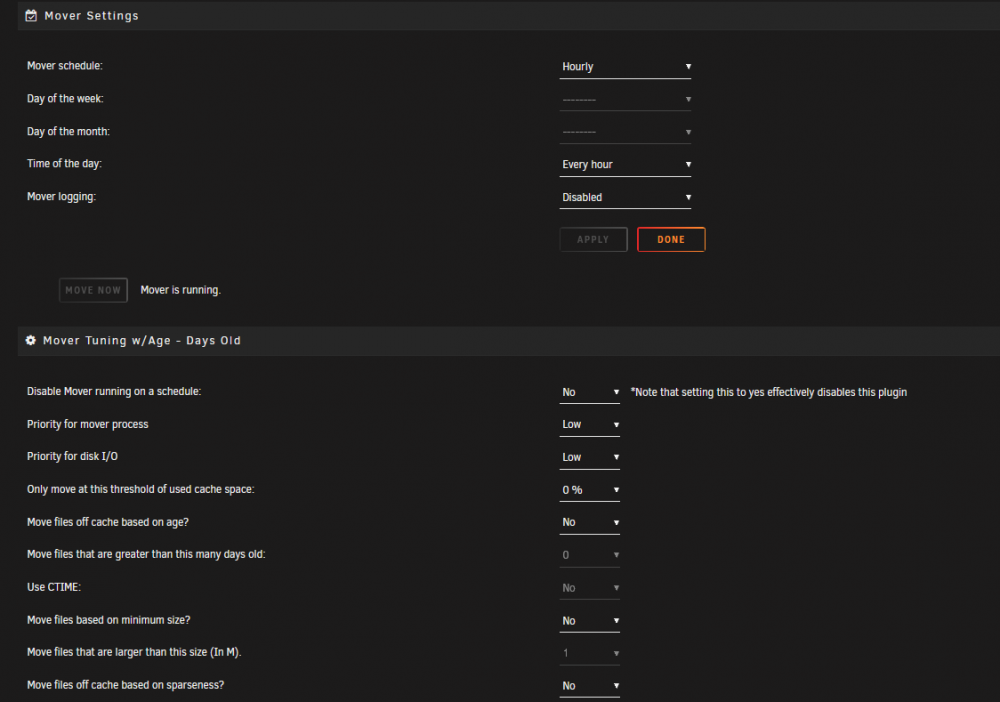
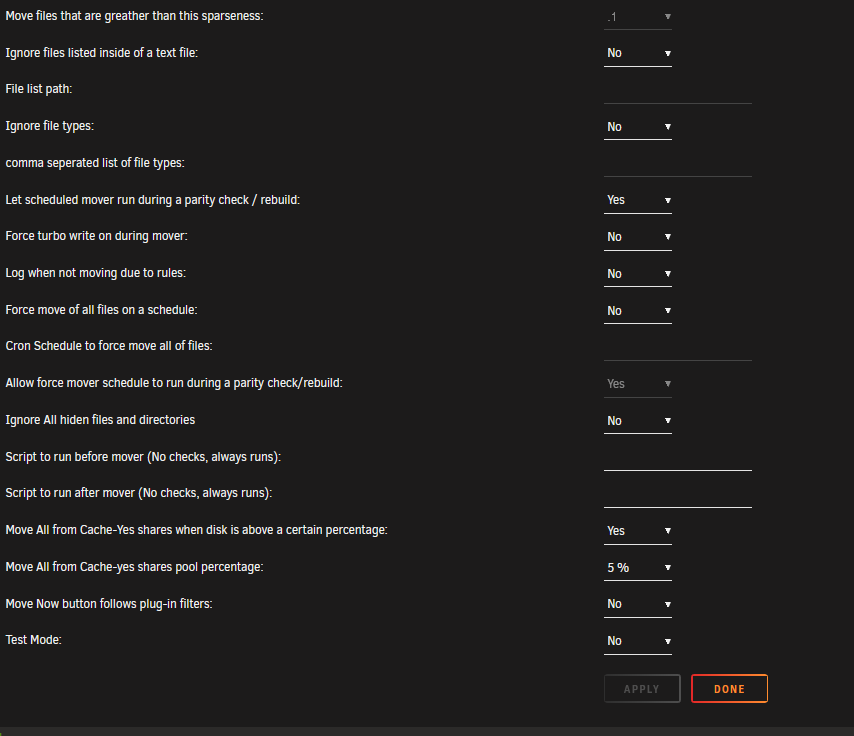
My cache is 2TB ( 2 1TB raid0 SSDs). I changed one share - which is the download share - to "Use cache pool: Yes": after that it filled up to the top. The mover is set to hourly: Those settings filled it up to 20 kbytes left. I stopped using the cache except for the mount drive and the app data in the past - since the mover made plex unusable. I am thankful for help - it looked like the plugin broke the mover, since when I pressed "Move" it did nothing. I should have been clearer - it was not like I was going to say that your work doesn't work, I thought more a update might have caused some issues or something. Thank you very much for your help
-
seems like the plugin is broken. Mover worked without it, but it caused 100% CPU usage and IO Wait to level that plex didnt work anymore. So I installed the plugin - which made my cache drive to fill up to 100% and all docker stopped. I had to remove it again. Someone else have this problem?
-
Is there a simple way to mount more than 1 gdrives? I have 3 teamdrives that I would like to mount on the same box. Should I simply copy the script and modifie to the new mount? I feel like this is not the way to go - or is it?
-
I tried to run it, since I have a Windows Chia client in the same network I tried to change the port to 8445. But somehow it always adds it anyway as 8444. And therefor it doesnt work. Anyone knows how to fix it?



