



Skip to content
View in the app

A better way to browse. Learn more.

Unraid

A full-screen app on your home screen with push notifications, badges and more.

To install this app on iOS and iPadOS
  1. Tap the Share icon in Safari
  2. Scroll the menu and tap Add to Home Screen.
  3. Tap Add in the top-right corner.
To install this app on Android
  1. Tap the 3-dot menu (⋮) in the top-right corner of the browser.
  2. Tap Add to Home screen or Install app.
  3. Confirm by tapping Install.

mtinii

Members
  • Joined

  • Last visited

  1. Hello all, I experienced like many others that the WSDD task pulls one core zu 100% randomly. I found out that this only happens, when I planed a schedule inside user scripts. Its reproduceable. It takes 2 schedules in order (over 2 days) to trigger wsdd 100% bug. Is that helpful? Martin
  2. thank you , its working again!
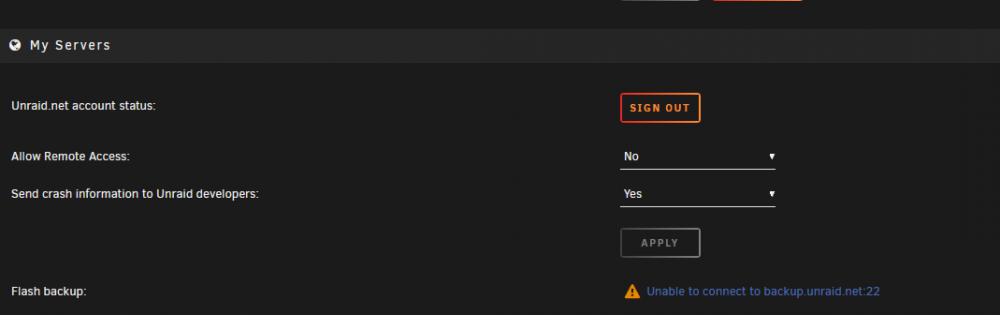
  3. Hello, since the last update my server overlay tells me the following inside managment access for the backup status: Unable to connect to backup.unraid.net:22 On the other hand, inside my sever dashboard online, its telling that its connected. I tried unraid-api restart but that doesnt fixed that. any suggestions? Um running latest unraid version 6.9.2 Regards Martin

Account

Navigation

Search

Search

Configure browser push notifications

Chrome (Android)
  1. Tap the lock icon next to the address bar.
  2. Tap Permissions → Notifications.
  3. Adjust your preference.
Chrome (Desktop)
  1. Click the padlock icon in the address bar.
  2. Select Site settings.
  3. Find Notifications and adjust your preference.