





Importimage1
Members
-
Joined
-
Last visited
Everything posted by Importimage1
-
That makes total sense. I appreciate you helping me with that. I will rename it. Thank you!
-
Not sure. I have a TEMP and Downloads shared folder. From there I have a pool named downloads. When I started Unraid, that's how I was told to to create them. I've been running it like this for around 8 years until I had the issue this time. How would you recommend I do this? I have my media download to a pool/cache drive "Downloads" From there it moves the files to the drives. Thank you
-
Thank you very much! That fixed the issue
-
Here is what I got 744G /mnt/downloads/temp 744K /mnt/downloads/Downloads 744G /mnt/downloads
-
This is the space on my Downloads folder.

-
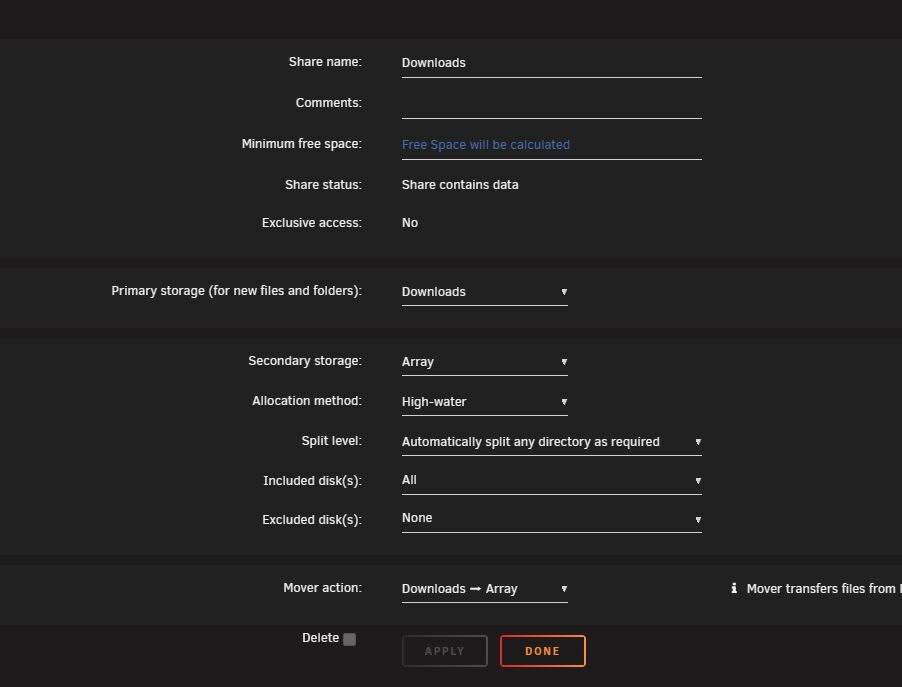
Hello. Yes I guess the TEMP folder is the cache folder "Downloads" In my shared folder folder which is also my cache drive "downloads" that is were my downloads go and then when the mover is active it would move the files over to the drives on my server. I made no changes and It's been working for years and now it just won't transfer or move from my downloads cache drive to my hard drives. My cache drive downloads still has 800GB that need to be moved Here is my settings for my folder "cache" drive Downloads. This is the settings I have had for years and had no issues
-
On my shared folder "donwloads" I use that as cache drive. There's still 800GB in that cache drive. It will not move the files. It just stops as soon as I hit Move.
-
In the log you can see it only runs for a few seconds and then it stops. I have over 800GB to transfer from "downloads" share to my drives.
-
When I press the move button, It just stops moving anything. Mainly I'm trying to move the share "Downloads" That's were my media gets downloaded to and then move to my drives. But it appears to not be working or moving anything. The "Move" button is back to being able to click on vs being grayed out when It's moving. Thank you
-
Thank you for letting me know. I have provided the updated diags.
-
Hello. Sorry about that. Seem like it worked for a little and then doing the same thing. My fault for not proving the diags. Here is the updated one. Thank youimportimage-diagnostics-20251014-0723.zip
-
Hello. That seem to have worked. It's just weird because I never disabled it. Anyways It's working now. Appreciate your help. Thank you
-
All of a sudden I'm not able to move files from my cache drive (Downloads) to my array. It was working fine and now it does not move anything. The scheduler is not working and also when I manually press the Move button nothing happens. I'm not sure what is going on. Any help would be appreciated. Thank youimportimage-diagnostics-20251012-0759.zip
-
But unfortunately Disk 1 is still unmountable
-
By doing the parity sync, it looks like it's starting to add the missing movies.
-
Also my available space is what I use to have but missing thousands of movies. When I click on some of the disk and click on movies, it shows the titles but then nothing inside of the those folders. Should I do a parity sync? Thank you
-
Okay. So I was able to do do a rebuild on top of Disk 1. After completing, it now says disk is unmountable importimage-diagnostics-20240907-1646.zip
-
When I restart Unraid I could see my HBA card and then under that it shows all my drives connected. Shows all 15 drives
-
I just replaced my power supply with a new 1000W. Still having issues. Some drives are not showing up. Not sure if these drives are bad. The WD drives are ok, I just need to connect it to sata power cable. If you could please take a look at the diagnostics. Thank you for your help. importimage-diagnostics-20240905-2248.zip
-
Hello. So now all drives are showing up, but still a rex X on Disk 1. Seems like maybe one of the drives was loose. Now just trying to see how to fix the Emulated Disk 1. Here is an updated diagnostics. importimage-diagnostics-20240830-1142.zip
-
Okay. Thank you. I will try cables first and then if that doesn't work, I will replace the PSU
-
Okay so now I',m getting Disk 3 saying its unmountable unsupported or no file system. I've attached a new Diagnostics. Thank you importimage-diagnostics-20240830-0948.zip
-
Okay. I will try that. So I had a power outage a couple days ago. So I believe that this is how this happened. It started to do a parity sync and started to find a lot of errors on other drives. They did not have the red X just errors. It froze and now I can't access the GUI or anything inside Unraid. Thank you
-
Hello. Just wondering what I can do? Thank you
-
Should I replace the drive?

