





Importimage1
Members
-
Joined
-
Last visited
Everything posted by Importimage1
-
I'm not really sure what's going on. Here is an updated diagnostics. Hopefully there is something that you see that's wrong. Thank you importimage-diagnostics-20240223-1327.zip
-
Okay I got the license working on the new drive. Still seam to be having the issues. Not able to restore my previous settings from my apps
-
Okay great. I used a new usb flash drive and it's asking me for a license key since i'm using a new flash drive. Would you happen to know what I need to do? Thank you
-
I have several backups of the flash drive. Latest one is from one week ago. I'm just having issues making a bootable drive. I've bees trying with the Unraid USB creator and it just hangs for over an hour and nothing happens.
-
Okay great I will do both. Thank you
-
and here is an updated diagnostics importimage-diagnostics-20240223-0945.zip
-
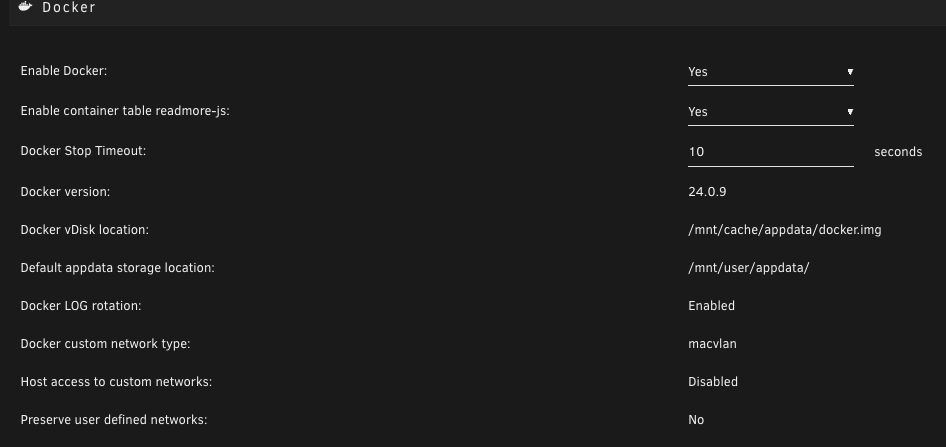
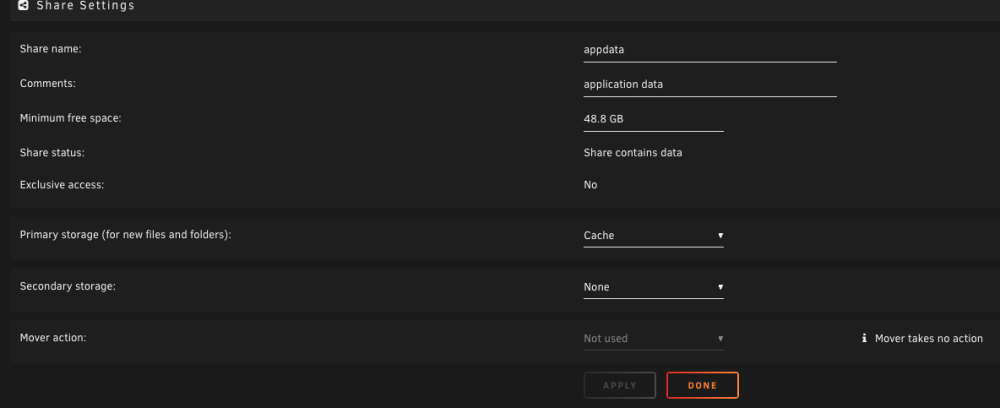
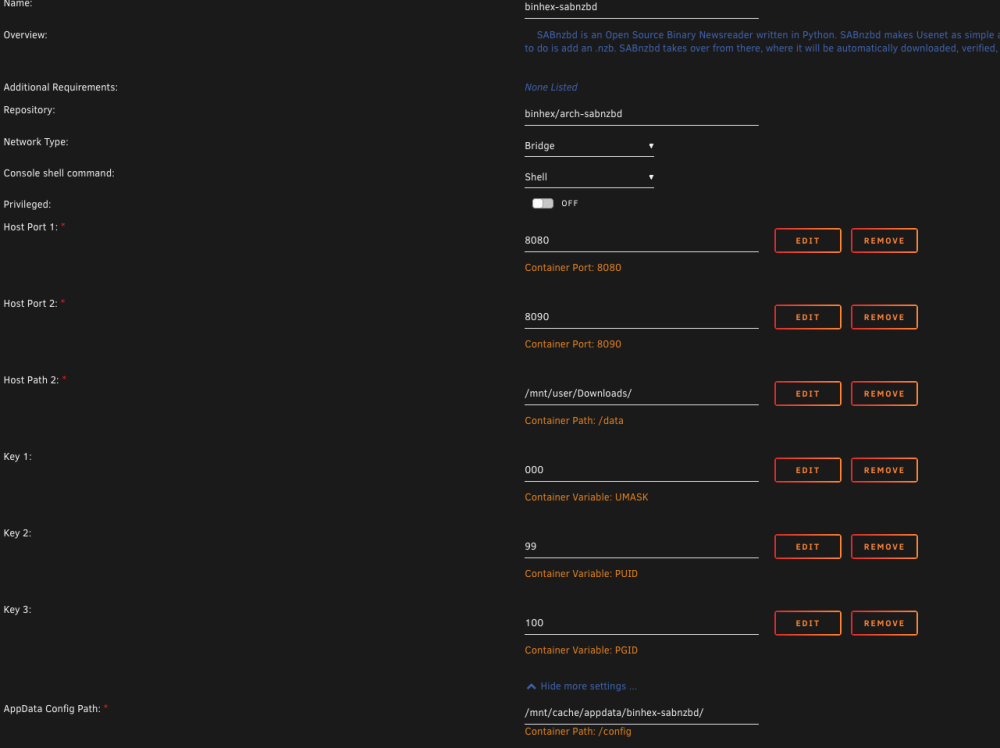
Here is how some of my apps and docker are mapped
-
Sorry don't know what it's called but the history like any saved settings that I previously had on my apps. I have saved appdata using the backup/restore appdata. I can see the .xml files. I tried to restore them but had no luck . How I'm restoring it is I first downloaded all the apps through the apps previously insatlled. When that did not work, I went and used the Backup/restore Appdata. Should I only be installing one of those types of backups or could I do both. restore appdata app and previously installed on apps? I'm not sure if maybe something is wrong with my flash drive?
-
It's pointing to the "cache" drive which is where all apps are stored.
-
i was using a disk share “cache” I left everything the same so did not change any mappings. So when I upgraded my appdata drive I could not rename it back to “cache” that was my original issue. I created a new one called “new_cache” but never changed any of the mappings to the new drive. After you guys helped me in renaming it back to “cache” I just recreated the the docker and downloaded all the apps. They were all under previous installed. I checked the mapping for the docker container and also the apps and everything was still pointing to “cache” drive. but now I’m not able to get any of my saved history from the my apps.
-
So when I click on an app and click on edit, I can see the settings that I entered when Installed the apps. But when I load the app, no history is there. So it's like if the app was new.
-
Thank you. I’m able to finally rename it back to “cache” drive. but now I’m having another issue. After I was able to rename app data “cache” drive back I tried restoring my apps through the previous installed apps. All apps are there, but all saved history or settings are not there. So when I click on app like sabnzb it’s asking to enter my info. So settings are missing. hope it making sense. Thank you for your help
-
I just looked and there's a lot of entries. I did the command and this is what I got drwx------ 2 root root 8.0K Feb 22 13:22 ./ drwx------ 12 root root 8.0K Feb 22 16:46 ../ -rw------- 1 root root 440 Mar 31 2023 AppData\ Backup.cfg -rw------- 1 root root 503 Apr 24 2018 Apps.cfg -rw------- 1 root root 440 Apr 7 2023 Backup.cfg -rw------- 1 root root 442 Mar 31 2023 Carlos.cfg -rw------- 1 root root 440 Mar 31 2023 Downloads.cfg -rw------- 1 root root 442 Apr 7 2023 Flash\ Backup.cfg -rw------- 1 root root 435 Apr 1 2023 Library.cfg -rw------- 1 root root 442 Apr 1 2023 MJ.cfg -rw------- 1 root root 442 Nov 5 09:50 Movies.cfg -rw------- 1 root root 440 Mar 31 2023 Music\ 2.cfg -rw------- 1 root root 440 Mar 31 2023 Music.cfg -rw------- 1 root root 440 Mar 31 2023 NextCloud.cfg -rw------- 1 root root 511 Nov 22 2017 Own\ Cloud.cfg -rw------- 1 root root 435 Feb 7 16:05 PLEX\ Backup.cfg -rw------- 1 root root 440 Mar 31 2023 Pics.cfg -rw------- 1 root root 444 Mar 31 2023 Plex\ Server.cfg -rw------- 1 root root 435 Dec 26 10:01 Plex\ TEMP.cfg -rw------- 1 root root 499 Sep 1 2017 Sonar.cfg -rw------- 1 root root 435 Dec 23 09:24 TEST.cfg -rw------- 1 root root 440 Mar 31 2023 TV\ Shows.cfg -rw------- 1 root root 516 Oct 27 2017 Time\ Capsule.cfg -rw------- 1 root root 454 Mar 31 2023 Time\ Machine.cfg -rw------- 1 root root 511 Oct 1 2017 Transmission.cfg -rw------- 1 root root 548 Apr 9 2020 Windows\ Disk.cfg -rw------- 1 root root 450 Feb 22 13:10 appdata.cfg -rw------- 1 root root 435 Dec 8 17:28 cache.cfg -rw------- 1 root root 435 Dec 8 17:28 data.cfg -rw------- 1 root root 435 Dec 25 07:34 databasetools.cfg -rw------- 1 root root 435 Dec 8 17:28 dlna.cfg -rw------- 1 root root 435 Apr 1 2023 docker.cfg -rw------- 1 root root 461 Dec 1 09:33 domains.cfg -rw------- 1 root root 548 May 27 2020 h265ize.cfg -rw------- 1 root root 548 May 28 2020 handbrake_out.cfg -rw------- 1 root root 435 Feb 3 10:05 inter.cfg -rw------- 1 root root 454 Dec 1 09:33 isos.cfg -rw------- 1 root root 435 Dec 8 17:45 jellyfin.cfg -rw------- 1 root root 418 Feb 22 13:22 mnt.cfg -rw------- 1 root root 435 Mar 29 2023 my_users.cfg -rw------- 1 root root 435 Feb 3 08:18 nzb.cfg -rw------- 1 root root 435 Feb 3 08:18 queue.cfg -rw------- 1 root root 454 Dec 1 09:33 system.cfg -rw------- 1 root root 443 Apr 1 2023 temp.cfg -rw------- 1 root root 435 Feb 3 08:18 tmp.cfg -rw------- 1 root root 548 May 27 2020 user.cfg
-
I was pretty much upgrading my "cache drive. I transferred the files using r-sync. Everything transferred but then I could not rename the pool back to "cache"
-
So I moved my cache drive which had my appdata to a new drive. i thought I could name it the same it like before "cache" but it's not allowing me and get the error "invalid pool name do not use user share names" I made a new pool named "new_cache" transfered everything to that drive. But now I cannot rename my new drive "new_cache" back to cache. Hope that makes sense. Thank you for helping
-
Attached. thank you
-
importimage-diagnostics-20240222-1647.zip
-
I’m very sorry. error I’m getting is invalid pool name do not use user share names
-
I've been trying to figure out how to rename my appdata folder back to 'cache" but keep getting the error. I accidently changed the name when I transsferred to a new drive. Thinking I could re-name it again. I've formated my drive and still cannot change the name. If someone could help that would be great. Thank you
-
I just recently had my flash drive go bad. I didn't have a backup. So I did a new config. My drives are all great. I'm just having an issue with my cache/pool drives. Getting a message next to them saying "unmountable no pool uuid" Just wondering how i could get my cache/pool drives to work without formatting them. Thank you!
-
I got it working. Thank you so much!
-
Hello. I thought it was enabled, but i'm going to assume this was not unfortunately. My question is how do I copy the file back like you suggested I do? I'm not to familiar with this. I created a new install on a new flash drive. So now i'm just trying to follow the instructions to get the array back up. I'm not able to see "disks.cfg" Since i't a new drive. If you could please help and let me know what steps I need to do in order to "Copy the file back"
-
Is there a reason why I can't restore from "My Servers" I just thought that It would be doing backups of my flash drive there
-
Sorry just don't understand. Haven't really done this before.
-
What would I need to create in order for the file to show up? I'm not really able to create anything since I don't have any drives mounted


