





Z3US
Members
-
Joined
-
Last visited
Everything posted by Z3US
-
Okay so after I do the parity swap for both drives do I replace the 2 failed drives and rebuild?
-
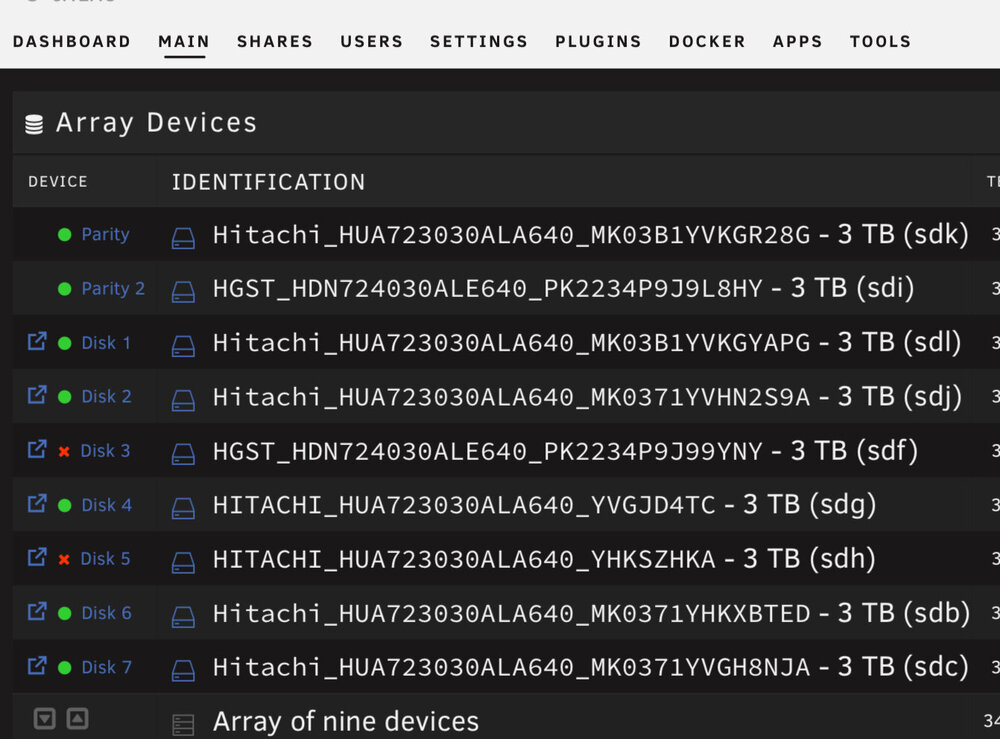
Here is my setup: I just purchased 4 new 10tb hdd to put in place. I want to go to 1 parity and 3 data. Im confused on the order of operations since due to having 2 failed drives. Do I upgrade the parity first then do the failed data disks? Then I can use Unbalanced to move the other data to the new disks? Thanks
-
I have two gpus snd I can only get one of them to work. Gtx 1070 works perfect solo. When I try to add my Gtx 970 neither works. They both are shown in my Nvidia list. Driver 465.19.01 and Cuda 11.3. Ive set device to 0,1 and added both to NVIDIA_VISIBLE_DEVICES and it’s a no go. Will my 970 not work? Thanks Edit: Okay my problem is my 970 doesn’t have enough memory to mine etash. Am I able to run two of these trex dockers on unraid?
