





Lonewolf147
Members
-
Joined
-
Last visited
-
Latest version fixed my issues too! Thanks binhex!
-
Switched back to ver .03 this morning and all is working again.
-
Alright, sorry for the delay. It's been a day... iptables -S -P INPUT DROP -P FORWARD DROP -P OUTPUT DROP -A INPUT -p udp -m udp --sport 53 -j ACCEPT -A INPUT -p tcp -m tcp --sport 53 -j ACCEPT -A OUTPUT -p udp -m udp --dport 53 -j ACCEPT -A OUTPUT -p tcp -m tcp --dport 53 -j ACCEPT
-
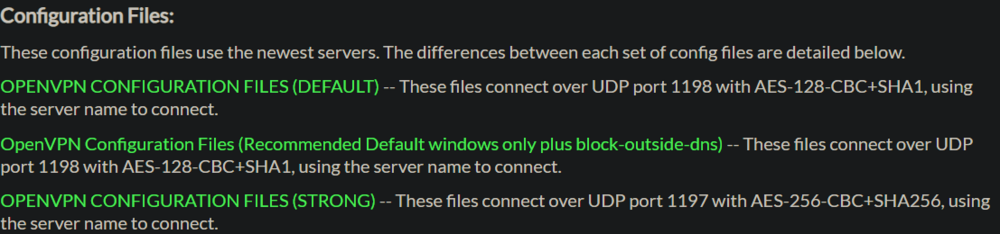
I'll do the rest of the testing after work today. As for the openvpn config files, I'm using PIA's strong encryption file which uses port 1197
-
Looked through those, and I still don't see anything specifically blocking them (and I never programmed them to). Running netstat I see lots of references to port 53, with the TIME_WAIT status.
-
Changed it, but same issue. supervisord - Copy.log
-
Here are my own files, I did not downgrade yet. And for note, my STRICT_PORT_FORWARD is set to no. supervisord - Copy.log Sabnzbd comman execution.txt
-
I just updated to the latest version yesterday, and now I can't connect to the GUI, and I'm getting this in the logs: 2024-07-02 06:29:03.508182 [info] Host is running unRAID 2024-07-02 06:29:03.539106 [info] System information Linux 4b1397840fb5 6.1.79-Unraid #1 SMP PREEMPT_DYNAMIC Fri Mar 29 13:34:03 PDT 2024 x86_64 GNU/Linux 2024-07-02 06:29:03.602092 [info] SHARED_NETWORK not defined (via -e SHARED_NETWORK), defaulting to 'no' 2024-07-02 06:29:03.635790 [info] PUID defined as '99' 2024-07-02 06:29:03.680954 [info] PGID defined as '100' 2024-07-02 06:29:03.745159 [info] UMASK defined as '000' 2024-07-02 06:29:03.775618 [info] Permissions already set for '/config' 2024-07-02 06:29:03.813028 [info] Deleting files in /tmp (non recursive)... 2024-07-02 06:29:03.881986 [info] VPN_ENABLED defined as 'yes' 2024-07-02 06:29:03.924489 [info] VPN_CLIENT defined as 'openvpn' 2024-07-02 06:29:03.945996 [info] VPN_PROV defined as 'pia' 2024-07-02 06:29:04.020537 [info] OpenVPN config file (ovpn extension) is located at /config/openvpn/ca_toronto.ovpn 2024-07-02 06:29:04.147855 [info] VPN remote server(s) defined as 'ca-toronto.privacy.network,' 2024-07-02 06:29:04.183599 [info] VPN remote port(s) defined as '1197,' 2024-07-02 06:29:04.203870 [info] VPN remote protcol(s) defined as 'udp,' 2024-07-02 06:29:04.242027 [info] VPN_DEVICE_TYPE defined as 'tun0' 2024-07-02 06:29:04.289293 [info] VPN_OPTIONS not defined (via -e VPN_OPTIONS) 2024-07-02 06:29:04.315415 [info] NAME_SERVERS defined as '84.200.69.80,37.235.1.174,1.1.1.1,37.235.1.177,84.200.70.40,1.0.0.1' Error: error sending query: Could not send or receive, because of network error Error: error sending query: Could not send or receive, because of network error ... The error just keep repeating (I know it retries every 10 seconds or so). I've left it sit overnight and it was still erroring out this morning. I've restarted the app a few times with no luck. I don't know if this error is a VPN issue or not, but I have one other docker (qbittorrent) that is connecting to my VPN just fine, and I have my laptop and cell phone also connected to PIA just fine.
-
About an hour before I got home from work, I got notice that my Plex and all other apps went offline. I tried to login remotely to Unraid, but my connection timed out. Once I finally got home, I turned on the monitor and saw a bunch of repeating info about the kernel scrolling over and over instead of a login prompt. I couldn't break the process, so I turned off and restarted the whole system. Booted up just fine and is running again. Thankfully, I had log mirroring turned on, and I ran a diagnostics as soon as it was booted. I've attached both here. Does something stand out as to what the problem was? Something that I can look into to try and prevent it from happening again? syslog-previous valaskjalf-diagnostics-20240627-1434.zip
-
I've been getting tons of those faults all week. But I've also been doing a lot of drive data rebuilds. I did run memtest just this morning to check, and all the tests ran ok.
-
Yeah, I switched not only the cables, but which port they were each plugged in to. The power cable is a shared split cable from the power supply. I did change which power cables I was using too. I'm still in the rebuild of the one drive, so I'll have to see if it finishes without issue.
-
That didn't seem to make a difference. I switched out the power cables for those two drives specifically. And they both still failed with write errors after starting the data rebuilds. I did spend the time and did a complete preclear on one of them before putting it back in the system. Still no luck. I removed both drives from the array again, put the one data drive in and started another rebuild, while leaving the second parity drive offline for now. Here's my latest diagnostics too. valaskjalf-diagnostics-20231224-1437.zip
-
I'll give that a try.
-
I have an 18tb drive that had a write error, then became disabled. I pulled it, reformatted it, put it back in and the rebuild started. It crashed with another write error a few hours into the build. I had this happen once before a few weeks ago, but it performed the rebuild just fine, and and extended smart test came back with no errors. If there are physical issues with the platters, if I run the preclear app on it, will that mark all the bad sectors if there are any? Here's a sample from my log of the write error occurring. Does this say what is actually wrong? (full diagnostics attached) Dec 21 01:04:26 Valaskjalf kernel: sd 10:0:7:0: [sdy] tag#983 UNKNOWN(0x2003) Result: hostbyte=0x00 driverbyte=DRIVER_OK cmd_age=3s Dec 21 01:04:26 Valaskjalf kernel: sd 10:0:7:0: [sdy] tag#983 Sense Key : 0x2 [current] Dec 21 01:04:26 Valaskjalf kernel: sd 10:0:7:0: [sdy] tag#983 ASC=0x4 ASCQ=0x0 Dec 21 01:04:26 Valaskjalf kernel: sd 10:0:7:0: [sdy] tag#983 CDB: opcode=0x8a 8a 00 00 00 00 00 5a 44 c9 b0 00 00 04 00 00 00 Dec 21 01:04:26 Valaskjalf kernel: blk_print_req_error: 8 callbacks suppressed Dec 21 01:04:26 Valaskjalf kernel: I/O error, dev sdy, sector 1514457520 op 0x1:(WRITE) flags 0x4000 phys_seg 128 prio class 2 Dec 21 01:04:26 Valaskjalf kernel: md: disk17 write error, sector=1514457456 Dec 21 01:04:26 Valaskjalf kernel: md: disk17 write error, sector=1514457464 Dec 21 01:04:26 Valaskjalf kernel: md: disk17 write error, sector=1514457472 . . . Dec 21 01:04:26 Valaskjalf kernel: md: disk17 write error, sector=1514464600 Dec 21 01:04:26 Valaskjalf kernel: md: disk17 write error, sector=1514464608 Dec 21 01:04:26 Valaskjalf kernel: md: disk17 write error, sector=1514464616 Dec 21 01:04:26 Valaskjalf kernel: md: recovery thread: exit status: -4 valaskjalf-diagnostics-20231221-0249.zip
-
Yeah. I know. It's my current only way of getting the extra drives into the array. I've been running this for over a year now and never had that specific problem. I get that it is risky, and I'm willing to accept that. In the meantime, I'm slowly saving money to get a larger case and a few more HBA's in order to move all the drives to an internal configuration.


