LFFPicard
Members
-
Joined
-
Last visited
-
Following up on my post above (18/19 August) - dug into this more and read back through the thread, and I think the answer is clear. The ~45 min gap between "Backing up plex..." and the tar failure suggests it was slowly working through the whole appdata tree and something inside kept changing while it read it. Plex's Library/Application Support/Plex Media Server/Cache, Media and Metadata folders are huge and churn constantly (thumbnails, transcode temp, background analysis), and can keep being touched for a while even after the container is told to stop - "stopped" doesn't mean every background task quits instantly with a big library. Tar reads recursively, so one of those subfolders changing mid-read triggers "file changed as we read it," and the message just surfaces at the parent directory. The first post's Hints section already recommends excluding those three folders since they "don't need to be saved" (regenerable cache/thumbnail data, not your actual config or watch history) - so that exclusion should fix it. One gotcha I found further back in the thread (page 47): a user added that exact exclusion and it silently did nothing, because he'd set the path starting with /mnt/user/... while the backup was actually reading from /mnt/cache/... (or vice versa). The exclusion has to match the real path exactly or it's just ignored - easy to have it look configured but do nothing. Might be worth a note about that in the first post since it seems to trip people up. Going to add those exclusions with the correct path and see how it goes. Thanks all.
-
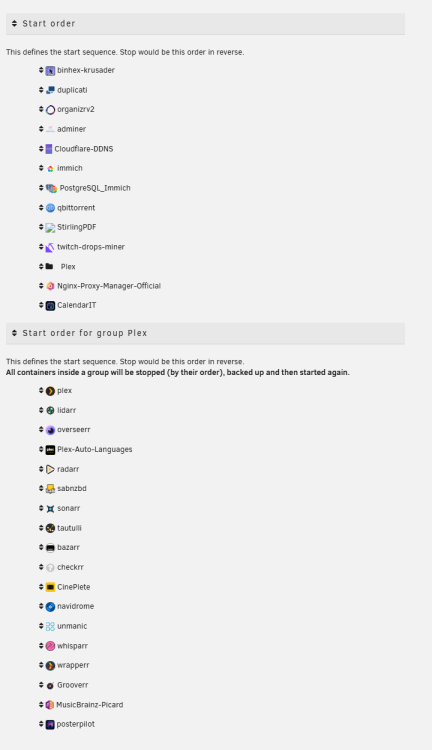
Hi, Having the same issue as before again, where Plex won't update because it says the file has changed since it was read. I can see here that Plex was already running when it tried to load it, but everything is set to stop, backup then start. All in a specific order. As far as I am aware, this all looks right. Can anyone confirm or suggest a fix? Maybe change backup type to stop all containers, instead of one at a time? Thanks!


-
So, Updated my server a few days back. I have a 1050 Ti, so as soon as I rebooted the server, the GPU was not working. I grabbed the legacy drivers for my GPU, like I have done before, to get it working again and rebooted my server. Now, before I grabbed the legacy drivers, both Plex and Unmanic would not start due to the properties specifying a card that can not be found. After grabbing the legacy drivers, they both start again. Unmanic has started converting with no issues. But Plex, for some reason, will not HW transcode anymore and is just chewing up my CPU. I have checked all the settings, and nothing has changed. The only thing that has happened is the server update and regrabbing the legacy drivers. So I am unsure what is wrong and why it won't HW transcode anymore. The Plex logs show everything should be fine, and the transcoder settings in Plex settings are all correct. I really am unsure why it is not working. **** permissions for /dev/dri/renderD128 are good **** **** permissions for /dev/dri/card0 are good **** Setting permissions on /transcode
-
Well, I started by struggling with it. But I am slowly finding out more and more as I nose around. I am a solid Sonarr and Radarr user so it is all familiar, but I must say some of the features on this are damn awesome. I just came across the trash guides importer. Very nice! I am struggling with root folders and matching, but I am trying to make it work with a current manual setup for Formula 1 and WWE so I will keep tweaking until I get it sorted. Great work! EDIT: Is there a way to change the scanner? I currently use TVDB for my Formula 1 naming so that it works in Plex, but when importing my 970! F1 files it fails to match a fair chunk of them due to the different naming convention SportsDB uses. Maybe if I can change to the TVDB scanner for import and then preview rename with SportsDB? I will need to do some testing to see if SportsDB naming works in Plex.
-
Hi, I have been getting a failed backup recently; the last working backup is now just over a month ago. The log shows it is because of PLex with the error.... [28.10.2025 03:30:14][ℹï¸][plex] Backing up plex... [28.10.2025 04:15:16][debug][plex] Tar out: tar: /mnt/cache/appdata/plex/Library/Application Support/Plex Media Server: file changed as we read it [28.10.2025 04:15:16][âŒ][plex] tar creation failed! Tar said: tar: /mnt/cache/appdata/plex/Library/Application Support/Plex Media Server: file changed as we read it [28.10.2025 04:16:38][debug][plex] lsof(/mnt/cache/appdata/plex) But further up the log it shows that it did stop the container without issue, so I do not know why this would be happening if the container is stopped. I did try and search through this thread but every search result took me to the wrong post so I could not find anything after 20mins of searching. Hope this is a simple fix, if anyone has any ideas that would be great. backup.debug.log
-
I am also interested in this. I just looked at this and spend more time than I care to admit setting up reverse proxy with SWAG only to then notice the version and wanted to move the stored files directory as looking at the template it is pointing /shared to appdata. But looking in the advanced admin settings I can see more options so reluctant to tinker until the version is resolved. Any update on this?
-
Hi, Stupid question. When setting up an API for IGDB it takes me to Twitch to intergrate the application, what do I put in the OAuth url? It wont let me create an API without this.
-
I fixed this. For some reason even though I changed the tag and it downloaded 1.19.4 it was still loading the 1.19.3 server. I went into my cache and the .jar for 1.19.3 was still there. I deleted it leaving only 1.19.4 and it now loaded the correct server.
-
I changed the tag to 1.19.4 as it was set to .3 and it redownloaded a package but when I load my client the server is still showing as 1.19.3. Will this be updated? Edit: Sorry, this is for the Fabric server.
-
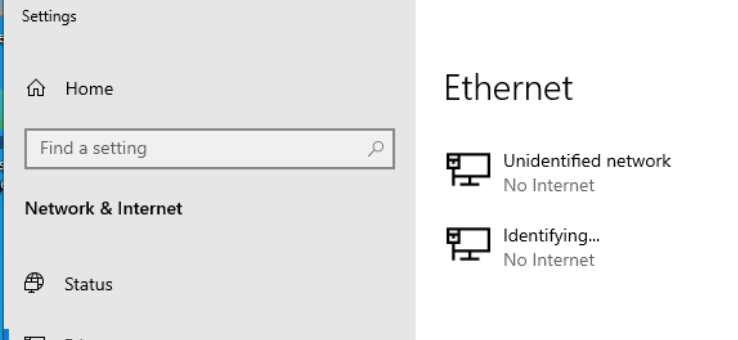
Sorry to necro. I have the same issue. Stupid question, how would I find the MAC address? I done a bit of googling and it appears dockers will have different MAC addresses, but how do I find one for a VM? I loaded the Windows 10 VM but as it can not find a network adapter ipconfig /all wont give a MAC address. EDIT: I got it working and the mac address is the same as my server. But now it is just stuck identifying.
-
I am moving 6TB at the moment and noticed the yellow indicators as well. As I can not see the log until it is finished, will the log for those be obvious so I can see what was wrong? I am assuming it is mostly it could not delete the source folder as it was in use or not empty or something.

-
Hi Ich, Having an issue with Conan. Thought I would set a server up now there is a new expansion for it but using default template (Not adding any workshop until I can get a stable server set up) I am getting alot of errors. I have restarted the container a couple times as a few messages said updates applied on next restart so thought that might clear up some errors but still getting loads. See pastebin below.. Any ideas? https://pastebin.com/y9TRwQg8 Thanks in advance
-
Yep! Perfect thank you, I can unleash it again! Thanks for all your hard work.
-
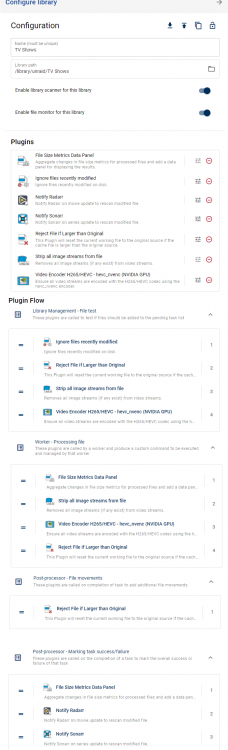
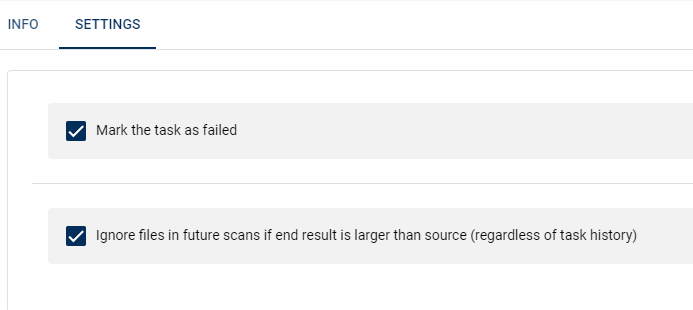
Hi Josh, Sorry for the delay, I moved home and then had to move the server so it has been all up in the air a bit. I think I set it up right according to the description you put in the plugin. I have had a bunch of stuff marked as failed when processing, I checked a couple and they had previously been converted before so I believe it is now working. If you would not mind skimming over the output log and just verifying I will let it loose on my library again. Thanks! https://pastebin.com/kWNHthRb
-
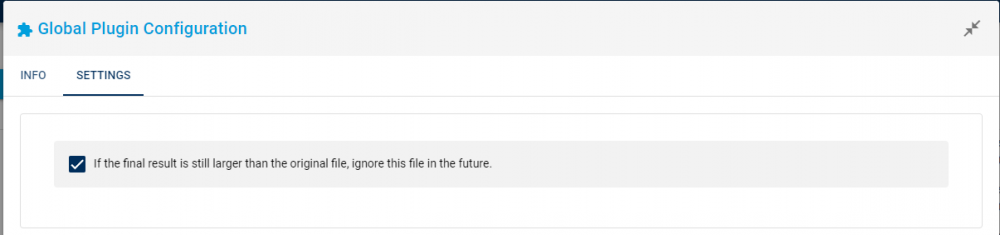
Can you also show us the config for the reject if larger plugin Ah yes sorry.