





master.h
Members
-
Joined
-
Last visited
-
This is a bit of an older topic but I'm having the same problem as Ivegottheskill and Hugh Jazz.... except I can't figure it out like they did. I've got Data Storage mapped to /mnt/user/appdata/.airdcpp (container path is default of /airdcpp). If I reboot the container, all seems to be fine, but if I modify it by adding a new data path or remove one, the container is rebuilt and all my changes are lost. I've copied the default config files into /mnt/user/appdata/.airdcpp and I've added -e PUID=1000 -e PGID=1000 in Extra Parameters (as the container wouldn't even start for me without specifying PUID/PGID). Any help would be appreciated.
-
import sys import time import json import urllib name = sys.argv[1] user_key = "user key goes here" app_token = "application token goes here" import http.client #Python 3 def pushover(): conn = http.client.HTTPSConnection("api.pushover.net:443") conn.request("POST", "/1/messages.json", urllib.parse.urlencode({ "token": app_token, "user": user_key, "message": name + " has finished downloading", #"message": " has finished downloading", }), { "Content-type": "application/x-www-form-urlencoded" }) conn.getresponse() pushover() I had to tweak this just a bit for my purposes. For some reason the script would fail to execute if I passed through the tags and size (even if I had the %G and %Z specified in the "run external program" section of qbittorrent). I just deleted those variables in the script and stopped passing them through the "run external program" section. I also renamed the "token" and "user" variables in the script to make it easier for me to follow. At this point I'm successfully receiving notifications on torrent completion, TYVM @Ademar!
-
I bet that was my problem. I input it verbatim how you had it in your original post. Made the change, I'll keep an eye on it. Thanks for the feedback.
-
Well, so far I've not received any alerts. Fairly certain I've got the path and and the "run external program" sorted out properly, but I think I might have this section wrong. What should the values for USER and TOKEN be (inside the quotes)? Right now, I have USER set with my pushover user token and TOKEN is set with my application api token I created.
-
Thank you very much! I'm not much of a scripter at all and know nothing about python, this is hugely helpful.
-
Has anyone been successful setting up notifications in qbit? I would like to receive a notification through the Pushover android app whenever a torrent is added but haven't been able to figure anything out yet.
-
I had that same issue, except after startup my calibre log was full of the timeout error messages. I resolved it by editing the calibre docker and removing the fields for GUAC_USER and GUAC_PASSWORD. Started up like a charm and I can get to the webui without issue.
-
I installed the plugin Community Applications on my server. It will add an "apps" tab to your main Unraid webpage. It's sort of like the iOS app store, or Google Play app store. Search/browse for the docker/plugin you want, and it automatically installs from there. You can download the plugin here: https://forums.unraid.net/topic/38582-plug-in-community-applications/ That's how I install all my dockers. I don't know how to add repos in manually.
-
I can't remember off the top of my head how to clear logs, I think you can force an update on the docker and it'll wipe all the logs. To prevent it you can add this to the "extra parameters" field week you're editing the docker with the advanced settings button turned on. It will limit your max log size to 50 megabytes --log-opt max-size=50m
-
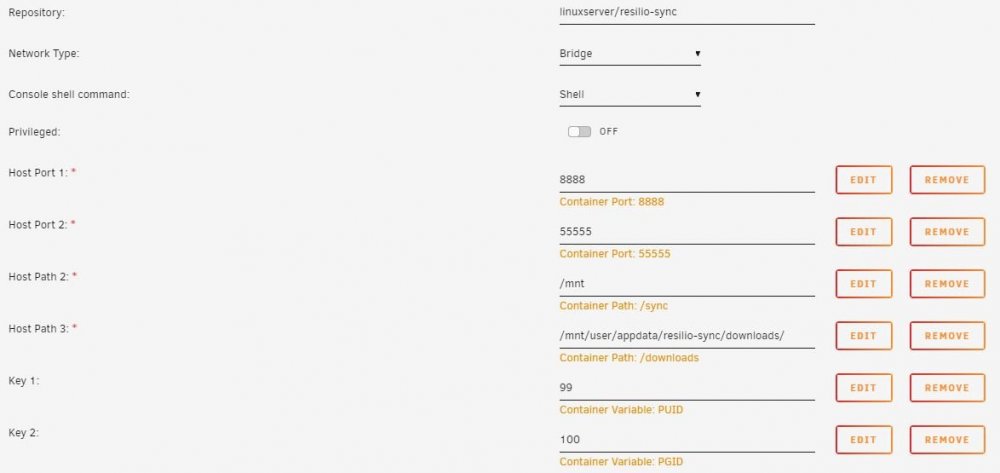
It's been a bit since I've installed the docker, but it looks from your screenshot that you're missing some configuration options. Here's what mine looks like. "Host Path 2" is what shares I'm syncing. In my case I passed through /mnt because I'm syncing disk-to-disk between two Unraid systems. EDIT: I see you're actually using the Resilio from the limetech repository, I'm using Linuxserver's repo. Not sure what settings to use or not use on the Limetech version.
-
I copied out the resilio log from the link on the unraid docker page, hopefully that's enough to go on. For what it's worth, resilio still is able to copy files from my local system to the destination system, all the while endlessly indexing disk1. resilio_log.txt
-
I've been using Resilio-sync successfully for quite some time now, but recently it seems to have gotten stuck "indexing" one of my read only shares, which in this case, is /mnt/disk1. Indexing ran constantly overnight, I woke up to over 44 million reads on disk1 at the main unraid management page. I know I can view the logs for resilio on the docker page, but how do I grab those out short of a copy/paste of the log window?
-
@Fireball3 this worked for me as well. I've got some reverse breakout cables on order now but it looks like all is well. Thanks for the instruction
-
AFAIK this came directly from a Dell T3400 (or something like that, some sort of desktop machine geared towards CAD applications) but it's sat in a drawer for about three years. This was the first time I've ever plugged it in, anyway. And yes, there was a message about megacli failing as well. I'll continue on with 5_DELL_IT and report back. Thank you kindly.
-
I just tried to flash a Perc H310 with the toolset linked here (the update from 11.04.2017). While running 1.bat I got this error. I typed quit to exit because I didn't know what to input for the firmware. C:\SAS2FLSH.EXE -l Adapters.txt -c 0 -list Adapter Selected is a LSI SAS: SAS2008(B2) Controller is not operational. A firmware download is required. Enter firmware file name or quit to exit: Due to error remaining commands will not be executed. Unable to Process Commands. Exiting SAS2Flash.

