





MarioRPGGeno
Members
-
Joined
-
Last visited
-
Incredibly thankful how easy this was to setup! I ran "curl https://am.i.mullvad.net/connected" in the container's console and confirmed I was connected via Mullvad VPN. I didn't add any inbound ports in the container's config. At this point can I be confident that there will be no leaks? Even if I forgot to add time to my VPN and it expired?
-
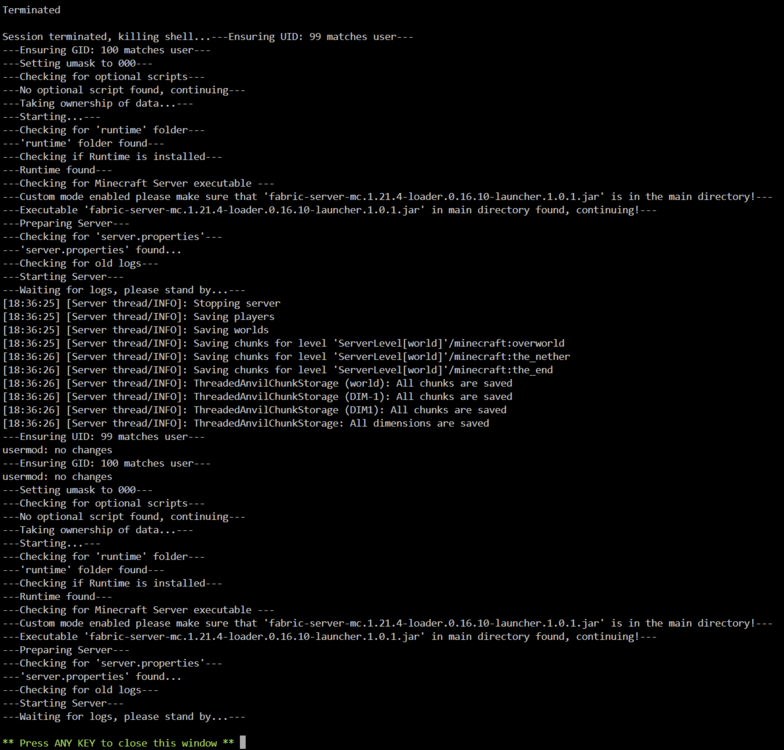
Never mind, turns out I accidentally removed some files from the runtime folder while moving files around. Turns out the "Stopping server" shown above was from an earlier log from when I was running the server on my desktop PC.
-
Hey, I'm wondering if anyone can help me with a problem with the MinecraftBasicServer docker. I'm trying to set up a server using a fabric server jar which I've done successfully before. I've transferred the respective files to appdata and I'm trying to run the server but according to the logs the server just shutdowns as soon as it starts and loops.
-
So I'm in the process of attempting to upgrade my array from 5x 1TB drives to 5x 12TB drives and I've been following the "Replacing a Data Drive" FAQ page. I stopped the array and unassigned the parity drive, shut down the system, replaced the old parity drive with the new 12TB drive and booted the system. Under Main I clicked the drop down with "no device" and clicked the label of the new drive. The page refreshed and the drop down still says "no device" but the drop down no longer shows the unassigned device. The device shows under Unassigned Devices and in the System Devices tab as well as in BIOS so I'm unsure as to what to do/try next. EDIT: Some further troubleshooting I've found input/output errors while trying to do a pre-clear and I can't perform a SMART report on the drive. EDIT 2: SOLUTION: Tried another one of the 12TB drives I purchased and I was able to successfully add it to the array as the new parity drive. I'm afraid the very first drive I tried appears to be DOA. This is my first time replacing drives in the array so I didn't expect this behavior from a DOA drive.
-
That'll work, thanks!
-
I'm using "MinecraftBasicServer" with a Forge modded server, and I'm running off the cache drive.
-
Hey, I'm new to using Unraid but I noticed when shutting down the Minecraft docker through the web GUI, upon restarting the world had been reverted to it's state several minutes prior to shutting down. Is there a way to fix this when shutting down the Docker?

