itz4blitz
Members
-
Joined
-
Last visited
Everything posted by itz4blitz
-
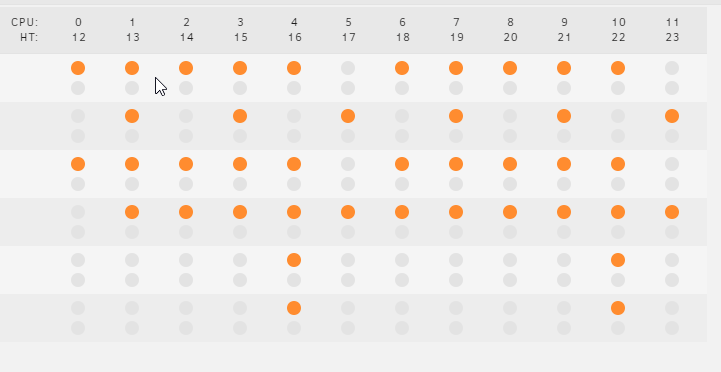
I was having this issue on a previous VM which was working fine but ended up after a few days with the gaming experience becoming completely unplayable. So I decided to create an entirely new VM this morning and make sure everything was 100% configured and on point before testing it. I followed Space Invader's videos on setting up a VM with GPU passthrough enabled. I also followed his 3 video series on tuning the server for ultimate performance. I have all my docker containers update. I have Windows 10 version 21H1 (OS Build 19043.1237). My GPU driver was installed (clean install) directly from Nvidia during setup. Like I said, I followed Space Invader's videos entirely as I have previously except now I cannot game at all without my VM shutting down as soon as I enter a match (Overwatch). I just replaced my previous R5 2600x with an R9 5900x - but the issue is the same. I thought maybe the issue was related to CPU core pinning and isolation. So I isolated 4 core and 4 threads specifically for the VM and restarted unraid and the VM. But the result is the same with the VM stopping as soon as the game logs in past the game menu. Also there is no warning. Screens go completely black like the system shut off, but tower is still on and Unraid is still accessible via my phone and browser. I booted back up and grabbed the syslogs. I've attached them here. Also fwiw, I have R9 5900x, 64GB DDR4 ram @ 3200Mhz, Asus B450M-A motherboard, 3 x 8TB HDD's (one of which, is no longer showing up despite me checking the plugs but hopefully unrelated? still see shares but no parity drive - this has been ongoing since CPU replacement, whereas crashing issue has existed prior to this even), MSI Gaming X 1080Ti, Corsair 750W PSU. All help greatly appreciated. VM XML: <?xml version='1.0' encoding='UTF-8'?> <domain type='kvm' id='2'> <name>Gaming VM</name> <uuid>8dc5cdb3-d52a-dfda-b9df-0ee2b3c0d879</uuid> <metadata> <vmtemplate xmlns="unraid" name="Windows 10" icon="windows.png" os="windows10"/> </metadata> <memory unit='KiB'>12582912</memory> <currentMemory unit='KiB'>12582912</currentMemory> <memoryBacking> <nosharepages/> </memoryBacking> <vcpu placement='static'>8</vcpu> <cputune> <vcpupin vcpu='0' cpuset='1'/> <vcpupin vcpu='1' cpuset='13'/> <vcpupin vcpu='2' cpuset='2'/> <vcpupin vcpu='3' cpuset='14'/> <vcpupin vcpu='4' cpuset='3'/> <vcpupin vcpu='5' cpuset='15'/> <vcpupin vcpu='6' cpuset='4'/> <vcpupin vcpu='7' cpuset='16'/> </cputune> <resource> <partition>/machine</partition> </resource> <os> <type arch='x86_64' machine='pc-i440fx-5.1'>hvm</type> <loader readonly='yes' type='pflash'>/usr/share/qemu/ovmf-x64/OVMF_CODE-pure-efi.fd</loader> <nvram>/etc/libvirt/qemu/nvram/8dc5cdb3-d52a-dfda-b9df-0ee2b3c0d879_VARS-pure-efi.fd</nvram> </os> <features> <acpi/> <apic/> <hyperv> <relaxed state='on'/> <vapic state='on'/> <spinlocks state='on' retries='8191'/> <vendor_id state='on' value='none'/> </hyperv> </features> <cpu mode='host-passthrough' check='none' migratable='on'> <topology sockets='1' dies='1' cores='4' threads='2'/> <cache mode='passthrough'/> <feature policy='require' name='topoext'/> </cpu> <clock offset='localtime'> <timer name='hypervclock' present='yes'/> <timer name='hpet' present='no'/> </clock> <on_poweroff>destroy</on_poweroff> <on_reboot>restart</on_reboot> <on_crash>restart</on_crash> <devices> <emulator>/usr/local/sbin/qemu</emulator> <disk type='file' device='disk'> <driver name='qemu' type='raw' cache='writeback'/> <source file='/mnt/user/domains/Gaming VM/vdisk1.img' index='3'/> <backingStore/> <target dev='hdc' bus='virtio'/> <boot order='1'/> <alias name='virtio-disk2'/> <address type='pci' domain='0x0000' bus='0x00' slot='0x03' function='0x0'/> </disk> <disk type='file' device='cdrom'> <driver name='qemu' type='raw'/> <source file='/mnt/user/isos/Win10_21H1_English_x64.iso' index='2'/> <backingStore/> <target dev='hda' bus='ide'/> <readonly/> <boot order='2'/> <alias name='ide0-0-0'/> <address type='drive' controller='0' bus='0' target='0' unit='0'/> </disk> <disk type='file' device='cdrom'> <driver name='qemu' type='raw'/> <source file='/mnt/user/isos/virtio-win-0.1.190-1.iso' index='1'/> <backingStore/> <target dev='hdb' bus='ide'/> <readonly/> <alias name='ide0-0-1'/> <address type='drive' controller='0' bus='0' target='0' unit='1'/> </disk> <controller type='usb' index='0' model='qemu-xhci' ports='15'> <alias name='usb'/> <address type='pci' domain='0x0000' bus='0x00' slot='0x07' function='0x0'/> </controller> <controller type='ide' index='0'> <alias name='ide'/> <address type='pci' domain='0x0000' bus='0x00' slot='0x01' function='0x1'/> </controller> <controller type='virtio-serial' index='0'> <alias name='virtio-serial0'/> <address type='pci' domain='0x0000' bus='0x00' slot='0x04' function='0x0'/> </controller> <controller type='pci' index='0' model='pci-root'> <alias name='pci.0'/> </controller> <interface type='bridge'> <mac address='52:54:00:51:77:93'/> <source bridge='br0'/> <target dev='vnet0'/> <model type='virtio-net'/> <alias name='net0'/> <address type='pci' domain='0x0000' bus='0x00' slot='0x02' function='0x0'/> </interface> <serial type='pty'> <source path='/dev/pts/0'/> <target type='isa-serial' port='0'> <model name='isa-serial'/> </target> <alias name='serial0'/> </serial> <console type='pty' tty='/dev/pts/0'> <source path='/dev/pts/0'/> <target type='serial' port='0'/> <alias name='serial0'/> </console> <channel type='unix'> <source mode='bind' path='/var/lib/libvirt/qemu/channel/target/domain-2-Gaming VM/org.qemu.guest_agent.0'/> <target type='virtio' name='org.qemu.guest_agent.0' state='connected'/> <alias name='channel0'/> <address type='virtio-serial' controller='0' bus='0' port='1'/> </channel> <input type='tablet' bus='usb'> <alias name='input0'/> <address type='usb' bus='0' port='1'/> </input> <input type='mouse' bus='ps2'> <alias name='input1'/> </input> <input type='keyboard' bus='ps2'> <alias name='input2'/> </input> <hostdev mode='subsystem' type='pci' managed='yes'> <driver name='vfio'/> <source> <address domain='0x0000' bus='0x08' slot='0x00' function='0x0'/> </source> <alias name='hostdev0'/> <rom file='/mnt/user/system/roms/MSI.GTX1080Ti.vbios1.rom'/> <address type='pci' domain='0x0000' bus='0x00' slot='0x05' function='0x0'/> </hostdev> <hostdev mode='subsystem' type='pci' managed='yes'> <driver name='vfio'/> <source> <address domain='0x0000' bus='0x08' slot='0x00' function='0x1'/> </source> <alias name='hostdev1'/> <address type='pci' domain='0x0000' bus='0x00' slot='0x06' function='0x0'/> </hostdev> <hostdev mode='subsystem' type='pci' managed='yes'> <driver name='vfio'/> <source> <address domain='0x0000' bus='0x0a' slot='0x00' function='0x4'/> </source> <alias name='hostdev2'/> <address type='pci' domain='0x0000' bus='0x00' slot='0x08' function='0x0'/> </hostdev> <hostdev mode='subsystem' type='usb' managed='no'> <source> <vendor id='0x046d'/> <product id='0xc539'/> <address bus='1' device='2'/> </source> <alias name='hostdev3'/> <address type='usb' bus='0' port='2'/> </hostdev> <hostdev mode='subsystem' type='usb' managed='no'> <source> <vendor id='0x0951'/> <product id='0x16b7'/> <address bus='3' device='5'/> </source> <alias name='hostdev4'/> <address type='usb' bus='0' port='3'/> </hostdev> <hostdev mode='subsystem' type='usb' managed='no'> <source> <vendor id='0x0a12'/> <product id='0x0001'/> <address bus='1' device='3'/> </source> <alias name='hostdev5'/> <address type='usb' bus='0' port='4'/> </hostdev> <hostdev mode='subsystem' type='usb' managed='no'> <source> <vendor id='0x1038'/> <product id='0x12b3'/> <address bus='3' device='3'/> </source> <alias name='hostdev6'/> <address type='usb' bus='0' port='5'/> </hostdev> <hostdev mode='subsystem' type='usb' managed='no'> <source> <vendor id='0x1b1c'/> <product id='0x0c13'/> <address bus='1' device='4'/> </source> <alias name='hostdev7'/> <address type='usb' bus='0' port='6'/> </hostdev> <hostdev mode='subsystem' type='usb' managed='no'> <source> <vendor id='0x1b3f'/> <product id='0x2008'/> <address bus='3' device='6'/> </source> <alias name='hostdev8'/> <address type='usb' bus='0' port='7'/> </hostdev> <hostdev mode='subsystem' type='usb' managed='no'> <source> <vendor id='0x26e0'/> <product id='0x3c13'/> <address bus='3' device='4'/> </source> <alias name='hostdev9'/> <address type='usb' bus='0' port='8'/> </hostdev> <memballoon model='none'/> </devices> <seclabel type='dynamic' model='dac' relabel='yes'> <label>+0:+100</label> <imagelabel>+0:+100</imagelabel> </seclabel> </domain> syslog
-
Sorry to dig up an old thread - but in case this helps anyone else - I was also having this issue. When I try to save from the settings > CPU Pinning page, after clicking apply, getting sent to Settings, and clicking CPU Pinning again, I'd return and all of my settings were reset to whatever they were previously. However I checked in the individual docker with advanced view enabled, and sure enough, the isolated CPU pinning was being applied.
-
I wanted to post an update since the CPU arrived a day early. I removed the R5 2600x, gave the case a nice clean, installed the R9 5900x (after watching a few videos on the best way to paste the R9), got the cooler's heatsink reattached, and booted it up. As soon as it powered on it detected a new CPU and made me click Y to proceed. I was then able to get into BIOS. To my astonishment, it was running at 70C in BIOS. I was pretty concerned. I restarted the system and this took it back down to the upper 40C range. Fast forward - I got my Win 10 gaming VM booted up. Installed Nerdpack for Perl and Dynamix System Temp - been chilling at about 50C after 30 minutes of moderate usage on the VM. I assume Unraid would default to removing any CPU pinning. But instead it kind of did it's own thing: I attempted to spin up Overwatch - I watched my FPS get up above 300, and immediately back down to 50-60 like I had been having after a day or two of using a new gaming VM. But then it crashed immediately. This has been an issue a few times on this VM - I'm planning to recreate the VM tomorrow and really focus on fine tuning everything. I had the same issue with my R5 2600x as far as gaming becoming unplayable a day or two after setting up the gaming VM (and it working flawlessly). This is a whole other issue, and if I'm still having issues with it, I expect I'll open a thread up in the appropriate section. Now, back to the reason I wanted to write this post: the new CPU. All I can say is, wow. It's a night and day difference. I expected an improvement, but this is much more of an improvement than I expected. The motherboard seems to be doing just fine. The voltage was pretty high (like 1.41) for CPU when I first installed it (which could account for those high temps I saw), but it was way lower when I checked earlier (1.100V). Oh, one last thing I wanted to mention: trying to get my 64GB DDR4 RAM to run at 3200MHZ using XMP or manually setting the speed in BIOS was a huge pain. At best I could get it to run stable for a while but 5-25 minutes into a game it would crash, reboot, and reset the memory speed in order to successfully start. This wasn't an issue once I installed the new CPU. I wasn't able to enable D.O.C.P - but I was able to manually set the ram to run at 3200Mhz. Anyhow, I appreciate everyone's help!
-
Hey all, I'm currently doing some system upgrades. I have Ryzen 5 2600x, 1080Ti, Corsair 750Watt PSU, an ASUS B450M-A CSM motherboard. I just purchased 64GB (4 x 16GB) DDR4 RGB Corsair Vengeance LPX 3200Mhz ram which I've installed. I have a Ryzen 9 5900x supposed to be here on Thursday/Friday. I currently have a Corsair H115i Pro CPU cooler. 3 x 8TB 7200RPM Seagate HDD's, a 500GB Samsung Evo 840 SSD cache drive, and a 2TB Crucial Sata SSD for docker and VM's. My concern is with my motherboard. It was a budget board when I originally built this system in 2018. It says it supports the Ryzen 9 5900x - but I wanted to get feedback / opinions here on if it's going to limit performance in any way. Thanks!
-
So I loaded the other vBIOS after lunch and it's been smooth sailing ever since then. No issues for the last 4.5 hours. So, if you have a GTX 1080Ti Gaming X GPU, hopefully this change will help you if you face similar issues.
-
Just wanted to throw this out there in case someone thinks it could be the case: I didn't have this issue with Windows crashing until I enabled GPU passthrough. On Tech PowerUp, there are 2 GPU's listed for the GTX 1080TI MSI Gaming X card. One is 1KB smaller than the other. I took the second (bigger) version. I'm going to download the second vBios and edit it following SpaceInvader's tutorial later today and I'll provide an update if this fixes anything.
-
Well, I had another crash minutes after writing this post. I ended up booting to an SSD with a bare metal Windows 10 install for the day until I can resolve this issue... Edit: I did update my GPU driver. I recall having this issue previously with Unraid - Windows 10 ran fine with GPU passthrough for some days before finally starting to experience such frequent issues that I was forced to abandon the setup. Again, all help is appreciated.
-
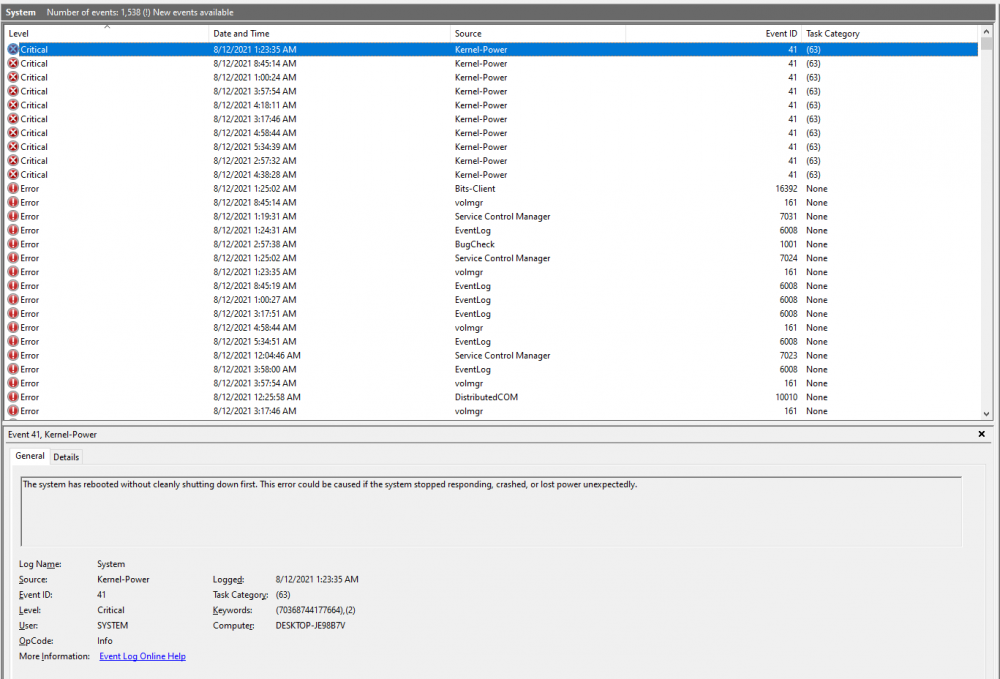
Hi, I recently rebuilt my unraid with my daily driver. I've had a few issues, but one specifically I'm hoping to get assistance addressing and hopefully fixing. I noticed this morning that Windows randomly restarted after I logged on. After my reboot I checked my event logs and saw that this same error causing the system to need to reboot has occurred many times. This specific error code kernel-power has been the bane of my existence in previous systems: So, previously when I ran unraid I had this issue as well and had to drop it because I didn't have time then to troubleshoot this. Also FWIW: I'm running a Ryzen 5 2600x @ stock 32GB DDR4 Corsair Vengenance LPX ram @ 3200Mhz 3 x 8 TB HDD's in my array 1 x 500GB Samsung 840 Evo SSD cache 1 x 2TB Crucial SSD GTX 1080Ti MSI Gaming X 650 Watt Corsair 80+ Bronze PSU I do have GPU passthrough enabled with the modded vBios following SpaceInvader One's videos. This Windows 10 is completely patched, I've only installed Brave Browser, Cylance AV, and Zoom. Any help is appreciated.