






itz4blitz
Members
-
Joined
-
Last visited
Everything posted by itz4blitz
-
v0.3.0 Released - Emby Support Added Emby Media Server support - Full session monitoring with WebSocket real-time updates, log parsing for Emby's NLog format Prowlarr fix - Resolved 404 error on queue endpoint Infrastructure - Improved build concurrency for growing provider count
-
v0.2.0 Released - Plex Support Added Plex Media Server support - Full session monitoring, real-time playback tracking with transcoding details, and activity log ingestion File-based log ingestion - Mount container log files directly Source diagnostics - New troubleshooting dialog to help debug connection issues
-
I've submitted a request to have the Logarr templates added to official CA-Apps Template Repo. For now, I've updated the templates and have walked through the entire setup on my server and put together a some installation steps to help anyone else interested in early testing: SSH into your server and navigate to the Unraid templates folder: cd /boot/config/plugins/dockerMan/templates-user/ Pull down the latest Logarr templates: wget https://raw.githubusercontent.com/itz4blitz/logarr/master/unraid/logarr-db.xml wget https://raw.githubusercontent.com/itz4blitz/logarr/master/unraid/logarr-redis.xml wget https://raw.githubusercontent.com/itz4blitz/logarr/master/unraid/logarr-backend.xml wget https://raw.githubusercontent.com/itz4blitz/logarr/master/unraid/logarr-frontend.xml Optional: Create a Logarr FolderRequires the Docker Folder plugin from Community Applications. Go to Docker tab → Add Folder Set Name: Logarr Set Icon URL: https://raw.githubusercontent.com/itz4blitz/Logarr/master/apps/frontend/public/icon.png Click Add Installation OrderInstall containers in this order (dependencies first): logarr-db - PostgreSQL database logarr-redis - Redis cache logarr-backend - API server logarr-frontend - Web dashboard Step 1: Install PostgreSQL (logarr-db)Go to Docker tab → Add Container Click the Template dropdown → select logarr-db Click Apply No configuration needed - defaults work out of the box. Step 2: Install Redis (logarr-redis)Go to Docker tab → Add Container Click the Template dropdown → select logarr-redis Click Apply No configuration needed - defaults work out of the box. Step 3: Install Backend (logarr-backend)Go to Docker tab → Add Container Click the Template dropdown → select logarr-backend Configure these values Field Value Database URL postgresql://postgres:postgres@YOUR_UNRAID_IP:5433/logarr Redis URL redis://YOUR_UNRAID_IP:6380 CORS Origin http://YOUR_UNRAID_IP:3001 Click Apply Step 4: Install Frontend (logarr-frontend)Go to Docker tab → Add Container Click the Template dropdown → select logarr-frontend Configure these values Field Value API URL http://YOUR_UNRAID_IP:4001/api WebSocket URL ws://YOUR_UNRAID_IP:4001 Click Apply Step 5: Access LogarrOpen your browser to: http://YOUR_UNRAID_IP:3001 Optional: Add apps to Logarr FolderEdit the Logarr folder and enable each of the Logarr apps to be pinned to the folder and press Submit.
-
Hey everyone, I am sharing a project I've been working on called Logarr - a logging dashboard that pulls logs from your media server apps into one place. Realtime Dashboard: Live tail logs: Issue Tracker: I don't always have time to stay on top of my server, so usually by the time I notice something's wrong it's already a mess. Then I'm digging through Jellyfin, Sonarr, Radarr, Prowlarr, etc. trying to figure out what actually broke. I find I often fix one thing, only to find another underneath it. For this reason, I built Logarr to help get to root cause faster since I tend to forget about my server for a while. Features: Real-time log aggregation from multiple sources Auto-detects errors and groups duplicates Impact scoring to prioritize what matters Basic AI analysis WebSocket-based live streaming Tech Stack: Frontend - Next.js, React 19, shadcn, zod Backend - Nest.js, Socket.io, Postgres, Redis Currently supports: Jellyfin, Sonarr, Radarr, Prowlarr through API and mounted log files for each service Install: cd /boot/config/plugins/dockerMan/templates-user/ wget https://raw.githubusercontent.com/itz4blitz/logarr/master/unraid/logarr-db.xml wget https://raw.githubusercontent.com/itz4blitz/logarr/master/unraid/logarr-redis.xml wget https://raw.githubusercontent.com/itz4blitz/logarr/master/unraid/logarr-backend.xml wget https://raw.githubusercontent.com/itz4blitz/logarr/master/unraid/logarr-frontend.xml Install order: db → redis → backend → frontend. Make sure to update the IPs in the config to your server IP. Links: GitHub: https://github.com/itz4blitz/logarr Docker: ghcr.io/itz4blitz/logarr-backend / ghcr.io/itz4blitz/logarr-frontend This is still very alpha. It works for me but expect rough edges. I appreciate all feedback and contributions.
-
Edit: video is working. I'm going to update the BIOS and I'll update results from memtest.
-
Thanks for the reply. I usually just access my server via browser from another system. I'm having issues getting anything other than a black screen when I switch my monitor to the Unraid server sadly. Once I resolve that issue, I'll run the memtest.
-
Also, I wanted to mention that I've come across several posts that mention checking the connection to the drive, however this is an nvme ssd.
-
Last night I had this happen after a reboot, I've made no other changes outside of the reboot. blitzraid-diagnostics-20230127-1518.zip
-
Some additional steps I've taken: Removed Gluetun and attempted to reinstall my applications Disable Gluetun and reinstall my applications They still continue to fail. As soon as I re-install Sonarr, Radarr, Prowlarr, Sab, etc. I get this error: Edit: I tested another container that isn't having issues (Nginx), and I was able to update it successfully. It seems only these containers which are routed through Gluetun are affected. Edit 2: I manually started GluetunVPN. It seems Sonarr/Radarr/etc re-installs fine, but they fail to start. If I try to manually restart them, I get the following:
-
-
I've also been trying to set this up and I have the same issue as @lukeoslavia. @Glassed Silver is this image still maintained? Edit: works perfectly. I found this comment which helped me resolve it: https://github.com/directus/directus/discussions/6480#discussioncomment-1106735 Thanks @Glassed Silver for this
-
I tried searching pretty extensively for anyone else experiencing this, but I only found posts about freezes during normal operation. To clarify: my system works fine when it is fully booted. It's whenever I manually restart or use a scheduled restart that my system is hanging up during the boot process. Typically I have to physically power the device off and back on a few times before it will boot to USB fine. When it has issues, the system will POST and then just sit at a black screen after. For some months this was fine because I was not restarting my system at all. Before I got my UPS it was only an annoyance whenever we lost power. However now that I have my UPS in place, its felt more like I'm using it as a band-aid to cover up the freezes during boot, rather than as a backup for power loss. Recently (a week or so ago), I setup a script to automatically reboot my system 2 times per week in the early hours. I'm waking up to a server/services that are offline. When I check my system it's powered on but not reachable and a blank screen if I power on my attached tv. If I disable this reboot script, it can run for weeks on end without any issues.
-
Installed the newest firmware, rebooted, started the array and let it do it's thing for a few hours. Came back a few hours later - seems to still be having tons of errors in the logs. unraid-diagnostics-20220417-1043.zip
-
Today I started receiving this error. It's only been about 1-2 days since I've restarted the server. I wanted to seek some assistance in figuring out what's going on with my server. The only "issues" I'm running into are occasional issues related to docker containers - and a VPN container I have running which is having issues with my torrent client (was only able to connect to a few seeds. This morning it's now completely stopped). I'm able to do a curl ifconfig from the console of containers running through the VPN app. They return the VPN IP address, so they are working. I had read some posts regarding the use of vpn containers and issues with having their ISP modem in bridge mode (which I have). They recommended switching their VPN container to use TCP instead of UDP. I've tried both with no success. I went from getting 50-60MB/s+ down while using the VPN container to 3-4MB/s max, to 0b/s today. Fwiw, I have a Ubiquiti Dream Machine. I've tried disabling all, few, and no security settings - nothing I do in my UDMP seems to help. Any help is appreciated! Happy Easter! unraid-diagnostics-20220417-1043.zip
-
Hi Binhex, Thanks for your response. I connected locally and I'm actually getting an error: Error loading webview: Error: Could not register service workers: SecurityError: Failed to register a ServiceWorker for scope ('https://192.168.1.122:8500/static/out/vs/workbench/contrib/webview/browser/pre/') with script ('https://192.168.1.122:8500/static/out/vs/workbench/contrib/webview/browser/pre/service-worker.js?v=4&vscode-resource-base-authority=vscode-resource.vscode-webview.net'): An SSL certificate error occurred when fetching the script.. And to answer your original question: I'm having the same issue there when trying to login to the account: it just shows "Loading..."
-
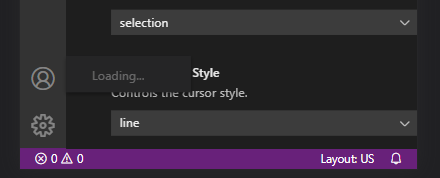
I'm having an issue trying to use the "Account" login inside the app: I am using cloudflared + NginxProxyManager for SSL. In the devtools console I am seeing the following warning: I'm also seeing this warning in the Docker logs: [12:17:36] Switching to using in-memory credential store instead because Keytar failed to load: Cannot find module 'keytar' Everything works great aside from this issue. I'm hoping to be able to login to my MS/Github account to sync my settings from my local client. If anyone has any ideas on what steps I can take to get this working, it's greatly appreciated.

-
ASUS H610M-A D4 I did update the bios earlier today as well.
-
It seems to have resolved itself after another reboot! To answer your question though, I only have 6 drives in this build. I'll report back if the issue returns. Thanks.
-
I just built a new server. I'm able to press F8 during post to get to the boot menu and select my USB and boot up just fine. But if my server restarts for any reason, after POST it goes to a black screen and no further. All help is appreciated!
-
I wanted to say thanks as well. I just built a new server with an Asus H610M-A D4 motherboard and found this response - it solved my issue as well.
-
Fixed the VMs. Stopped the array, went into Settings > VM Manager (Advanced View) and changed Libvirt storage location to: /mnt/cache/system/libvirt/libvirt.img. Started the array and all the VM's reappeared. Now to fix docker. Edit: Fixed docker containers. Went to Apps > Previously Installed and installed everything. Solved issue.
-
Here's the output from: find /mnt -name libvirt.img /mnt/user/system/libvirt/libvirt.img /mnt/user0/system/libvirt/libvirt.img /mnt/cache/system/libvirt/libvirt.img /mnt/disk1/system/libvirt/libvirt.img Here is the libvirt log: 2021-09-18 00:45:43.325+0000: 10263: info : libvirt version: 6.5.0 2021-09-18 00:45:43.325+0000: 10263: info : hostname: Tower 2021-09-18 00:45:43.325+0000: 10263: warning : networkNetworkObjTaint:5292 : Network name='default' uuid=a67b7b9b-bef4-488b-b243-c9e5f391a3b1 is tainted: hook-script
-
I have an 3 x 8TB HDD's in an array with one acting as a parity. That drive was unplugged at some point when redoing some cable management. When it came back up it appeared as an unassigned device. I did some searching and found someone with the same issue that was instructed to go to Tools > New Config and build a new config and then assign their drives. I did this. After starting the array however, all of my docker images and VM's are not showing up. I've attached my diagnostic logs. Help is greatly appreciated. tower-diagnostics-20210917-2048.zip
-
Update: I got some advice from @fmp4m that my GPU may have not been stubbed properly. After a bit of searching, I came across this great thread: ** VIDEO GUIDE - How to Easily Dump a vBIOS from any GPU directly from the Server for passthrough - VM Engine (KVM) - Unraid I followed this guide. When I went to actually dump the vBIOS my Unraid would actually crash. I did a bit more research - and I also came across this video: After I followed the above video, I then returned back to the vBIOS script and it had no issues dumping the vBIOS. I booted up (after having to remove some of the missing USB devices from my VM's XML), got into Overwatch and was seeing 250 FPS
-
Just an update, I opened the VM log and then from my VM entered in game. It crashed shortly after entering a match. This was the error log: qemu-system-x86_64: hw/usb/host-libusb.c:838: usb_host_ep_update: Assertion `udev->altsetting[i] < conf->interface[i].num_altsetting' failed. 2021-09-16 18:53:40.232+0000: shutting down, reason=crashed

