




.JPG.504053a50f6c875b04965456fcc83698.JPG)
crzynik
Members
-
Joined
-
Last visited
-
Well, right as I posted this someone on reddit figured it out, in this case it was the Unraid HomeAssistant plugin
-
I am running 7.2.0-rc1 (not 100% sure if that is related, but this is a relatively new behavior) Something is keeping my disks spun up, but it is not reads / writes as the read & write counter does not go up. Also, I watched my drives spin down automatically only to immediately be spun back up again. Here are some logs Oct 16 09:09:37 StorageWhacker emhttpd: spinning down /dev/sdd Oct 16 09:09:37 StorageWhacker emhttpd: spinning down /dev/sde Oct 16 09:09:37 StorageWhacker emhttpd: spinning down /dev/sdb Oct 16 09:09:37 StorageWhacker emhttpd: spinning down /dev/sdf Oct 16 09:09:37 StorageWhacker emhttpd: spinning down /dev/sdc Oct 16 09:09:37 StorageWhacker emhttpd: spinning down /dev/sda Oct 16 09:09:41 StorageWhacker emhttpd: read SMART /dev/sdb Oct 16 09:09:51 StorageWhacker emhttpd: read SMART /dev/sdc Oct 16 09:10:00 StorageWhacker emhttpd: read SMART /dev/sde Oct 16 09:10:00 StorageWhacker emhttpd: read SMART /dev/sda Oct 16 09:10:00 StorageWhacker emhttpd: spinning down /dev/sde Oct 16 09:10:00 StorageWhacker emhttpd: spinning down /dev/sdb Oct 16 09:10:00 StorageWhacker emhttpd: spinning down /dev/sdc Oct 16 09:10:00 StorageWhacker emhttpd: spinning down /dev/sda Oct 16 09:10:10 StorageWhacker emhttpd: read SMART /dev/sdf Oct 16 09:10:10 StorageWhacker emhttpd: read SMART /dev/sda Oct 16 09:10:25 StorageWhacker emhttpd: read SMART /dev/sde Oct 16 09:10:25 StorageWhacker emhttpd: read SMART /dev/sdb Oct 16 09:10:25 StorageWhacker emhttpd: read SMART /dev/sdc Oct 16 09:12:12 StorageWhacker emhttpd: spinning down /dev/sde Oct 16 09:12:12 StorageWhacker emhttpd: spinning down /dev/sdb Oct 16 09:12:12 StorageWhacker emhttpd: spinning down /dev/sdf Oct 16 09:12:12 StorageWhacker emhttpd: spinning down /dev/sdc Oct 16 09:12:12 StorageWhacker emhttpd: spinning down /dev/sda Oct 16 09:12:13 StorageWhacker emhttpd: read SMART /dev/sda Oct 16 09:12:18 StorageWhacker emhttpd: read SMART /dev/sdb Oct 16 09:12:31 StorageWhacker emhttpd: read SMART /dev/sdc Oct 16 09:12:41 StorageWhacker emhttpd: read SMART /dev/sde Oct 16 09:12:51 StorageWhacker emhttpd: read SMART /dev/sdf Oct 16 09:23:05 StorageWhacker emhttpd: spinning down /dev/sde Oct 16 09:23:05 StorageWhacker emhttpd: spinning down /dev/sdb Oct 16 09:23:05 StorageWhacker emhttpd: spinning down /dev/sdf Oct 16 09:23:05 StorageWhacker emhttpd: spinning down /dev/sdc Oct 16 09:23:05 StorageWhacker emhttpd: spinning down /dev/sda Oct 16 09:23:27 StorageWhacker emhttpd: read SMART /dev/sdb Oct 16 09:23:43 StorageWhacker emhttpd: read SMART /dev/sdc Oct 16 09:23:53 StorageWhacker emhttpd: read SMART /dev/sde Oct 16 09:24:03 StorageWhacker emhttpd: read SMART /dev/sdf/mnt/disk2# fatrace -tc 09:58:21.887942 emhttpd(7480): RO /mnt/disk2 09:58:21.887942 emhttpd(7480): C /mnt/disk2 09:58:21.897838 shfs(10045): RO /mnt/disk2 09:58:21.897903 shfs(10045): RC /mnt/disk2 09:58:23.068766 emhttpd(7480): RCO /mnt/disk2 09:58:23.078239 shfs(10045): RO /mnt/disk2 09:58:23.078289 shfs(10045): RC /mnt/disk2 09:58:24.244291 emhttpd(7480): RO /mnt/disk2 09:58:24.244291 emhttpd(7480): C /mnt/disk2 09:58:24.253751 shfs(10045): RO /mnt/disk2 09:58:24.253815 shfs(10045): RC /mnt/disk2 09:58:25.422115 emhttpd(7480): RO /mnt/disk2 09:58:25.422115 emhttpd(7480): C /mnt/disk2 09:58:25.433031 shfs(10045): RO /mnt/disk2 09:58:25.433119 shfs(10045): RC /mnt/disk2 09:58:26.599376 emhttpd(7480): RCO /mnt/disk2 09:58:26.610636 shfs(10045): O /mnt/disk2 09:58:26.610636 shfs(10045): R /mnt/disk2 09:58:26.610747 shfs(10045): RC /mnt/disk2
-
Yeah that is fair, after getting all 24 of my containers pulled, it does actually seem faster at extracting the layers than it was before. So main thing I am curious about is why the frontend won't load in other tabs while one tab is running the docker container command.
-
Followed the suggestion to move to overlay2 as I have a ZFS cache pool that holds the docker images. Docker containers seem quite slow to download however. This issue is compounded because it seems while a docker image is being pulled I can't access the frontend from another tab. Edit: looks like pulling a docker container via CLI does not block the UI in the same way These are my docker settings
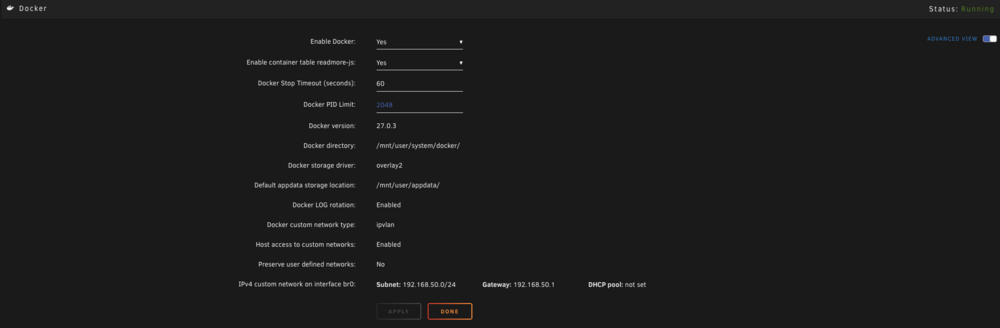
-
Have you looked at the mover tuning plugin? That offers a lot of options like you are talking about
-
Running Unraid RC 6.11.0-RC1 and both nerdpack and dev tools seem to load forever. Also the dynamix temp plugin complains of no perl installed which tells me the nerdpack isn't being initialized properly perhaps? Happy to provide logs or whatever is needed. Error I see in Unraid log: `root: Warning: preg_grep() expects parameter 2 to be array, string given in /usr/local/emhttp/plugins/NerdPack/scripts/packagemanager on line 79`
-
Makes sense. I will update here when done. Just wanted to say thanks a lot, was quite stressed but found a solution that works for me and I learned a lot along the way. 👍
-
I have already taken the existing parity drive out, so I will have to rebuild the parity either way. I added the SSD as a data drive and plan is to move all data over to it then put the HDD into parity and let the parity build. And yes, I have my shares quite organized and the only one that has data I need (not a direct backup of a device) I already have a separate copy of.
-
I already have two 256GB SSDs (pooled) that I use for my docker containers and what not, so these big drives are just for using as a time machine backup for my mac and also as other bigger backups, so it needs to go in the array somewhere. I think I'd like to put it as a data disk, is there a relatively easy way to move everything over to it from the HDD?
-
I see, that is very informative. The issue being raised was with not being able to TRIM. I would like to use the SSD as best I can. @trurl does that mean whether I use the SSD in the array or as the parity, it is a moot point (speed wise)? In any case, I am thinking it may be better try to swap them and use the HDD as a parity drive, but I want to be sure I am making an informed decision. (If I were to rebuild this system, definitely would have done it differently storage wise lol)
-
Thank you for taking a look, I appreciate it. A couple things: 1. I was advised that using an SSD as a parity drive is a bad idea. If this is the case, I may prefer to copy the HDD -> SSD and make the HDD my parity drive. 2. If 1 isn't the way to go, would a new config entail data loss for the existing HDD? Thanks again for your help.
-
Updated with the full zip folder.
-
here are the diagnostics: storagewhacker-diagnostics-20220106-1331.zip
-
Thanks, they are the same size bytes wize. The SSD says it has an unkown partition format.
-
Hi everyone, so I built this Unraid NAS a year ago with two 8TB HDDs (one as parity, one as a drive). For the last couple months the parity drive has been throwing a lot of errors and dropping offline so I decided to upgrade it to an 8TB Samsung SSD. To do this I unassigned the parity drive, shut down, and then replaced it. Powered back up and tried assigning the Samsung drive to the parity slot and it is complaining that it is not the biggest drive. I am at a loss of what to do. I understand that it may be formatted differently and appearing as smaller, I couldn't find an option in Unraid to format it. These are the drive sizes: `Samsung_SSD_870_QVO_8TB_S5VUNJ0RA03845J (sdd): 7,814,026,532 KB (K=1024)` `ST8000DM004-2CX188_ZCT2P6QP (sdb): 7,814,026,532 KB (K=1024)` Any help is appreciated, thanks!
.thumb.JPG.3a470f7d0c5a04f916b3a43f6020f075.JPG)
