





siddonj
Members
-
Joined
-
Last visited
Everything posted by siddonj
-
I have remote shares. I usually have to mount them before I start the array.
-
Upgraded to 7.1.4 and had BZ* checksum issues on reboot. Replaced the BZ files from the latest downloaded image. It rebooted (took longer than usual), and now all my shares are missing. tower1-diagnostics-20250718-1925.zip
-
I went into the users tab and changed the root password there and it seems to have stuck this time.
-
Here are the diags. tower1-diagnostics-20250429-0834.zip
-
My usb drive failed. Restored via Unraid connect backup. When it comes up the GUI asks me to set the root password. I set it and I login to the gui with no issues. But when I try to go back and login to the GUI it will not let me login. Says root password is incorrect. I have gone to the /config folder multiple times and deleted the appropriate files and reset the password multiple times with the same result.
-
I removed the IPMI Support plugin and it worked fine. Thanks. I don't use it anyway.
-
root@Tower1:~# /usr/sbin/ipmisensors --comma-separated-output --output-sensor-state --no-header-output --interpret-oem-data base64: invalid input /usr/sbin/ipmi-sensors: connection timeout
-
Here are the results: root@Tower1:~# /usr/local/emhttp/plugins/controlr/controlr -port 2378 -certdir '/boot/config/ssl/certs' I: 2023/10/11 13:40:13 app.go:57: controlr v2022.12.30|4.0.0 starting ... I: 2023/10/11 13:40:13 app.go:65: No config file specified. Using app defaults ... I: 2023/10/11 13:40:13 app.go:170: cert: found certificate_bundle.pem I: 2023/10/11 13:40:13 app.go:75: state(&{Name:Tower1 Timezone:America/Chicago Version:6.12.4 CsrfToken:9865C36960731A1 Host:http://Tower1 Origin:{Name:Tower1 Protocol:http Host:Tower1 Port:443 Address:192.168.1.110} Secure:false Cert:certificate_bundle.pem UseSelfCerts:false}) I: 2023/10/11 13:40:13 core.go:83: starting service Core ... I: 2023/10/11 13:40:13 core.go:357: Created ipmi sensor ... I: 2023/10/11 13:40:13 core.go:384: No ups detected ... 2023/10/11 13:40:33 Unable to wait for process to finish: exit status 1 root@Tower1:~#
-
I am sorry. I looked but cannot find a flag to disable UPS. Can you help with that?
-
Here are the results: root@Tower1:~# /usr/local/emhttp/plugins/controlr/controlr -port 2378 -certdir '/boot/config/ssl/certs' -showups I: 2023/10/11 12:34:14 app.go:57: controlr v2022.12.30|4.0.0 starting ... I: 2023/10/11 12:34:14 app.go:65: No config file specified. Using app defaults ... I: 2023/10/11 12:34:14 app.go:170: cert: found certificate_bundle.pem I: 2023/10/11 12:34:14 app.go:75: state(&{Name:Tower1 Timezone:America/Chicago Version:6.12.4 CsrfToken:9865C36960731A1 Host:http://Tower1 Origin:{Name:Tower1 Protocol:http Host:Tower1 Port:443 Address:192.168.1.110} Secure:false Cert:certificate_bundle.pem UseSelfCerts:false}) I: 2023/10/11 12:34:14 core.go:83: starting service Core ... I: 2023/10/11 12:34:14 core.go:357: Created ipmi sensor ... I: 2023/10/11 12:34:14 core.go:375: Created apc ups ... 2023/10/11 12:34:34 Unable to wait for process to finish: exit status 1
-
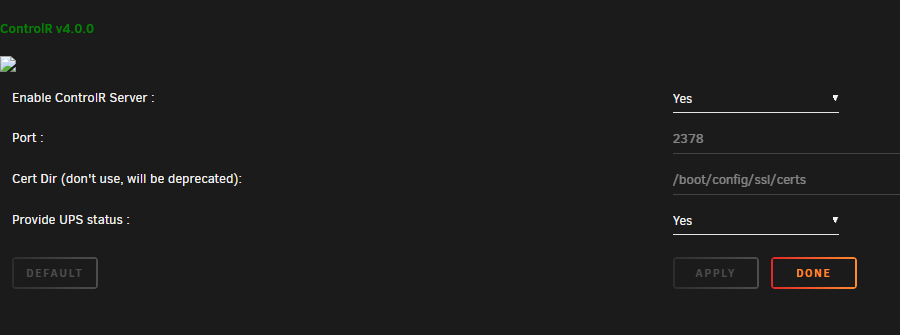
When I start the plugin it shows the service running. But then shuts down immediately. Also I do not get a QR Code. I looks like the image link is broken. Oct 10 18:23:24 Tower1 root: plugin: creating: /boot/config/plugins/controlr/controlr-4.0.0.tgz - downloading from URL https://github.com/jbrodriguez/controlr/releases/download/4.0.0/controlr-4.0.0.tgz Oct 10 18:23:26 Tower1 root: plugin: checking: /boot/config/plugins/controlr/controlr-4.0.0.tgz - MD5 Oct 10 18:23:26 Tower1 root: plugin: creating: /boot/config/plugins/controlr/controlr.cfg - from INLINE content Oct 10 18:23:27 Tower1 root: plugin: running: anonymous Oct 10 18:23:27 Tower1 root: plugin: creating: /tmp/controlr-chkconf - from INLINE content Oct 10 18:23:27 Tower1 root: plugin: running: /bin/bash /tmp/controlr-chkconf Oct 10 18:23:27 Tower1 root: plugin: controlr.plg installed Oct 10 18:24:57 Tower1 ool www[17286]: /usr/local/emhttp/plugins/controlr/scripts/start Oct 10 18:24:57 Tower1 sudo: root : PWD=/usr/local/emhttp ; USER=root ; COMMAND=/usr/bin/bash -c '/usr/local/emhttp/plugins/controlr/controlr -port 2378 -certdir \'/boot/config/ssl/certs\' -showups' Oct 10 18:24:57 Tower1 sudo: pam_unix(sudo:session): session opened for user root(uid=0) by (uid=0) Oct 10 18:25:18 Tower1 sudo: pam_unix(sudo:session): session closed for user root Oct 10 18:26:09 Tower1 unassigned.devices: Undefined POST action - .
-
Hmm, I have two cache drives: Cache_HDD and Cache_nvme My data has always gone to Cache_nvme. But lately it has been going to Cache_HDD
-
My appdata is being sent to the wrong folder. tower1-diagnostics-20231002-1126.zip
-
Thanks for the response but I do not understand the link. It there a fix to my issue? Or just reboot? I am rebooting everyday at this point.
-
this issue happens daily now. can you tell me how to filter the logs so you can review? tower1-diagnostics-20230507-0705.zip
-
this iss` tower1-diagnostics-20230507-0705.zip
-
Also I do not know if it matters or is part of the problem. When I rebooted last night all my shares where gone after it came back up.
-
Sorry I do not.
-
Ok I have uploaded a diag before I rebooted. tower1-diagnostics-20230415-1938.zip
-
Every month or so the User folder disappears. User0 is there. I have attached my diagnostics. tower1-diagnostics-20230328-1925.zip
-
That worked! thanks
-
What was the fix?
-
Log Shows the following: ✔️ UNRAID API started successfully! Oct 5 12:55:27 Tower1 unraid-api[19387]: ⚠️ Caught exception: value.match is not a function Oct 5 12:55:27 Tower1 unraid-api[19387]: ⚠️ UNRAID API crashed with exit code 1
-
Same issue
-
Thanks for your edit. I have been racking my brain.....

