





Unrailed
Members
-
Joined
-
Last visited
-
Thanks, great recourses and great software!
-
Thanks, just installed and configured Duplicati and it seems to work great so far, but I haven’t really tried restoring data yet. How does it compare to Restic?
-
Hi, I know this is not specifically about Unraid, but it is related. How does Gluetun actually work? I have set up a container stack in Unraid that includes Gluetun. For the other container in the same stack, I have specified the network like this: network_mode: service:gluetun. From what I understand, Gluetun establishes a VPN connection to the VPN provider, gets a different public IP address, and then routes the traffic from all other containers in the stack that are configured to use Gluetun through that connection. Is that correct? This is one of my stacks: version: "3" services: gluetun: image: qmcgaw/gluetun cap_add: - NET_ADMIN devices: - /dev/net/tun:/dev/net/tun environment: - VPN_SERVICE_PROVIDER=[VPN provider] - VPN_TYPE=wireguard - WIREGUARD_PRIVATE_KEY=[Password] - WIREGUARD_ADDRESSES=[IP] - SERVER_COUNTRIES=[Country] - SERVER_CITIES=[City] - SERVER_CONNECTION_PROTOCOL=ipv4 - HTTP_CONTROL_SERVER_AUTH=basic - HTTP_CONTROL_SERVER_USERNAME=vpn - HTTP_CONTROL_SERVER_PASSWORD=[Password] ports: - 8012:8012 - 9526:9526 - 8666:8666 - 7232:7232 volumes: - /mnt/user/appdata/gluetun:/gluetun healthcheck: test: ["CMD-SHELL", "wget -qO- https://test.net/ | grep -q 'You are connected'"] interval: 10s timeout: 5s retries: 30 start_period: 20s restart: unless-stopped qbittorrent: image: lscr.io/linuxserver/qbittorrent:latest container_name: qbittorrent network_mode: service:gluetun depends_on: gluetun: condition: service_healthy environment: - PUID=252 - PGID=123 - TZ=[] - WEBUI_PORT=8034 volumes: - /mnt/user/appdata/qbittorrent:/config - /mnt/user/downloads:/downloads restart: unless-stopped networks: {}Is this the correct way to set it up, and how can I verify that the container is actually using the VPN? Will this also work as a secure kill switch if the VPN connection goes down? Regards
-
Hi, I have now migrated from TrueNAS to Unraid, and all that remains is setting up Backblaze B2 backup. I have searched online, but it doesn’t seem as straightforward as in TrueNAS, where it was built in and Backblaze provided a clear and simple guide. I want the backup to upload changes at least once per day and provide a clear log showing exactly how the job went. Unraid doesn’t seem to have a built-in backup module yet, so what is the right way to set this up? Regards
-
So is this really how it works? There’s no proper way to manage jobs? Unraid seems nice overall, but this is a major drawback, there’s no real task manager or job manager. So what file manager should I use instead, one that can handle large move operations without losing the session, but can still be canceled if needed? Ideally, I’d also like to be able to queue move jobs. Pleas, pleas don't say terminal with tmux.
-
Yes, that’s correct. I only added the 8 TB backup disk and formatted it as XFS. The problem is that the terminal session keeps closing from time to time. It has now happened twice, which stops the copy process. I might need to use tmux so the operation continues running on the server even if the terminal disconnects, but tmux is not installed by default. Since I have not added the cache drive yet, it seems that some apps cannot be installed. Right now it is a bit confusing how I should copy the remaining files in a reliable way without the process stopping when the terminal closes.
-
Thanks, I found this link: Version 7.1.0 2025-05-05 | Unraid Docs So I booted Unraid, mounted the ZFS disk and verified that I could read the files without any problems. The new 8 TB backup disk was then added to the array and formatted with XFS. After that I created a script that copies all data to the 8 TB disk. The copy process has now been running for about 10 hours and is currently at 63%. The speed is not very high, around 70 to 80 MB/s, probably because rsync verifies the files during the transfer and because the data is being copied from ZFS to XFS. Here is the script I am running: set -e mkdir -p /mnt/disk1/data1 mkdir -p /mnt/disk1/data2 mkdir -p /mnt/disk1/data3_secure mkdir -p /mnt/disk1/data2/ix-apps rsync -aHAXS --numeric-ids --info=progress2 /data1/ /mnt/disk1/data1/ rsync -aHAXS --numeric-ids --info=progress2 /data2/ /mnt/disk1/data2/ rsync -aHAXS --numeric-ids --info=progress2 /.ix-apps/ /mnt/disk1/data2/ix-apps/ rsync -aHAXS --numeric-ids --info=progress2 /data3_secure/ /mnt/disk1/data3_secure/ sync
-
The version of TrueNAS I got is 25.10.2.1 - Goldeye if that helps. The Disk pools looks like this:
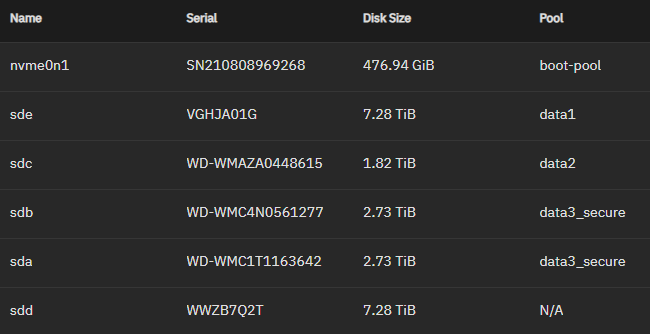
-
Thanks, I understand that if I add a 1000 GB NVMe, only 512 GB will be usable when mirroring it with the existing 512 GB drive. I will try to find a 512 GB model, but if the price difference is small I may still buy a 1000 GB. Regarding parity, I understand the concept but did not plan to use it initially. The main pool will therefore be unprotected. If a disk fails, the data on that specific disk will be lost, and I accept that. Sensitive data will instead be stored on two mirrored 3 TB drives and backed up to Backblaze. I may add a parity disk later, but it feels too expensive right now since I just bought an 8 TB disk for the migration. I would also like to avoid copying files over the network to speed things up, which is one of the reasons I bought the 8 TB backup disk. After some reading it seems that exFAT might be the best filesystem since it is supported by Windows, TrueNAS and Unraid. NTFS is another option, but Linux support does not seem as good, if I understood correctly. If I choose exFAT I will have to mount the 8 TB backup disk in to a Windows 11 computer to format it. If I manage to set up the 8 TB backup disk properly, I could copy everything from TrueNAS to it and then transfer the data to Unraid after installation and pool creation without using the network. However, in my current TrueNAS SCALE setup only the two 3 TB drives are in RAID (mirrored). All other drives have their own pools and datasets. This is not the typical TrueNAS setup, but in my case most of the data is replaceable. Both Unraid and TrueNAS support ZFS if I understand correctly. Since most of my disks are not in RAID, I should be able to export them (except for the mirrored pair) and then import them in Unraid. During the Unraid installation I would only use the NVMe drive, then add the 8 TB backup disk as a JBOD disk without parity and move the data there. Once the data from a ZFS drive has been moved, that disk could then be added to the JBOD pool together with the 8 TB disk. Is this approach possible, and how big is the risk that something fails during the process?
-
Yes, I can buy another NVMe. It will probably have to be a 1 TB model if I cannot find a reasonably priced 512 GB, but that should not matter. It may take a little time before I receive the disk, but from what I understand it should be possible to add it later and convert the cache to a mirror without any issues. Your suggestion about using parity for the entire HDD array is reasonable. The downside is that I would lose quite a bit of usable space since one of the 8 TB drives would need to be used as parity. While it is certainly nice to have all data protected, in my case only about 1 TB of the data is truly irreplaceable, and that part will also be backed up to Backblaze. That said, I do understand the appeal of having one single protected storage pool for everything. In any case, since the initial copy to the 8 TB migration disk will likely take 10 to 15 hours, I would like to start that process as soon as possible. What would be the safest way to prepare the disk and transfer the data? Should I move the drive to a Windows computer and format it as exFAT, or can everything be done directly in TrueNAS where the disk is currently installed so the transfer happens internally?
-
Hi, I have been testing TrueNAS for a couple of weeks, but after the demo tour of Unraid I believe it will fit my needs much better. Current hardware System Intel Core i3-10100, 3.6 GHz, 4 cores / 8 threads 16 GB DDR4 (2×8 GB), 3600 MHz, CL16 512 GB NVMe SSD (PCIe 3.0 x4, M.2 2280) Gigabyte B560M AORUS PRO motherboard Drives WD20EARS-00MVWB0, 2 TB, 5400 RPM (WD Green) WD30EFRX-68AX9N0, 3 TB (WD Red NAS) WD30EFRX-68EUZN0, 3 TB (WD Red NAS) WD80EDAZ-11TA3A0, 8 TB (WD Red Plus / white label) Gigabyte GP-GSM2NE3512GNTD, 512 GB NVMe SSD I have also purchased a new empty disk to assist with the migration: Seagate IronWolf ST8000VN004, 8 TB (NAS) My assumption is that I first need to format the IronWolf with a filesystem that Unraid can read, then copy all data from TrueNAS to that disk (internal, not over network) before setting up the final Unraid configuration. It is very important that no files or metadata are lost during this process. The goal in Unraid is to have two storage areas: Mirrored secure storage WD30EFRX-68AX9N0, 3 TB (WD Red NAS) WD30EFRX-68EUZN0, 3 TB (WD Red NAS) Large non-mirrored (raid) storage area where I can add disks later, and where a failed disk only affects the data stored on that specific disk: WD20EARS-00MVWB0, 2 TB (WD Green) WD80EDAZ-11TA3A0, 8 TB (WD Red Plus / white label) Seagate IronWolf ST8000VN004, 8 TB (NAS) What would be the safest and most reliable way to perform this migration?
-
So I could skip any disc to the parity slot and just run it as is? If I add disk to the parity disc the entire disc will be used to parity, nothing else can be stored here. And if the biggest data disc I got is 8Tb the parity disc needs to be 8TB? If that is correct then it sounds like I will have to run it without parity disk. The problem is that this is the only way to secure data in unRaid, there is no regular raid levels, right? Is there a NAS software out there that you think would be better in my case? This is the features Im looking for : - Share data to Windows and Android clients within LAN - Run BackBlaze(cloud backup) - Run torrent - Run VPN
-
Thanks, and if I add a second and third disc, will it create the parity itself? Will it use an entire disc or just a part of it for this? I have read in other forums that 1 drive is used as parity, that's why I ask. From what I understand the largest disk needs to be used as parity so that means I should start moving over my 8TB disk?
-
-
But how does the partion register work? From what I understand 1 disc needs to hold patition information? Might it be better to start adding a smal disc for this? Will the entire disc be used for this?

