





Christobol
Members
-
Joined
-
Last visited
Everything posted by Christobol
-
Look for motherboard error codes, and if you can try other OSs to see if they have the same problem, which will show it's not an Unraid issue, but a MB issue. On my Asrock x299 board, I have the same issue, which is a memory issue that becomes severely exacerbated when xhci handoff is enabled. I have the problem in both a separate drive with Windows and UnRaid, so it's not an UnRaid issue. The MB error code helps too.
-
I must have email updates turned off since I didn't see this response. I ended up deleting the array and building everything from scratch. The appdata restore didn't work. So good learning lesson, now I have a failure test case to see if I can get the restore to work for the future.
-
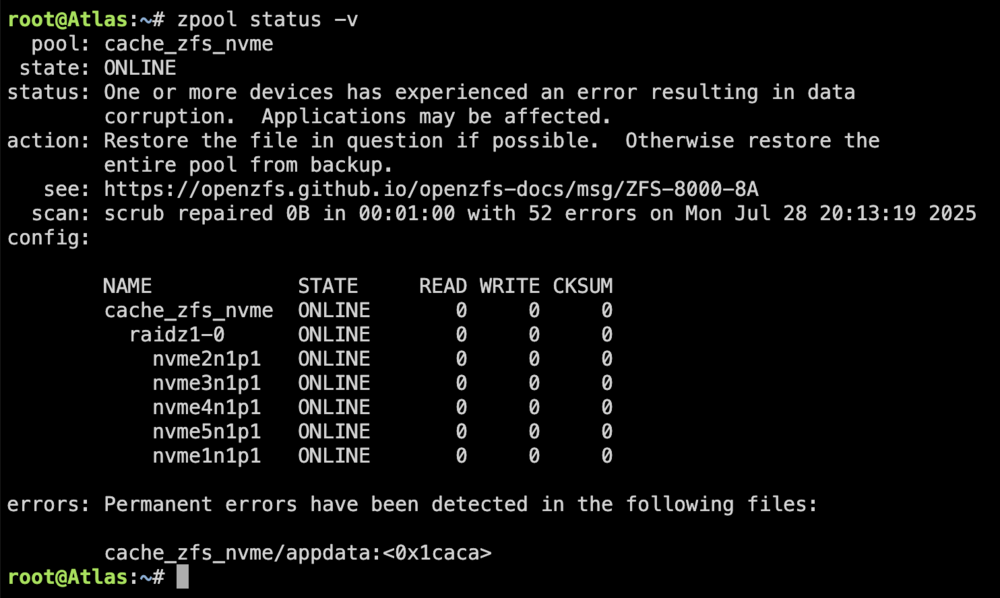
I forced a power cycle. I rebooted into safe mode, started the array in maintenance mode, and it worked. -Booted safemode again - Started Array -System is stuck here like earlier today. I've attached new logs (the prior logs had no updates from what was posted after running ~6 hours other than a reboot command) -2 cpus are pinned at 100% utilization again - after ~32 minutes the array started as did one cache pool, the ZFS pool is still mounting -> I do not see a log entry that the other drives were available in the GUI zpool status -v output I guess this is a zfs issue? I'll look for next steps. My inclination is to give up on the data on the drive, kill the pool, format and build a new one? atlas-diagnostics-20250729-1626.zip
-
My system has been down for a few months while I tried to troubleshoot a number of problems. It looks like the old motherboard went bad, and given the age of the Intel 10980xe, finding a replacement MB was tough. Finally, I found one and figured out the memory wasn't compatible. I upgraded the parity drives and SATA controller to a 9500-16i, etc. So I'm not super surprised I had a problem with a file system error given the problems that were occurring, but I can't get the system to a place to start fixing the fundamental problems (it seemed to be working until I tried to scrub the ZFS cache). Last night, after the scrub checking zpool status -v and seeing the bad files, I tried to delete them. The affected files were Plex cache/library files. That process ran an hour before I decided to shut down Docker. Then I tried to scrub again from the GUI. The system seemed to get stuck with 8 or so CPUs maxed out at 100%. I tried to shut down, and nothing changed, so I let it run overnight for 12 hours, and there was no change. I still couldn't shut down. I finally pulled the power this morning. Tried to start the array and after 3 hours it is still starting, and 2 CPU coresare pinned again. Tried to run fix common errors, it stalls at 36%. What should I do from here? I'm guessing this is all related to the corruption of the ZFS cache (running 5 NVMe's in a raidz1). atlas-diagnostics-20250729-1055.zip
-
Well, the first step was to determine the fragmentation level. As the tool states, the value is mostly meaningless, so unless I found reports of very high fragmentation, there would not be much of a reason to defragment. The thread you linked had a post with the encrypted drive parameter, which answered my original suspicion about why the command I was using wasn't working, my array is encrypted. For encrypted drives you need to run: xfs_db -r /dev/mapper/mdXp1 #X is the drive number, and adding /mapper/ is for encrypted arrays in 6.12+ So a cheat sheet of commands -r means read-only For unRaid 6.12 and newer, non-encrypted arrays use /dev/mdXp1 For unRaid 6.12 and newer, encrypted arrays use /dev/mapper/mdXp1 For unRaid 6.11 and older use /dev/mdX Not sure if /mapper/ applies to encrypted arrays in 6.11 or older as I cannot test that My drives mostly returned values below 10% total or file fragmentation. 2 drives returned 30%. With those two am I going to move some files off as they are approaching max capacity anyway. And yes, the xfs_fsr is the defrag command ljm42 used in the thread I posted. I was still in the information-gathering stage.
-
I am currently doing a couple of parity-swap (disable), then will be removing a few of my 3TB drives and moving their data to the, soon to be, old parity drives. I read the threads about xfs fragmentation and thought I would check mine while doing so much array work. The command I found to check the frag level is failing through: Defrag XFS Array Drives root@Atlas:~# xfs_db -r /dev/md3p1 xfs_db: /dev/md3p1 is not a valid XFS filesystem (unexpected SB magic number 0x4c554b53) Use -F to force a read attempt. So I tried adding the -F: root@Atlas:~# xfs_db -r -F /dev/md3p1 *(I tried other drive numbers and all return the same result)* xfs_db: /dev/md3p1 is not a valid XFS filesystem (unexpected SB magic number 0x4c554b53) xfs_db: V1 inodes unsupported. Please try an older xfsprogs. When looked up the V1 inodes unsupported I found references to the drive being formatted with an old version of xfs. Any ideas what is going on? I doubt this matters but it's xfs encrypted. atlas-diagnostics-20240722-2344.zip
-
I actually started and stopped the array a few times to run the commands and realized that when it was stopped it wouldn't work. Very strange. Since then I let an update run so I imagine finding the problem might be problematic in the diagnostics. atlas-diagnostics-20240405-2238.zip
-
As I mentioned above I tried zpool import when the array was running, along with: export and list. I spent about about 5 hours, without a reboot or me doing anything other than having the array running, reading dozens of support threads and trying to figure out why Fix Common Problems plugin reported this: * **cache_zfs_nvme (Samsung_SSD_970_EVO_Plus_2TB_S59CNM0R601069W) has file system errors ()** and that error was gone. So I decided to run: zpool list --> nothing showed up again zpool import and suddenly my pool was showing: @Atlas:/mnt# zpool import pool: cache_zfs_nvme id: 7422096033263261955 state: ONLINE action: The pool can be imported using its name or numeric identifier. config: cache_zfs_nvme ONLINE raidz1-0 ONLINE nvme2n1p1 ONLINE nvme3n1p1 ONLINE nvme4n1p1 ONLINE nvme5n1p1 ONLINE nvme0n1p1 ONLINE ---- @Atlas:/mnt# zpool import cache_zfs_nvme cannot import 'cache_zfs_nvme': I/O error Recovery is possible, but will result in some data loss. Returning the pool to its state as of Fri 22 Mar 2024 09:37:58 AM CDT should correct the problem. Approximately 6 seconds of data must be discarded, irreversibly. Recovery can be attempted by executing 'zpool import -F cache_zfs_nvme'. A scrub of the pool is strongly recommended after recovery. ---- @Atlas:/mnt# zpool list NAME SIZE ALLOC FREE CKPOINT EXPANDSZ FRAG CAP DEDUP HEALTH ALTROOT cache_zfs_nvme 9.09T 1.53T 7.57T - - 0% 16% 1.00x ONLINE - I stopped the array and then started it again and my data was back. Now I'm showing a different error: When I hover over the red lock, I get device locked with unknown error. After stopping the array and starting it again the red lock was gone. I don't know what to do at this point, or why it suddenly was able to be located and repaired. I'm concerned about this occuring again. I did lose a number of files in my plex docker directory (and apparently only plex). I am confused about how zfs protected my files if file corruption was possible at the disk level and not recoverable.

-
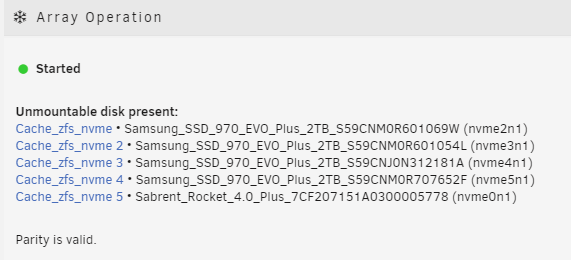
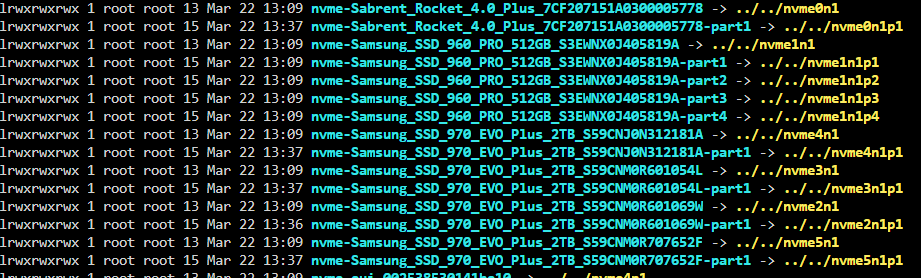
My unraid crashed today and when I checked the command line before rebooting saw a kernal panic and I think a macvlan issue. (macvlan issue was created a couple of days ago when I wanted to start assigning dockers to certain vlans) Running 6.12.8 ZFS pool created using SpaceInvaderOne's video guide once ZFS was official (forgot what release that was). I doubt this is related, my Plex server went into database migration a few days ago and hasn't worked since. I also had another crash ~2 DAYS ago for which I didn't get any log info and didn't investiage. This is where I store my appdata, system etc, so all of my dockers are dead right now. Reading about this I found people who had other issues, nothing quite the same but I tried to use zpool to get more info and get: zpool list (import export etc instead of list) no pools available the Fix Common Problems plugin reported this: * **cache_zfs_nvme (Samsung_SSD_970_EVO_Plus_2TB_S59CNM0R601069W) has file system errors ()** Though I just tried to run it again and it didn't show up I ran ls -l /dev/disk/by-id/ and here is a partial screen shot since I have so many drives in my primary array. I am at a loss as to why zpool doesn't see the array, and I don't know how to correct the corruption found on the first drive. I'm not sure what is best to do from here, I thought with this drive running zfs I wouldn't need to worry about a single nvme failure. Currently I can't load any dockers to start getting services back since my appdata etc were on that drive. atlas-diagnostics-20240322-1354.zip

-
I had the same problem and renaming the vfio-pci.cfg fixed the issue. My system was rebooting 2 seconds after the Boot Option menu timed out, so I never saw any scrolling lines of text from the boot process.
-
I'm sure there are logs that will help troubleshoot this, I'm just not sure which and how to save them. <-- direction would be appreciated So have 2 ssd's setup as my download cache with any overage going to my array. The two drives total 256G. In Sabnzbd when I download at 70-120MB/s and get close to filling the drive, plus unpacking all of my docker containers stop responding, Sonarr, Radarr, Docker (tab in the webgui), Apps (tab in webgui). I can still look at the Main tab and Dashboard and see that CPU usage is 20-60% (60 is the highest I've seen), and that I have tons of available memory. I'm running a 10980xe, with 64g ram so it takes a lot to max the system out. I can't figure out what is causing all of the other dockers to totally freeze on me and fail to load, as well as parts of the webgui. I did have a USB failure and lost my docker containers. After getting the array working with a clean USB with a fresh config directory (thank goodness for drive location screenshots!), I couldn't get the dockers to install and work. So I deleted their appdata directories and installed new versions... and everything worked with the prior settings intact. So how do I troubleshoot this?
-
Just to give people an update on current cases. Here are the ones I found that I liked the most, there are others of course, but I thought I'd point out the ones that really have good capacity and are actively being sold right now rather than discontinued as of this posting date. Fractal Define 7 XL series - Full Tower: https://www.fractal-design.com/products/cases/define/define-7-xl/Black/ 18 3.5" drive bays with add on HDD cages $200 Mesh 2 XL Same case as Define 7 XL, slightly different airflow, Mesh 2 XL - Full Tower: https://www.fractal-design.com/products/cases/meshify/meshify-2-xl-dark-tempered-glass/black/ ~$200 Phanteks Enthos Elite - Super Tower: https://phanteks.com/Enthoo-Elite.html -13 x 3.5" and 6 x 2.5" ~$850 Enthos 719 - Full Tower: https://phanteks.com/Enthoo-719.html 12 x 3.5" and 11 x 2.5" ~$190 I have this case and REALLY like all aspects of it, from water cooling, lighting, build quality etc Enthos Pro 2 - Full Tower: https://phanteks.com/Enthoo-Pro2-TemperedGlass.html - with extra drive trays 12 x 3.5" and 3 x 2.5" ~$190 I have this case and again really like it, but the Enthos 719 is better Eclipse P600S - Mid Tower https://phanteks.com/Eclipse-P600s.html 10 x 3.5" and 3 x 2.5" ~$160 Eclipse P500A - Mid Tower https://phanteks.com/Eclipse-P500A.html 10 x 3.5" Corsair Obsidian 750D - Full Tower https://www.corsair.com/us/en/Categories/Products/Cases/Obsidian-Series™-750D-Airflow-Edition-Full-Tower-ATX-Case/p/CC-9011078 9 x 3.5" and 4 x 2.5" ~$160 Obsidian 800D - Full Tower https://www.corsair.com/us/en/Categories/Products/Cases/Obsidian-Series™-800D-Full-Tower-Case/p/CC800DW 9 x 3.5"" and 2 x 2.5" ~$300 Obsidian 1000D - Super Tower https://www.corsair.com/us/en/Categories/Products/Cases/Software-Control-and-Monitoring-Cases/Obsidian-Series-1000D-Super-Tower-Case/p/CC-9011148-WW - 5 x 3.5" and 6 x 2.5" $500 I also own this case and it's a beast, I do love it, and it's stuffed with equipment and water cooling. Given how much space there is, you can easily add extra 3.5" (12 or 25 more easily) mounts, just not sure it'll be pretty. Thermaltake View 91 RGB Plus - Super/Full Tower: https://www.thermaltakeusa.com/view-91-tempered-glass-rgb-edition.html 12 x 3.5" or 2.5" ~$500 (just ordered and will see what the quality is like and looks like lots of space for what cooling too) Level 20 - Full Tower https://www.thermaltakeusa.com/level20.html 14 x 3.5" or 2.5" $1000 Core W200 - Super Cube https://www.thermaltakeusa.com/core-w200.html 17 x 3.5" or 2.5" $550 (dual server case) expandable Core W100 - Full Tower https://www.thermaltakeusa.com/core-w100.html 13 x 3.5" or 2.5" $400
-
I figured out how to change to UEFI and his videos show the same. I did try his method with UEFI enabled on the flash creation with a new drive that he recommends. First boot, select GUI, and blinking curser once loading finishes. So... how do I get into the GUI locally while booting to UEFI? Let's ignore the VM comment, and focus on one problem at a time.
-
So I'm BRAND new to unRAID and am still testing the system against my other storage servers. So I'm certain there are huge blanks in my knowledge. I'm planning on running a Win10 in VM to game on the system, hence wanting the webgui to work so that I can eventually get the VM to run with the connected monitor and keyboard etc (side issue, on my first install had problems with getting my 3090 to pass through to the VM and, tried a number of fixes listed none worked, and then found the UEFI boot option and thought I'd give it a try on a fresh install). So I did a wipe of my USB drive from my first install so I'm starting clean. Changing to Permit UEFI and altering my bios settings, the system boots, I see all of the linux processes start, scrolling text with the screen going blank leaving a flashing curser in the top left of an otherwise blank window. From there the system won't respond to keyboard inputs. The remote web interface works fine. I took a video of the boot up to see what was last displayed before the blank screen: ___ Starting crond: ...blah blah... Starting atd: ...blah blah... Starting Samba: ...blah blah... unRAID Server OS Version: 6.9.2 IPv4 address: 192.168.1.x IPv6 address: not set Tower login: _ -----> blank screen with flashing curser For the heck of it I tried typing in Root <enter> <enter> since I haven't changed any user login info yet. Any suggestions? Eventually I'd like to be about to run this as a normal computer with all of the unRAID stuff behind the scenes, dockers etc. System info: Model: Custom M/B: ASUSTeK COMPUTER INC. ROG RAMPAGE VI EXTREME ENCORE Version Rev 1.xx - s/n: MB-1xxx BIOS: American Megatrends Inc. Version 1004. Dated: 03/19/2021 CPU: Intel® Core™ i9-10980XE CPU @ 3.00GHz HVM: Enabled IOMMU: Enabled Cache: 0 KiB, 0 KiB, 0 KiB Memory: 32 GiB DDR4 (max. installable capacity 3072 GiB)




