





E-ManN
Members
-
Joined
-
Last visited
-
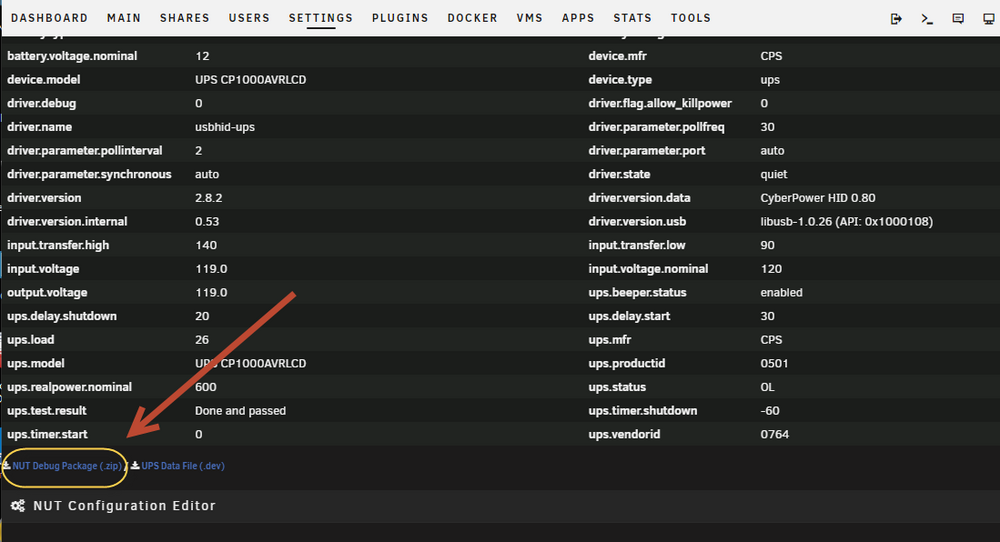
from Rysz ... Great, glad you got it working. If it fails again, please don't uninstall the plugin, but download the "NUT Debug Package" from "NUT Settings" and post here again before doing anything else. 🙂 Foe those who don't know I founD what Rysz was referring to for "NUT Debug Package" from "NUT Settings" ... I had to look hard for it ... 😁 thought I'd share as I did not see it right away. thanks, E
-
Vr2Io, Thanks for the follow-up. The Developer Rysz actually gave me the fix in the the main thread for the app. Top level was just had use the official NUT by Rysz and then go into the template and hit the RESET to default button, then re-enter NUT Server configuration. more details can be found here ...
-
thanks for that Vr2Io Reading up on Home Assistant now. thanks, E
-
ok thanks will do. E
-
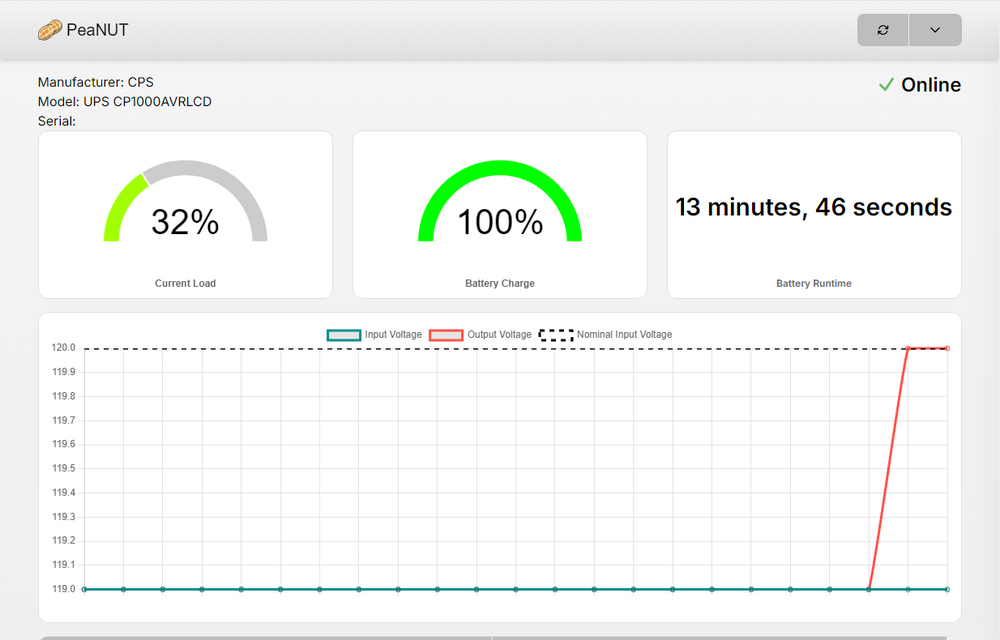
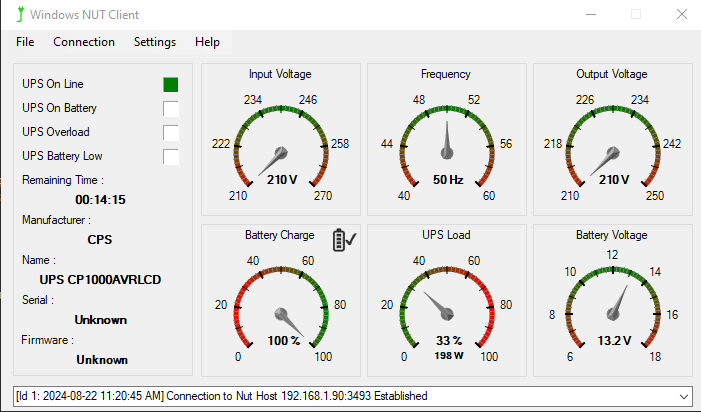
Thanks for all your help Rysz. Got it working with your version of NUT ... hopefully on next reboot it will not give me that service not started error again. step taken to fix ... 1) Uninstall the old unsupported version of the NUT Plugin 2) From terminal session .. - cd /tmp/plugins/pluginPending - rm nut.plg - cd .. - rmdir pluginPending 3) Search for NUT in CA .. pending is gone. Woo Hoo ! 4) Install NUT service will fail to start again ... 5) are per your instructions .. click "Reset Config" button 6) RE-Configure your nut server ALL IS good for now ... thanks, 😁 E

-
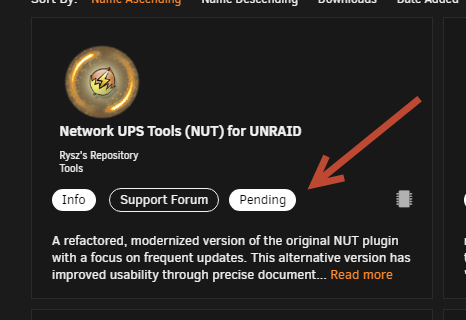
OK thanks for that info. OK so I have uninstalled the old NUT Plugin. But your plugin on CA has "Pending" Probably because I was monkeying around with it this morning trying to install it. I'm not sure how to get around this ... can you post the plugin URL path in this thread ? I'll try installing it this way. thanks, E
-
Hi ALL, So a few days ago I installed ... Network UPS Tools (NUT) for UNRAID - desertwitch from RYSZ's Repository on CA and set it up and got it working perfectly on my UNRAID server as Master and configured winut client on my Windows Machines as slaves pointing to the nut server on UNRAID. Happy happy happy! Two days ago, I reboot my UNRAID server and all came up fine except for my NUT server. Nut Service would not start. Checked Syslog and found this error ... "Aug 20 04:48:05 servername root: plugin: skipping: nut-2.8.2-x86_64-3master.ssl31.txz - Unraid version too low, requires at least version 6.13" I'm puzzled at this as I am running the lasted version UNRAID 6.12.11 anyhow I removed this plugin & installed a older version of NUT server from older thread ... using the plugin URL https://raw.githubusercontent.com/dmacias72/NUT-unRAID/master/plugin/nut.plg My UPS is once again being recognized by UNRAID and all clients seeing the UPS service on URNAID server. this morning I see a message on UNRAID console informing met that NUT has been removed as the version is no longer supported. SO I go back to CA and install the version from RYSZ's Repository and again the NUT service won't start. SO for now I'm back on old version of NUT which I know at some point will auto uninstall again. any suggestions on how to install a version of NUT which woks on UNRAID 6.12.11 ? thanks, E
-
Hi ALL, I know this thread it a little bit old but I was wondering if I can get some help here. So a couple days ago I installed ... Network UPS Tools (NUT) for UNRAID - desertwitch from RYSZ's Repository and set it up and got it working perfectly on my UNRAID server as Master and configured winut client on my Windows Machines as slaves pointing to the nut server on UNRAID. Happy happy happy! This morning I reboot my UNRAID server and all came up fine except for my NUT server. Nut Service would not start. Checked Syslog and found this error ... "Aug 20 04:48:05 servername root: plugin: skipping: nut-2.8.2-x86_64-3master.ssl31.txz - Unraid version too low, requires at least version 6.13" I'm puzzled at this as I am running the lasted version UNRAID 6.12.11 anyhow I removed this plugin & installed a older version of NUT server from this thread ... using the plugin URL https://raw.githubusercontent.com/dmacias72/NUT-unRAID/master/plugin/nut.plg My UPS is once again being recognized by UNRAID and all clients seeing the UPS service on URNAID server. My Question is ... IS it possible to install Apache2-nut cgi webpage on UNRAID? It's not listed in CA. I would really like to get the detailed UPS Graphs and information if possible. Or can you suggest another GUI I can use to get Detailed UPS information? thanks, E
-
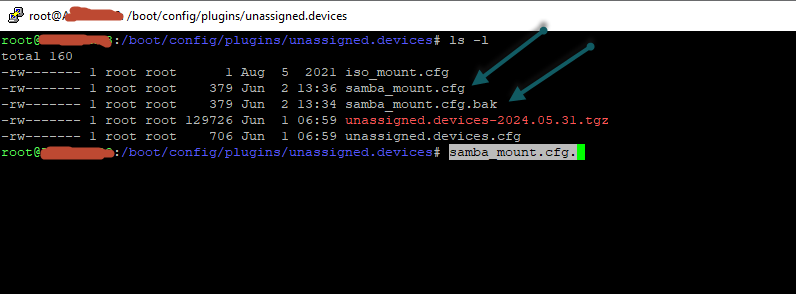
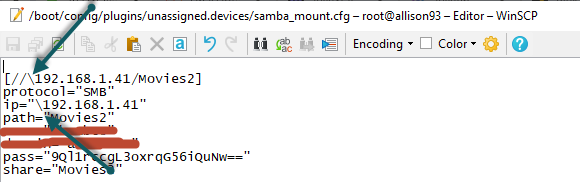
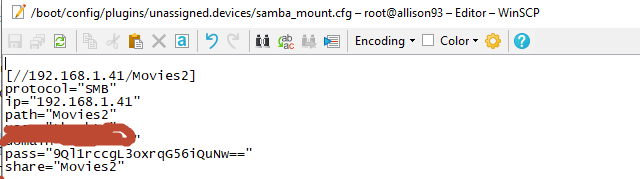
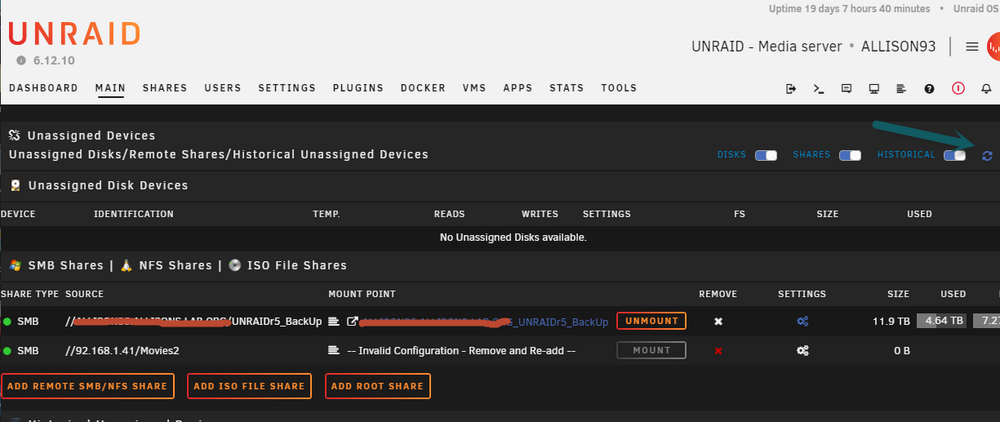
woo hoo ! Thanks a million dlandon. All fixed! The name of my config file was a little different. for those of you interested I documented the steps in more detail ... ok .. so I connected to my UNRAID server with winscp. made a backup of samba_mount.cfg. ... samba_config.cfg was not found, but this looks like the correct file ... in winscp made a copy of (in the same folder) /boot/config/plugins/unassigned.devices/samba_mount.cfg named it ... /boot/config/plugins/unassigned.devices/samba_mount.cfg.bak edited in winscp /boot/config/plugins/unassigned.devices/samba_mount.cfg removed the two \ from the file. before ... after ... saved the file. opened the file again to verify that the changes stuck. now onto this step ... "Go to the UD page and click on the double arrows in the upper right" now I can mount or delete the remote share ... thanks again for your help dlandon. It was my badd using the back slashes. Yes I'm a Windows guy. lol thanks, E
-
ok ... from putty went to /boot/logs found the the UD diag file. copied to PC using winscp .... here is the uploaded diag file. thanks, E ud_diagnostics-20240602-101750.zip
-
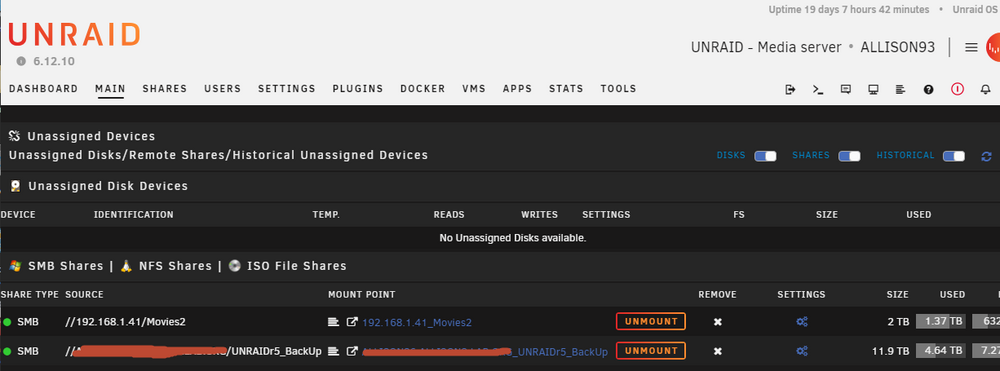
Hi all, Been having this problem for a couple weeks now. I missed a "1" when I tried to add a remote share using UD. I'm trying to remove it from the UNRAID GUI and cannot. The GUI tries to remove, says it has been removed but then it's still there. I waited for the latest UD update to come down a couple days ago and installed it. Still no joy. things I have tried ... - stopping array and try to remove the remote share - Putty session into UNRAID server and ensure that the remote share\folder was not in the remotes folder I am running the most recent versions of dlandon UD & UD Plus ... any suggestions much appreciated ... thanks, E


-
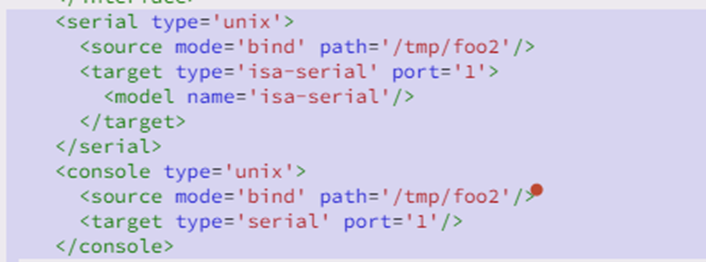
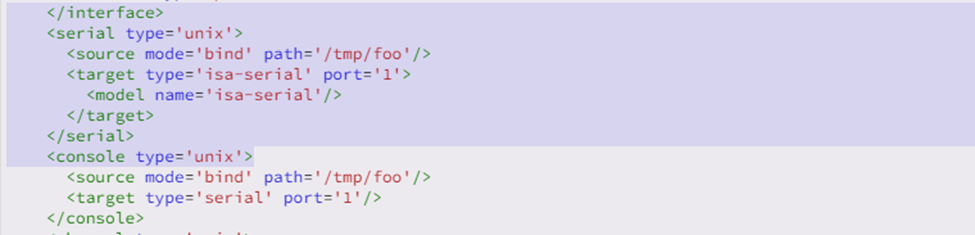
brain fart on me .. i got it working. Had to change the port=1 to port=0 on both vms in the XML file as the tty connect I was using was to port0 .. ah duh !. I now have console session on Linux mint VM. Thanks A million SimonF .. you are a Rockstar !
-
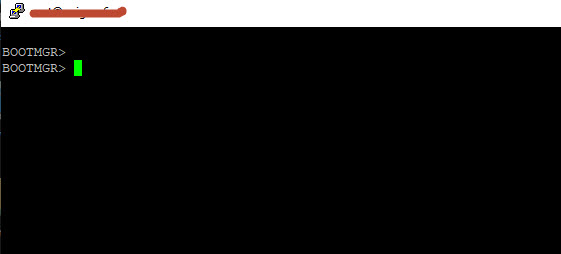
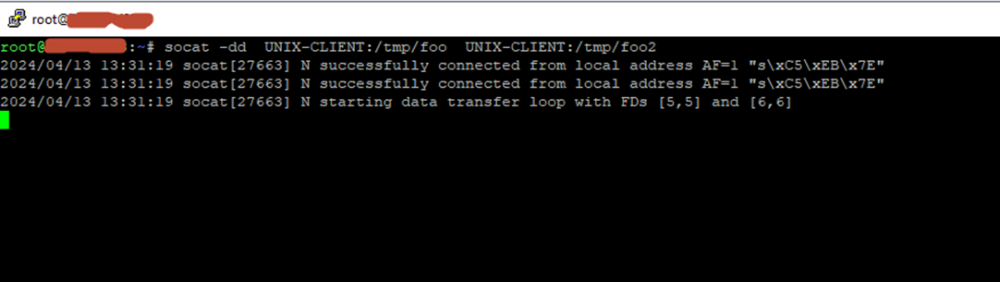
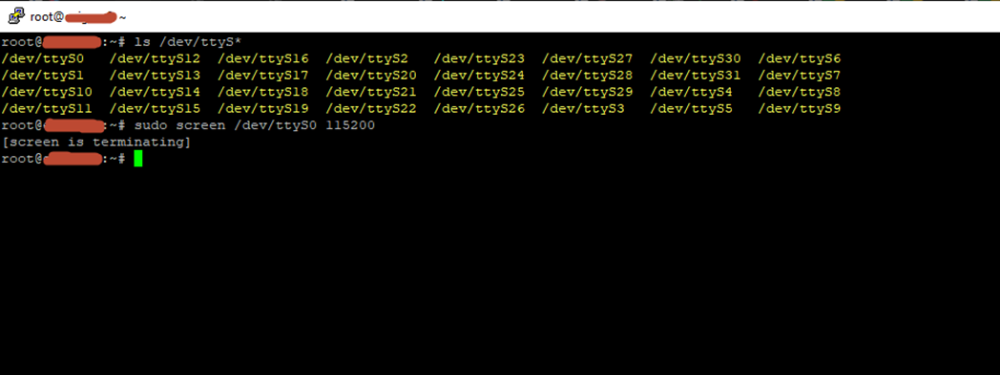
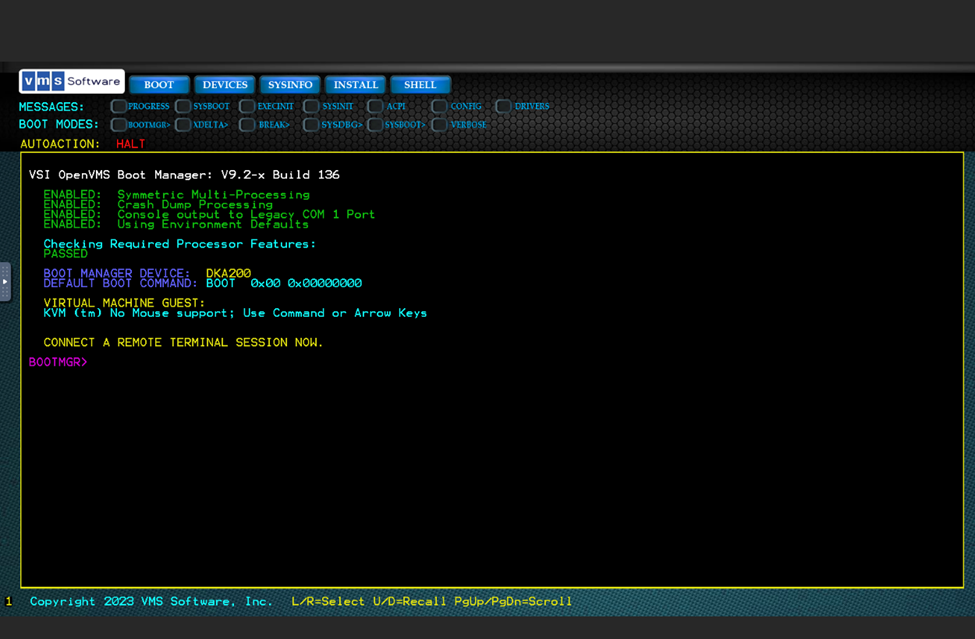
Kool ... thanks for the info. I expected as much. update ... Ok. So playing around in the lab this am. As per the instructions 1) I installed socat-1.7.4.3 on my UNRAID 6.12-.10 Pro server 2) I configured the serial connection in the XML file for my OpenVMS VM as outlined in the steps 3) I configured the serial connection in the XML file for my Linux mint VM (Serial console machine) VM – on the same UNRAID server as OpenVMS VM. 4) Powered up both VMs and then from command prompt on UNRAID server ran a. socat -dd UNIX-CLIENT:/tmp/foo UNIX-CLIENT:/tmp/foo2 b. got the desired connection results 5) Went back to my linux mint console VM and checked the tty ports 6) Then tried a screen connect to get a console session on my OpenVMS VM from my Linux Mint VM … screen failed to open – used à sudo screen /dev/ttyS0 115200 Should I be using another command on my Linux mint machine to get console display from the OpenVMS VM ? This is what the UNRAID console session for the OPenVMS VM looks like in UNRAID VM Console (VNC) … and this is what I am trying to get on my Linux Mint VM with the serial console connect. I feel like this a brain freeze on my part … so close but missing something. I’m reading up on socat whitepapers. I’m not a Guru Linux guy but learning. J Thanks, E
-
Thanks a lot SimonF for the speedy reply. I will work on it this weekend to see if I can get it working. Awesome ! 🙂 forgot to mention that I am on UNRAID 6.12.10 Pro version .... yikes how stupid of me that I forgot to mention this ! so if I am understanding your setup I should use the socat-1.7.4.3-x86_64-1.txz version but for the next release of UNRAID I will need to install the socat-1.8.0.0-x86_64-1.txz version. Not sure if you can tell me this but, will I have to keep installing the latest version of socat each time UNRAID OS is upgraded ... or after each upgrade I should check it it still works and if not search for latest version of socat? anyhow thanks again ... will go to my lab later and try this out. 🙂 thanks, E
-
Hi All, I have been searching for days now and have not found a solution yet. I'm trying to use a Linux mint VM and VSI OpenVMS on x86 VM, both on the same UNRAID server and have them share a serial connection using the Linux mint VM as the serial console connection for the VMS server VM. Yes I know nostalgia here ... but when I first started working after University my 1st job was a VAX Operator. Much appreciated if someone knows how to set this up. I've tried suggestion I googled and can't get it working. I have this working on my VMWare Pro Workstation host with the serial connection for both VMs a named pipe. I want to get this working on my UNRAID server in hopes to set up another VAX and get a VAX cluster going between the two systems. thanks, E





