





AlexON
Members
-
Joined
-
Last visited
Everything posted by AlexON
-
Mac double-click the file make_bootable_mac file and enter your admin password when prompted. That doesn’t work Envoyé de mon iPhone en utilisant Tapatalk
-
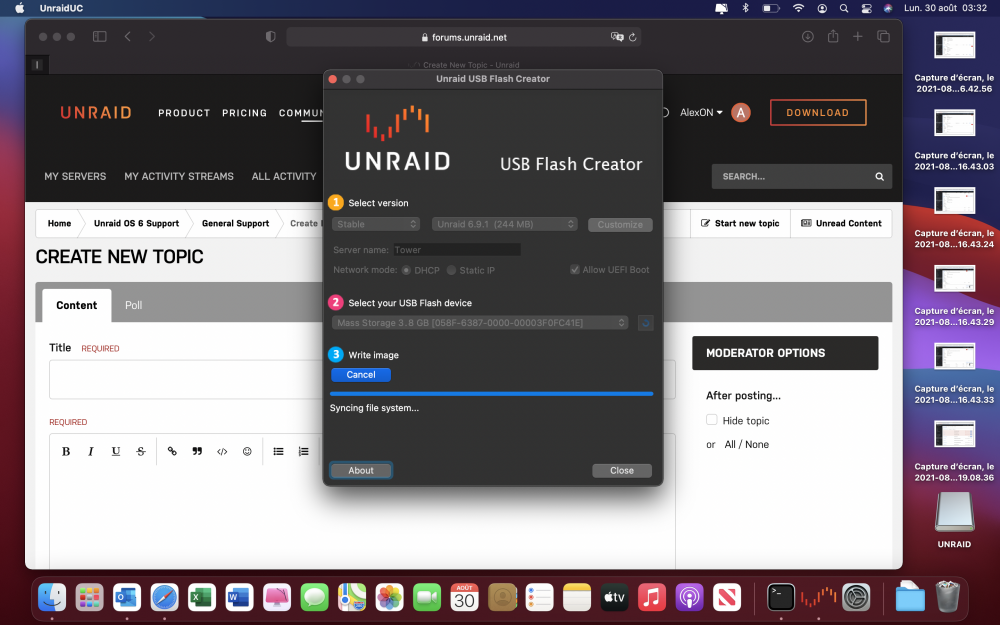
I think the photo speaks for itself. Do you have a solution?
-
Bien d’accord avec toi. Je sais pas si je sais pas suivre les tutos de superboki mais ça fonctionne pas. Envoyé de mon iPhone en utilisant Tapatalk
-
Hi I am having the same problem as @slipstream. I am running UNRAID USB Creator on MAC and the application hangs on "syncing file system ...". An idea ? Or I formatted my key in FAT32 and renamed UNRAID. I copied the whole archive to the stick, and when I run make_bootable_mac, it gives me this. Last login: Sun Aug 8 12:52:44 on ttys000 alexandremate@MacBook-Air-de-Alexandre ~ % /Volumes/UNRAID/make_bootable_mac INFO: make_bootable_mac v1.3 INFO: The following drive appears to be the unRAID USB Flash drive: /dev/disk4 4.0GB Permit UEFI boot mode [Y/N]: Y cp: /tmp/UNRAID/syslinux/ldlinux.c32: Permission denied cp: /tmp/UNRAID/syslinux/libcom32.c32: Permission denied cp: /tmp/UNRAID/syslinux/libutil.c32: Permission denied cp: /tmp/UNRAID/syslinux/make_bootable_linux.sh: Permission denied cp: /tmp/UNRAID/syslinux/make_bootable_mac.sh: Permission denied cp: /tmp/UNRAID/syslinux/mboot.c32: Permission denied cp: /tmp/UNRAID/syslinux/mbr.bin: Permission denied cp: /tmp/UNRAID/syslinux/menu.c32: Permission denied cp: /tmp/UNRAID/syslinux/syslinux: Permission denied cp: /tmp/UNRAID/syslinux/syslinux.cfg: Permission denied cp: /tmp/UNRAID/syslinux/syslinux.cfg-: Permission denied cp: /tmp/UNRAID/syslinux/syslinux.exe: Permission denied cp: /tmp/UNRAID/syslinux/syslinux_linux: Permission denied To continue please enter your admin Password: sudo: /tmp/UNRAID/syslinux/make_bootable_mac.sh: command not found alexandremate@MacBook-Air-de-Alexandre ~ % or with the sudo command alexandremate@MacBook-Air-de-Alexandre ~ % sudo /Volumes/UNRAID/make_bootable_mac INFO: make_bootable_mac v1.3 INFO: The following drive appears to be the unRAID USB Flash drive: /dev/disk4 4.0GB Permit UEFI boot mode [Y/N]: Y To continue please enter your admin sudo: /tmp/UNRAID/syslinux/make_bootable_mac.sh: command not found alexandremate@MacBook-Air-de-Alexandre ~ % Thank you

