





tech_rkn
Members
-
Joined
-
Last visited
-
Hello, using this container, i am having trouble when logging via a browser. Am i the only one ? My trouble is a loop originating-ending on the password-user skipping all 2FA options i am using. The only workaround is to reboot unraid. Start-stop-restart of docker are useless. Using nextcloud , proxy_manager_nginx , redis. And, of courses, no logs usefull...
-
Hello, Don't think not sure ... /etc/system.conf is persistant at unraid reboot. Any modifications is revert back at original file. This is why I modify the /boot...
-
Thank you I might just stick to wireguard as I used it to access my lan too.
-
Hello, My log is complaining about: vm.overcommit_memory = 1 How to make it persistant ? can't remember ... !! okay, i found out. created a sysctll.conf files under /boot/config/ # redis vm.overcommit_memory = 1 then execute : /sbin/sysctl -p /boot/config/sysctl.conf should do the trick... posted for other newbee like me...
-
Hello, the real question about this "feature" is, is it safer than a wireguard or openvpn tunnel ??
-
unraid.net killed my wireguard conf ... resolved by resolved ...
-
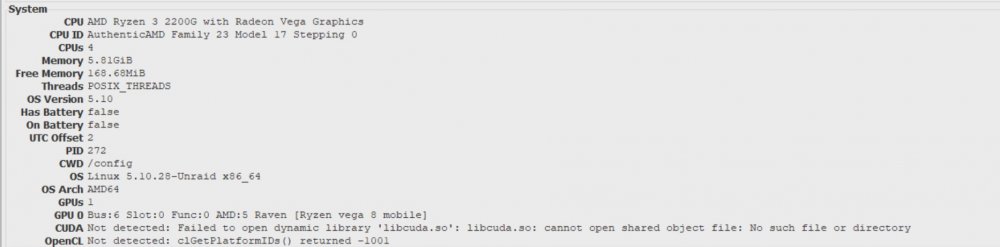
unRAID 6.9.2 opencl support with this folding docker ?? error in folding@home FAHcontrol ... Is it the docker missing something, or unRAID missing amdgpu-opencl drivers ?? ClGetPlateformId -1001
-
Dear community, Some thoughts following CNN article about: "hackers repeatedly took advantage of several known flaws and one newly discovered vulnerability in Pulse Secure VPN, a widely used remote connectivity tool, to gain access to dozens of organizations in the defense industrial sector" I am pretty sure others vpn like wireguard and openvpn may have the same flaws. But there is another point of failure in our network. Our ISP routers. Bypassing vpn by direct access using them is possible. Even sometime easy as they have built in login as admin/admin most of the time... Yesterday, using burp, hydra and kali I gained access to a test network through the wifi as a demonstration to one of my friend, trying to show him how to hardened his Isp routers. Once done, I hit his openmediavault Gui, trying log in. Using an eset network scanner, I highlight a login failure as admin/openmediavault was still used. The only thing stoping me by the lack of time was his F2A protection. My point here, is unRAID might be in the same trouble, and don't have F2A login protection. What are your tought on this subject ?
-
Securing a tunnelwithe openvpn or wireguard is nice, but a unsecured door is still an unsecure door... There is a spof in every home, your isp router. Usually, for economic reason, this box are low grade quality, sometimes without firewall or even set with an admin/admin like password never change by the users and can be ( not so easy but feasible ) access through wifi ( as for my neighbours , both of them, with 2 different isp ) When done, their network are simply open. At that time, forget your nicely done tunnel. Adding one more security layer like a F2A/fido validation for the sign-in is not so stupid.
-
More security, fully manageable firewall, u2f fido, live like journalctrl in dashboard...
-
I saw the F2A for the forum. Nice. How about F2A for unRAID himself ? I am using my yubikey on almost every accounts/services I have, except my own unRAID...
-
tech_rkn changed their profile photo
-
Hé bien voilà... J'ai trouvé le point de config bloquant. Le message du container disait: listen tcp 0.0.0.0:80: bind: address already in use. Je pensais que cela était lié à une ip, une route mal configuré. Que nenni. C'est le port 80 qui était bind au setup du management de unraid, onglet settings/management Access. Changement de port, et hop, sa marche pour swag. Heuuu, monsieur @superboki, est ce que j'ai raté une étape de tes tutos sur cette étape ?? allez, je continue à tester....
-
Salut ChatNoir, les miens sont plutôt blancs ... Merci de participer a ma désillusion. Ma decision n'est pas encore definitive concernant l'abandon de ce projet unraid. J'ai reproduit le bug sur une autre plateforme hardware un peu plus vielle. c'est zarb ! Je suis persuadé que c'est lié a la gestion de l'ipv6 et/ou de la façons que les dockers ont de binder les IP. Je me suis dit que j'allait tester le version précédente en 6.8.x sauf que ma dernière clé usb cheap Transcend Clé USB 2.0 4 Go JetFlash 350, ben elle a mourru dans le processus de creation, et que depuis, c'est une jolie petite brique... ( pas réussi a la récup via gparted ou mon utilitaire sous win ) Aaaargh, j'en ais plus dans mon tiroir... Je recommande immédiatement un Kingston DTSE9 qui elle marche... A suivre. Je vais tenter une derriere Boué en anglais, au cous ou !
-
Vu le peu de réponses ou d'intérêt ( 60 lectures, 0 participations ), abandon du projet unraid pour ma part. La communauté semble ere en mode hibernatus. Pour ma part, je suis presque sur que c'est un bug soit d'unraid, soit de swag par rapport a la version 6.9.1 En plus, je suis encore trop débutant par rapport a nginx, docker pour tous maitriser et configurer seul. J'ai testé deux autres projets qui fonctionnent parfaitement sur ma machine de test. Openmediavault et truenas. Mais idem, c'est beaux, jolie, et dockerisé. En plus, sa bouge plus sur leur forum. Allez, hop, bye .... je passerais continuer mes test avec les version a venir.
-
help ...




