abonabca
Members
-
Joined
-
Last visited
-
I tried a few different things and eventually decided to turn off Jumbo Frames on the 10GBE interface. This is now the only active network port on the Unraid server, and has been for a long time even before I tuned off Jumbo Frames when the server was still crashing every few days. All my crashing problems went away. It has been running stable without a hitch for 3 months now without any crashes. Not a peep of any issues in the syslog. So lesson learned here for me, hopefully it will help someone else. I am still running 6.9.2 same as when I posted the initial trouble back in July. I should probably update soon.
-
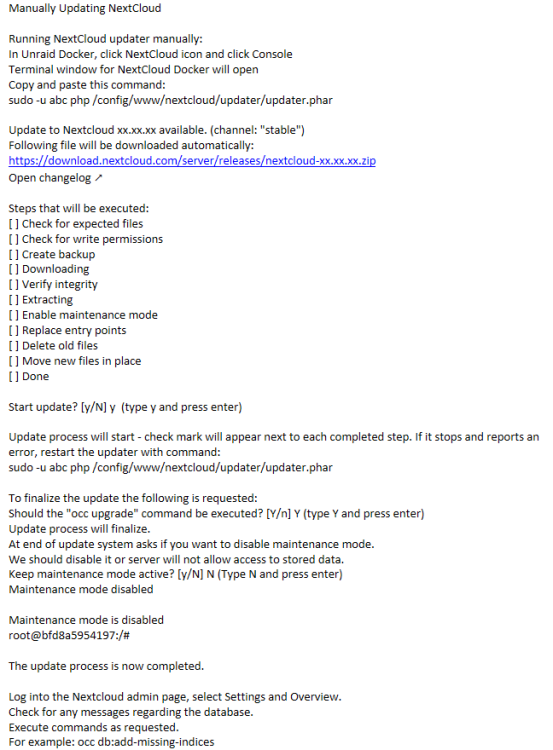
I gave up trying to use the web updater, just kept failing and clicking Retry over and over did nothing. This is what worked for me. I went from 22.2.3 all the way to 24.0.8 without a hitch using this method below. I just repeated it for each successive version.
-
Spoke too soon, no crashes but call traces started popping up from late last night. I feel this is a bug that should have been addressed in 6.9. I just dont get it that we have to migrate to a whole new version and go to a completely differnet approach to solve this problem. I'm no developer for sure and dont pretend to know how to fix this but for goodness sake networkng code has been around for years. From the forum I see a lot of users having this issue, not just like its one or two guys.
-
So I did some reading about V6.10. This is failry new release. I am reluctant to upgrade our server that we use for business data storage and shared access to files etc. If we had a 2nd identical server that I could run it on and test to make sure everything works with the same applications environment and it remained stable for a week or two I'd be ok with it. We dont have one at the moment so I am going to try some different things first. So far I have: Updated all Docker containers except Nextcloud. Disabled VM's since we dont have any. Disabled the one on-board GigE port that was for management LAN access but its not absolutely required at the moment. I'd be happy if this reduces the Kernel panic crashes to what they were before like once a month or so until I am confident in moving the system to V6.10 So far there has been no call traces for about 34hrs, previously I'd see them in the syslog a few times per day and then every few days system crashed.
-
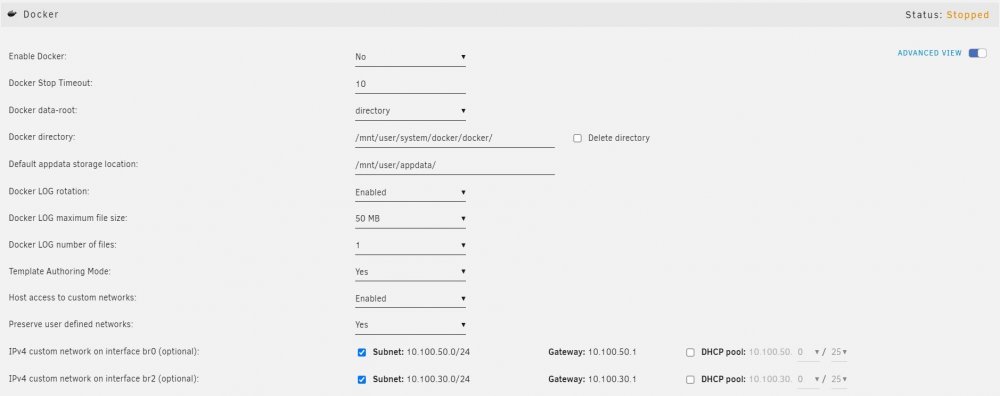
I do not see a setting for "Docker custom network type" Am I looking in the right place? I went to Settings>Docker, the attached is what I see after I disable docker. When Docker is enabled this setting is also not there.
-
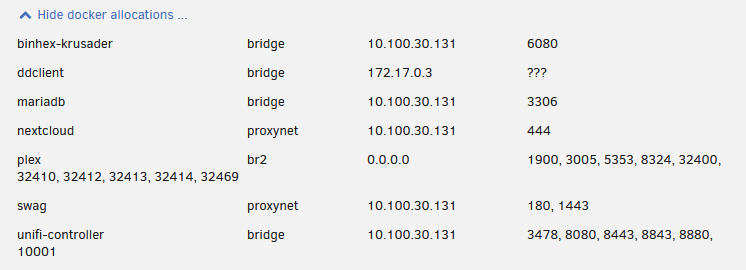
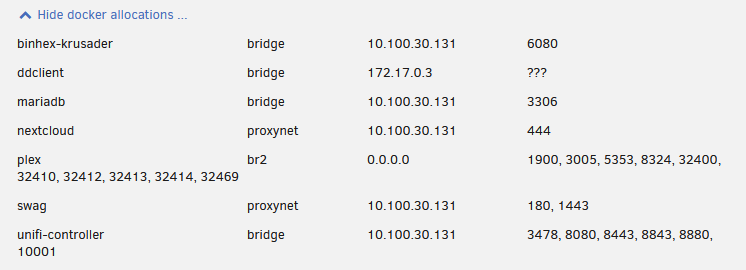
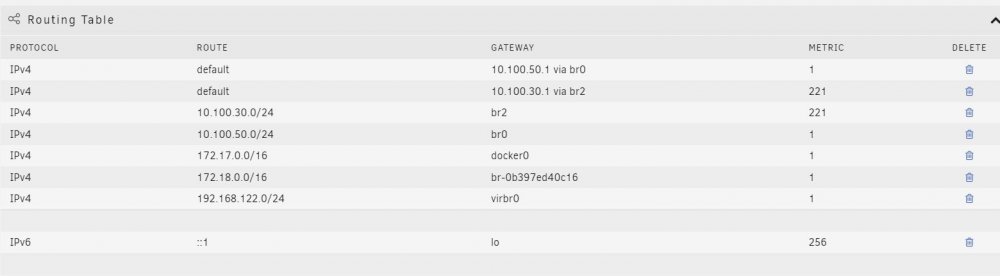
I am unsure if it is. Attached is a snapshot of the network setup in my server. I would have thought that if it was setup related the issue would have been failry constant since inception. I have not added dockers or apps to the server since inception, always been the same. Not running VMs. I have had the smae network setup since inception. So the question is why initially did it only happen one a month if that, but gradually over the space of 12 months its gotten worse to where the server is crashing every few days? Perhaos I ned to simplify the network setup on the server, just have one phy interface? I am using static IP address on the SWAG docker, could this be an issue? Any help pointing me closer to where the issue could be is approciated. Thanks
-
OK so it crashed sometime today. I noticed it was down sometime around 2pm local. Two days ago I set up the syslog server to save syslog to the Cache-NVME-a drive. I noticed at the server console (direct attached screen and keyboard) I was able to log in. I ran the diagnostics command but it just hung at: "Starting diagnostics collection......" and did not do anything, did not appear to write a diagnostics.zip file to the Flash /boot/logs directory. ^C would abort and return to command prompt. So I ran the diagnostics command after I rebooted the server and got access to the GUI. Attached is the syslog and diagnostics.zip file. I am afraid this may not be of much help since I could not run the diagnostics command just after the system crashed. syslog-10.x.log.log ganymedeii-diagnostics-20220711-1800.zip
-
OK, great, thanks for the help and guidance. I will proceed and post the syslog and diagnostics at the next crash.
-
Thanks for the clarification and quick replies. Should I be concerned about syslog writing to the /boot/logs directory onthe flash drive? It's a 16GB cruzer not sure how much log data would accumulate in a week. There's about 15GB free on it presently.
-
I am a little confused.... Is the info captured in the syslog file in the boot flash drive /boot/logs directory different to that captured by the syslog server? I dont have syslog server currently enabled yet the syslog file mentioned above seem to have current log entries.
-
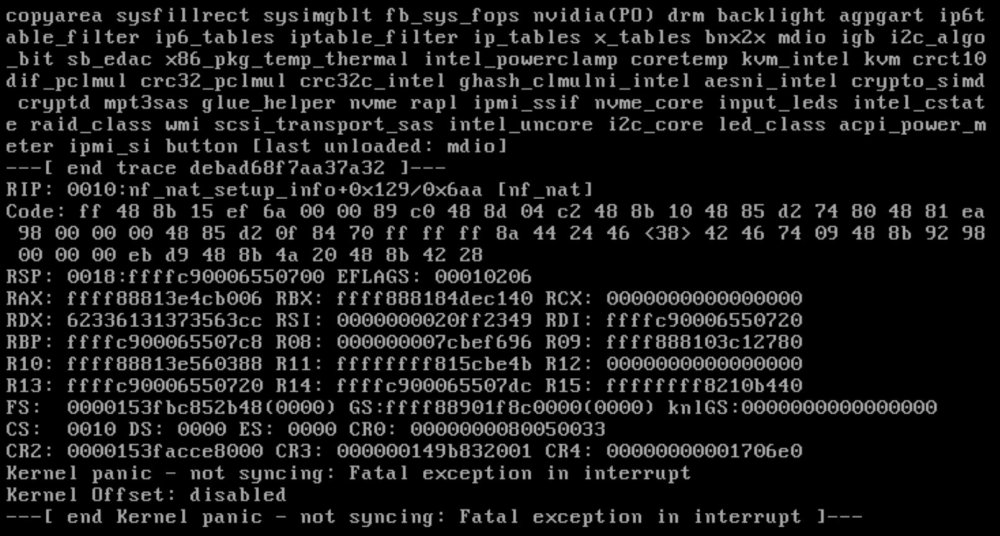
HELP PLEASE!! - This has been going on for a long time. Started right after I first got the system up and running last year. It was happening perhaps one a month or less. Slowly it has gotten worse, every few weeks and now for the past month every few days sometimes goes a week without it happening. I have: Dell PowerEdge R720 dual CPU Intel(R) Xeon(R) CPU E5-2650 v2 @ 2.60GHz 8 x 16GB DIMMs DDR3 1600MHz Dual redundant power supplies NIC - built in - Intel(R) GbE 4P I350-t rNDC NIC card - BRCM 10GbE 2P 57810S-t Adapter All firmware is up to date. Kernel Panic spits out per the attached pic to the console, identical every time. The syslog appears to show nothing, everything seems ok then nothing logged as it crashed at some point after 1am then you see the reboot after I intervene at 7:51am: Jul 8 01:00:01 GanymedeII Docker Auto Update: Community Applications Docker Autoupdate running Jul 8 01:00:01 GanymedeII Docker Auto Update: Checking for available updates Jul 8 01:00:08 GanymedeII Docker Auto Update: Found update for ddclient. Not set to autoupdate Jul 8 01:00:08 GanymedeII Docker Auto Update: Found update for mariadb. Not set to autoupdate Jul 8 01:00:08 GanymedeII Docker Auto Update: Found update for nextcloud. Not set to autoupdate Jul 8 01:00:08 GanymedeII Docker Auto Update: Found update for plex. Not set to autoupdate Jul 8 01:00:08 GanymedeII Docker Auto Update: Found update for swag. Not set to autoupdate Jul 8 01:00:08 GanymedeII Docker Auto Update: Found update for unifi-controller. Not set to autoupdate Jul 8 01:00:08 GanymedeII Docker Auto Update: No updates will be installed Jul 8 01:00:48 GanymedeII emhttpd: read SMART /dev/sdd Jul 8 01:00:53 GanymedeII crond[2536]: exit status 1 from user root /usr/local/sbin/mover &> /dev/null Jul 8 07:51:10 GanymedeII kernel: Linux version 5.10.28-Unraid (root@Develop) (gcc (GCC) 9.3.0, GNU ld version 2.33.1-slack15) #1 SMP Wed Apr 7 08:23:18 PDT 2021 Jul 8 07:51:10 GanymedeII kernel: Command line: BOOT_IMAGE=/bzimage initrd=/bzroot
-
I have 3 Ethernet cards in the server, each with own IP net. Purpose is Eth0 10.100.30.131/24 is for systems management access, Eth1 10.100.100.10/24 will serve requests form Internet direct via firewall (not DMZ), Eth 2 10.100.50.10/24 will serve requests from local LAN. I have SWAG installed with reverse proxy set up to support Nextcloud as per vids from spaceinvaderone. It works fine in the sense that I can access Nextcloud via the reverse proxy (from Internet) but all responses from the server come out via Eth0 the management interface. I've set up my firewall to direct all incoming (from Internet) requests for Nextcloud via Eth1 (Internet access interface) the server receives and responds back out via Eth 0. I tried playing with the docker network connect command to attach an IP from Eth1 to swag but to no avail. Anyone have any idea how I can go about getting this setup to work correctly such that the server will respond back out the interface it received requests on? GII-NetworkSettings.pdf