





Luka
Members
-
Joined
-
Last visited
Everything posted by Luka
-
It seems that this fixed my issue. I had no stops of Unraid after the fix. Thanks
-
Ok, I've changed this setting. Now I'll wait to see for a few days then report back. Thanks
-
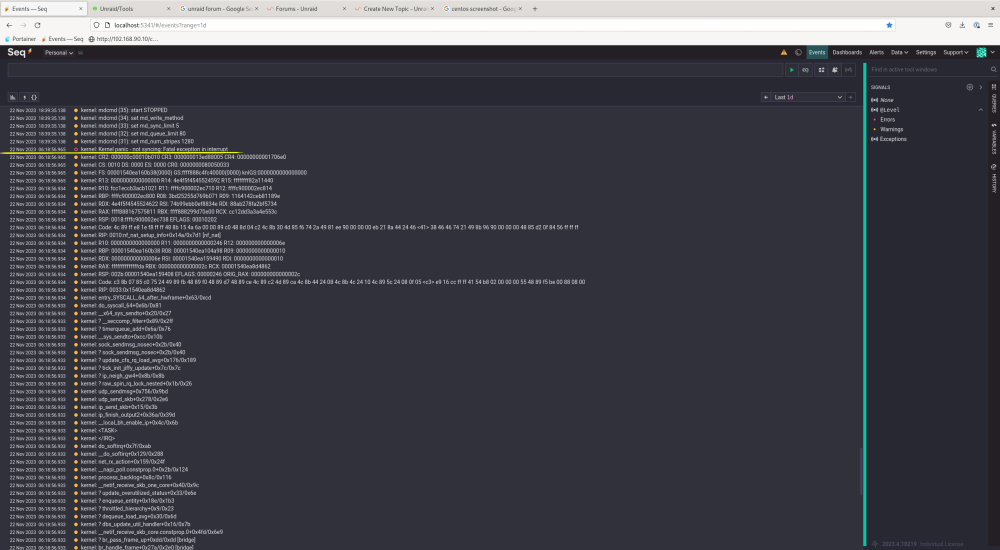
Hi, my unraid server every few days blocks. So no ui access, no ssh access, not able to ping it either. The only thing that helps is total server shutdown/power off and the power on. I took a look at the logs but I don't understand what the logs says. Also I noticed that I loose the logs from the accident, so I set unraid to write logs to external syslog server. And there was this error: and a bunch of warnings before that. Please help Thanks unraid-diagnostics-20231122-1908.zip SyslogEvents.csv
-
The reboot fixed the issues. Thanks
-
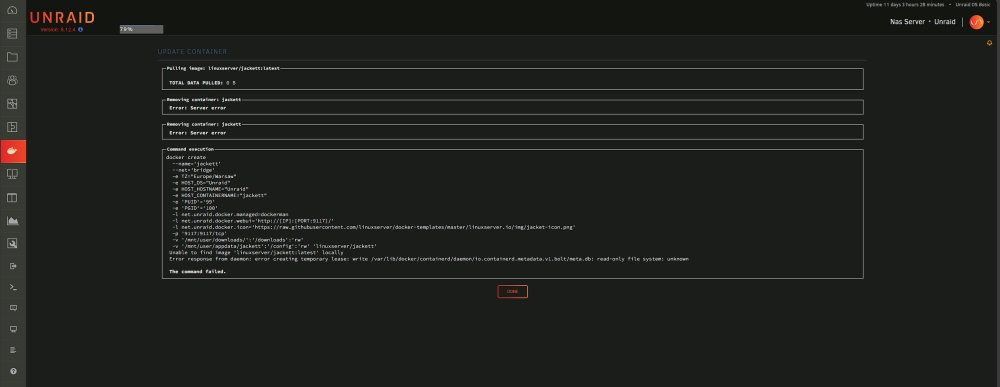
Hi, I can not start, remove, edit, update, install any container anymore. Also have some orphaned containers I can't delete because of "Server error" When I try to edit then apply a container it throws error (see picture). What's wrong with my unraid installation? unraid-diagnostics-20230921-1529.zip
-
Ok, after I have deleted the BTRS.key, no more errors. I don't know from where did I get this file. I followed an online guide one and a half year ago when I bought the basic license. On that guide there was a link to download unraid image to be written on the usb. I don't know what the guide was, I tried to look in my browsing history but with no success. Anyway there are no more that errors. Thanks
-
Hi, I finally managed to do as You told me... 1. Unraid server shutdown. 2. Unplug the USB flash drive from the Unraid server 3. Plug the USB flash drive onto my laptop 4. Downloaded the Basic.key from the mail link You've sent me yesterday 5. Copied the Basic.key into USB flash drive / config folder and overwrite the existing one 6. Safe eject/remove on windows 7. Unplug usb flash drive from laptop 8. Plug the usb flash drive into the server 9. Start the Unraid server The errors still persist. My NEW diagnostics in the attachment. unraid-diagnostics-20211119-1852.zip
-
Ok, I'll try this then will come back with the result. Thanks
-
Yes, the issue persist. I tried this a couple of days ago and now. With no results. I have attached new diagnostic after I have re-installed the key now. unraid-diagnostics-20211118-2210.zip
-
Hi, here are my diagnostics. Beware, my parity disk is rebuilding because of read errors. But the error in question I am getting (UNRAID EMHTTPD: ERROR: GET_KEY_INFO, 579: INVALID ARGUMENT) is from months ago and goes till now. unraid-diagnostics-20211118-2108.zip
-
Hi, I have Unraid basic subscription and I started to get this error (the log is full of them): Quote Unraid emhttpd: error: get_key_info, 579: Invalid argument What does this error mean? Please help
-
Hi, I have Unraid basic subscription and I started to get this error (the log is full of them): What does this error mean? Please help



