





jcofer555
Members
-
Joined
-
Last visited
Everything posted by jcofer555
-
i'll take the bet haha. i think i should be able to make work a button or checkbox to click to be like "use same as source" kinda thing
-
based on the current logic of the code it should be able to extract cbz, could you give that a test when you get a chance and based on the results will let me know more. the cbr might also work but might not being based on rare and the logic right now would't process that with the rar binary it would use the 7zzs binary which can extract .rar files but not all so might need to adjust it if it doesn't extract
-
Sounds good, ill look into adding them
-
-
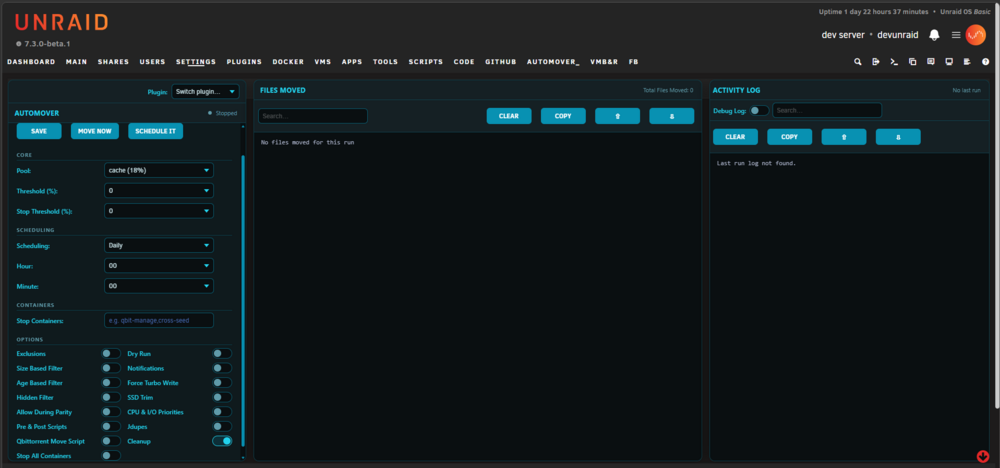
Auto Mover Plugin for unRAID Github link - https://github.com/jcofer555/automover Monitor pool disks, trigger the mover when thresholds are exceeded, and keep your system tidy — all through a smart, customizable UI. Development has ended and no further updates will be released ## Features ## - Scheduler available - Able to schedule different settings for different pools - Dry-run mode to simulate a run - Only moves from pool -> array or pool -> pool and skips any shares set to array -> pool - Threshold setting to prevent moving unless pool is at least that % full - Stop threshold setting to stop moving once pool reaches that % - Allow or deny moving when parity is checking - Option to trim ssd disks after files are moved - Option to run a script pre move and/or post move - Notification support for discord, gotify, ntfy, pushover, slack, and unraids built in - Ability to set cpu and i/o priorities - Built in trash guides mover script to pause and resume active torrents so the files can be moved - Jdupes option to re-hardlink any files after every move - Option to stop containers before moves and start them back after finish - Ability to force turbo write on during move - Ability to manually set file/folder excludes - Ability to skip hidden folders/files - Ability to exclude files from moving unless they are X number of days or older - Ability to exclude files from moving unless they are at least X MB in size or larger - Logging available in the webui and at /tmp/automover - Recommend disabling unraids built in mover schedule at settings > scheduler which requires unraid 7.2.1+ - Recommend not combining with mover tuning plugin
-
do you mean creating or extracting? i can look into it, i've not heard of these extensions but sounds possible if just a different kind of zip and rar
-
glad to hear it, thanks for reporting back
-
put out an update that should fix this issue for you
-
thanks, i got an idea of why, i'll try to put in a fix in the next few days and push the update. if you test after that please let me know as i don't have any of those kind of rar's to test with
-
and is the rar password protected?
-
and you are selecting the base .rar file when trying right? not selecting any of the r01 or other ones?
-
i just pushed the new update
-
i decided to remove the limit altogether
-
or maybe no limit at all?
-
i've changed it to 1gb in my new version i'm releasing here soon, my thought was the length of time handling large archives or large creations, maybe i change it to a higher limit like 50gb?
-
@jeffreywhunter sorry i hid the forum thinking it would still be visible to me so had to redo it haha. i got it submitted to CA so hopefully in the next week or less as it's a holiday weekend so i imagine it'll take a bit. if you want to manually install it here's the link. https://raw.githubusercontent.com/jcofer555/zip_manager/main/plugin/zip_manager.plg
-
-
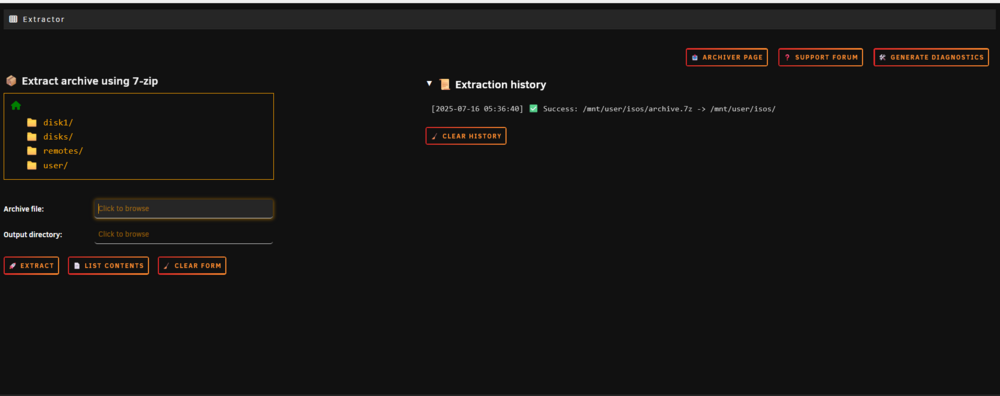
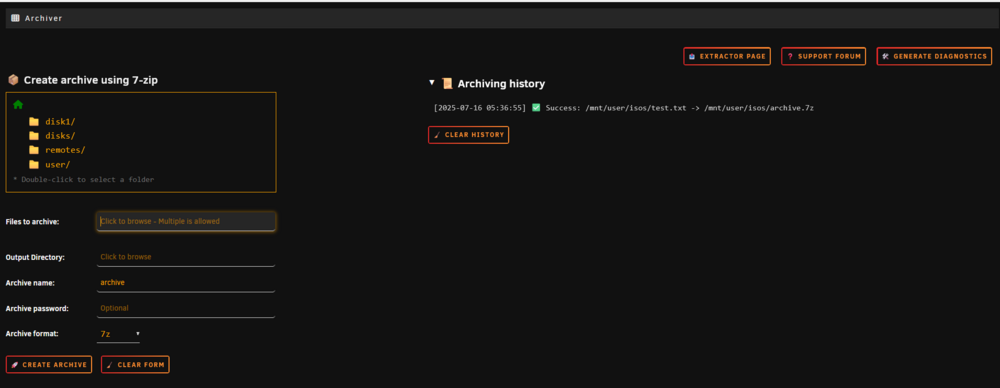
🔧 Archiver & Extractor Plugin for UnraidGithub link - https://github.com/jcofer555/zip_manager Easily compress and extract a wide variety of archive formats directly from the Unraid WebUI. This plugin integrates 7-Zip with a simple user interface, allowing users to create or unpack archives all without leaving the browser. Development has ended and no further updates will be released Features:Browse and select source files and destination folders via the WebUI Extract archives with support for dozens of formats Archive folders and files into .7z, .zip, .tar,.tar.gz, and tar.zst formats Automatically sets correct file ownership and permissions after extraction Clean and simple interface under the "Tools" tab Perfect for managing archive files directly on your Unraid server.
-
thanks for the work :) 2 improvements that come to mind are a way to change coloring of the theme, and second is to make it so when you click cancel or save changes when editing a script that it doesn't push you to the top of the page again and it stays where you are at in the page so you don't have to scroll back down. same for when the you do "run script" and click done on the log it pushes you to the top after as well
-
i have been getting this error since updating to 7.1.3. sda for me is a usb external hard drive and my unraid flash is sdb which is for most people sda is the flash drive, i wonder if the error is somehow related to something looking for the unraid flash but it not being sda it throws the error. diagnostics attached Jun 8 17:31:48 unraid emhttpd: error: get_device_size, 1796: No such device or address (6): open: /dev/sda Error unraid-diagnostics-20250608-1830.zip
-
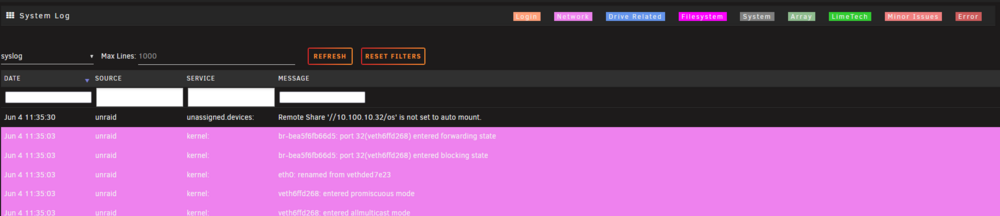
i think it's just on reboot that it's happening but for a chunk of time or a certain event happens (which i haven't been able to determine) the ability to filter by log type isn't showing but the others are like in the screenshot. diagnostics attached just noticed it only affects the "syslog" not syslog-previous or the persistent syslog files available when click the dropdown to pick the log file to look at. also noticed i have no counts page. fixed the counts page part resolved with an update, thanks @EDACerton unraid-diagnostics-20250604-1142.zip
-
for now you can remove plugin, install old version from the install plugin page on the plugins page using this url: https://raw.githubusercontent.com/unraid/community.applications/4e0da5c4c810188735683fab63ef1a676dac30a2/plugins/community.applications.plg once on the old version go to apps page and click any app on the page and click pin app, then you can update to the newest version if you'd like and it'll work credit goes to @EDACerton for the temporary fix until squid can push an update to resolve
-
same for me
-
i could only say again i'm sure if LT was worried they wouldn't have been ok with it. i think it's a non issue myself but eh maybe big bad lawsuit is coming
-
i'd think if LT was worried they wouldn't have been ok with it when EDACerton got the ok to do it.







