





singularity098
Members
-
Joined
-
My flash drive corrupted a couple of weeks ago. It wouldn't boot because of checksum errors on the bz* files. Every single one of them had a bad sha256 sum. I tried to restore to an old USB drive and got it up and running, however the license wouldn't activate because that old USB was blacklisted. Very annoying, but ok. Now I have purchased a USB DOM on eBay, and I've beaten the crap out of it with badblocks and f3 programs, and it seems to be 100% reliable under those tests. Great! I'm about to load it up and put it into "production". But here's the problem. I did identify one config file (a docker template xml file for the program glances) which was corrupted. I could load it in a text editor but many characters were garbage. Incredibly lucky of me that the only obvious non-bz* corrupted config file was for a program which requires virtually no configuration, so I can just delete it and make it from scratch with no trouble. All of my other docker templates seem ok. And all of my USB flash backups had that file corrupted as well. That's the fundamental problem that I'm scratching my head about with how Unraid's architecture is built. Ok, we are forced to use kind of cheap-o flash memory (nearly all USB flash is unreliable) for the main OS unless you research and look really hard for something better, and that's where the config files reside, and they could be prone to corruption. Well if it corrupts, just restore from a backup. But.... what are the odds that your backup is not also corrupted? Kind of low, actually.... since you will not likely discover the corruption until a reboot, and you may reboot the server once a month - and that's being good about it. How many of us keep backups from months ago, and would you want to restore something so old anyway? It's honestly surprising to me that an OS which is completely built around data storage and data integrity, forces us to use a FAT32 file system which has no checksumming and will not even throw an error on reading when files are corrupted (until the reboot). Like a Ferrari that must be started with a hand-crank. Anyway, forgive my rant. What I really need to know is, how do I vet this flash backup for corruption? EVERY bz* file did not pass the checksum, and my "config" directory contains 377 MB of data, so if I were to take a bet on it I would think that there is more corrupt data in there but I just don't know how to find it. How do I approach this aside from just finding out what's broken from using the system?
-
Confirmed fixed. The system no longer dies as long as the Shinobi docker image is left in a down state, or if I run it with the --pids-limit 1000 parameter. What a relief. Thanks for the great troubleshooting help!
-
Awesome, I will definitely give that a try... but first I am going to let the server run with Shinobi completely off just for confirmation of sanity. Will report back... thanks!
-
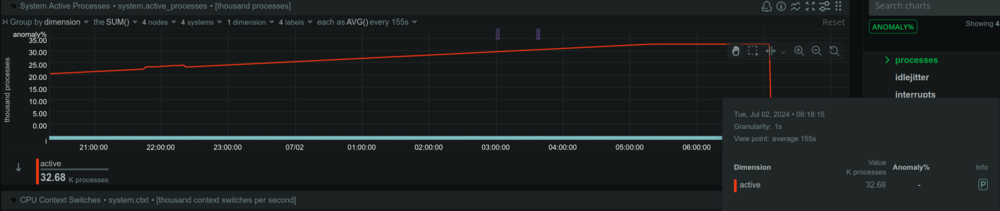
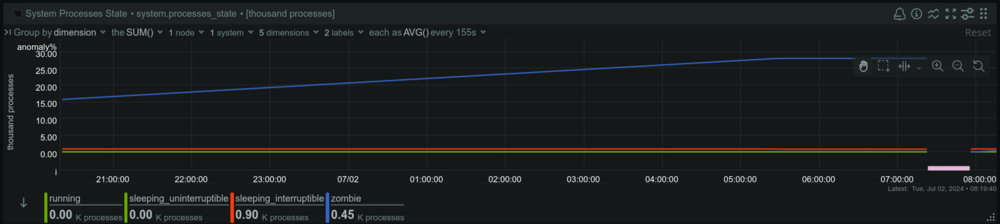
Ok, I think that I have it figured out..... It ran perfectly fine for over a week in safe mode with docker and VM's disabled. Then I rebooted not in safe mode, but still with docker and VM's disabled. Still was perfectly fine for days. Then I turn on docker and it crashes within 24 hours. Ok... so there's a problem somewhere involving docker. I don't see much in the logs once again. But I did look through Netdata to find any interesting graphs. The one the jumps out at me is number of processes. I see a steadily increasing number of processes. More interestingly still, they're zombie processes. Ok, so I look for zombie processes on the terminal, and I see an ever increasing number of defunct ffmpeg processes. And the parent process? A Shinobi script. That's what's happening, I think. I moved into my new home weeks ago, and I set everything up... EXCEPT for my security cameras. They're still not hooked up. Shinobi is trying to get a camera feed and can't, and it seems to be causing an endless loop of defunct ffmpeg processes, for whatever reason. Maybe I should report this as a Shinobi defect, as well. Still I need to wait and see if I have the stability that I'm expecting on the server because I literally only just found this.... but it seems very likely I got it! Really appreciate the help in steering me to the right direction.
-
Just happened again. Hooray. syslog.zip
-
It hasn't crashed again quite yet. But I did already have a syslog server running all along, I guess I forgot that it might not be included in the diagnostics. Attaching here... syslog.zip
-
Ok, I've just unplugged and reseated everything inside the machine... except for the CPU but it looked perfect and is tightly mounted, so I am sure it's ok. Everything looked perfect, but I'll see if it crashes again within the next 48 hours.
-
So, I moved to another city recently. I packed my server in my own car, drove just 1 hour to the new place, and set it up. I started running a parity check. The server crashed before the parity check was finished. I power it up again and start another parity check. Again the same thing happens. It may have found 1 error I think, but I chalk that up to the fact that it crashed. And when I say crash, I mean that I cannot access the web GUI, I cannot ssh into the server, and most docker applications are nonresponsive. However, a few of them actually do respond so I know that the OS isn't actually fully frozen, just most of the processes are failing. So I start up again, and run a parity check. It locked up but this time I figured that if I just let it sit there maybe it is still doing the parity check and will finish. So I wait many hours, then power cycle, and I was right, it finished the parity check without errors according to the log. I have also ran a BTRFS scrub on all the disks and no errors found. But now I restart yet again, and again the server becomes unresponsive after some time. This is really irritating. Along the way, I did see an error in the log complaining of an unregistered flash drive. I figured ok, the flash is failing. I followed the restore/replace license key process and figured I'd be ok. But it's not ok, it is still crashing. So the flash drive is not the problem. I'm not sure what to do next. Do I just have some bad hardware? All the disks seem fine. singularity-nas-diagnostics-20240619-2218.zip
-
Ok. I have no clue where the modification came from and I know that I never modified this file directly. But I'll revert the file and then see if I can figure out how this came about. Thanks for the help!
-
Ok, I've got you. Sharing my diagnostics here. (EDIT: Removed the diagnostics since it is no longer necessary)
-
No, I don't know where the script comes from. Obviously it has something to do with a Dynamix plugin based on the file path, but I had uninstalled all Dynamix plugins and the thing was still there and writing errors to my log. I have no idea where the script comes from or what the purpose is. All I know is that I noticed the error in the log, Googled it, ended up in this thread and found a fix.
-
I was able to fix it on my system. Even though on my system, the script "/usr/local/emhttp/plugins/dynamix/scripts/monitor" does NOT have single or double quotes as shared by others: if ( ! ((date(i) * date(H) * 60 + date(i)) % $sync_interval_minutes) && file_exists("/var/lib/docker/containers")) { I changed it to adding double quotes around those variables anyway. It fixed the issue: if ( ! ((date("i") * date("H") * 60 + date("i")) % $sync_interval_minutes) && file_exists("/var/lib/docker/containers")) { No more errors in my logs.
-
I am also having this issue. Every minute, my log gets this annoying message. Feb 21 01:17:01 MyServer crond[1597]: exit status 255 from user root /usr/local/emhttp/plugins/dynamix/scripts/monitor &> /dev/null When I look at the file "/usr/local/emhttp/plugins/dynamix/scripts/monitor", I can see this code on line 4. if ( ! ((date(i) * date(H) * 60 + date(i)) % $sync_interval_minutes) && file_exists("/var/lib/docker/containers")) { This is similar to but not quite the same as what's being discussed in the thread. The variables on my system have no single or double quotes. I never modified this script myself and honestly have no idea what it even does. I've read the thread a couple of times but it's not even clear to me how this got corrupted on the OP's machine, or if my issue is something totally unrelated and the script is failing for a different reason. Not sure how to proceed. Any help on this?
-
Thank you! I finally found the danged thing. But I had even more trouble with it than this. I was using the "Gray" dynamix theme, and the lock icon doesn't even show up whatsoever on that theme. I had to change it to "White" to see the lock, then I can change it back after I've rearranged.
-
My Netdata starts and crashes immediately due to too many errors. I've used it for like over a year and it just started doing this a couple of weeks ago. I have no idea what's changed and why this is happening. I didn't change anything in my Docker template mappings. I am on Unraid 6.11.5. 2023-08-16 21:35:59: go.d ERROR: logstash[local] check failed 2023-08-16 21:35:59: go.d WARNING: k8s_kubelet[k8s_kubelet] error on reading service account token from '/var/run/secrets/kubernetes.io/serviceaccount/token': open /var/run/secrets/kubernetes.io/serviceaccount/token: no such file or directory 2023-08-16 21:35:59: go.d ERROR: k8s_kubelet[k8s_kubelet] Get "http://127.0.0.1:10255/metrics": dial tcp 127.0.0.1:10255: connect: connection refused 2023-08-16 21:35:59: go.d ERROR: k8s_kubelet[k8s_kubelet] check failed 2023-08-16 21:35:59: go.d WARNING: k8s_kubelet[k8s_kubelet] error on reading service account token from '/var/run/secrets/kubernetes.io/serviceaccount/token': open /var/run/secrets/kubernetes.io/serviceaccount/token: no such file or directory 2023-08-16 21:35:59: go.d ERROR: k8s_kubelet[k8s_kubelet] Get "https://localhost:10250/metrics": dial tcp 127.0.0.1:10250: connect: connection refused 2023-08-16 21:35:59: go.d ERROR: k8s_kubelet[k8s_kubelet] check failed 2023-08-16 21:35:59: go.d ERROR: nginx[local] http://127.0.0.1/basic_status returned HTTP status 404 2023-08-16 21:35:59: go.d ERROR: nginx[local] check failed 2023-08-16 21:35:59: go.d ERROR: nginx[local] http://localhost/stub_status returned HTTP status 404 2023-08-16 21:35:59: go.d ERROR: nginx[local] check failed 2023-08-16 21:35:59: go.d ERROR: nginx[local] http://127.0.0.1/stub_status returned HTTP status 404 2023-08-16 21:35:59: go.d ERROR: nginx[local] check failed 2023-08-16 21:35:59: go.d ERROR: nginx[local] http://127.0.0.1/nginx_status returned HTTP status 404 2023-08-16 21:35:59: go.d ERROR: nginx[local] check failed 2023-08-16 21:35:59: go.d ERROR: nginx[local] http://127.0.0.1/status returned HTTP status 404 2023-08-16 21:35:59: go.d ERROR: nginx[local] check failed 2023-08-16 21:35:59: go.d ERROR: lighttpd[local] http://localhost/server-status?auto returned HTTP status 404 2023-08-16 21:35:59: go.d ERROR: lighttpd[local] check failed 2023-08-16 21:35:59: go.d ERROR: lighttpd[local] http://127.0.0.1/server-status?auto returned HTTP status 404 2023-08-16 21:35:59: go.d ERROR: lighttpd[local] check failed 2023-08-16 21:35:59: netdata INFO : P[proc] : cpufreq is using /host/sys/devices/system/cpu/cpu*/cpufreq/stats/time_in_state 2023-08-16 21:35:59: netdata INFO : P[proc] : Using now_boottime_usec() for uptime (dt is 7 ms) 2023-08-16 21:35:59: netdata ERROR : P[proc] : Cannot read pressure information from /host/proc/pressure/cpu. (errno 2, No such file or directory) 2023-08-16 21:35:59: netdata ERROR : P[proc] : Cannot read pressure information from /host/proc/pressure/memory. (errno 2, No such file or directory) 2023-08-16 21:35:59: netdata ERROR : P[proc] : Cannot read pressure information from /host/proc/pressure/io. (errno 2, No such file or directory) 2023-08-16 21:35:59: netdata ERROR : P[proc] : PROCFILE: Cannot open file '/host/proc/net/wireless' (errno 2, No such file or directory) 2023-08-16 21:35:59: netdata ERROR : P[proc] : PROCFILE: Cannot open file '/host/proc/net/sctp/snmp' (errno 2, No such file or directory) 2023-08-16 21:35:59: netdata ERROR : P[proc] : PROCFILE: Cannot open file '/host/proc/net/ip_vs_stats' (errno 2, No such file or directory) 2023-08-16 21:35:59: netdata ERROR : P[proc] : PROCFILE: Cannot open file '/host/proc/net/stat/synproxy' (errno 2, No such file or directory) 2023-08-16 21:35:59: netdata ERROR : P[proc] : DEVICE-MAPPER ('loop0', 7:0): Cannot open directory '/host/dev/mapper'. (errno 2, No such file or directory) 2023-08-16 21:35:59: netdata ERROR : P[proc] : DEVICE-MAPPER ('loop0', 7:0): Cannot open directory '/host/dev/disk/by-label'. (errno 2, No such file or directory) 2023-08-16 21:35:59: netdata ERROR : P[proc] : DEVICE-MAPPER ('loop0', 7:0): Cannot open directory '/host/dev/vx/dsk'. (errno 2, No such file or directory) 2023-08-16 21:35:59: netdata ERROR : P[proc] : DEVICE-MAPPER ('loop1', 7:1): Cannot open directory '/host/dev/mapper'. (errno 2, No such file or directory) 2023-08-16 21:35:59: netdata ERROR : P[proc] : DEVICE-MAPPER ('loop1', 7:1): Cannot open directory '/host/dev/disk/by-label'. (errno 2, No such file or directory) 2023-08-16 21:35:59: netdata ERROR : P[proc] : DEVICE-MAPPER ('loop1', 7:1): Cannot open directory '/host/dev/vx/dsk'. (errno 2, No such file or directory) 2023-08-16 21:35:59: netdata ERROR : P[proc] : DEVICE-MAPPER ('loop2', 7:2): Cannot open directory '/host/dev/mapper'. (errno 2, No such file or directory) 2023-08-16 21:35:59: netdata ERROR : P[proc] : DEVICE-MAPPER ('loop2', 7:2): Cannot open directory '/host/dev/disk/by-label'. (errno 2, No such file or directory) 2023-08-16 21:35:59: netdata ERROR : P[proc] : DEVICE-MAPPER ('loop2', 7:2): Cannot open directory '/host/dev/vx/dsk'. (errno 2, No such file or directory) 2023-08-16 21:35:59: netdata ERROR : P[proc] : DEVICE-MAPPER ('loop3', 7:3): Cannot open directory '/host/dev/mapper'. (errno 2, No such file or directory) 2023-08-16 21:35:59: netdata ERROR : P[proc] : DEVICE-MAPPER ('loop3', 7:3): Cannot open directory '/host/dev/disk/by-label'. (errno 2, No such file or directory) 2023-08-16 21:35:59: netdata ERROR : P[proc] : DEVICE-MAPPER ('loop3', 7:3): Cannot open directory '/host/dev/vx/dsk'. (errno 2, No such file or directory) 2023-08-16 21:35:59: netdata ERROR : P[proc] : DEVICE-MAPPER ('loop4', 7:4): Cannot open directory '/host/dev/mapper'. (errno 2, No such file or directory) 2023-08-16 21:35:59: netdata ERROR : P[proc] : DEVICE-MAPPER ('loop4', 7:4): Cannot open directory '/host/dev/disk/by-label'. (errno 2, No such file or directory) 2023-08-16 21:35:59: netdata ERROR : P[proc] : DEVICE-MAPPER ('loop4', 7:4): Cannot open directory '/host/dev/vx/dsk'. (errno 2, No such file or directory) 2023-08-16 21:35:59: netdata ERROR : P[proc] : DEVICE-MAPPER ('loop5', 7:5): Cannot open directory '/host/dev/mapper'. (errno 2, No such file or directory) 2023-08-16 21:35:59: netdata ERROR : P[proc] : DEVICE-MAPPER ('loop5', 7:5): Cannot open directory '/host/dev/disk/by-label'. (errno 2, No such file or directory) 2023-08-16 21:35:59: netdata ERROR : P[proc] : DEVICE-MAPPER ('loop5', 7:5): Cannot open directory '/host/dev/vx/dsk'. (errno 2, No such file or directory) 2023-08-16 21:35:59: netdata ERROR : P[proc] : DEVICE-MAPPER ('loop6', 7:6): Cannot open directory '/host/dev/mapper'. (errno 2, No such file or directory) 2023-08-16 21:35:59: netdata ERROR : P[proc] : DEVICE-MAPPER ('loop6', 7:6): Cannot open directory '/host/dev/disk/by-label'. (errno 2, No such file or directory) 2023-08-16 21:35:59: netdata ERROR : P[proc] : DEVICE-MAPPER ('loop6', 7:6): Cannot open directory '/host/dev/vx/dsk'. (errno 2, No such file or directory) 2023-08-16 21:35:59: netdata ERROR : P[proc] : DEVICE-MAPPER ('loop7', 7:7): Cannot open directory '/host/dev/mapper'. (errno 2, No such file or directory) 2023-08-16 21:35:59: netdata ERROR : P[proc] : DEVICE-MAPPER ('loop7', 7:7): Cannot open directory '/host/dev/disk/by-label'. (errno 2, No such file or directory) 2023-08-16 21:35:59: netdata ERROR : P[proc] : DEVICE-MAPPER ('loop7', 7:7): Cannot open directory '/host/dev/vx/dsk'. (errno 2, No such file or directory) 2023-08-16 21:35:59: netdata ERROR : P[proc] : DEVICE-MAPPER ('sda', 8:0): Cannot open directory '/host/dev/mapper'. (errno 2, No such file or directory) 2023-08-16 21:35:59: netdata ERROR : P[proc] : DEVICE-MAPPER ('sda', 8:0): Cannot open directory '/host/dev/disk/by-label'. (errno 2, No such file or directory) 2023-08-16 21:35:59: netdata ERROR : P[proc] : DEVICE-MAPPER ('sda', 8:0): Cannot open directory '/host/dev/vx/dsk'. (errno 2, No such file or directory) 2023-08-16 21:35:59: netdata ERROR : P[proc] : DEVICE-MAPPER ('sda1', 8:1): Cannot open directory '/host/dev/mapper'. (errno 2, No such file or directory) 2023-08-16 21:35:59: netdata ERROR : P[proc] : DEVICE-MAPPER ('sda1', 8:1): Cannot open directory '/host/dev/disk/by-label'. (errno 2, No such file or directory) 2023-08-16 21:35:59: netdata ERROR : P[proc] : DEVICE-MAPPER ('sda1', 8:1): Cannot open directory '/host/dev/vx/dsk'. (errno 2, No such file or directory) 2023-08-16 21:35:59: netdata ERROR : P[proc] : DEVICE-MAPPER ('nvme0n1', 259:0): Cannot open directory '/host/dev/mapper'. (errno 2, No such file or directory) 2023-08-16 21:35:59: netdata ERROR : P[proc] : DEVICE-MAPPER ('nvme0n1', 259:0): Cannot open directory '/host/dev/disk/by-label'. (errno 2, No such file or directory) 2023-08-16 21:35:59: netdata ERROR : P[proc] : DEVICE-MAPPER ('nvme0n1', 259:0): Cannot open directory '/host/dev/vx/dsk'. (errno 2, No such file or directory) 2023-08-16 21:35:59: netdata ERROR : P[proc] : DEVICE-MAPPER ('nvme0n1p1', 259:1): Cannot open directory '/host/dev/mapper'. (errno 2, No such file or directory) 2023-08-16 21:35:59: netdata ERROR : P[proc] : DEVICE-MAPPER ('nvme0n1p1', 259:1): Cannot open directory '/host/dev/disk/by-label'. (errno 2, No such file or directory) 2023-08-16 21:35:59: netdata ERROR : P[proc] : DEVICE-MAPPER ('nvme0n1p1', 259:1): Cannot open directory '/host/dev/vx/dsk'. (errno 2, No such file or directory) 2023-08-16 21:35:59: netdata ERROR : P[proc] : DEVICE-MAPPER ('sdb', 8:16): Cannot open directory '/host/dev/mapper'. (errno 2, No such file or directory) 2023-08-16 21:35:59: netdata ERROR : P[proc] : DEVICE-MAPPER ('sdb', 8:16): Cannot open directory '/host/dev/disk/by-label'. (errno 2, No such file or directory) 2023-08-16 21:35:59: netdata ERROR : P[proc] : DEVICE-MAPPER ('sdb', 8:16): Cannot open directory '/host/dev/vx/dsk'. (errno 2, No such file or directory) 2023-08-16 21:35:59: netdata ERROR : P[proc] : DEVICE-MAPPER ('sdb1', 8:17): Cannot open directory '/host/dev/mapper'. (errno 2, No such file or directory) 2023-08-16 21:35:59: netdata ERROR : P[proc] : DEVICE-MAPPER ('sdb1', 8:17): Cannot open directory '/host/dev/disk/by-label'. (errno 2, No such file or directory) 2023-08-16 21:35:59: netdata ERROR : P[proc] : DEVICE-MAPPER ('sdb1', 8:17): Cannot open directory '/host/dev/vx/dsk'. (errno 2, No such file or directory) 2023-08-16 21:35:59: netdata ERROR : P[proc] : DEVICE-MAPPER ('sdc', 8:32): Cannot open directory '/host/dev/mapper'. (errno 2, No such file or directory) 2023-08-16 21:35:59: netdata ERROR : P[proc] : DEVICE-MAPPER ('sdc', 8:32): Cannot open directory '/host/dev/disk/by-label'. (errno 2, No such file or directory) 2023-08-16 21:35:59: netdata ERROR : P[proc] : DEVICE-MAPPER ('sdc', 8:32): Cannot open directory '/host/dev/vx/dsk'. (errno 2, No such file or directory) 2023-08-16 21:35:59: netdata ERROR : P[proc] : DEVICE-MAPPER ('sdc1', 8:33): Cannot open directory '/host/dev/mapper'. (errno 2, No such file or directory) 2023-08-16 21:35:59: netdata ERROR : P[proc] : DEVICE-MAPPER ('sdc1', 8:33): Cannot open directory '/host/dev/disk/by-label'. (errno 2, No such file or directory) 2023-08-16 21:35:59: netdata ERROR : P[proc] : DEVICE-MAPPER ('sdc1', 8:33): Cannot open directory '/host/dev/vx/dsk'. (errno 2, No such file or directory) 2023-08-16 21:35:59: netdata ERROR : P[proc] : DEVICE-MAPPER ('sdd', 8:48): Cannot open directory '/host/dev/mapper'. (errno 2, No such file or directory) 2023-08-16 21:35:59: netdata ERROR : P[proc] : DEVICE-MAPPER ('sdd', 8:48): Cannot open directory '/host/dev/disk/by-label'. (errno 2, No such file or directory) 2023-08-16 21:35:59: netdata ERROR : P[proc] : DEVICE-MAPPER ('sdd', 8:48): Cannot open directory '/host/dev/vx/dsk'. (errno 2, No such file or directory) 2023-08-16 21:35:59: netdata ERROR : P[proc] : DEVICE-MAPPER ('sdd1', 8:49): Cannot open directory '/host/dev/mapper'. (errno 2, No such file or directory) 2023-08-16 21:35:59: netdata ERROR : P[proc] : DEVICE-MAPPER ('sdd1', 8:49): Cannot open directory '/host/dev/disk/by-label'. (errno 2, No such file or directory) 2023-08-16 21:35:59: netdata ERROR : P[proc] : DEVICE-MAPPER ('sdd1', 8:49): Cannot open directory '/host/dev/vx/dsk'. (errno 2, No such file or directory) 2023-08-16 21:35:59: netdata ERROR : P[proc] : DEVICE-MAPPER ('sde', 8:64): Cannot open directory '/host/dev/mapper'. (errno 2, No such file or directory) 2023-08-16 21:35:59: netdata ERROR : P[proc] : DEVICE-MAPPER ('sde', 8:64): Cannot open directory '/host/dev/disk/by-label'. (errno 2, No such file or directory) 2023-08-16 21:35:59: netdata ERROR : P[proc] : DEVICE-MAPPER ('sde', 8:64): Cannot open directory '/host/dev/vx/dsk'. (errno 2, No such file or directory) 2023-08-16 21:35:59: netdata LOG FLOOD PROTECTION too many logs (201 logs in 1 seconds, threshold is set to 200 logs in 1200 seconds). Preventing more logs from process 'netdata' for 1199 seconds. 2023-08-16 21:35:59: apps.plugin ERROR : APPS_READER : Received error on stdin. (errno 22, Invalid argument) EOF found in spawn pipe.



