





citizengray
Members
-
Joined
-
Last visited
Everything posted by citizengray
-
Hi, I have been playing with Unraid for a couple of weeks now... and based on a lots of people's review I was expecting it to be a very system to use. However I feel that I am plagued by a lot of issues... I posted sometime ago about a network issue (unraid does not see internet after a reboot before being online for at least ~20h !?! for reference. It is still not resolved. But the issue that is driving mad is the issue of "disappearing drives"... I have a bunch of drives: 5 x 14tb + 8tb + 3tb + 4tb I was planning on adding all of those to the array, but it seems that it's impossible to get them to stay long enough to run pre-clear. Some drives (2x 14TB, the 3TB and the 4TB) seem to disappear randomly... Those drives are a mix of brand spanking new drives and old drives and a mix of chucked drives and proper NAS drives. There seem to be no pattern to the dropping. Unraid show no error what so ever, the drives are just no longer here... I can get them to re-appear on reboot... or by remove them and plug them back in... Every single one of those drives that disappears got tested on a mac and seem to be working just fine... All SMART data and health data on those drives are good. I have re-seated all the cables... I have run ~24h of memory test with issues... The drives are plugged to a mix of a SAS card and directly to the mother board, seems to have no relation to the dropping either... The drives are all connected through a cage (https://www.amazon.com/gp/product/B00DGZ42SM/ref=ppx_yo_dt_b_asin_title_o05_s00?ie=UTF8&psc=1) I tried to move drives around to install them in slot where the drive does seem to stay... changes nothing. Also it seems that when I delete the Array (Tools > New Config) all the disappearing drive come back for while.... but that's only temporary. Additionally, when I was running some tests on previous Array (before I got all the drives that I wanted in there, the performance seemed abysmal... especially when moving from the NVME Cache to the Array... I am talking single digit MB/s transfer...) I am out of ideas... Unraid has been a much more complicated and frustrating experience than I was imagining.... Any ideas ? unraid-diagnostics-20211016-1915.zip
-
Humm interesting, maybe I can go in the bios and disable the onboard card. But what worries me the most is that I had the same issue when I only had the onboard card and I had physically removed the 10gb card from the pci8x slot...
-
And boom it happened again... not touching a single thing. Array has now been up for 1 day, 14 hours, 57 minutes and this morning I have "found" internet access again... root@unraid:~# ping www.google.com ^C root@unraid:~# ping www.google.com PING www.google.com (142.250.69.228) 56(84) bytes of data. 64 bytes from den08s05-in-f4.1e100.net (142.250.69.228): icmp_seq=1 ttl=115 time=12.6 ms 64 bytes from den08s05-in-f4.1e100.net (142.250.69.228): icmp_seq=2 ttl=115 time=12.7 ms 64 bytes from den08s05-in-f4.1e100.net (142.250.69.228): icmp_seq=3 ttl=115 time=12.5 ms 64 bytes from den08s05-in-f4.1e100.net (142.250.69.228): icmp_seq=4 ttl=115 time=12.9 ms ^C --- www.google.com ping statistics --- 4 packets transmitted, 4 received, 0% packet loss, time 3004ms rtt min/avg/max/mdev = 12.508/12.684/12.867/0.134 ms This is so weird...
-
Ok, I have disabled bonding and bridging between ETH0 and ETH1. Here is the new diagnostic file. But so far no luck, still no connection from unraid.unraid-diagnostics-20211006-1059.zip
-
Right I can disable it, no pb. But as I mentioned before, I tried the setup with a single NIC (in the case) and no bonding, and I had the same connectivity issues.
-
It is definitely not a DNS issue... as soon as I finished the parity build, I rebooted unraid, and boom upon restart, no access to internet again. Unraid has been up for 15 hours now, and still no access. No other devices has any issues on my network. Starting to regret buying the pro license... how can this be ?
-
No I don't think that is a DNS issue. 1. I noticed the issue over the week end (Sunday evening - there was no facebook issue at this point) 2. My router has Google DNS setup as default and propagate them automatically via DHCP to all devices. 3. I was able to ping the DNS (8.8.8.8) from the unraid console, yet I still had no internet access
-
Right, but why would only unraid be impacted !? I have a slew of other devices that I had no problem connecting... including an old QNAP Nas that was doing it's thing without issue.
-
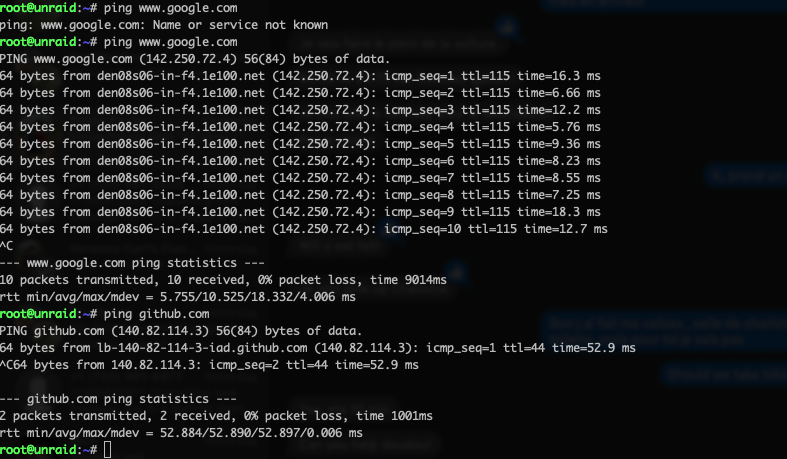
Ok the weirdest thing happened this morning... I have changed 0 configuration settings, changed nothing on the router side either... and somehow magically, the unraid system can now ping google... You can see below, I was sshed into unraid, I pinged www.google.com last night - nothing, and tried the command again this morning and now it works !?!
-
Anything at all ? I have no idea on how to move forward...
-
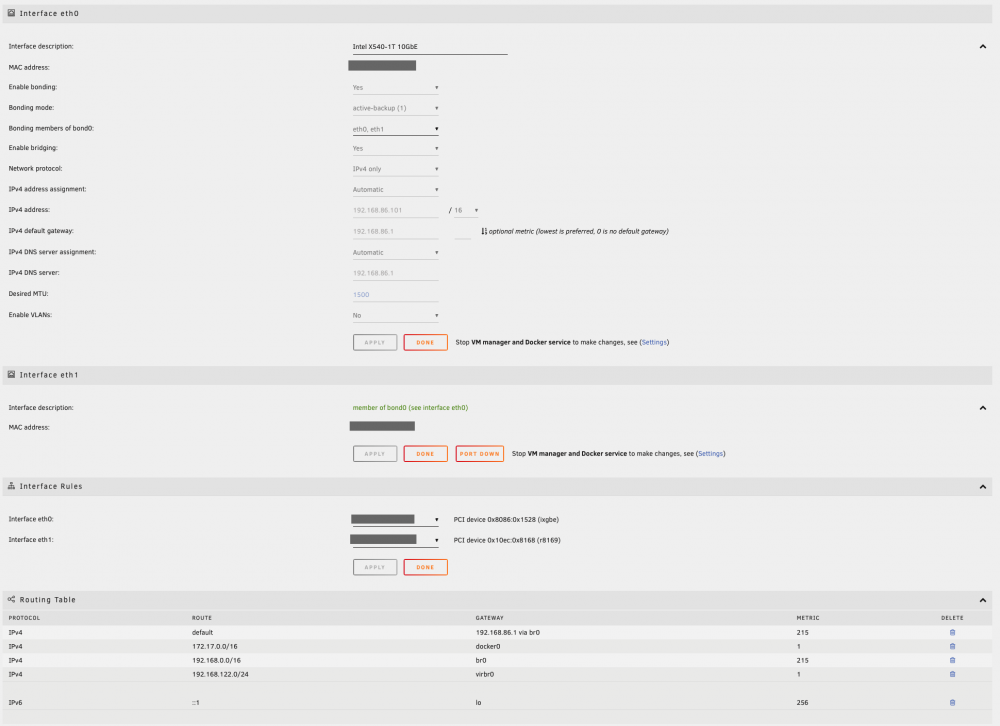
Right - good point So this diagnostics file is from the setup with 2 NICs (currently running parity building) Intel is ETH0 - plugged in Onboard is ETH1 - unplugged Here is the GUI config options, nothing special as far as I can tell unraid-diagnostics-20211004-0825.zip
-
Hello everyone, My first time Unraid user, just purchased a new pc to build a brand new spanking nas. Everything went just fine until I tried to start installing the CA plugin, it is only then that I realized that Unraid had no access to internet. It sees my local network no problem, it can ping the Google DNS (8.8.8.8, etc.) but it cannot ping www.google.com or anything else. I have 2 NIC on the setup, one embedded on the motherboard and one Intel X540-T1 10GbE. At first I thought that I might have screwed up the configuration with the 2 NIC so I took out the Intel and plugged the onboard one. No luck, still exact same issue. The I installed a brand new unraid from a new USB key with a trial license (on the main one, I purchased the pro) with only the onboard card to make sure I had the most vanilla install as possible. Still no luck, exact same behavior. So it seems, it is not any sort of configuration that I have done and possibly not my hardware. My local network is extremely simple: - 1 single router (Google Wifi Mesh), local subnet is 192.168.86.XX - have a bunch of Google Wifi Mesh as repeater throughout the house - all cabled directly to the main router, so everything is 192.168.86.XX - unraid IP addresses are DHCP reserved based on the MAC Address of each NIC. Onboard: 192.168.86.102 & Intel: 192.168.86.101. Both work fine and get the right IP address depending on which card I cable. Then I thought maybe there was some sort of config the Wifi Router preventing Unraid from accessing outside or something, but none of the devices that I have plugged in or wified in needed any configuration whatsoever. I am completely at a loss... I have no idea what to try next... I am by no mean a network expert, but I am also decently knowledgable. Any help would be appreciated. Thx, Alex
