





davbay1
Members
-
Joined
-
Last visited
Everything posted by davbay1
-
Thank you! I appreciate the help.
-
Thanks for the clarification! I started the parity swap. Once it completes and I move onto step 15 which is “Start the array to begin the data rebuild.” Can I add the second 26TB drive before starting the rebuild? Or is it better to let the rebuild complete and then add the drive after it finishes?
-
Thank you Jorge! I read over the parity swap document, and it makes sense. During the parity swap, can I add the 26TB drive into the array at the same time as I replace the parity drive with the 26TB? Or do I have to wait for the parity process to complete and then add the 26TB drive? Follow-up question, if I decided to use the 14TB Parity drive for a different purpose. Is the recommended method to follow the parity swap process, move the 14TB drive to the array, wait for it to complete the copy of parity info, and then remove it and replace it with the 26TB drive?
-
Hi everyone, I am trying to figure out the best path forward. I currently have a single 14 TB parity drive with 3 14 TB and 1 12 TB array drives. I just bought 2 new external 26 TB drives. I was going to use them to replace a partiy drive and then expand the array by one. I started a Pre-Clear on them last week to check them before shucking them in case I needed to return one. In preparation for the drive's finishing the preclear, I started a partiy check yesterday on my current array. Most of the check finished fine, and around the 99.2 percent mark, I got a notification - Disk 2 reallocated sector ct is 1, current pending sector is 8. I left it be, 10 minutes later I get a notification - Disk 2 reallocated sector ct is 2, current pending sector is 16. Another 10 minutes later, I get this notification - Disk 2 in error state with 2672 read errors. I would just replace it with the new drive, but the new drive is bigger than my parity drive. In the current state, what is my best way to add these 2 new drive to my system to replace the dead/dying 14 TB drive? I appreciate any help you can offer!
-
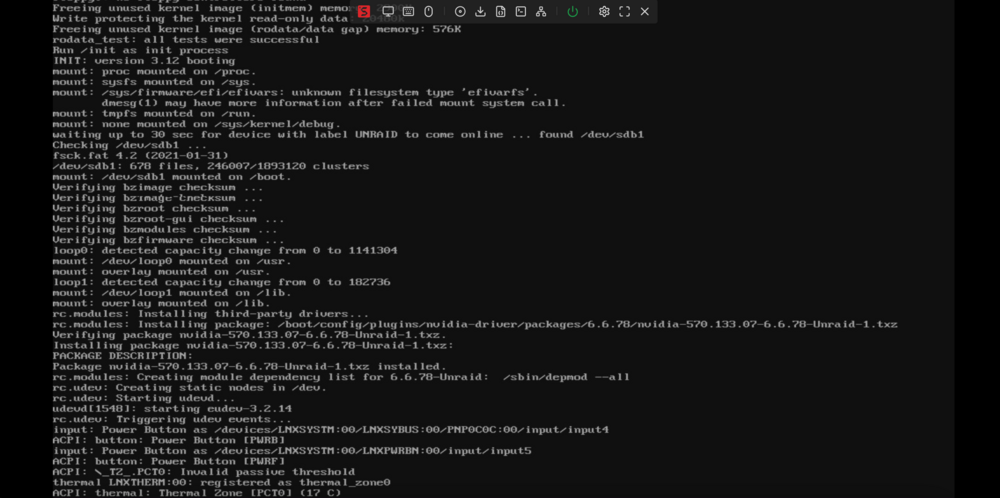
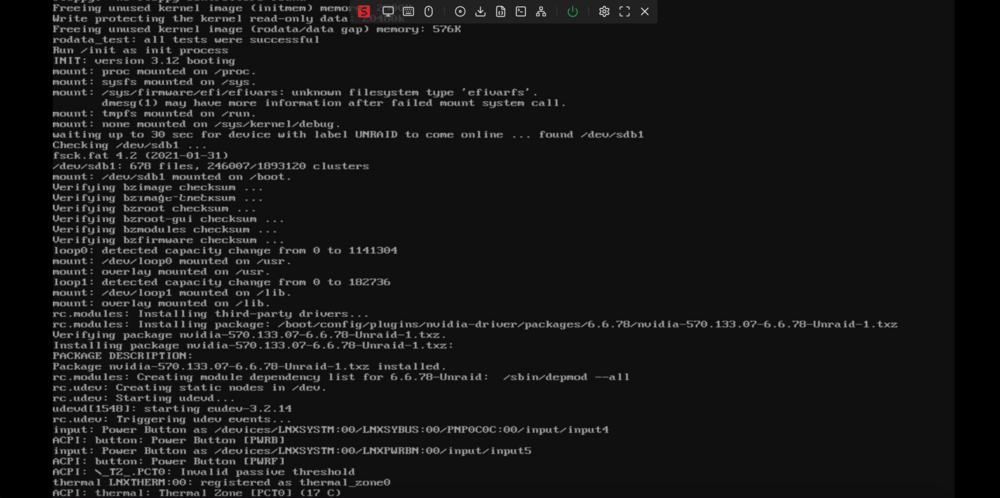
I did have it on a USB3. I just moved it to a USB2. Rebooted, no luck. Here is a screenshot of this boot. It froze a couple lines below the previous one.
-
Alright I needed to do a reboot and the issue reoccurred. I boot, pass the bios screen, and reach the Unraid options page. From here I select booth GUI mode and it starts to boot with the two .bz files. It goes on and at some point stops. Here is a screenshot of the latest attempt at booing. It got stuck on ACPI: thermal: Thermal zone [PCTO] 17c
-
Got it. I don't have a screenshot of it, but before I got it to boot this morning, it would get stuck on the following line: ACPI: tz_.pcto Invalid Passive Threshold. I'll see if I get some time over the next couple of days to reboot and see if I can take a screenshot of where it gets stuck.
-
Hi everyone, I am having some weird issues with my Unraid server. For the most part, when it's working, it works great. I can have it up and running 24/7 for 30-60 days with no issues, but it will sometimes crash and stop responding. The last time it occurred, I was running a syslog software on a different computer and it seemed to crash on this log "child 1234121 exited on signal 9 (SIGKILL) after 691.439213 seconds from start". While this sucks, if it were simple as rebooting I would probably deal with it. However, the real issue is that when I reboot it, it fails to boot 14 out of 15 times. And on try 15, it will boot and then run for 30-60 days unless it crashes or a need to reboot it. If I reboot it, again I will have to do it 15 tries for it to actually boot. I can not seem to figure out what is causing the issue. I will also add that after booting successfully. If I reboot again, the whole process restarts and on try 15 it will boot again. I attached diagnostic logs here. Any thoughts on how to go about diagnosing the issue? tower-diagnostics-20250226-1334.zip
-
Yep, that was it. Don't know why that wasn't the first thing I thought of. Thank you!
-
Hi everyone, Trying to figure out what is going on. I shutdown my server, pulled out a PCIE USB card and turned it back on. To my surprise as soon as my server booted, it gave me an error that my USB was corrupt and I was unable to access on anything on the drive or array. It also said that the USB drive was blacklisted. I had a spare new drive so I installed a fresh copy of Unraid, copied over the config folder from the old drive and it booted fine. It ran fine for about 2 hours while I waited on a replacement key from support. Once I got the key I input it and everything was still fine. However, as soon as I started the array it immediately gave me the error that the USB drive is corrupt and I was thrown back into the same issue of a corrupted Unraid install. Anyone have any thoughts? I attached diagnostics of both corrupted drives, new and old. I appreciate all the help! new_drive_diagnostics-20230202-0233.zip old_drive_diagnostics-20230201-1710.zip
-
Yep PIA. Same, works without proxy enabled but would prefer to have it working.
-
Hi everyone, I have been using the proxy feature for over a year with no issues when suddenly within the last couple of weeks I have started getting "Failed to test proxy" messages in services that are using Privoxy. I looked over the FAQ's and guides and it looks like everything is configured correctly. The weird thing is that if I restart the service, it will work fine for sometime however eventually it will give me a "Failed to test proxy" message and stop working. Any thoughts?
-
Sorry for the late reply, but finally got around to diagnosing some more. All of my time setting for shutdowns seem ok. I have VM's set to hibernate. Here is the last diagnostic saved on the USB. I think it might be an issue with docker not shutting down. When I initiate a clean shutdown it seems like dockers don't start shutting down until I manually press stop all. However, not totally sure. Any thoughts? tower-diagnostics-20221125-1701.zip
-
Hi everyone, Whenever I shutdown or restart my server I get an unclean shutdown error. How can I go about diagnosing the issue? I have already set the VM's to hibernate instead of shutting down. Here are my log files. Anything stand out? server-diagnostics-20220730-1726.zip
-
Hi everyone, I had to run a parity check after an unclean shutdown. I had a brief power outage which caused the unclean shutdown. Not too sure why it caused the shutdown since I have it on a UPS that still holds battery well. I am guessing that a Windows VM might have held it up so I changed shutdown behavior to hibernate based on some recommendations I read on the forum. Anyway, after running the parity check I have 4 errors. Should I be good to run it again with error correction enabled? Here are my logs. Thanks for your help. server-diagnostics-20220711-2053.zip
-
They are set to autostart. I have two VM's. One is a windows 10 vm and one is a linux vm. Here is the windows 10 vm, however I pulled the 10gb card to get the server back online while I do more troubleshooting. Not sure if this XML will tell you anything since its been working fine since pulling the card. "<?xml version='1.0' encoding='UTF-8'?> <domain type='kvm' id='2'> <name>Windows 10 VM Hypo On</name> <uuid>e1db6a62-ac25-39c1-8a5d-f739d7d5adbd</uuid> <metadata> <vmtemplate xmlns="unraid" name="Windows 10" icon="windows.png" os="windows10"/> </metadata> <memory unit='KiB'>24641536</memory> <currentMemory unit='KiB'>24641536</currentMemory> <memoryBacking> <nosharepages/> </memoryBacking> <vcpu placement='static'>12</vcpu> <cputune> <vcpupin vcpu='0' cpuset='6'/> <vcpupin vcpu='1' cpuset='18'/> <vcpupin vcpu='2' cpuset='7'/> <vcpupin vcpu='3' cpuset='19'/> <vcpupin vcpu='4' cpuset='8'/> <vcpupin vcpu='5' cpuset='20'/> <vcpupin vcpu='6' cpuset='9'/> <vcpupin vcpu='7' cpuset='21'/> <vcpupin vcpu='8' cpuset='10'/> <vcpupin vcpu='9' cpuset='22'/> <vcpupin vcpu='10' cpuset='11'/> <vcpupin vcpu='11' cpuset='23'/> </cputune> <resource> <partition>/machine</partition> </resource> <os> <type arch='x86_64' machine='pc-q35-6.0'>hvm</type> <loader readonly='yes' type='pflash'>/usr/share/qemu/ovmf-x64/OVMF_CODE-pure-efi-tpm.fd</loader> <nvram>/etc/libvirt/qemu/nvram/e1db6a62-ac25-39c1-8a5d-f739d7d5adbd_VARS-pure-efi-tpm.fd</nvram> <boot dev='hd'/> </os> <features> <acpi/> <apic/> </features> <cpu mode='host-passthrough' check='none' migratable='on'> <topology sockets='1' dies='1' cores='6' threads='2'/> <cache mode='passthrough'/> <feature policy='require' name='topoext'/> </cpu> <clock offset='localtime'> <timer name='rtc' tickpolicy='catchup'/> <timer name='pit' tickpolicy='delay'/> <timer name='hpet' present='no'/> </clock> <on_poweroff>destroy</on_poweroff> <on_reboot>restart</on_reboot> <on_crash>restart</on_crash> <devices> <emulator>/usr/local/sbin/qemu</emulator> <disk type='file' device='cdrom'> <driver name='qemu' type='raw'/> <source file='/mnt/user/isos/virtio-win-0.1.208-1.iso' index='1'/> <backingStore/> <target dev='hdb' bus='sata'/> <readonly/> <alias name='sata0-0-1'/> <address type='drive' controller='0' bus='0' target='0' unit='1'/> </disk> <controller type='sata' index='0'> <alias name='ide'/> <address type='pci' domain='0x0000' bus='0x00' slot='0x1f' function='0x2'/> </controller> <controller type='pci' index='0' model='pcie-root'> <alias name='pcie.0'/> </controller> <controller type='pci' index='1' model='pcie-root-port'> <model name='pcie-root-port'/> <target chassis='1' port='0x8'/> <alias name='pci.1'/> <address type='pci' domain='0x0000' bus='0x00' slot='0x01' function='0x0' multifunction='on'/> </controller> <controller type='pci' index='2' model='pcie-root-port'> <model name='pcie-root-port'/> <target chassis='2' port='0x9'/> <alias name='pci.2'/> <address type='pci' domain='0x0000' bus='0x00' slot='0x01' function='0x1'/> </controller> <controller type='pci' index='3' model='pcie-root-port'> <model name='pcie-root-port'/> <target chassis='3' port='0xa'/> <alias name='pci.3'/> <address type='pci' domain='0x0000' bus='0x00' slot='0x01' function='0x2'/> </controller> <controller type='pci' index='4' model='pcie-root-port'> <model name='pcie-root-port'/> <target chassis='4' port='0xb'/> <alias name='pci.4'/> <address type='pci' domain='0x0000' bus='0x00' slot='0x01' function='0x3'/> </controller> <controller type='pci' index='5' model='pcie-root-port'> <model name='pcie-root-port'/> <target chassis='5' port='0xc'/> <alias name='pci.5'/> <address type='pci' domain='0x0000' bus='0x00' slot='0x01' function='0x4'/> </controller> <controller type='pci' index='6' model='pcie-root-port'> <model name='pcie-root-port'/> <target chassis='6' port='0xd'/> <alias name='pci.6'/> <address type='pci' domain='0x0000' bus='0x00' slot='0x01' function='0x5'/> </controller> <controller type='pci' index='7' model='pcie-root-port'> <model name='pcie-root-port'/> <target chassis='7' port='0xe'/> <alias name='pci.7'/> <address type='pci' domain='0x0000' bus='0x00' slot='0x01' function='0x6'/> </controller> <controller type='pci' index='8' model='pcie-root-port'> <model name='pcie-root-port'/> <target chassis='8' port='0xf'/> <alias name='pci.8'/> <address type='pci' domain='0x0000' bus='0x00' slot='0x01' function='0x7'/> </controller> <controller type='pci' index='9' model='pcie-root-port'> <model name='pcie-root-port'/> <target chassis='9' port='0x10'/> <alias name='pci.9'/> <address type='pci' domain='0x0000' bus='0x00' slot='0x02' function='0x0' multifunction='on'/> </controller> <controller type='pci' index='10' model='pcie-root-port'> <model name='pcie-root-port'/> <target chassis='10' port='0x11'/> <alias name='pci.10'/> <address type='pci' domain='0x0000' bus='0x00' slot='0x02' function='0x1'/> </controller> <controller type='pci' index='11' model='pcie-root-port'> <model name='pcie-root-port'/> <target chassis='11' port='0x12'/> <alias name='pci.11'/> <address type='pci' domain='0x0000' bus='0x00' slot='0x02' function='0x2'/> </controller> <controller type='virtio-serial' index='0'> <alias name='virtio-serial0'/> <address type='pci' domain='0x0000' bus='0x02' slot='0x00' function='0x0'/> </controller> <controller type='usb' index='0' model='qemu-xhci' ports='15'> <alias name='usb'/> <address type='pci' domain='0x0000' bus='0x00' slot='0x07' function='0x0'/> </controller> <interface type='bridge'> <mac address='52:54:00:a7:70:15'/> <source bridge='br0'/> <target dev='vnet1'/> <model type='virtio-net'/> <alias name='net0'/> <address type='pci' domain='0x0000' bus='0x01' slot='0x00' function='0x0'/> </interface> <serial type='pty'> <source path='/dev/pts/1'/> <target type='isa-serial' port='0'> <model name='isa-serial'/> </target> <alias name='serial0'/> </serial> <console type='pty' tty='/dev/pts/1'> <source path='/dev/pts/1'/> <target type='serial' port='0'/> <alias name='serial0'/> </console> <channel type='unix'> <source mode='bind' path='/var/lib/libvirt/qemu/channel/target/domain-2-Windows 10 VM Hypo O/org.qemu.guest_agent.0'/> <target type='virtio' name='org.qemu.guest_agent.0' state='disconnected'/> <alias name='channel0'/> <address type='virtio-serial' controller='0' bus='0' port='1'/> </channel> <input type='mouse' bus='ps2'> <alias name='input0'/> </input> <input type='keyboard' bus='ps2'> <alias name='input1'/> </input> <tpm model='tpm-tis'> <backend type='emulator' version='2.0' persistent_state='yes'/> <alias name='tpm0'/> </tpm> <audio id='1' type='none'/> <hostdev mode='subsystem' type='pci' managed='yes'> <driver name='vfio'/> <source> <address domain='0x0000' bus='0x0a' slot='0x00' function='0x0'/> </source> <alias name='hostdev0'/> <address type='pci' domain='0x0000' bus='0x03' slot='0x00' function='0x0'/> </hostdev> <hostdev mode='subsystem' type='pci' managed='yes'> <driver name='vfio'/> <source> <address domain='0x0000' bus='0x0a' slot='0x00' function='0x1'/> </source> <alias name='hostdev1'/> <address type='pci' domain='0x0000' bus='0x04' slot='0x00' function='0x0'/> </hostdev> <hostdev mode='subsystem' type='pci' managed='yes'> <driver name='vfio'/> <source> <address domain='0x0000' bus='0x04' slot='0x00' function='0x0'/> </source> <alias name='hostdev2'/> <address type='pci' domain='0x0000' bus='0x05' slot='0x00' function='0x0'/> </hostdev> <hostdev mode='subsystem' type='pci' managed='yes'> <driver name='vfio'/> <source> <address domain='0x0000' bus='0x07' slot='0x00' function='0x0'/> </source> <alias name='hostdev3'/> <address type='pci' domain='0x0000' bus='0x06' slot='0x00' function='0x0'/> </hostdev> <hostdev mode='subsystem' type='pci' managed='yes'> <driver name='vfio'/> <source> <address domain='0x0000' bus='0x07' slot='0x00' function='0x1'/> </source> <alias name='hostdev4'/> <address type='pci' domain='0x0000' bus='0x07' slot='0x00' function='0x0'/> </hostdev> <hostdev mode='subsystem' type='pci' managed='yes'> <driver name='vfio'/> <source> <address domain='0x0000' bus='0x07' slot='0x00' function='0x3'/> </source> <alias name='hostdev5'/> <address type='pci' domain='0x0000' bus='0x08' slot='0x00' function='0x0'/> </hostdev> <hostdev mode='subsystem' type='pci' managed='yes'> <driver name='vfio'/> <source> <address domain='0x0000' bus='0x0a' slot='0x00' function='0x2'/> </source> <alias name='hostdev6'/> <address type='pci' domain='0x0000' bus='0x09' slot='0x00' function='0x0'/> </hostdev> <hostdev mode='subsystem' type='pci' managed='yes'> <driver name='vfio'/> <source> <address domain='0x0000' bus='0x0a' slot='0x00' function='0x3'/> </source> <alias name='hostdev7'/> <address type='pci' domain='0x0000' bus='0x0a' slot='0x00' function='0x0'/> </hostdev> <memballoon model='none'/> </devices> <seclabel type='dynamic' model='dac' relabel='yes'> <label>+0:+100</label> <imagelabel>+0:+100</imagelabel> </seclabel> </domain>"
-
@jorgeb Any thoughts on my two previous posts?
-
At this point I am thinking it has to be a hardware compatibility issue. Even though the ConnectX-3 works fine, maybe it has some sort of issues with my motherboard that causes the Sata ports or controller to stop working. Although it wouldn't explain why it only happens after the array is started.
-
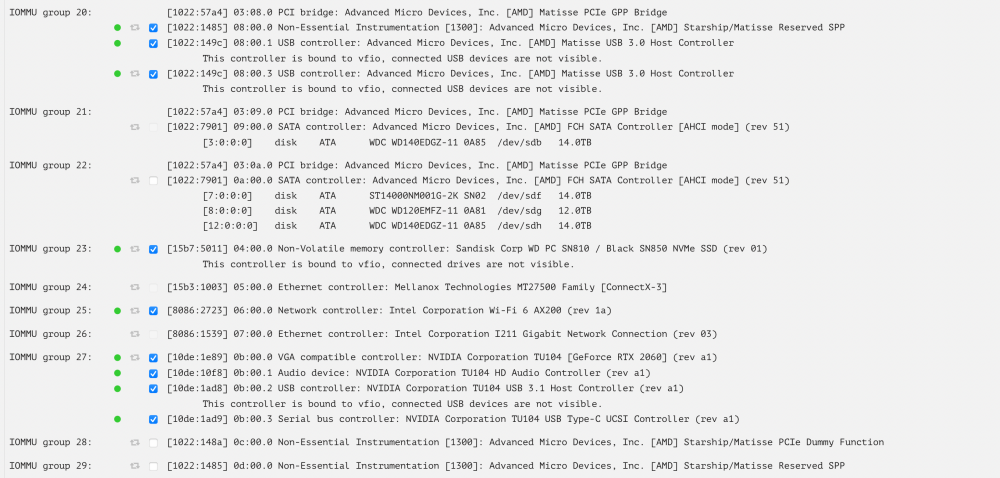
I did it and right away got the same issue. Here is a screenshot of the devices I have passed-through. The Sata Controllers are left untouched. I uploaded logs of before starting the Array and after. after server-diagnostics-20220426-2120.zip before server-diagnostics-20220426-2118.zip
-
That makes a ton of sense. I did make one hardware change after moving before firing up Unraid which would explain the issues. I added a 10g SFP card. The card worked fine and it seemed like Unraid was fine and only the usb failed so I didn’t think anything of it. I probably should have known better. I had a trip planned last week and as a last ditch effort I pulled the card, restarted the server and it has been working fine ever since. Now that I’m back and read your response, I want to see if I can get this all sorted out. Ideally I would still love to get the 10g card to play nicely. As far as I can tell, under system devices, all I am currently passing through is a GPU, an NVME drive, and a couple USB ports. How should I proceed if I want to add the 10g card back into the system?
-
I restarted the server and disk 3 is now disabled. The same disk that I just rebuilt with no errors. I ran smart tests on all the disks and they all passed. I then unassigned the disk, started the array in maintenance mode. Stopped it and then I added the disk again. I got the yellow triangle saying disk is emulated. I believe starting the regular array would start a rebuild and I just finished one so I crated a new config and said that the parity was valid. Before starting the area I was able to access disk logs and run smart tests and everything looked good. However, when I started the array in regular mode I got the same errors and am no longer able to access the logs and smart data on the disks.
-
Awesome, I ended up running a rebuild in maintenance mode and it just finished successfully with no errors. I stopped the array and restarted it in the regular mode. Within a minute I get the following error on all of my Disks 1, 2, and 3: Drive mounted read-only or completely full. Before starting the array I ran smart tests on all the disks and they all passed. I uploaded my diagnostic. Any ideas? server-diagnostics-20220419-1109.zip
-
Hi everyone, I recently moved and had an adventure with my Unraid server when setting it back up. During my initial boot it looked like my Samsung Bar USB drive that was a little over a year old died. Probably my fault, could have done a better job of moving it. I ended up purchasing a new flash drives to use and finally got it booted from a back up that I made right before the move. However, once I booted in, my disk 3 said "DEVICE IS DISABLED, CONTENTS EMULATED". Maybe it got jostled during the move? I am able to access it and see it’s stats fine right now. I ran an Smart test and it came back fine. I have uploaded it here. What’s the best way for me to proceed? Thank you for all your help! WDC_WD140EDGZ-11B2DA2_3GHNJ81E-20220416-1544-2.txt



